PS3 Project RSX Boost: Overclock your Retail PS3 RSX Speeds (ps3 cfw only)

If someone could guide me on how to, I guess hex edit the files to make different clocks, I'm ready for it. Not a PS master, but I definitely know my sh*t with computers so maybe I could even automate this :biggrin: As my understanding goes, a file has to be replaced in the ROM? Probably has been answered but my thick brain isn't following and I want to test this so baaaaad. I want CELL OC too :bitsbubba:
 
Hello, yes please. I think GPU could reach 900 with a shunt mod (idk if it's possible on RSX tho)
OCing the memory is generally safer, as it usually causes artifacts before hard locks (at least on the PC generation of these cards)

This is the order of testing I'd follow to find max safe clock.

I'd game for a few hours/days on each setting to be certain in stability.

Code:
550 - 650
550 - 700
550 - 750
550 - 800
550 - 850
550 - 900
550 - 950
550 - 1000
600 - 650
600 - 700
600 - 750
600 - 800
600 - 850
600 - 900
600 - 950
600 - 1000
650 - 650
650 - 700
650 - 750
650 - 800
650 - 850
650 - 900
650 - 950
650 - 1000
700 - 650
700 - 700
700 - 750
700 - 800
700 - 850
700 - 900
700 - 950
700 - 1000
750 - 650
750 - 700
750 - 750
750 - 800
750 - 850
750 - 900
750 - 950
750 - 1000
800 - 650
800 - 700
800 - 750
800 - 800
800 - 850
800 - 900
800 - 950
800 - 1000
850 - 650
850 - 700
850 - 750
850 - 800
850 - 850
850 - 900
850 - 950
850 - 1000
900 - 650
900 - 700
900 - 750
900 - 800
900 - 850
900 - 900
900 - 950
900 - 1000

There's no 4.91 OC cfw yet?
I don't think you'd need a shunt mod since there are no limitiers to circumvent here. You would need a mod to increase the voltage to the core and/or memory to go higher. But then you'll risk blowing up the RSX VRM entirely since it was never made to supply that amount of current.

The PC GPUs the RSX is based on did go up to 690MHz on the core and 865MHz on the memory, which basically lines up with how the RSX behaves. 700MHz is stable, everything after is janky.
The memory is a slightly different story since the PS3 uses either GDDR3 rated for 667MHz or 700MHz which is considerably lower than what higher end 7900 GTX models used (Usually 800MHz or 900MHz rated memory) so you have to adjust your expectations accordingly. I'll guess over 800Mhz is a gamble already.

If someone could guide me on how to, I guess hex edit the files to make different clocks, I'm ready for it. Not a PS master, but I definitely know my sh*t with computers so maybe I could even automate this :biggrin: As my understanding goes, a file has to be replaced in the ROM? Probably has been answered but my thick brain isn't following and I want to test this so baaaaad. I want CELL OC too :bitsbubba:
You have to modify the firmware accordingly when it's not running since the lv1 files are in use when the system is on.
Usually that's done by installing a modified update file. On the modifications themselves though i have no idea. I just got already modified update files to install and test.
The CELL can only be OCed by modifying the system base clock, which is 400MHz on retail PS3s. Someone managed to inject firmware files from early dev kits which had it running at 600MHz resulting in a CELL clock of 4.8GHz, running very unstable obviously.
 
Last edited by a moderator:
You have to modify the firmware accordingly when it's not running since the lv1 files are in use when the system is on.
Usually that's done by installing a modified update file. On the modifications themselves though i have no idea. I just got already modified update files to install and test.
The CELL can only be OCed by modifying the system base clock, which is 400MHz on retail PS3s. Someone managed to inject firmware files from early dev kits which had it running at 600MHz resulting in a CELL clock of 4.8GHz, running very unstable obviously.

If someone can point me in the right direction how to change the values and update the files I'm all ears.

4.8 GHz? I mean, PS3s are Bulldozer architecture AFAIK and those were OC monsters. They would pull 200W while OC tho :') If it would be possible to change the base clock to let's say 450 MHz that would be awesome and probably stable too. 3.2 -> 3.6 GHz doesn't seem like overkill.
 
If someone can point me in the right direction how to change the values and update the files I'm all ears.

4.8 GHz? I mean, PS3s are Bulldozer architecture AFAIK and those were OC monsters. They would pull 200W while OC tho :') If it would be possible to change the base clock to let's say 450 MHz that would be awesome and probably stable too. 3.2 -> 3.6 GHz doesn't seem like overkill.
Honestly if you don't know how to recover a PS3 or willing to brick one Im not sure if giving anyone these files is a good idea.

Bulldozer? No mate you're far off. PS3 used the custom Cell Broadband Engine which is 1/9 PowerPC, 8/9 custom ISA. Nothing to do with AMDs Bulldozer which is x86 and came out 5 years after the release of the PS3.
The CBE was initially designed for 4GHz operation though and the PowerPC part for up to 6GHz.

EDIT: https://youtu.be/ENLp_DX0Mjs (CBE OC to 4.8GHz)
 
Last edited:
I have updated the RSX task on my mfwbuilder mod git, so you have to patch on your own.

I have added now following speeds for own tests and on your own risk:
Code:
650MHz/650MHz
700MHz/650MHz
750MHz/650MHz
800MHz/650MHz
850MHz/650MHz
900MHz/650MHz
950MHz/650MHz
1000MHz/650MHz

650MHz/700MHz
700MHz/700MHz
750MHz/700MHz
800MHz/700MHz
850MHz/700MHz
900MHz/700MHz
950MHz/700MHz
1000MHz/700MHz

650MHz/750MHz
700MHz/750MHz
750MHz/750MHz
800MHz/750MHz
850MHz/750MHz
900MHz/750MHz
950MHz/750MHz
1000MHz/750MHz

550MHz/800MHz
600MHz/800MHz
650MHz/800MHz
700MHz/800MHz
750MHz/800MHz
800MHz/800MHz
850MHz/800MHz
900MHz/800MHz
950MHz/800MHz
1000MHz/800MHz

550MHz/850MHz
600MHz/850MHz
650MHz/850MHz
700MHz/850MHz
750MHz/850MHz
800MHz/850MHz
850MHz/850MHz
900MHz/850MHz
950MHz/850MHz
1000MHz/850MHz

550MHz/900MHz
600MHz/900MHz
650MHz/900MHz
700MHz/900MHz
750MHz/900MHz
800MHz/900MHz
850MHz/900MHz
900MHz/900MHz
950MHz/900MHz
1000MHz/900MHz

550MHz/950MHz
600MHz/950MHz
650MHz/950MHz
700MHz/950MHz
750MHz/950MHz
800MHz/950MHz
850MHz/950MHz
900MHz/950MHz
950MHz/950MHz
1000MHz/950MHz

550MHz/1000MHz
600MHz/1000MHz
650MHz/1000MHz
700MHz/1000MHz
750MHz/1000MHz
800MHz/1000MHz
850MHz/1000MHz
900MHz/1000MHz
950MHz/1000MHz
1000MHz/1000MHz

I have uploaded now patched 4.91 CFW lv1.self, with (safe) speed of 600MHz/750MHz
 

Attachments

Last edited:
I have updated the RSX task on my mfwbuilder mod git, so you have to patch on your own.

I have added now following speeds for own tests and on your own risk:
I have uploaded now patched 4.91 CFW lv1.self, with (safe) speed of 600MHz/750MHz

If I understand correctly, now all I have to do is:
1. put my Evilnat 4.91 CFW into the MFW builder,
2. set the clock I want under "Patch LV1 for RSX Overclock",
3. build MFW,
4. put on USB stick and patch on PS3 through storage media update?
 
Guys proficient with the MFW builder... It would be really nice if some of you could chip in on this. And don't RTFM me... There's a lot of people here who'd like to learn and I believe writing a comprehensive guide on how to use it and make the best of it would make the world a difference. Think about it, more brains, more smarts, some people just need a nudge ;)
 
I have decided to try it myself, but MFW builder won't make the files. I have followed this video from @zecoxao to an extent.
1. Copy contents from "data" folder to "ps3keys" folder.
2. Run "ps3mfw.exe" as admin.
3. Go to Settings and set TEMP and PS3KEYS folders.
4. Set Evilnat's 4.91 CEX OC FW as original.
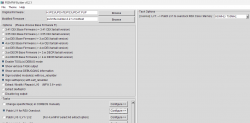
5. Using these settings:
upload_2024-3-29_8-47-53.png

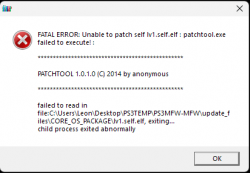
6. I get the following error:
upload_2024-3-29_8-49-1.png

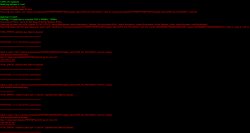
7. The command that fails is this one:
upload_2024-3-29_8-49-37.png

@haxxxen any ideas?

Thanks! <3
 
Last edited:
I have decided to try it myself, but MFW builder won't make the files. I have followed this video from @zecoxao to an extent.
1. Copy contents from "data" folder to "ps3keys" folder.
2. Run "ps3mfw.exe" as admin.
3. Go to Settings and set TEMP and PS3KEYS folders.
4. Set Evilnat's 4.91 CEX OC FW as original.
5. Using these settings:
View attachment 42706

6. I get the following error:
View attachment 42707

7. The command that fails is this one:
View attachment 42708

@haxxxen any ideas?

Thanks! <3

check if the keys are proper (aka 4.91 keys)
 
I have decided to try it myself, but MFW builder won't make the files. I have followed this video from @zecoxao to an extent.
1. Copy contents from "data" folder to "ps3keys" folder.
2. Run "ps3mfw.exe" as admin.
3. Go to Settings and set TEMP and PS3KEYS folders.
4. Set Evilnat's 4.91 CEX OC FW as original.
5. Using these settings:
View attachment 42706

6. I get the following error:
View attachment 42707

7. The command that fails is this one:
View attachment 42708

@haxxxen any ideas?

Thanks! <3
I'm not sure I'd use a firmware already patched with that patch. It can cause it to error, but your steps are essentially correct from what I remember. Just add 4.91 keys. I was using it a long time ago to build nobd or nobt firmware of other cfw. It's relatively easy to use. No guarantees though, so be careful. Have a flasher on hand in case something bad happens.
 
Has anyone built a .PUP with higher clocks? I'm going to be without my PC for a while and I want to test overclocks
I made one with 600/750, since it's considered a safe range.

Are the other steps okay, I won't brick my console? :')

I just checked and the 4.91 keys are not present in the "ps3keys" folder. The last keys are 4.89. Rename 4.89 files to 4.91?
To add new keys, use the provided bat.
 
@Charles_n_town Thanks for the information! Unfortunately I don't have a HW flasher so trying this on my Slim would be quite dangerous.

We already have a 600/750 version and now we're "negotiating" to get some other versions as well :angel:
When Evilnat finishes building his 4.91 CFW with fixes, I will contact him and ask if he can make a higher OC version. He has been a great guy and already made a few custom CFWs for me with minor changes so I believe he will help. G.O.A.T.!
 
Back
Top