PS3 Project RSX Boost: Overclock your Retail PS3 RSX Speeds (ps3 cfw only)

Yes, I just forgot to precise it in the name of the file.


Truly a gem, the gameplay is just excellent. In fact, everything is excellent in this game.


As I said, we can't do 25MHz increments on core but for VRAM/memory it's ok.
I take note of that !

Aaand the video is out !
I hope that everything is clear, making tutorials isn't my speciality :y
Thank you so much for this. You made it simple to understand. With this anyone can do it without screwing up. Seriously man thanks.
 
About that thing for Uncharted 2 and The Last of Us I use PS3MAPI, that comes on Webman to apply the value changes. use your phone or tablet or pc to apply the changes. Put "ip address the console is connected to"/home.ps3mapi and go to Processes Commands and search for the desired memory address. Once it finds it change only the values that will return the desired effect that in our case is unlocking the framerate or raising the fps cap in the game. For the values, I've been checking on RPCS3 in the pages related to the game I want to unlock.
65nm A01 Frankie with 650/800 OC & webMan Mod Manual 35% Fan:
- TLOU stock (30FPS): CPU 64C | GPU 56C | 35% Fan
- TLOU No Cap (38FPS): CPU 66C | GPU 59 | 35% Fan
- Uncharted2 Stock (30FPS): CPU 64C | GPU 55C | 35% Fan
- Uncharted2 No Cap (47FPS): CPU 66C | GPU 59C | 35% Fan

Notes:
  • Ambient temp during test = 27C
  • On both games I chose the opening scene where the player gains control of the character as the test location. Without touching the controller. I like games I can put the disc in and not have long load times to stress test a repair. So the opening scene is my go to test spot.
 
Let's see what everyone can get in the TLOU menu with FPS uncapped. I get exactly 48FPS with 950/1000. Quick and easy benchmark!

For those who don't know how to do: go into http://<Ps3_IP>/setmem.ps3mapi and lookup address location 1571A6F, in the Value field all the way at the bottom should see beginning with "02" - replace with 00 and SET.
 
Last edited:
Aaand the video is out !
I hope that everything is clear, making tutorials isn't my speciality :y
Where should I put this video for it not to be "buried" ? A new thread ? Genuine question.

Thank you so much for this. You made it simple to understand. With this anyone can do it without screwing up. Seriously man thanks.
I'm glad it helps ! :D

Besides, I plan to add 25MHz (VRAM) increments to the list into ps3MFW-Builder. That way, it would probably be a bit safer to find limits (almost done).
 
Last edited:
Hello, I would like to give you some information about PS3 Performance.

1/HDCP,
"High Bandwidth Digital Content Protection" HDCP is a technology used to protect digital content, but sometimes it can negatively impact your gaming performance. Therefore, you may want to disable HDCP to get a smoother gaming experience. If you want to disable it, I leave the link to this video.

2/ You can make the background black as a theme, this will reduce the processor load

3/ SSD Will Be Better When You Use "SSD" Overclocking Update. HDD is slow compared to these speeds. Then I Saw There Was a Delay in the Tissues

3/Recreate Database
It will be better

4/If You Only Play Games, You Can Disable Enabled Things from Network Settings.

5/"Delid" is made by cutting the CPU and GPU Cover. You must be careful. If you don't know, don't take risks. Have it done by someone who knows. You can get both heat and performance by using Thermal Paste for the CPU and GPU and placing Thermal Pads in VRAM and Memory.
 
Last edited:
I'm able to render Transformers Fall of Cybertron at 1080. And it looks insane. And runs pretty well with OC. Making it more GPU bound. And that's how I play it. I had to decrypt the col ini file and edit it and then encrypt it again. It's the only game so far that allows me to do that. That's an unreal engine game. Though there are games I wish I can force vsync on. When games drop below 30 I see annoying screen tearing. There has to be a way to fix that.

Cheers, I'll give that game a try in the future!

When you say "decrypt the col ini file and edit it and then ecrypt it again", are you referring to decrypting and then re-encrypting an ISO to make changes to an ini file contained within? or is this an additional step where the actual ini file itself needs to be decrypted/encrypted?

Interesting !
I think you can use an autoexec.cfg with Crysis games.

There also is this proof of concept of somehow using RPCS3 FPS patches on a real PS3 through Artemis.

That's pretty cool, I hadn't even thought about consulting existing RPCS3 FPS patches. I'll look into these as well!

This tracks with mine. I think CXD5300GGB is the clear winner as far as we know.I made a post earlier with these details but don't know how to get the MB revision and manufacturer, can you decode from it?

I was able to identify which Motherboard revision I had by looking at the "Platform ID" output in the SYSCON Error Log and then comparing it to the Motherboard Revisions page on psdevwiki. My CECH-2502A came back as CokJ20 which aligns with the JSD-001 motherboard.

The manufacturer is identified by finding the FAB number in the lvl1 RSX String. 1 = TOSHIBA, 2 = SONY and 4 = TSMC.

RIP-Felix's post on Page 79 of this thread details how to dump and review both of these in detail!

I have a Cvar modified version of Crysis3. That user data directory has a config file in which you can ebable and disable features, unlock framrates, increase draw distance on grass animations, tessilation, etc. I cranked to absolute max on everything and unmodified 500/650 manages about 12FPS at my test location. My 650/800 OC (65nm A01 frankie) bumps that up to about 15FPS...lol! Clearly it's not ideal to play at this level of detail, but it is taxing the console full tilt and easily overwhelming any OC you toss at it.

The test location has grass in the foreground and distance (grass animation draw distance), water (ripples and reflections are known to be hard on ps3), cobble stones (tesselation), 3D models in enemies and humans fighting and buildings (many objects loaded in memory), lots of strait edges on buildings and wires (antialiasing), is half dark with moving shaddows across the scene and lighting (there were setting related to this in Cvars, I forget which. But I cranked them based on whatever said it was GPU intensive). There is fire and smoke, and fog. All in one test location. Basically it testes everything this game can put on screen and cranked to max to be the worst case scenario for the PS3.

The Cvar config only works on a base version from disc. They were patched out in update 1.04.

That sounds awesome!

I've tried looking into this myself just now, are you using the Crysis 3 CVar Configurator to make changes to the system.cfg file contained within PS3_GAME > USRDIR? or did you achieve this through a different process?

Can you point me in the right direction for TLOU? That's my goto test game. I would like to mess with it.

Looks like NunoRS200 was able to explain how to unlock the frame rate through PS3MAPI!

If you're interested in playing around with TLOU though, I'd also reccomend using the developer menu. I'm using a modified version called "Dev Menu +" that was made by Illusion, Freako and Smasher248.

The dev menu offers up a number of features that are beneficial for benchmarking, like navigating to any checkpoint in the game and disabling some visual features like motion blur and depth of field (disabling both tends to net an extra 1-3 fps depending on the scene) among a number of other things.

If you want to give it a try you can access it through the discord linked in the below YouTube video's description, it's the second most recent item in the "mod-releases" text channel. Alternatively, to save you the hassle of joining here is a direct download link to the file as the direct download in the description is broken.


I believe you need either a BCES01584 or BCES01585 copy of TLOU on version 1.11 (most recent patch) for it to work. To install it, you just need to replace the EBOOT.BIN within the dev_hdd0/game/BCES01584/USRDIR folder, make sure to keep a back up copy of the original EBOOT.BIN just in case.

-------

I've also come to realize that I incorrectly advised that the dev menu for Uncharted 1-3 and TLOU could cap/uncap the frame rate. I've mistaken aspects of their functionality with that of the PS4 remastered version's dev menus. I've corrected my original message to avoid misinforming others in the future.

To clarify their functionality, PS3 Uncharted 1 - 3 dev menus cannot cap/uncap frame rate. PS4 Uncharted 1 - 3 dev menus can toggle between the default 60fps cap and 30 fps cap, they can also uncap the framerate. PS3 TLOU dev menu can "fix" the frame rate at a chosen figure between 1 and 120, but values above 30 won't achieve anything without the frame rate being independently unlocked (values set above what the PS3 is capable of outputting whether capped or uncapped, will cause the game to run in slow motion). PS4 TLOU offers the ability to toggle a 30 fps cap, or run at the default 60 fps cap, in the normal display settings of the game. PS4 TLOU dev menu can uncap the frame rate, it also has the same "fix" frame rate functionality as the PS3 version.

I already created, check here

Would it also be appropriate to post changes to graphical settings in here as well? or should this thread be limited to 60 FPS patches as per the title?

Let's see what everyone can get in the TLOU menu with FPS uncapped. I get exactly 48FPS with 950/1000. Quick and easy benchmark!

I'm getting 45 fps with 850/950 in the main menu

 
Besides, I plan to add 25MHz (VRAM) increments to the list into ps3MFW-Builder. That way, it would probably be a bit safer to find limits (almost done).
Done ! Added more 25MHz increments for memory(/VRAM) (775 - 825 - 875 - 925 -975).
I've also updated the link provided in the video's description.

https://www.mediafire.com/file/5hyin98ed8b06tl/ps3mfw-builder-0.2.1-mod-master.zip/file
or
https://www.dropbox.com/scl/fi/gdut...ey=kmlra3s5qfyq027phxdnbpbrp&st=ts54lzl2&dl=0

EDIT : I've just created this thread to keep the video tutorial about ps3MFW-Builder easy to find.
https://www.psx-place.com/threads/how-to-use-ps3mfw-builder-rsx-overclocking-project.43714/

EDIT 2 : @Yusuf Mantam , if you still need it :

650/875
https://www.mediafire.com/file/8aa1nhjrpqf5dln/test_650_875_b8.pup_4.91.PEX-PS3UPDAT.zip/file

700/750
https://www.mediafire.com/file/f0yojqm4fizpsj9/test_700_750_b8.pup_4.91.PEX-PS3UPDAT.zip/file

700/775 (bonus !)
https://www.mediafire.com/file/areh842yphx9980/test_700_775_b8.pup_4.91.PEX-PS3UPDAT.zip/file

700/800
https://www.mediafire.com/file/x2h7qusll4txlhl/test_700_800_b8.pup_4.91.PEX-PS3UPDAT.zip/file
 
Last edited:
Guys I'm new to this and I just want to make sure I do this right before I brick my PS3. So I have a CECH-2504A what is the most stable OC I can go for other than the standard 600/750?
 
I have a Cvar modified version of Crysis3. That user data directory has a config file in which you can ebable and disable features, unlock framrates, increase draw distance on grass animations, tessilation, etc. I cranked to absolute max on everything and unmodified 500/650 manages about 12FPS at my test location. My 650/800 OC (65nm A01 frankie) bumps that up to about 15FPS...lol! Clearly it's not ideal to play at this level of detail, but it is taxing the console full tilt and easily overwhelming any OC you toss at it.

The test location has grass in the foreground and distance (grass animation draw distance), water (ripples and reflections are known to be hard on ps3), cobble stones (tesselation), 3D models in enemies and humans fighting and buildings (many objects loaded in memory), lots of strait edges on buildings and wires (antialiasing), is half dark with moving shaddows across the scene and lighting (there were setting related to this in Cvars, I forget which. But I cranked them based on whatever said it was GPU intensive). There is fire and smoke, and fog. All in one test location. Basically it testes everything this game can put on screen and cranked to max to be the worst case scenario for the PS3.
Can you share your Crysis 3 config for benchmarking on higher oc'd consoles here?
Did you try that custom config in some campaign levels? If yes, how it went?
 
Guys I'm new to this and I just want to make sure I do this right before I brick my PS3. So I have a CECH-2504A what is the most stable OC I can go for other than the standard 600/750?
It varies, you'll have to test and make your way up the OC values.

25XX models tend to handle higher overclocks. Some games that are being used to test are Assassin's Creed IV: Black Flag, Bioshock Infinite, Crysis, God of War: Ascension, The Last of Us and Metal Gear Rising: Revengeance among other titles.

Start with the standard OC, then increase memory by 50MHz. Once you reach your console's limit, increase the core by 50MHz and start memory from scratch and redo the process.

Higher memory is more beneficial so if you find your console struggling with a high core but low memory, it's better to lower the core so you can increase the memory back up.
 
I was able to identify which Motherboard revision I had by looking at the "Platform ID" output in the SYSCON Error Log and then comparing it to the Motherboard Revisions page on psdevwiki. My CECH-2502A came back as CokJ20 which aligns with the JSD-001 motherboard.
Yeah, that's why I'm asking people to post their SYSCON Errorlog dump as well. It has the Platform ID listed and is right there in evilnat's CFW tools now. Easy to correlate to the MB rev using the Devwiki.

I am also curious to see what errors may be triggered by pushing the RSX clocks this high. There are some errors that could silently trigger, like...
  • 2020/2120, 2022/2122, or 2024/2124 that could indicate AV instability (DVE and HDMI transmission).
  • 1002 could be due to RSX core voltage instability, that would trigger a YLOD.
  • 1001s and 1004s is very likely to be in the log as they occur from unexpected shutdowns, which will happen when the console freezes and is forced off. But it can also indicate CPU core voltage instability, but I doubt that would be happening this case, since we're not OC the Cell (yet).
  • FBVDDQ might cause 10x 2120/ 1x 3013 error combos from a short, but insufficient voltage/filtering I'm not sure what error it might cause. I'd just like to have the logs in case something interesting pops up.
...are you using the Crysis 3 CVar Configurator to make changes to the system.cfg file contained within PS3_GAME > USRDIR? or did you achieve this through a different process?
I edited the config file directly using the Cvar commands after reading down the list and how they work.

I'm getting 45 fps with 850/950 in the main menu
So start a new game and skip the movie. Then leave the controller alone. When Sarah stands up she'll be facing a mirror. That's been a standard test spot in TLOU for the last few years and most of us that test temps and FPS us it as out baseline. So pleas use it as well or we won't be talking about the same consistent setup/workload.

Can you share your Crysis 3 config for benchmarking on higher oc'd consoles here?
Did you try that custom config in some campaign levels? If yes, how it went?
  1. Rip Crysis3 to PS3 using multiman. DO NOT update.
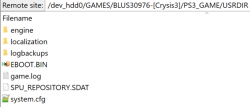
  2. FTP to /dev_hdd0/GAMES/BLUS30976-[Crysis3]/PS3_GAME/USRDIR
  3. Where to put config.png
  4. Copy system.cfg and keep it safe. Or rename original.
  5. Save the following modified system.cfg to
    /dev_hdd0/GAMES/BLUS30976-[Crysis3]/PS3_GAME/USRDIR
    Code:
    ; crysis3
    
    sys_game_folder=c3
    
    sys_localization_folder=localization
    
    release_install=1
    
    sys_languages=english,french,spanish
    g_language=english
    
    con_restricted=0
    sv_cheatprotection=0
    r_displayinfo=1
    pl_health.normal_regeneration_rateSP=99999
    pl_health.normal_threshold_time_to_regenerateSP=0.1
    g_godmode=1
    g_infiniteammo=1
    g_infinitesuitenergy=1
    g_inventoryNoLimits=1
    v_goliathMode=1
    g_infiniteCloak=1
    sys_MaxFps=0
    e_ParticlesObjectCollisions=Dynamic
    e_ParticlesMotionBlur=1
    e_Tessellation=255
    r_WaterTessellationHW=1
    r_SilhouettePOM=1
    e_GI=0
    r_FogShadows=0
    r_FogShadowsWater=0
    r_SSReflections=0
    r_Sharpening=0
    r_ChromaticAberration=0
    r_ssdo
    e_GsmCache=0
    e_ShadowsResScale=40
    e_ShadowsPoolSize=4096
    e_ShadowsMaxTexRes=1024
    e_GICache=0
    e_TessellationMaxDistance=255
    e_MergedMeshesInstanceDist=255
    e_MergedMeshesViewDistRatio=255
    e_LodRatio=255
    e_ViewDistRatio=255
    e_ViewDistRatioDetail=255
    e_ViewDistRatioVegetation=255
  • Delete any game data if it exists.

    Note: If you DL Crysis3 then it'll be the updated 1.04 version, which was patched to prevent this from working.
 
Higher memory is more beneficial so if you find your console struggling with a high core but low memory, it's better to lower the core so you can increase the memory back up.
This will depend on the game's engine however I would recommend overclocking core first because core instability is easier to find and core can only OC in 50mhz increments.

Most 2500 should handle 650 core, most can handle 700 core, only a few can handle 750+ or higher core.
 
This will depend on the game's engine however I would recommend overclocking core first because core instability is easier to find and core can only OC in 50mhz increments.

Most 2500 should handle 650 core, most can handle 700 core, only a few can handle 750+ or higher core.
Yup. If a slim can handle 750 fully stable, then it's a lucky one. Honestly, I own 4 slims and 2 of them can only do 700 core while one other one does 750 and my golden goose 2501B does a whole 900. That's insane. Binning these are hard.
 
Guys I'm new to this and I just want to make sure I do this right before I brick my PS3. So I have a CECH-2504A what is the most stable OC I can go for other than the standard 600/750?
Start with the standard OC, then increase memory by 50MHz. Once you reach your console's limit, increase the core by 50MHz and start memory from scratch and redo the process.
For memory, I would suggest to do 25MHz increments, since it's possible.
This way, you will probably have less risks to brick your PS3. It should help to spot artifacts/instabilities better. For example, if 950 is the "point of bricking", then maybe 925Mhz could show you early warning signs before doing a huge mistake.
 
so I finished overclocking my CECHA00 40nm super slim

750/1000 seems to work just fine, no longtime tests or anything but it has been running the hardcore crysis 3 config for 15 minutes.

before increasing vram I went up to 800mhz core which wasnt stable.

67c on both CELL and RSX fanspeed compensates to 29% ish
 
Guys I'm new to this and I just want to make sure I do this right before I brick my PS3. So I have a CECH-2504A what is the most stable OC I can go for other than the standard 600/750?
Get your RSX model number. The better the letter we assume the better it can OC. My -GGB model can hit 1000.
 
Nobody knows what the suffix means. I'm failrly sure it has nothing to do being able to clock higher

so I finished overclocking my CECHA00 40nm super slim

750/1000 seems to work just fine, no longtime tests or anything but it has been running the hardcore crysis 3 config for 15 minutes.

before increasing vram I went up to 800mhz core which wasnt stable.

67c on both CELL and RSX fanspeed compensates to 29% ish

Yay, you can post now! welcome.

For the record. His SS 40nm is a CXD5302.
 
Last edited by a moderator:
Nobody knows what the suffix means. I'm failrly sure it has nothing to do being able to clock higher
Really? Even though it goes A,A1,C,D,G? I'd assume alphabetical = later in manufacture timeline but even my own two slims disprove that lol. I still have to see what my C can hit.

Also my SYSCON for the -G 950/1000 is

Platform ID: CokJ20
Product Code: 00 84
Product Sub Code: 00 0B
Hardware Config: 000000000A03BC3C
Syscon Firmware Version: 08C2.0000000000000000 (EEPROM: 0000000000000000)
Bringup Count: 5925, Shutdown Count: 5840
Runtime: 379 Days, 17 Hours, 22 Minutes, 4 Seconds
Error Log
01: FFFFFFFF Fri Dec 31 19:59:59 1999
^^ repeated
 
Last edited:
Really? Even though it goes A,A1,C,D,G? I'd assume alphabetical = later in manufacture timeline but even my own two slims disprove that lol. I still have to see what my C can hit.

Also my SYSCON for the -G 950/1000 is

Platform ID: CokJ20
Product Code: 00 84
Product Sub Code: 00 0B
Hardware Config: 000000000A03BC3C
Syscon Firmware Version: 08C2.0000000000000000 (EEPROM: 0000000000000000)
Bringup Count: 5925, Shutdown Count: 5840
Runtime: 379 Days, 17 Hours, 22 Minutes, 4 Seconds
Error Log
01: FFFFFFFF Fri Dec 31 19:59:59 1999
^^ repeated
Manufacture date when?
 
Back
Top