I'm able to render Transformers Fall of Cybertron at 1080. And it looks insane. And runs pretty well with OC. Making it more GPU bound. And that's how I play it. I had to decrypt the col ini file and edit it and then encrypt it again. It's the only game so far that allows me to do that. That's an unreal engine game. Though there are games I wish I can force vsync on. When games drop below 30 I see annoying screen tearing. There has to be a way to fix that.
Cheers, I'll give that game a try in the future!
When you say "decrypt the col ini file and edit it and then ecrypt it again", are you referring to decrypting and then re-encrypting an ISO to make changes to an ini file contained within? or is this an additional step where the actual ini file itself needs to be decrypted/encrypted?
Interesting !
I think you can use an autoexec.cfg with Crysis games.
There also is this proof of concept of somehow using RPCS3 FPS patches on a real PS3 through Artemis.
That's pretty cool, I hadn't even thought about consulting existing RPCS3 FPS patches. I'll look into these as well!
This tracks with mine. I think CXD5300GGB is the clear winner as far as we know.I made a post earlier with these details but don't know how to get the MB revision and manufacturer, can you decode from it?
I was able to identify which Motherboard revision I had by looking at the "Platform ID" output in the SYSCON Error Log and then comparing it to the
Motherboard Revisions page on psdevwiki. My CECH-2502A came back as CokJ20 which aligns with the JSD-001 motherboard.
The manufacturer is identified by finding the FAB number in the lvl1 RSX String. 1 = TOSHIBA, 2 = SONY and 4 = TSMC.
RIP-Felix's post on Page 79 of this thread details how to dump and review both of these in detail!
I have a Cvar modified version of Crysis3. That user data directory has a config file in which you can ebable and disable features, unlock framrates, increase draw distance on grass animations, tessilation, etc. I cranked to absolute max on everything and unmodified 500/650 manages about 12FPS at my test location. My 650/800 OC (65nm A01 frankie) bumps that up to about 15FPS...lol! Clearly it's not ideal to play at this level of detail, but it is taxing the console full tilt and easily overwhelming any OC you toss at it.
The test location has grass in the foreground and distance (grass animation draw distance), water (ripples and reflections are known to be hard on ps3), cobble stones (tesselation), 3D models in enemies and humans fighting and buildings (many objects loaded in memory), lots of strait edges on buildings and wires (antialiasing), is half dark with moving shaddows across the scene and lighting (there were setting related to this in Cvars, I forget which. But I cranked them based on whatever said it was GPU intensive). There is fire and smoke, and fog. All in one test location. Basically it testes everything this game can put on screen and cranked to max to be the worst case scenario for the PS3.
The Cvar config only works on a base version from disc. They were patched out in update 1.04.
That sounds awesome!
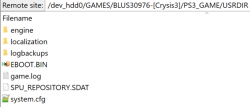
I've tried looking into this myself just now, are you using the Crysis 3 CVar Configurator to make changes to the system.cfg file contained within PS3_GAME > USRDIR? or did you achieve this through a different process?
Can you point me in the right direction for TLOU? That's my goto test game. I would like to mess with it.
Looks like NunoRS200 was able to explain how to unlock the frame rate through PS3MAPI!
If you're interested in playing around with TLOU though, I'd also reccomend using the developer menu. I'm using a modified version called "Dev Menu +" that was made by Illusion, Freako and Smasher248.
The dev menu offers up a number of features that are beneficial for benchmarking, like navigating to any checkpoint in the game and disabling some visual features like motion blur and depth of field (disabling both tends to net an extra 1-3 fps depending on the scene) among a number of other things.
If you want to give it a try you can access it through the discord linked in the below YouTube video's description, it's the second most recent item in the "mod-releases" text channel. Alternatively, to save you the hassle of joining
here is a direct download link to the file as the direct download in the description is broken.
I believe you need either a BCES01584 or BCES01585 copy of TLOU on version 1.11 (most recent patch) for it to work. To install it, you just need to replace the EBOOT.BIN within the dev_hdd0/game/BCES01584/USRDIR folder, make sure to keep a back up copy of the original EBOOT.BIN just in case.
-------
I've also come to realize that I incorrectly advised that the dev menu for Uncharted 1-3 and TLOU could cap/uncap the frame rate. I've mistaken aspects of their functionality with that of the PS4 remastered version's dev menus. I've corrected my original message to avoid misinforming others in the future.
To clarify their functionality, PS3 Uncharted 1 - 3 dev menus cannot cap/uncap frame rate. PS4 Uncharted 1 - 3 dev menus can toggle between the default 60fps cap and 30 fps cap, they can also uncap the framerate. PS3 TLOU dev menu can "fix" the frame rate at a chosen figure between 1 and 120, but values above 30 won't achieve anything without the frame rate being independently unlocked (values set above what the PS3 is capable of outputting whether capped or uncapped, will cause the game to run in slow motion). PS4 TLOU offers the ability to toggle a 30 fps cap, or run at the default 60 fps cap, in the normal display settings of the game. PS4 TLOU dev menu can uncap the frame rate, it also has the same "fix" frame rate functionality as the PS3 version.
I already created, check
here
Would it also be appropriate to post changes to graphical settings in here as well? or should this thread be limited to 60 FPS patches as per the title?
Let's see what everyone can get in the TLOU menu with FPS uncapped. I get exactly 48FPS with 950/1000. Quick and easy benchmark!
I'm getting 45 fps with 850/950 in the main menu