
You are using an out of date browser. It may not display this or other websites correctly.
You should upgrade or use an alternative browser.
You should upgrade or use an alternative browser.
PS2 PS2 DVD Player modifications
- Thread starter krHACKen
- Start date

Hmm
I tried PS2 DVD Players\USB\With Progressive Hack\3.11J\English\US_EU.ELF just now, no memory card inserted, and it worked.
EDIT : Same with the Without Progressive Hack variant.
Hey krHACKen,
First of all, thanks for this mod
But I was just wondering...
Will there ever be a day when it supports progressive scan for PAL DVDs?
I just can't seem to find a way around this as I own an NTSC PS2
There are many, many PAL exclusive DVDs I would like to watch, but don't want to buy a region-free DVD player if I don't have to

Sadly nope, no progressive PAL doable on my side.
The plain ELFs were posted in another thread (cannot find it right now), if someone wants to hack them...
Ah darn
Well, great hack anyway
Thanks again
There is no such thing as a "progressive scan PAL DVD". If you see interlacing artifacts, it could be caused by a bad conversion, less likely a DVD player. You get two consecutive fields from the same frame so there should not be any combing, if we are saying about 25p source material.
There is no such thing as a "progressive scan PAL DVD". If you see interlacing artifacts, it could be caused by a bad conversion, less likely a DVD player. You get two consecutive fields from the same frame so there should not be any combing, if we are saying about 25p source material.
There's no combing
But, for instance, when I play my Un Homme Qui Dort DVD, which is region 2 PAL, it flickers like crazy
It's basically unwatchable, unless I want a massive headache
At least it plays with this hack, which is more than I can say for anything else I've tried

jolek
Senior Member
Un Homme Qui Dort
Wow, The Man Who Sleeps from 1974.
Anyway you're from Europe, did you try different cable?
I mean RGB SCART:
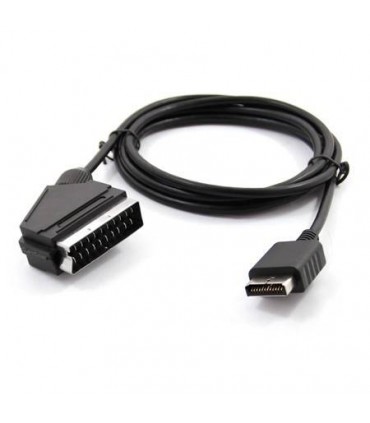
Avoid cheap composite SCART cables which may look the same.
It has to be RGB SCART cable.
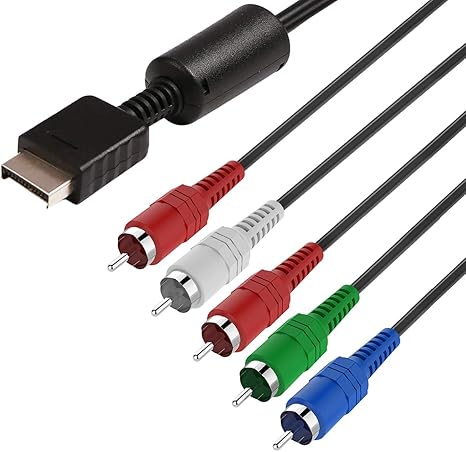
Or component:
Wow, The Man Who Sleeps from 1974.
Anyway you're from Europe, did you try different cable?
I'm from the US, actually
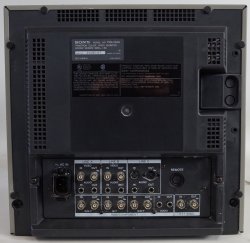
For reference, my monitor is a Sony PVM-1354Q
My PS2 is a fat model SCPH-35001 (NTSC)
And I'm using PS AV to SCART
and then SCART to BNC
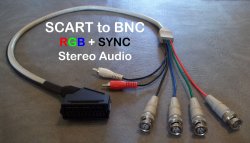
The SCART to BNC is very good quality, but the AV to SCART is fairly cheap and isn't grounded, so that may be the problem?
I'm replacing with this:
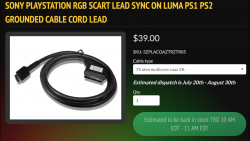
It's a much nicer cable, so maybe it will help
Why do you want to use BNC anyway?
Isn't it used for HD-Component (YUV-Color-space and compressed/multiplexed signal, compared to RGB SCART)?
I'd rather go with a SCART-VGA-Adapter, IMO.
My monitor doesn't support VGA
Just RCA/Composite, RGB/Component and S-Video

sandungas
Developer
From that selection i would go with RGB (with the 5 RCA connectors), is the most standard, good quality and future proof
In my oppinion, the ideal cable is the photo posted by jolek
If you find a cable like that it will be perfect, and is way better than using several cables connected to each other, keep in mind everytime we connect a cable to other cable there is an small quality loss because the connectors itself, just to show an example... the second option is better:
AV connector (PS2) ---> to SCART ---> to RGB (TV)
AV connector (PS2)---> to RGB (TV)
But dont spend 39$ in it dude, thats a lot, i dont know how much they cost but i would pay 10$ as much (unless you find the official ones made by sony with metal RCA connectors and "fireworks", this ones should be a bit more expensive)
And btw, when looking for them you can search for PS3 video cables, as mentioned before the AV connector of the PS2 and the PS3 are the same, so the cables are the same, but probably is going to be easyer to find sellers announcing cables for PS3 than PS2
Edit:
The "problem" of the BNC connectors of your TV could be solved by buying 3 of those (BNC to RCA adapters):

Last edited:
sandungas
Developer
Sorry if my previous post was a bit confusing, i was mentioning RGB but the photo i posted is a component cable 
The point is... both "RGB input" and "component input" are exactly the same connectors in your TV, and this modes are the best you can choose (the others, for composhite and S-video are worst)
So you just need one cable and then you can select RGB/component video output when you boot the PS2, in the menu settings (and i guess your TV is going to switch video modes automatically in between RGB/component if you change them in the PS2 menu)
There is lot of people suggesting that RGB is the best video quality and others that prefers component, but this is a matter of preferences, and depends a lot of your display/TV
The difference is in RGB the video signal is a bit more raw so the image is more crispy
And component softness the image it a bit, and as far i remember it does some kind of progressive scan or things like that (dependant of the circuitry or software of the display/TV)
The point is... both "RGB input" and "component input" are exactly the same connectors in your TV, and this modes are the best you can choose (the others, for composhite and S-video are worst)
So you just need one cable and then you can select RGB/component video output when you boot the PS2, in the menu settings (and i guess your TV is going to switch video modes automatically in between RGB/component if you change them in the PS2 menu)
There is lot of people suggesting that RGB is the best video quality and others that prefers component, but this is a matter of preferences, and depends a lot of your display/TV
The difference is in RGB the video signal is a bit more raw so the image is more crispy
And component softness the image it a bit, and as far i remember it does some kind of progressive scan or things like that (dependant of the circuitry or software of the display/TV)
There's no combing
But, for instance, when I play my Un Homme Qui Dort DVD, which is region 2 PAL, it flickers like crazy
It's basically unwatchable, unless I want a massive headache
At least it plays with this hack, which is more than I can say for anything else I've tried
Then it's a synchronization problem. Your TV set is not getting the 50 Hz signal right.
Then it's a synchronization problem. Your TV set is not getting the 50 Hz signal right.
Ah, I see
I wonder if there's a fix for that...
It's a pretty nice Sony Trinitron PVM monitor, but maybe it's just not capable of handling that signal
I have read the manual for your monitor and it looks like it does support PAL/SECAM signal, so it should support 50 Hz signal from any input.
Are you sure you have connected all inputs right? The switches on the front board should be set: A/RGB on, LINE/RGB on, EXT SYNC on.
Are you sure you have connected all inputs right? The switches on the front board should be set: A/RGB on, LINE/RGB on, EXT SYNC on.
