Ps3 runs 720p only

Hey guys .. i have a weird issue with my ps3
My ps3 fat is connected to 32inch LCD .. and it only works with 720p and i believe my screen support 1080p .. it is connected with HDMI cable for sure .. i tried to untick 720p Option from HDMI menu and keep the 1080p and 1080i but the game starts with 480p which is the lowest quality i guess .. is this something related to PS3 or my Tv?
 
Believing is not enough. ;) Go to producer site and check specific TV model what resolutions supporting.

I never have 720p native screen so I don't know, maybe that's why all resolutions above it are locked.

You can also try flagging system to boot to screen output setup.
 
Its neither, you have unchecked the option for 720p any 720p game will then run in SD resolution if it does not support 1080p. Most game will run 720p, for example most Metal Gear Solid game are 720p.

Best thing is to select ALL the resolutions your TV supports or lett the PS3 detect to resolutions through automatic dispaly setup.. The output supported by each game is embedded in the param.sfo of the game, it will also tell you on the back of the game case which resolutions each game supports.
 
Most of PS3 games will run at 720p, only a few of them such as GT5/GT6 could do full HD resolution with 60fps. Nothing much you can do.

Alternatively, you can enjoy remastered titles of past PS3 games on PS4 or PC which will give full HD 60fps.
 
Have you tried resetting the video settings by holding down the power button until you hear a second beep when turning the system on?
 
Games indeed, most of them runs on 720p

Yeah quite alot of them are.

Some 1080p Games> Black Ops 2, Black Ops 1, Advanced Warfare, Ghosts, World at War, Modern Warfare 1, 2, 3, AC, AC 2, AC3, AC Botherhood, AC Revelations , AC Black Flag, Red Faction Armageddon, Final Fantasy XIII-2
 
Believing is not enough. ;) Go to producer site and check specific TV model what resolutions supporting.

I never have 720p native screen so I don't know, maybe that's why all resolutions above it are locked.

You can also try flagging system to boot to screen output setup.
I guess it's my tv tho .. i found the manual note and they never mentioned FHD quality
 
Its neither, you have unchecked the option for 720p any 720p game will then run in SD resolution if it does not support 1080p. Most game will run 720p, for example most Metal Gear Solid game are 720p.

Best thing is to select ALL the resolutions your TV supports or lett the PS3 detect to resolutions through automatic dispaly setup.. The output supported by each game is embedded in the param.sfo of the game, it will also tell you on the back of the game case which resolutions each game supports.
I mainly play BF4 .. and i see videos with 1080p obviously.. much much better and more dynamic.. is BF4 support FHD on ps3 ?
 
Most of PS3 games will run at 720p, only a few of them such as GT5/GT6 could do full HD resolution with 60fps. Nothing much you can do.

Alternatively, you can enjoy remastered titles of past PS3 games on PS4 or PC which will give full HD 60fps.
We have 100% customs on all imported electronics where i live :D ps4 is way expensive now :D could be 2 months salary for me as a pharmacist:D
 
if it has hdmi it suports 1080p in input,it just downscales to native resolution.you should be able to see the difference if it doesn't says what resolution it's displaying when it turns on,in 720p in XMB text will be noticeably bigger than on 1080p.just untick 1080p and 1080i in video settings,then tick it back to check the differences.confirm with X.
 
Can I use this led tv for ps3?
This led tv resolution is 1366 x 768
Does this led tv resolution is enough for ps3?
Because I want to buy this led tv 32 inch
 
Can I use this led tv for ps3?
This led tv resolution is 1366 x 768
Does this led tv resolution is enough for ps3?
Because I want to buy this led tv 32 inch
I guess it has the same resolution as mine .. but mine doesn't run any game with FHD so i guess it would be the same case
 
but mine doesn't run any game with FHD

Any game that's full 1080p will run at lower resolutions eg> 1080i, 720p etc....

So a 1080p game will work on 720p TV. Technically a 720p should also be able to run it at 1080i. All of the 720p TVs I have had in the past have done this, they just wont do 1080p as they don't support the progressive side of it but interlaced is a different matter.
 
Advice to those buying LED TV or monitors.

Pay a few $ extra and buy Full HD LED TV or monitor. Stay away from "HD Ready" LED TV. Also check the viewing angles of TV and monitor before buying. Good quality LED TV or monitor have 180 degree viewing angles. If you are not sure what to buy. Just keep two things in mind. Buying Full HD and buying IPS panels.
 
IPS especially cheaper ones aren't suited for everybody.they have almost guaranteed problems with backlight bleed (a.k.a. "IPS glow") so for anyone who looks plays darker games where blacks are important IPS is far from ideal.but almost always same or similar model will have VA panel alternative and it would typically cost a bit less than IPS counterpart.it would have worse viewing angles and colors would be a tad less saturated but nothing too much worse.

so,if you're buying display for your main room,you would watch TV on it,play sports simulations,driving games etc - buy a IPS panel.
if you're buying dedicated gaming display for consoles and you like darker games,horror games etc - buy an (a)VA panel.

nobody should buy TN panel in 2019 unless it's absolutely pivotal to have fastest one you can afford and you don't have too much of an budget.
 
IPS especially cheaper ones aren't suited for everybody.they have almost guaranteed problems with backlight bleed (a.k.a. "IPS glow") so for anyone who looks plays darker games where blacks are important IPS is far from ideal.but almost always same or similar model will have VA panel alternative and it would typically cost a bit less than IPS counterpart.it would have worse viewing angles and colors would be a tad less saturated but nothing too much worse.

so,if you're buying display for your main room,you would watch TV on it,play sports simulations,driving games etc - buy a IPS panel.
if you're buying dedicated gaming display for consoles and you like darker games,horror games etc - buy an (a)VA panel.

nobody should buy TN panel in 2019 unless it's absolutely pivotal to have fastest one you can afford and you don't have too much of an budget.

IPS has better colors and viewing angles compared to VA (at least in budget segment). In fact IPS are pretty good for budget panels. Don't expect perfect blacks in LED panels. For that, you need high end LEDs, and still they can't match blacks of HD CRTs.

Buy an IPS if you are on a tight budget. If money is not a problem, then you don't have much to worry about viewing angles etc. high end TVs and monitors don't have these problems.
Avoid TN at all costs specially the low budget ones. They have viewing angles of less than 60 degrees. they are horrible. Forget about gaming, you can't even use them for ordinary stuff. They are strain on eyes.

Funny story. I bought my first new LED monitor 5 years back. It was TN Dell 20 inch i think. It was so horrible that i can't stand. The same day i studied all about LED panels. The very next day, i went to dealer with my Dell monitor, and requested him for replacement. I told him about the viewing angle problem and requested him for some IPS monitor. He generously replaced Dell TN with new Dell IPS S2240 model. It was one of the best budget IPS panel at that time. Cost me $120. But it was worth it. VA panels in similar budget were not as attractive. Yes, backlight bleed is hit or a miss. its unavoidable problem specially in budget LED segment. Some panels have more, some have less. Its pure luck.
 
it's not hit and miss,i've returned 6-7 higher end dell ones and couple of TV's due to really unacceptable glow.i have OLED tv and by comparison VA panel cheap AOC monitor that i've brought for my nephew isn't terribly worse when it comes to colors.and it has really nice deep blacks and zero backlight bleed (and i'm very,very susceptible to that).can i go back to VA and ever to IPS after OLED?sure,i can't but for someone that's on TN VA would be nice upgrade even when it comes to color.

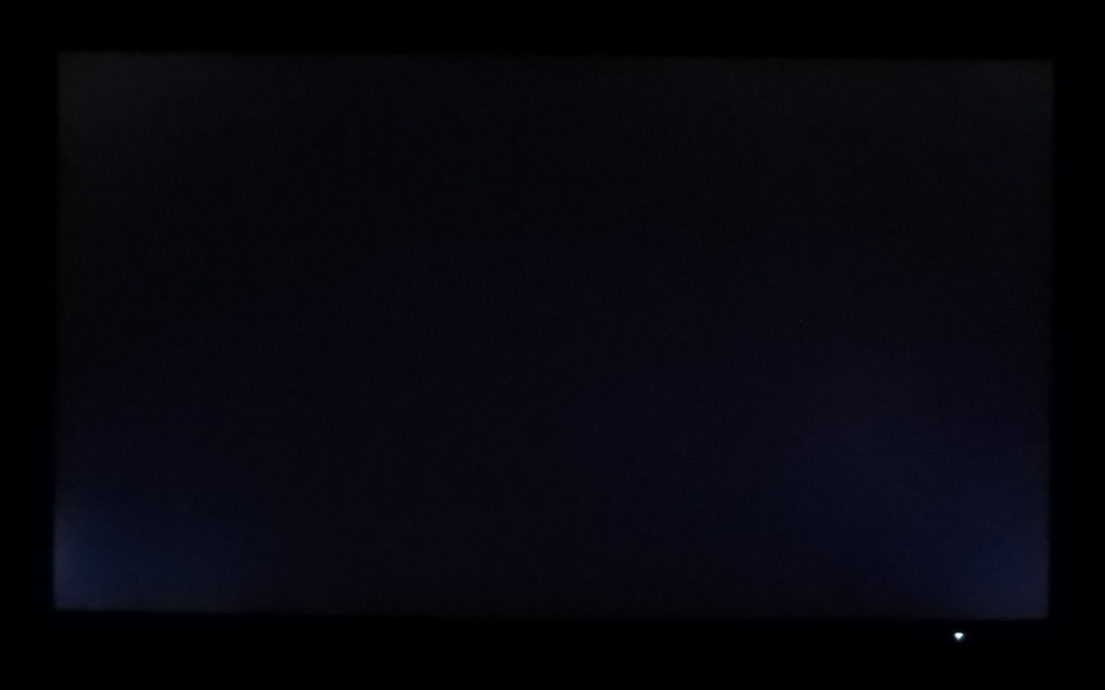
between IPS and VA it comes down to preference and needs,but IPS can't pull off anything darker.not even high end ones:

P1210017.JPG

this is blacklight bleed on a most recent dell ultrasharp,a 500+ dollar IPS precalibrated monitor and it's best one i've seen when it comes to blacklight bleed on IPS.so it's the best case scenario.and it's 27".obviously larger displays due to size always have bigger problems due to limitations of technology.
 

Similar threads

Back
Top