PS3 super slim doesn't read or even spin discs

It is not required to hash ALL possible options. It could be most recents OFW/CFW from 4.84-4.89. It should cover at least 80% of the scenarios. Or the hash could be collected from the current users. Not to tell that a ROS has Rebug, but to tell that it has OFW 4.xx or CFW 4.xx
I understand what you are saying but I don't function that way, when I implement a Toolset feature, it has to cover 100% of cases otherwise I just postpone it. That is why you don't see any info on active ROS on NAND for instance even though it's feasible, I am still looking for a way to get that information for NOR somehow so that feature is on standby.
If someone can provide a way to md5 hash 7Mb of memory (not a string like a js library would expect) in acceptable times, then I should be able to add all the hashes that littlebalup collected.
At some point I would need to reverse engineer the cellSslCertGetMd5Fingerprint vsh export, there might be a reusable sub there that could do the job..
The picture that I posted was using MAMBA. So it looks like there's a regression.
I am looking at the code right now I don't see anything obviously wrong with it.
The code calls syscall 1022 with sub code 0x7FFF in theory that should return 0x666 (right?), in which case the payload is identified as Mamba.
There's an easy way to check in the Toolset logs, check the Debug messages checkbox, you will get a ton of extra logs so I recommend to look just after loading.
If you care to look in those logs, there are 4 lines giving you the result of each test for syscall 6, syscall 8 for CFW, syscall 8 for HEN and syscall 1022.
It will look like:
"peek sc_1022 ret: 0x???"
 
Just in case people find it easier or use OFW and don't want to install HEN to dump system information, they can use the PS3 Toolset in the browser to get the exact same information and take a screenshot to post after hiding IDPS and PSID with the appropriate context menu options.
You know, your app saved me a lot of time in trying to disassembled consoles already assembled, it was precise and these new moedls appeared like "unknown". Thanks for that :)

Btw, it would be easier to get this info by letting a message in the "System Manager", saying something like "If you have a NPX eMMC please confirm at.."

Thanks, i added it in both links :encouragement:
https://www.psdevwiki.com/ps3/Platform_ID#Cookie_Series
https://www.psx-place.com/threads/release-ps3-advanced-tools.34104/page-6#post-327852

Just to be clear... the CokM10 = MPX-001 is a NOR flash type, and the sticker is labeled as PS3 model CECH-40xxB or CECH-40xxC, right ?
I wouldn't give too much relevance to the HDD letter, sometimes I tend to mix cases lol. But all of them are 40xx, NPXs too.

-------------------------------------

About the other models, I have to say I had bad luck, since most of the eMMC mobos I have are the damn PQXs, and all the three "40xx" I have are NOR, so no eMMCs on MSX and NPX models in my stock.

But I do have something interesting, a dead NOR RTX and a GLOD NOR PPX. I know it's not the best result, but I want to know what you have to say about it, @M4j0r @sandungas. There's a method to get the info we need?

About the other two models MSX/NPX eMMC, I think those could be some asian releases, because I never saw those mobos/models. Hard stuff to find, maybe in Japan?
 
You have mainly two ICs and a fuse when talking about drives failures, without mentioning the main controller, Renesas.

Usually when you have a dead BD on these models a fuse is the issue, the one just by the little IC on the pic. When you ahve calibration issues, the bigger one could be the issue, check those fuses.

What the disc does when you press the mechanism to active the drive? Also you should use another one of these when testing drives.

I made a thread about these drives sometime ago, it could be useful for you.

https://www.psx-place.com/threads/guide-some-info-about-4xxx-bd-drives-rant.35420/
Okay I just tested the fuses and I get continuity on the one near the BD7763EFV (F7201) but I think the one near the other smaller chip is toast because I get no signal from that one (F7501). Do you happen to know what value of fuse I should use to replace it?
 
Okay I just tested the fuses and I get continuity on the one near the BD7763EFV (F7201) but I think the one near the other smaller chip is toast because I get no signal from that one (F7501). Do you happen to know what value of fuse I should use to replace it?
I often replace it with other fuse around the board, it could be less than 1A, I don't really know. If your board is a PPX, then it came with the small single laser, when you used the bigger single laser probably killed that fuse. Well at least that's what happened to me, and why I warned people in the other thread.

PQX= Dual laser
PPX= Little single laser
REX/RTX: both sizes for the single laser.
 
I often replace it with other fuse around the board, it could be less than 1A, I don't really know. If your board is a PPX, then it came with the small single laser, when you used the bigger single laser probably killed that fuse. Well at least that's what happened to me, and why I warned people in the other thread.

PQX= Dual laser
PPX= Little single laser
REX/RTX: both sizes for the single laser.
Hmm yeah I checked mouser and digikey and for 0402 SMD fuses I think the only options for voltage were like 24-32V.
I guess I could just order some really low amperage fuses and keep replacing them with higher and higher amperage ratings until they stop exploding.
The unit is a CECH-4301A btw but I do also have 2 CECH-4201As with the same issue that probably need the same repair.
Also don't you mean dual lens?
 
Btw, it would be easier to get this info by letting a message in the "System Manager", saying something like "If you have a NPX eMMC please confirm at.."
By now is better to display the motherboard name as "unknown" because we need the user to open the PS3 to read it and tell the explicit motherboard name in the report

You know, if we give an option to the user where the only posible results are "yes" or "no" there is going to be people that is going to choose one of them without really knowing
In other words... displaying it as "unknown" prevents the false reports ;)

I wouldn't give too much relevance to the HDD letter, sometimes I tend to mix cases lol. But all of them are 40xx, NPXs too.
I was asking just incase someone else is reading and wants to report her/his info, you forgot to tell the MPX-001 you reported had a NOR flash type (but you told to me in private), and didnt mentioned the complete PS3 model with the suffix A, B or C, this details are needed in the report to be sure

But I do have something interesting, a dead NOR RTX and a GLOD NOR PPX. I know it's not the best result, but I want to know what you have to say about it, @M4j0r @sandungas. There's a method to get the info we need?
Thats another 2 more unknowns :eek:
Yes, the platformid can be seen in all syscon EEPROM dumps... actually the standard syscon dumps from superslim PS3 models stars with the platformid in human readable format
The old mullion syscons had a command named "hversion" to read it but they removed it in sherwood syscons like yours... so you need to read it from the EEPROM in raw either by using the python script that does a syscon dump automatically.... or by this trick i mentioned
https://www.psx-place.com/threads/syscon-fan-settings-coordinate-graphs.31188/page-4#post-292692
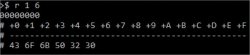
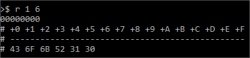
Basically, you just need to use the "r" command (to read) 6 bytes from offset 1... and the syscon should replay with "CokXxx"

In other words, the command ">r 1 6" is reading the bytes 2nd, 3rd, 4th, 5th, 6th, 7th
This is a sample of how it starts the syscon dump of a REX-001(eMMC)
Code:
Offset(h) 00 01 02 03 04 05 06 07 08 09 0A 0B 0C 0D 0E 0F

00000000  D8 43 6F 6B 52 34 30 00 00 51 60 40 FF FF FF FF  ØCokR40..Q`.ÿÿÿÿ
00000010  01 4E 00 FF FF 22 03 BC 2C FF FF FF FF FF FF FF  .N.ÿÿ".¼,ÿÿÿÿÿÿÿ
00000020  00 02 00 00 03 C8 78 FF FF FF FF 00 FF FF FF FF  .....Èxÿÿÿÿ.ÿÿÿÿ

About the other two models MSX/NPX eMMC, I think those could be some asian releases, because I never saw those mobos/models. Hard stuff to find, maybe in Japan?
The NPX-001(eMMC) seems to be unusual, but i found a photo of it in google
The PSX-001(eMMC) is speculation, we never found a photo of it
 
Last edited:
Hmm yeah I checked mouser and digikey and for 0402 SMD fuses I think the only options for voltage were like 24-32V.
I guess I could just order some really low amperage fuses and keep replacing them with higher and higher amperage ratings until they stop exploding.
The unit is a CECH-4301A btw but I do also have 2 CECH-4201As with the same issue that probably need the same repair.
Also don't you mean dual lens?
Here where I live it's cheaper to get a non functional PS3 instead of buying non-chinese electronics parts. You never know what else you will need in the future. I don't think those voltages are appropiate, like I said, you can take a replacement from a donor board, fuses on old fat drives are 2A.
Also don't you mean dual lens?
yeah, my bad.
In other words... displaying it as "unknown" prevents the false reports ;)
Actually that's what I meant haha, marked them as "unknown" is a good idea.
In other words, the command ">r 1 6" is reading the bytes 2nd, 3rd, 4th, 5th, 6th, 7th
This is a sample of how it starts the syscon dump of a REX-001(eMMC)
Wait, so after I'm connected to the syscon I only need to write the command ">r 1 6" and boila?
 
Finished :)

RTX - 001 NOR -> CokR10
PPX - 001 NOR -> CokP20
 

Attachments

  • PPX-001 CokP20.jpg
    PPX-001 CokP20.jpg
    9.1 KB · Views: 56
  • RTX-001 CokR10.jpg
    RTX-001 CokR10.jpg
    8.8 KB · Views: 52
Finished :)

RTX - 001 NOR -> CokR10
PPX - 001 NOR -> CokP20
Great, i updated this links again, please check the list in wiki to see if is fine
https://www.psdevwiki.com/ps3/Platform_ID#Cookie_Series
https://www.psx-place.com/threads/release-ps3-advanced-tools.34104/page-6#post-327852

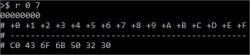
Im sorry for asking again, but can you try the command ">r 0 7" in them again ?
The reason why im asking aout this is because the platformid is stored inside syscon twice with 2 identifyers, the other identifyer is a single byte located at EEPROM offwset 0x0 (inmediatly before the "cok" name), @M4j0r was interested in it and is something we need to confirm to be sure

In theory the CokR10 is = 0xD0 (it shares this ID with his bastard brother CokR20)
And the CokP20 = 0xC0 (it shares this ID with his bastard brother CokP10)

In my last edit in wiki where i added this 2 reports im asuming is like that... but now im regretting a bit about it because im not 100% sure
You know... sony was doing weird things when they was assigning IDs to the superslim motherboards, right now we have a better understanding and we built a theory about it, but is a mess
 
Cool I added those 2 in the Toolset, the additions will roll out soon, along with the xRegistry editor I am currently polishing.

Is that it for the moment, just those 2 are new?
And we still have 3 more missing Pokemon to hunt for? @sandungas ?
Only 2 are missing: MSX-001(eMMC) and NPX-001(eMMC)

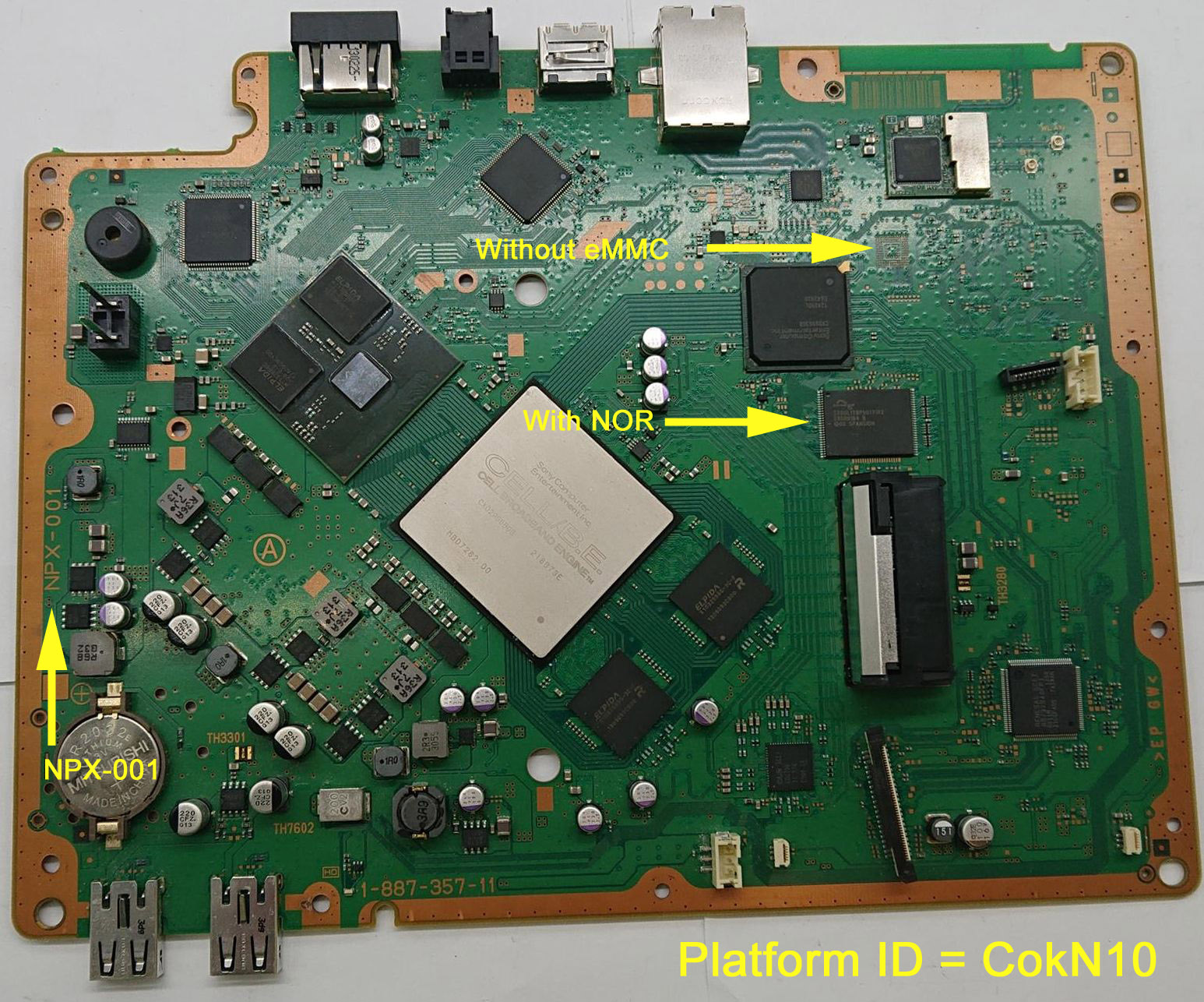
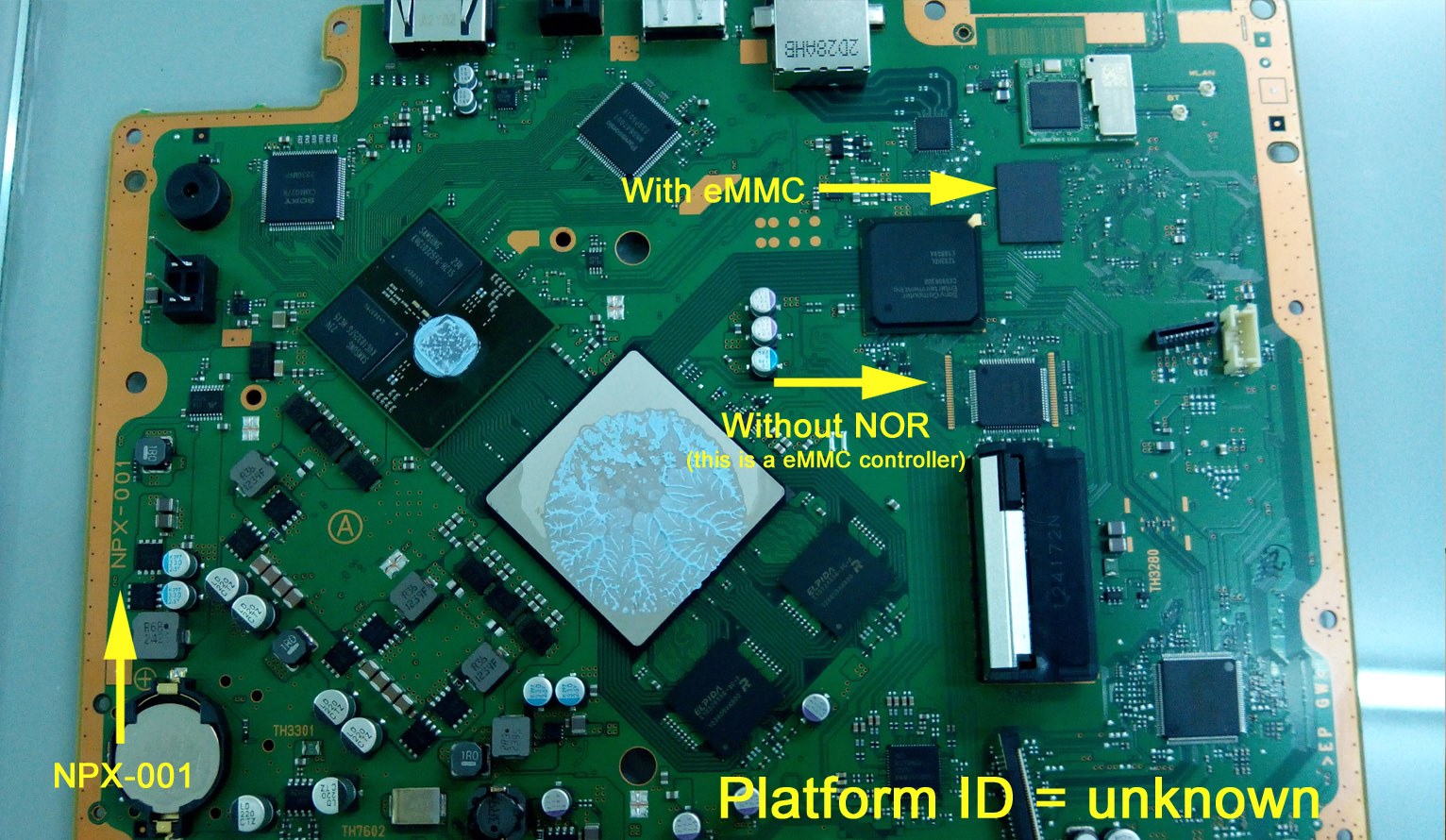
I made a couple of images to show you the trick we was using to figure how many platformId's there are , and how sony assigned them to the different PS3 superslim motherboards

We search google for images of the motherboard name (in this case a NPX-001)... and keep attention at the presence of the NOR chip (a rectangle) ...or... an eMMC controller (a squared chip soldered in the position of the NOR chip, instead of it)... and the presence of the eMMC chip itself that is always an addon
NPX-001-NOR.jpg

Basically... you need to look at the chip located next to the HDD connector... if is a rectangle it means is NOR... otherway if is an squared chip with pins all around is eMMC :)
NPX-001-e-MMC.jpg


Long story short... we are sure NPX-001(eMMC) exists because that photo... and we know sony gave it an unique platformID to it... so this one is missing for sure in our lists

--------------------
The MSX-001(eMMC) should be labeled as speculative, because we are not sure if it exists... but well... for anyone reading us remember this trick searching for photos in google works for all superslim motherboards, in all them the circuitry is designed to (optionally) use a NOR chip of the combination of eMMC controller + eMMC chip

So if some of you finds a photo of a MSX-001 with the eMMC components please advise us and we will chnage his status in wiki from speculative to realistic, because that photo would be a proof that it aws manufactured a combo of MSX-001 with eMMC
 
Last edited:
Great, i updated this links again, please check the list in wiki to see if is fine
https://www.psdevwiki.com/ps3/Platform_ID#Cookie_Series
https://www.psx-place.com/threads/release-ps3-advanced-tools.34104/page-6#post-327852

Im sorry for asking again, but can you try the command ">r 0 7" in them again ?
The reason why im asking aout this is because the platformid is stored inside syscon twice with 2 identifyers, the other identifyer is a single byte located at EEPROM offwset 0x0 (inmediatly before the "cok" name), @M4j0r was interested in it and is something we need to confirm to be sure

In theory the CokR10 is = 0xD0 (it shares this ID with his bastard brother CokR20)
And the CokP20 = 0xC0 (it shares this ID with his bastard brother CokP10)

In my last edit in wiki where i added this 2 reports im asuming is like that... but now im regretting a bit about it because im not 100% sure
You know... sony was doing weird things when they was assigning IDs to the superslim motherboards, right now we have a better understanding and we built a theory about it, but is a mess

Wouldn't it be a good idea to add a IDPS "product sub code" column to that table?

Basicaly for the super slim:
ModelIDPS prod. sub codenotes
CECH-40xxB/C0x000DConfirmed
CECH-40xxA0x000EConfirmed
CECH-40xxB/C (v2?, NPX board?)0x000Fconfirmed (motherboard model not reported)
CECH-40xxA (v2?, NPX board?)0x0010speculation
CECH-42xxB/C0x0011Confirmed
CECH-42xxA0x0012Confirmed
CECH-43xxB/C0x0013Confirmed
CECH-43xxA0x0014Confirmed
 
Wouldn't it be a good idea to add a IDPS "product sub code" column to that table?

Basicaly for the super slim:
ModelIDPS prod. sub codenotes
CECH-40xxB/C0x000DConfirmed
CECH-40xxA0x000EConfirmed
CECH-40xxB/C (v2?, NPX board?)0x000Fconfirmed (motherboard model not reported)
CECH-40xxA (v2?, NPX board?)0x0010speculation
CECH-42xxB/C0x0011Confirmed
CECH-42xxA0x0012Confirmed
CECH-43xxB/C0x0013Confirmed
CECH-43xxA0x0014Confirmed
Well, in the way i see it (my personal oppinion, that could change at some point) is better to keep the platform ID page clean... and merge all the info in this table
https://www.psdevwiki.com/ps3/Product_Sub_Code

In some way... the table in the "Product Sub Code" wiki page is derivated from the other "Platform ID" table
This means in practise... that is a lot more tricky to complete the table of the "Product Sub Code" wiki page
The natural progression would be to complete the table from the "Platform ID" first... and then complete the other for the "Product Sub Code"

Btw, the link im giving is intended for standard wiki readers... but for wiki editors you need to check this one (is the same info, but with a lot of additional notes and spaeculation at bottom)
https://www.psdevwiki.com/ps3/Template:Minimum_Firmware_Version

As you can see... there is another table "splitted" at bottom (but is incorrectly ordered).. i made it just because the way how is made that table is tricky so i wanted to have a "template" ready to join it later
Also, in it i kept "placeholders" for the other misterious ID's

At some point we need to discuss how to complete that table, and you need to confirm everything matches with pyps3checker and the info you colleced from flash dumps
 
@M4j0r @littlebalup i merged the info from Platform ID into the "splitted" table at bottom of Minimum Firmware Version and i been also reviewing some of our talks from many time ago (specially littlebalup reports related with pyps3checker) and everything seems to match with the new wiki table

Please review it and tell me if you agree with it, im asking for your bless to join together the "splitted" table (for superslims) with the other (for slims and fats)
Is hard to believe but it seems we completed the puzzle :eek:

Well... to be fair... the "platform id" and the "product sub code" of the NPX-001(eMMC) is still doubtful... but from the 2 posible options im displaying the most probable (you know... following the same rules of all the other superslims)
 
Finally I could run the script, but it was just as usual, but instead of the errors script, you just put the dump script.

D:\PS3\SYSCON\ps3syscon-master\ps3syscon-master>SysconEEPdumpSW.py COM3 SW
Version: S1E
Auth successful
Dumping NVS
Reading 0x0000
Reading 0x0040
Reading 0x0080
Reading 0x00C0
Reading 0x0100
Reading 0x0140
Reading 0x0180
Reading 0x01C0
Reading 0x0200
Reading 0x0240
Reading 0x0280
Reading 0x02C0
Reading 0x0300
Reading 0x0340
Reading 0x0380
Reading 0x03C0
Reading 0x0400
Reading 0x0440
Reading 0x0480
Reading 0x04C0
Reading 0x0500
Reading 0x0540
Reading 0x0580
Reading 0x05C0
Reading 0x0600
Reading 0x0640
Reading 0x0680
Reading 0x06C0
Reading 0x0700
Reading 0x0740
Reading 0x0780
Reading 0x07C0
Reading 0x0800
Reading 0x0840
Reading 0x0880
Reading 0x08C0
Reading 0x0900
Reading 0x0940
Reading 0x0980
Reading 0x09C0
Reading 0x0A00
Reading 0x0A40
Reading 0x0A80
Reading 0x0AC0
Reading 0x0B00
Reading 0x0B40
Reading 0x0B80
Reading 0x0BC0
Reading 0x0C00
Reading 0x0C40
Reading 0x0C80
Reading 0x0CC0
Reading 0x0D00
Reading 0x0D40
Reading 0x0D80
Reading 0x0DC0
Reading 0x0E00
Reading 0x0E40
Reading 0x0E80
Reading 0x0EC0
Reading 0x0F00
Reading 0x0F40
Reading 0x0F80
Reading 0x0FC0
Reading 0x1000
Reading 0x1040
Reading 0x1080
Reading 0x10C0
Reading 0x1100
Reading 0x1140
Reading 0x1180
Reading 0x11C0
Reading 0x1200
Reading 0x1240
Reading 0x1280
Reading 0x12C0
Reading 0x1300
Reading 0x1340
Reading 0x1380
Reading 0x13C0
I opened the dump script and read that a line was for printing the auth errors, that's how I realized.

@sandungas could you check this one? If it's ok I'm going for the RTX one.

BTW, you can put the NOR NPX as a 40XX B/C, I didn't see it in a 42xx.
 

Attachments

  • PPX.jpg
    PPX.jpg
    8.7 KB · Views: 45
  • PPX_SW.txt
    PPX_SW.txt
    5 KB · Views: 36
Last edited:
Back
Top