PS3 PS3Xport Tool - Inject backups on 4.83/4.84 OFW

Nope , it will format your ps3 everytime you restore it. You might wanna grab a ext hdd instead.

It takes 18 hours to backup a system with a 6gb game or so(for me). Most of the time gets taken up for preparing the backup.

Imagine having 15-20 games on your system. It might take a week or so to get 500GB or more backed up
& on top of that your storage space also matters & again the ps3xport tool will take it's own time for writing to this huge amounts of data & after all that, restoring the data onto the ps3 -,-

Thanks for the info btw.
 
Last edited:
Hello, So how to add other games without losing those already installed. here is my problem. Thank you.

Option A: Inject multiple games at once using ps3xport tool. (In the same backup)

Option B: If you want to inject a game again with a pre-installed one on your system. BACKUP the current data. Move over to the xport tool & inject another game, then restore. You will find all your games (installed previously & current ones) in your system.

imo try finishing one game & then move on to the other. This way you can delete the game once you finish it & you also will enjoy the game more.
 
It takes 18 hours to backup a system with a 6gb game or so(for me). Most of the time gets taken up for preparing the backup.
Those speeds are God awful, something is wrong with either your PS3's HDD or the storage device you were using. It shouldn't take anywhere near that long for 6 GB. It look me < 18 hours to backup my whole hard drive which was totally full.
 
Those speeds are God awful, something is wrong with either your PS3's HDD or the storage device you were using. It shouldn't take anywhere near that long for 6 GB. It look me < 18 hours to backup my whole hard drive which was totally full.
ikr, I've mentioned the initializing too it took 3/4 of the time to "prepare the update" and finally start.
The same thing happens in dtu too. I wonder why this is happening.
 
It takes 18 hours to backup a system with a 6gb game or so(for me). Most of the time gets taken up for preparing the backup.

Imagine having 15-20 games on your system. It might take a week or so to get 500GB or more backed up
& on top of that your storage space also matters & again the ps3xport tool will take it's own time for writing to this huge amounts of data & after all that, restoring the data onto the ps3 -,-

Thanks for the info btw.
In that case , I think something is wrong with your ps3. For me it only took 14-15 minutes to transfer a >6 gb game. Try changing your usb drive or ext drive. If that didn't work out then try to format your ps3 or restore your ps3. Hope it helps.
 
Hello, my ps3 is on 4.70 and i have many backups from my originals converted with old manual method, the question is: if i update the console to 4.83 can i still inject using ps3xport tool, the games that i have converted already or i must re-convert it all with cfw2ofw tool?

thanks.
 
Last edited:
Hello, my ps3 is on 4.70 and i have many backups from my originals converted whit old manual method, the question is: if i update the console to 4.83 can i steel play that games, can i inject the games that i have converted already, injectin now whith new ps3xport too, not trueancestor like until now, it works for me?

thanks.
No need to make installing games hard for you HFW(Hybrid Firmware) recover HAN Abilities you must update your ps3 with HFW 4.84.2
then use HAN like if did when it was on 4.82 ,injection operation take alot of time backing up your ps3 with installed game will take time and the injector will take time when injecting files to your backup ,and ps3 take time to restore so its really tiring but with HAN things comes easy,just create pkg of your games and games update use HAN Installer to install han supportfiles then ps3 reboots with Package Manger installed after that if you going to install han signed pkgs use HAN enabler ,if you have debug pkg(not signed) use Debug PKG Enabler and with this you will be abled to add your games without delete the existing ones and add games without taking much time :)

See this thread :
https://www.psx-place.com/threads/u...lash-tools-restored-for-4-84-ofw-users.23094/
 
but i dont have internet conection on my ps3, the time is not a problem, i just want to know if the games that i have converted work with the new firmware o i must reconvert all, with the new tools?
 
but i dont have internet conection on my ps3, the time is not a problem, i just want to know if the games that i have converted work with the new firmware o i must reconvert all, with the new tools?
They will work on 4.83 or 4.83 but i tell you about cause it take less time then backup injection
 
Last edited:
thanks a lot, taht is for my litle child, he is 6 and have broken all my discs, i just backup all before, and i already have the games converted, han i have read that u must activate and so... i nwwd an easy way, for my child he cant read, and with the method i use u turn on the system and boom the games ar there, thanks a lot
 
but i dont have internet conection on my ps3, the time is not a problem, i just want to know if the games that i have converted work with the new firmware o i must reconvert all, with the new tools?
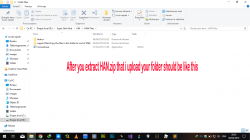
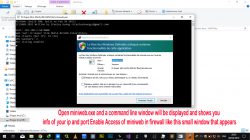
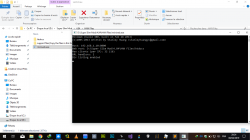
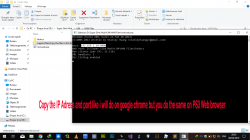
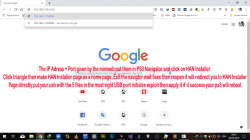
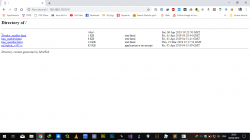
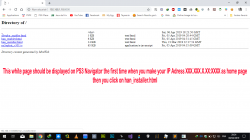
You don't need internet connection just download HAN release files and PKG Linker v2 mount a RJ45 ethernet cable directly between ps3 and pc and start webserver(miniweb will be enough)
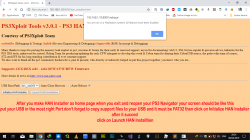
then enter the IP given from miniweb into ps3 web browser go to the page you want to use like HAN Installer make it the Home page Clear Cookies,Clear Data cache,Clear History then reopen your navigator HAN Installer page will be opened apply the exploit then your ps3 will reboot then go navigator and select HAN Enabler or Debug PKG Enabler as a home page then do as you do with HAN Installer but this time ps3 will not reboot enable HAN then install the last toolbox it will have all the exploit so you don't need to go to webbrowser in Network column :)
 
thanks a lot, taht is for my litle child, he is 6 and have broken all my discs, i just backup all before, and i already have the games converted, han i have read that u must activate and so... i nwwd an easy way, for my child he cant read, and with the method i use u turn on the system and boom the games ar there, thanks a lot
Yes even HAN is more easier and when you open the ps3 you will see your games like its a backup injection but HAN gain more time
 
Yes they will work you inject games before so you now the convert operation so :
  • First Step is done (CFW2OFW Convert)
  • Second convert your Update (BXXX12345) and Game (NPXX12345) to a pkgs (this is my create pkg batch ) :
https://mega.nz/#!8td2CC6S!ZzGKaQQXZZSo95YoIXIOe0QkruwJ7b1nV01PWcA_Bv4
  • Now you will Have Package Manager in Game Column
  • Download PKG Linker v2 put your ip adress in your config and a new Package_List.pkg will be create and put your pkgs same folder as PKGLinkerV2.exe and remember that your path must have no space or unicontroller will show error say that no space allowed when you put your pkg same folder as pkg linker exe click on refresh button in PKG linker and it will create a new Packages_List will be create copy that package_list to your usb root
  • enable HAN on ps3 using HAN enabler then install the packge_list.pkg and a new folder called Install Package from webserver will be created in Pacakge Mangager go to that folder and you will see your pkg games that you put in PKG Linker Folder
  • PKG Will be downloaded then Install automaticly
Hope you get confused, if you face problem pm i will show everything one by one
 

Attachments

  • Capture d’écran (1801).png
    Capture d’écran (1801).png
    135.9 KB · Views: 239
  • Capture d’écran (1802).png
    Capture d’écran (1802).png
    181.1 KB · Views: 215
  • Capture d’écran (1803).png
    Capture d’écran (1803).png
    136.8 KB · Views: 240
  • Capture d’écran (1804).png
    Capture d’écran (1804).png
    154.4 KB · Views: 232
  • Capture d’écran (1805).png
    Capture d’écran (1805).png
    174.8 KB · Views: 218
  • Capture d’écran (1806).png
    Capture d’écran (1806).png
    113.7 KB · Views: 228
  • Capture d’écran (1807).png
    Capture d’écran (1807).png
    138.3 KB · Views: 236
  • rVhhvp7.jpg
    rVhhvp7.jpg
    76.3 KB · Views: 191
  • Capture d’écran (1808).png
    Capture d’écran (1808).png
    181.8 KB · Views: 218
  • maxresdefault.jpg
    maxresdefault.jpg
    64 KB · Views: 153
  • Capture d’écran (1809).png
    Capture d’écran (1809).png
    160.8 KB · Views: 222
Last edited:
thanks a lot bro!
but i cant download from mega, my internet conection is so bad u cant imagine. i must do everithing ofline, i am from cuba.

anyway i will read all caerfully and try to search the net for mirrors to download all necesary software to do it. thanks so much!

the whole procedure can be done offline?
 
Last edited:
Back
Top