PS3 RCO Mage (Dumping RCO's)

Most probably is because the "stuff" that is supposed to be displayed in between quotes in the texts you have posted here are 2 icons (loaded from imagefont.bin)
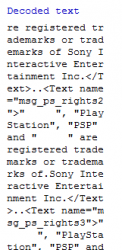
<Text name="msg_ps_rights">" ", "PlayStation", "PSP" and " " are registered trademarks or trademarks of Sony Interactive Entertainment Inc.</Text>


Are 2 of these:
Imagefont.bin_PS3_4.60_contents_%28LOGOS%29.jpg


If you open the xml file in a hexeditor and look at that position you are going to find this character codes in hexadecimal
 
Last edited:
Or this :

20 20 20 20 20 ??? Is that supposed to display something?
Yes, thats what i meant, this is the way to identify that icons :encouragement:

But i dont get why you have the value 0x2020202020 i guess the character has been "lost" in between copypastes of the text (0x20 is an space character, so that are 5 spaces)
Try to extract the rco contents again, and open the xml file directly in the hexeditor
 
Yes, thats what i meant, this is the way to identify that icons :encouragement:

But i dont get why you have the value 0x2020202020 i guess the character has been "lost" in between copypastes of the text (0x20 is an space character, so that are 5 spaces)
Try to extract the rco contents again, and open the xml file directly in the hexeditor

Done that Shows 20 20 20 again
Are there some character that rcomage couldn't read ? I also tried and there is no hex code at this position.
Yeah exactly. but rcomage couldn't possibly corrupt the file since after saving and copying it over to the ps3 the ps3 displays it fine...
 
Are there some character that rcomage couldn't read ? I also tried and there is no hex code at this position.
Rcomage can read all characters codes as far i know, even cyrilic fior russian, korean, chinese, etc...
It deals with characters in UTF-8 and this is supposed to cover all them

So... i guess is not an error of rcomage
What seems to be happening is sony uses a different method to display the icons at that positions
The text only "reserves" that area by using spaces and they displays the icon by other means on top of the reserved area


Edit:
If you are curious... try to extract contents of an old PS3 firmware (2.00 CEX or older) and take another look at that text line in a hexeditor, in the same way you did
I bet in old firmwares are going to appear the character codes instead of the 20 20 20 20 20
 
Last edited:
Ok now its funny....
So I've tried extracting LuanTeles Ps3 4k pro mod to test,
I've dumped his sysconf_plugin.rco (altho it was unsucessful showed an error)
Opened it & got this...

That means it shows PS3 Symbol right?.
But why does his sysconf show that but not the original unmoded ps3
 

Attachments

  • Capture.PNG
    Capture.PNG
    4.6 KB · Views: 178
Last edited:
Ok now its funny....
So I've tried extracting LuanTeles Ps3 4k pro mod to test,
I've dumped his sysconf_plugin.rco (altho it was unsucessful showed an error)
Opened it & got this...

That means it shows PS3 Symbol right?.
But why does his sysconf show that but not the original unmoded ps3 show diff
Yes, is the PS3 logo icon from this image 0xEFA297 :encouragement:
Imagefont.bin_PS3_4.60_contents_%28LOGOS%29.jpg


And... i cant imagine why in luanteles files appears the correct code but not in yours :/
 
I did say luanteles's rco Returned an error, has that got something to do with this?
I dont think is related with the error
Try to extract contents from an old firmware (2.00 CEX or older) and the same rco, and take a look at the xml in hexeditor

Maybe is something sony changed in latest firmwares ?
Or maybe you are having a problem in windows and all your extracted files have that same problem ?

And try this rcomage version btw, it have the same compatibility than v1.1.2 but have some improvements that could help you understand better how the rco files works
http://www.psx-place.com/threads/research-rcomage-psdevwiki-mod.17958/
Maybe this version works to you ?
 
Maybe is something sony changed in latest firmwares ?
Or maybe you are having a problem in windows and all your extracted files have that same problem ?

Tbh I'm pretty sure my copy of windows is alright, all my extracted files were okay I've even tried modding eplipsy screen, changing gameboot everything worked fine.
I'm facing a problem only in this very area hmm....

Read this carefully, If I am to take this very file and inject it onto my ps3 It works alright. But in hxd it shows there are spaces, but luanteles's one shows a different story. Taking his rco and opening it with hex editor shows it's proper character values... & Shaolin faces this same issue using the rco used in the restore folder in zip located in the ps3xploit site.
 
Last edited:
Did you try to rebuild the rco with something like this ?
Code:
<Text name="msg_ps_rights">TEST</Text>
If the PS3 logo icon still appears in the same position it means the icon is displayed in his position by other means, or the whole text string is loaded from other rco

Another thing you could try is this, maybe this "overrides" it (here im replacing the spaces with TEST)
<Text name="msg_ps_rights">"TEST", "PlayStation", "PSP" and "TEST" are registered trademarks or trademarks of Sony Interactive Entertainment Inc.</Text>
 
Back
Top