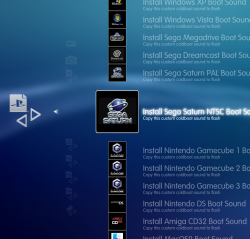
Ultimate Toolbox

PS3 [RELEASE] ★ Ultimate Toolbox v2.03 - It Only Does Everything! v2.03 (FW 4.84 - 4.91)

DeViL303

Developer
PSX-Place Supporter
Here is my newest XMB menu called Ultimate Toolbox!

upload_2021-1-11_20-7-35.png


It was not made for HEN, But it seems to work Ok in my limited testing.

THIS XMB MOD ONLY SUPPORTS RECENT FIRMWARES UP TO VERSION 4.88.

NOT COMPATIBLE WITH 4.89 CFW/HFW


Download HERE


There might be some bugs, So use at your own risk. This should work on any recent CFW that has support for XMBM, by that I mean any recent CFW that has this query in category_game.xml. If your firmware does not have this query you can add support by simply adding it to your own xml.

HEN users would need to add this query to their category game xml
Code:
<Query
class="type:x-xmb/folder-pixmap"
key="game_xmbm_hdd0"
src="xmb://localhost/dev_hdd0/game/XMBMANPLS/USRDIR/game_main.xml#seg_xmb_hdd0_app"
/>
It has been tested on 4.87.2 Evilnat CFW and also on recent Rebug FW (4.84.2 and 4.86.1).

Some extra info on this XMB Mod for those interested.

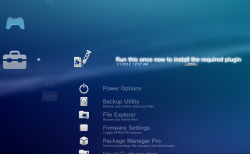
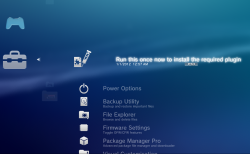
You will notice when you first install it there is a "Run this once now to install the required plugin" item at the top of the menu. Like the title suggests this should be ran once to install the required files to flash. This is placed here so that its not missed by anyone as its very important this is ran after initial install.
upload_2021-1-13_14-28-32.png

This installer application installs these vital files to dev_flash:
  • xai_plugin.sprx (used for dump tools, installed incase it does not exist on the system)
  • xai_plugin.rco - dummy rco
  • videodownloader_plugin.sprx (extended xai_plugin required for all copy operations)
  • videodownloader_plugin.rco (dummy rco)
  • category_psn.xml (installed to stop category HM apps from showing in the PSN category)
  • downloader_plugin.sprx (I added this due to the fact that Evilnat 4.87.2 CFW seems to be missing a patch to this file)
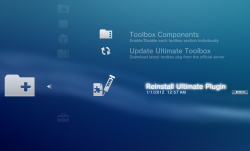
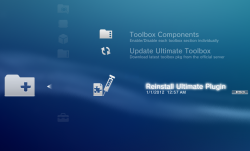
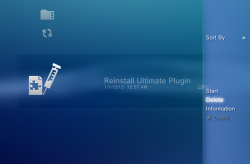
So that's all fairly simple, run this once and files install and once the console comes back to the XMB. You will notice that its not there anymore at the top of the menu, now it has moved into the Ultimate Toolbox Setup menu and now it has a different name "Reinstall Ultimate Plugin". This is put there in case you need it later.

upload_2021-1-13_14-28-50.png

The reason this is included here is for the situation where you have updated or reinstalled your CFW, this will lead to the files on flash being removed, so if you install or update CFW, remember you need to run this again once to reinstall the required files to flash.

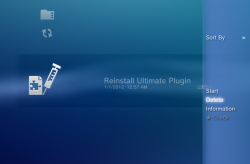
Uninstalling Ultimate Toolbox: If you want to remove the Toolbox from your system for any reason you can press triangle on this icon and select "Delete", after a reboot the Toolbox will be uninstalled.
upload_2021-1-13_14-29-41.png


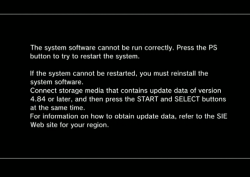
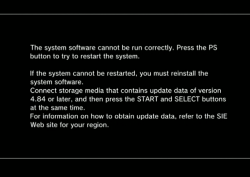
Important Note: If you forget/fail to run this application initially after first installing the toolbox, OR after a CFW reinstall/update, you will get kicked to recovery and see this screen if you try to use most features, do not worry, this is not a soft brick. Just press the PS button once and the system will reboot back onto the XMB. Then you can run the "Reinstall Ultimate Plugin" app and everything will be working again. This happens due to the fact you are trying to call a plugin that does not exist.
upload_2021-1-13_14-30-8.png
 
Last edited:
I finally got around to testing it a lil. I have a few reports.

1. The description of Ultimate ToolBox, there's what looks to be a period at the far left of "It only does everything!" Not a bother to me one bit, I just thought I'd bring it to your attention in case you didn't mean for that. :encouragement:

2: I tried to enable webman MOD settings, as it is not showing up by default, but nothing ever got enabled. I kept getting a "0 files copied successfully" notification. And yea I did do XMB refresh after every attmept of enabling. I did, however, notice a cfw_settings.log located in: /dev_hhd0/tmp. I opened it because I noticed it was a new file and wanted to see what it said and it appears to be from your mod and it had some information in regards to the webman MOD settings:
Code:
2021-01-08 15:06:19 [xai_plugin] :  : _xai_plugin_prx_entry()
2021-01-08 15:06:19 [xai_plugin] : 1 : xai_plugin_init()
2021-01-08 15:06:19 [xai_plugin] : 1 : xai_plugin_start()
2021-01-08 15:06:19 [xai_plugin] : ACT0 : xai_plugin_action(fcopy#/dev_hdd0/game/XMBMANPLS/USRDIR/TOOLBOX/xmls/WebMAN_MOD_Settings_Disabled.xml#/dev_hdd0/game/XMBMANPLS/USRDIR/TOOLBOX/xmls/WebMAN_MOD_Settings.xml#move)
/dev_blind enabledfcopy: Move mode enabled - /dev_blind disabledfcopy: All 0 copy operations completed successfully

2021-01-08 15:07:16 [xai_plugin] : 1 : xai_plugin_stop()
2021-01-08 15:07:16 [xai_plugin] : 1 : xai_plugin_exit()
2021-01-08 15:07:16 [xai_plugin] :  : _xai_plugin_prx_stop()
2021-01-08 15:13:18 [xai_plugin] :  : _xai_plugin_prx_entry()
2021-01-08 15:13:18 [xai_plugin] : 1 : xai_plugin_init()
2021-01-08 15:13:18 [xai_plugin] : 1 : xai_plugin_start()
2021-01-08 15:13:18 [xai_plugin] : ACT0 : xai_plugin_action(fcopy#/dev_hdd0/game/XMBMANPLS/USRDIR/TOOLBOX/xmls/WebMAN_MOD_Settings_Disabled.xml#/dev_hdd0/game/XMBMANPLS/USRDIR/TOOLBOX/xmls/WebMAN_MOD_Settings.xml#move)
/dev_blind enabledfcopy: Move mode enabled - /dev_blind disabledfcopy: All 0 copy operations completed successfully

2021-01-08 15:13:35 [xai_plugin] : 1 : xai_plugin_stop()
2021-01-08 15:13:35 [xai_plugin] : 1 : xai_plugin_exit()
2021-01-08 15:13:35 [xai_plugin] :  : _xai_plugin_prx_stop()
2021-01-08 15:24:55 [xai_plugin] :  : _xai_plugin_prx_entry()
2021-01-08 15:24:55 [xai_plugin] : 1 : xai_plugin_init()
2021-01-08 15:24:55 [xai_plugin] : 1 : xai_plugin_start()
2021-01-08 15:24:55 [xai_plugin] : ACT0 : xai_plugin_action(fcopy#/dev_hdd0/game/XMBMANPLS/USRDIR/TOOLBOX/xmls/WebMAN_MOD_Settings_Disabled.xml#/dev_hdd0/game/XMBMANPLS/USRDIR/TOOLBOX/xmls/WebMAN_MOD_Settings.xml#move)
/dev_blind enabledfcopy: Move mode enabled - /dev_blind disabledfcopy: All 0 copy operations completed successfully

2021-01-08 15:27:20 [xai_plugin] : 1 : xai_plugin_stop()
2021-01-08 15:27:21 [xai_plugin] : 1 : xai_plugin_exit()
2021-01-08 15:27:21 [xai_plugin] :  : _xai_plugin_prx_stop()
2021-01-08 15:38:30 [xai_plugin] :  : _xai_plugin_prx_entry()
2021-01-08 15:38:30 [xai_plugin] : 1 : xai_plugin_init()
2021-01-08 15:38:30 [xai_plugin] : 1 : xai_plugin_start()
2021-01-08 15:38:30 [xai_plugin] : ACT0 : xai_plugin_action(fcopy#/dev_hdd0/game/XMBMANPLS/USRDIR/TOOLBOX/xmls/WebMAN_MOD_Settings_Disabled.xml#/dev_hdd0/game/XMBMANPLS/USRDIR/TOOLBOX/xmls/WebMAN_MOD_Settings.xml#move)
fcopy: Move mode enabled - fcopy: All 0 copy operations completed successfully

2021-01-08 15:39:54 [xai_plugin] : 1 : xai_plugin_stop()
2021-01-08 15:39:54 [xai_plugin] : 1 : xai_plugin_exit()
2021-01-08 15:39:54 [xai_plugin] :  : _xai_plugin_prx_stop()
2021-01-08 15:59:14 [xai_plugin] :  : _xai_plugin_prx_entry()
2021-01-08 15:59:14 [xai_plugin] : 1 : xai_plugin_init()
2021-01-08 15:59:14 [xai_plugin] : 1 : xai_plugin_start()
2021-01-08 15:59:15 [xai_plugin] : ACT0 : xai_plugin_action(enable_devblind)
/dev_blind access enabled
2021-01-08 15:59:29 [xai_plugin] : ACT0 : xai_plugin_action(fcopy#/dev_hdd0/game/XMBMANPLS/USRDIR/TOOLBOX/xmls/WebMAN_MOD_Settings_Disabled.xml#/dev_hdd0/game/XMBMANPLS/USRDIR/TOOLBOX/xmls/WebMAN_MOD_Settings.xml#move)
fcopy: Move mode enabled - fcopy: All 0 copy operations completed successfully

2021-01-08 15:59:41 [xai_plugin] : ACT0 : xai_plugin_action(fcopy#/dev_hdd0/game/XMBMANPLS/USRDIR/TOOLBOX/xmls/WebMAN_MOD_Settings.xml#/dev_hdd0/game/XMBMANPLS/USRDIR/TOOLBOX/xmls/WebMAN_MOD_Settings_Disabled.xml#move)
fcopy: Move mode enabled - File copy operation - source: /dev_hdd0/game/XMBMANPLS/USRDIR/TOOLBOX/xmls/WebMAN_MOD_Settings.xml - destination: /dev_hdd0/game/XMBMANPLS/USRDIR/TOOLBOX/xmls/WebMAN_MOD_Settings_Disabled.xml -
Copy operation succeeded -
move mode : Delete source path: /dev_hdd0/game/XMBMANPLS/USRDIR/TOOLBOX/xmls/WebMAN_MOD_Settings.xml - move mode : Delete operation succeeded -
fcopy: All 1 copy operations completed successfully

2021-01-08 16:00:23 [xai_plugin] : 1 : xai_plugin_stop()
2021-01-08 16:00:23 [xai_plugin] : 1 : xai_plugin_exit()
2021-01-08 16:00:23 [xai_plugin] :  : _xai_plugin_prx_stop()
2021-01-08 16:02:00 [xai_plugin] :  : _xai_plugin_prx_entry()
2021-01-08 16:02:00 [xai_plugin] : 1 : xai_plugin_init()
2021-01-08 16:02:00 [xai_plugin] : 1 : xai_plugin_start()
2021-01-08 16:02:00 [xai_plugin] : ACT0 : xai_plugin_action(fcopy#/dev_hdd0/game/XMBMANPLS/USRDIR/TOOLBOX/xmls/WebMAN_MOD_Settings_Disabled.xml#/dev_hdd0/game/XMBMANPLS/USRDIR/TOOLBOX/xmls/WebMAN_MOD_Settings.xml#move)
fcopy: Move mode enabled - File copy operation - source: /dev_hdd0/game/XMBMANPLS/USRDIR/TOOLBOX/xmls/WebMAN_MOD_Settings_Disabled.xml - destination: /dev_hdd0/game/XMBMANPLS/USRDIR/TOOLBOX/xmls/WebMAN_MOD_Settings.xml -
Copy operation succeeded -
move mode : Delete source path: /dev_hdd0/game/XMBMANPLS/USRDIR/TOOLBOX/xmls/WebMAN_MOD_Settings_Disabled.xml - move mode : Delete operation succeeded -
fcopy: All 1 copy operations completed successfully

2021-01-08 16:02:51 [xai_plugin] : 1 : xai_plugin_stop()
2021-01-08 16:02:51 [xai_plugin] : 1 : xai_plugin_exit()
2021-01-08 16:02:51 [xai_plugin] :  : _xai_plugin_prx_stop()
2021-01-08 16:07:05 [xai_plugin] :  : _xai_plugin_prx_entry()
2021-01-08 16:07:05 [xai_plugin] : 1 : xai_plugin_init()
2021-01-08 16:07:05 [xai_plugin] : 1 : xai_plugin_start()
2021-01-08 16:07:05 [xai_plugin] : ACT0 : xai_plugin_action(disable_devblind)
/dev_blind access disabled
2021-01-08 16:09:44 [xai_plugin] : ACT0 : xai_plugin_action(fcopy#/dev_hdd0/game/XMBMANPLS/USRDIR/TOOLBOX/xmls/WebMAN_MOD_Settings_Disabled.xml#/dev_hdd0/game/XMBMANPLS/USRDIR/TOOLBOX/xmls/WebMAN_MOD_Settings.xml#move)
/dev_blind enabledfcopy: Move mode enabled - /dev_blind disabledfcopy: All 0 copy operations completed successfully

2021-01-08 16:19:10 [xai_plugin] : 1 : xai_plugin_stop()
2021-01-08 16:19:10 [xai_plugin] : 1 : xai_plugin_exit()
2021-01-08 16:19:10 [xai_plugin] :  : _xai_plugin_prx_stop()

As I'm sure you'll notice, a few successful copies occurred but that was only after I read the log and seen that it was referencing /dev_blind/. So I enabled /dev_blind/ to see what would happen. It would copy the file successfully but webman MOD settings still don't appear.

3. I host all my files via Network with PS3 Net Server. In Ultimae ToolBox: Package Manager Pro>Install Package Files>Packages on Web Server, did not populate my packages being hosted. My packages are located under PKG folder on my pc which is being read by PS3 Net Server.

In the description for "Packages on Web Server", you have (PKG Linker), is that something I need or is that just a short way of saying it links packages from a web server? lol Sorry if that sounds dumb but since my packages didn't show up it left me wondering.

Funny thing about the packages not being populated under "Packages on Web Server", is that I figured that maybe I needed to mount my PKG folder via webman MOD for them to populate under Ultimate ToolBox. So, I tried that and they still didn't populate, but, they did however get populated under the "Package Folders(Install from /packages/ folder on mass storage devices). Makes sense since webman MOD mounts them as a data disc. Now, what's funny is that webman MOD does the opposite when mounting my PKG folder, it populates them under "Standard Package Location(Install from ROOT of mass storage devices)".

That last part was just interesting to me, funny, but I'd still like to know what I need to do to get "Packages on Web Server" to populate a list of my packages from my PC.

4. I've seen/read some of your other threads and I think I remember seeing a video where you had XMB Refresh listed under power options, anyway to bring that back. Personally, since Refresh XMB is already installed through webman MOD, I'd rather not install the package you included for it. I'm not tryinmg to add more things for you to do, just a suggestion/request.

Also it'd be for convenience sake since using webman MOD's Refresh XMB also does a rescan of games listed under webman MOD, which takes longer.

Alas, forgive me for this wall of text but those are some of things I've noticed so far. If I find anything else I'll be sure to let you know. Thanks again for bringing this to CFW, felt left out from those hen users lol.
 
Last edited:
Thanks for the feedback.

1. The description of Ultimate ToolBox, there's what looks to be a period at the far left of "It only does everything!" Not a bother to me one bit, I just thought I'd bring it to your attention in case you didn't mean for that. :encouragement:
Yeah it was on purpose. I didn't like the way it looked with the text offset, and spaces were ignored. I might be able to come up with a better way to do that

2: I tried to enable webman MOD settings, as it is not showing up by default, but nothing ever got enabled. I kept getting a "0 files copied successfully" notification. And yea I did do XMB refresh after every attmept of enabling. I did, however, notice a cfw_settings.log located in: /dev_hhd0/tmp. I opened it because I noticed it was a new file and wanted to see what it said and it appears to be from your mod and it had some information in regards to the webman MOD settings:

As I'm sure you'll notice, a few successful copies occurred but that was only after I read the log and seen that it was referencing /dev_blind/. So I enabled /dev_blind/ to see what would happen. It would copy the file successfully but webman MOD settings still don't appear.
I disabled that webman mod menu by commenting it out in game_main.xml, I guess I forgot to remove the option in settings for enabling it. I was having some issues with the fan speed options causing a slow down and didnt want to release something that would impact performance. I might look into enabling/updating that menu in a update someday.

3. I host all my files via Network with PS3 Net Server. In Ultimae ToolBox: Package Manager Pro>Install Package Files>Packages on Web Server, did not populate my packages being hosted. My packages are located under PKG folder on my pc which is being read by PS3 Net Server.

In the description for "Packages on Web Server", you have (PKG Linker), is that something I need or is that just a short way of saying it links packages from a web server? lol Sorry if that sounds dumb but since my packages didn't show up it left me wondering.

Funny thing about the packages not being populated under "Packages on Web Server", is that I figured that maybe I needed to mount my PKG folder via webman MOD for them to populate under Ultimate ToolBox. So, I tried that and they still didn't populate, but, they did however get populated under the "Package Folders(Install from /packages/ folder on mass storage devices). Makes sense since webman MOD mounts them as a data disc. Now, what's funny is that webman MOD does the opposite when mounting my PKG folder, it populates them under "Standard Package Location(Install from ROOT of mass storage devices)".

That last part was just interesting to me, funny, but I'd still like to know what I need to do to get "Packages on Web Server" to populate a list of my packages from my PC.
Yes, That is only related to PKG linker which was the only way for HAN users to serve packages, but it works fine on CFW too if that option is there. Its not related not ps3netserv. I do not know of a way to read ps3netserv and add the packages there. I guess it would need a dedicated plugin, will probably never happen.

4. I've seen/read some of your other threads and I think I remember seeing a video where you had XMB Refresh listed under power options, anyway to bring that back. Personally, since Refresh XMB is already installed through webman MOD, I'd rather not install the package you included for it. I'm not tryinmg to add more things for you to do, just a suggestion/request.
If you install that included Reload XMB pkg, It will show up in the power options under the advanced menu. Its a separate app to the one you have installed already.
Also it'd be for convenience sake since using webman MOD's Refresh XMB also does a rescan of games listed under webman MOD, which takes longer.

Alas, forgive me for this wall of text but those are some of things I've noticed so far. If I find anything else I'll be sure to let you know. Thanks again for bringing this to CFW, felt left out from those hen users lol.
It's cool, good to get some feedback.

If I have more time I will add some updates and fix some bugs.
 
Sweet, thanks for the tip about the Reload XMB.pkg. I see the option under Advanced Power options now. I'm glad you took the time to add it for us CFW users, very much appreciated. :encouragement:

One more thing before I take a break, got a headache from reading/posting/testing. With the File Manager, when I click :but tri: on a file/folder, I get 2 options: unlink and unlink(folder). Do those options mean delete? A bit unclear. Both options appear even if only selecting a single file outside of a folder. Also, is it possible to allow File Manager to rename/copy/paste? If it is possible, that'd be pretty fuckin' slick, the ultimate all in one, no need to boot into an app, would be able to do it all from within the XMB.

 
Last edited:
Sweet, thanks for the tip about the Reload XMB.pkg. I see the option under Advanced Power options now. I'm glad you took the time to add it for us CFW users, very much appreciated. :encouragement:

One more thing before I take a break, got a headache from reading/posting/testing. With the File Manager, when I click :but tri: on a file/folder, I get 2 options: unlink and unlink(folder). Do those options mean delete? A bit unclear. Both options appear even if only selecting a single file outside of a folder. Also, is it possible to allow File Manager to rename/copy/paste? If it is possible, that'd be pretty fuckin' slick, the ultimate all in one, no need to boot into an app, would be able to do it all from within the XMB.

Yes they both mean delete. Use "unlink" for files and "unlink folder" for folders. You need to exit out of the menu and back in for it to update the GUI. This method can be used to delete files that wont delete via FTP. Its also very quick to delete folders with many small files.

Copy and paste is probably not possible. This is a hidden official firmware function left over from pre 1.00 firmware. It will even work on OFW with just an xml mod. It is possible to edit the string to say "delete" but it requires explore_plugin.sprx to be patched. I prefer not to include sprx patches as it makes the mod firmware dependent.

Side note: people have been asking me to add copy/paste for about 10years now since I first discovered it by mistake. :)
 
Here is an updated version v1.01: Link Removed, see v1.02 HERE


New features since v1.00:
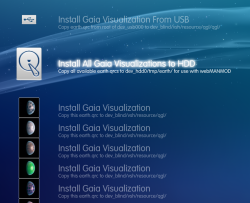
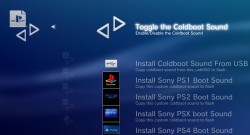
  • Gaia installer
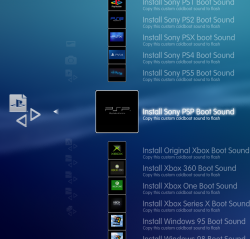
  • Coldboot sound installer with 30 boot sounds
  • Toggle coldboot.raf on and off
  • Toggle extended download plugin
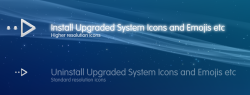
  • Toggle imagefont.bin upgrade
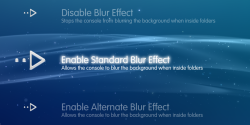
  • Toggle blur effects
  • Dump tools (by Mysis) added to backup utility
  • More info added to lots of entries
  • Little tweaks here and there
Note: As usual there might be some bugs, so use this at your own risk!

Note 2: If you want to use a long coldboot sound like the PS5 or Xbox series X boot sound, you will find it cuts off early when the XMB has loaded fully. There is a workaround for this. Just go to Visual Customization > Toggle Blur effect and click on any one of the 3 options. This will install a custom_render_plugin.rco that allows longer coldboot sounds to play fully.

Credits: To everyone in the scene, there are too many to name. It builds on the work of just about everyone.

Special thanks to @aldostools, @bguerville @Berion and @mysis @pink1
 
Last edited:
Some extra info on this XMB Mod for those interested.

You will notice when you first install it there is a "Run this once now to install the required plugin" item at the top of the menu. Like the title suggests this should be ran once to install the required files to flash. This is placed here so that its not missed by anyone as its very important this is ran after initial install.

upload_2021-1-13_13-57-35.png

This installer application installs these vital files to dev_flash:
  • xai_plugin.sprx (used for dump tools, installed incase it does not exist on the system)
  • xai_plugin.rco - dummy rco
  • videodownloader_plugin.sprx (extended xai_plugin required for all copy operations)
  • videodownloader_plugin.rco (dummy rco)
  • category_psn.xml (installed to stop category HM apps from showing in the PSN category)
  • downloader_plugin.sprx (I added this due to the fact that Evilnat 4.87.2 CFW seems to be missing a patch to this file)
So that's all fairly simple, run this once and files install and once the console comes back to the XMB. You will notice that its not there anymore at the top of the menu, now it has moved into the Ultimate Toolbox Setup menu and now it has a different name "Reinstall Ultimate Plugin". This is put there in case you need it later.

upload_2021-1-13_14-5-1.png

The reason this is included here is for the situation where you have updated or reinstalled your CFW, this will lead to the files on flash being removed, so if you install or update CFW, remember you need to run this again once to reinstall the required files to flash.

Uninstalling Ultimate Toolbox: If you want to remove the Toolbox from your system for any reason you can press triangle on this icon and select "Delete", after a reboot the Toolbox will be uninstalled.

upload_2021-1-13_14-8-26.png


Important Note: If you forget/fail to run this application initially after first installing the toolbox, OR after a CFW reinstall/update, you will get kicked to recovery and see this screen if you try to use most features, do not worry, this is not a soft brick. Just press the PS button once and the system will reboot back onto the XMB. Then you can run the "Reinstall Ultimate Plugin" app and everything will be working again. This happens due to the fact you are trying to call a plugin that does not exist.

upload_2021-1-13_14-15-4.png
 
Last edited:
Thanks for the post @DeViL303, you should think of adding this to OP in case it gets lost somewhere down the line.
Done.

@all I just realized there is a potential issue here. If you remove the toolbox by pressing triangle on "Reinstall Ultimate Plugin", this will also remove some of webMAN MODs support files as they also install into the dev_hdd0/game/XMBMANPLS/ folder. In the next update I will add a dedicated uninstall option to the menu.
 
Last edited:
@DeViL303 Some feedback:
- In Coldboot Logo Installer => Install Coldboot Logo (OFW) didn't work
- In Coldboot Sound Installer => Install Amiga CD32 Boot Sound the icon is missing (shows a rotating icon)
- In Coldboot Sound Installer => please add the option Muted Boot Sound
- In Toggle Power Options => please add option for Power Off in Users category (2 icons: Power Off no confirm + Power Options)
- In Firmware Settings => It would be cool if you include your Impose mod
- In Visual Customisation > Gaia Installer => please add Switch Gaia Visualization (call /earth.ps3)
 
Great feedback and bugs found. Thanks.
- In Coldboot Logo Installer => Install Coldboot Logo (OFW) didn't work
Ok, I see what happened there. The Rebug and OFW logos are miixed up. If you use the Rebug option it will install the OFW raf.
- In Coldboot Sound Installer => Install Amiga CD32 Boot Sound the icon is missing (shows a rotating icon)
Not sure how I missed that. :)

Icon is named AmigaCD32.png and xml is looking for Amiga32CD.png. Damn. Bloody typos still catching me out. :D
- In Coldboot Sound Installer => please add the option Muted Boot Sound
That should be there. At the top. Its named "toggle" though not mute, maybe I should change it or at least add the word "mute" somewhere.

Maybe I will change the info line to read "Mute / Unmute" instead of "Enable / Disable"?

upload_2021-1-14_3-51-1.png
In Toggle Power Options => please add option for Power Off in Users category (2 icons: Power Off no confirm + Power Options)
Good idea, will do.
- In Firmware Settings => It would be cool if you include your Impose mod
You mean the one with the PS3 image based on 0.90 DECR? Will do.

- In Visual Customisation > Gaia Installer => please add Switch Gaia Visualization (call /earth.ps3)
Great idea, Thanks.


I will have them all sorted and added for the next version. ;)
 
Last edited:
@DeViL303 can i borrow you Coldboot sounds to use with my PROTOOLBX?

I have about 20 because i got lazy and made the previews just with the console name =P

Can i borrow you sounds and preview images?

xKq9p5h.png
 
Last edited:
@DeViL303 can i borrow you Coldboot sounds to use with my PROTOOLBX?

I have about 20 because i got lazy and made the previews just with the console name =P

Can i borrow you sounds and preview images?

xKq9p5h.png
Sure, no problem.

What was your hack with the icons.qrc again, I forget? Remember with the shaders, cheap, full etc? You had the icons looking like glass etc?
 
Last edited:

Similar threads

Back
Top