PS3 (Research/Experimental) - NEC/TOKIN Capacitors Replacement - YLOD

You can always buy a reel of copper tape and kapton tape and have a go yourself. I haven't done it but I'd try the following:
- Cut a piece of thin card about the same size as a NEC Cap
- Cover the card in kapton
- Make sure you have two seperate copper tracks taped around the card. Allocate one as +ve and one as -ve; you don't want any bridging or shorts!

Experiment a bit and use @Workz_777 posts and pictures as a guide/inspiration.

The only thing I'd want to clarify is how they are soldered to the pads. I'm guessing it's soldered on at each corner.

*edit, changed care to card

i think i understand how to do it i'll try to do it
 
OK, so I tested on a broken sem-001 board, disconnected the nec tokins from the RSX and CELL.

The syscon showed these errors - 0093003 and 0093004.

As a quick test, check on the postive of the nec tokin location, the CELL should read 1.1+v and RSX 1.2+v when hitting power on from standby, if not those readings then your caps are not connected properly or other power related issue further down - use my testpoint guide - https://github.com/db260179/ps3syscon/tree/master/mb_readouts

Hope this helps?

I have successfully tapped the syscon, and this is the output:

Code:
>$ lasterrlog
lasterrlog
Last Error Code:0xa0093004, Time:0xffffffff
[mullion]$
>$ errlog
errlog
ofst[ 56]:err_code:0xffffffff, clock:0xffffffff
ofst[ 60]:err_code:0xa0093004, clock:0xffffffff
ofst[ 64]:err_code:0xa0093004, clock:0xffffffff
ofst[ 68]:err_code:0xa0093004, clock:0xffffffff
ofst[ 72]:err_code:0xa0093004, clock:0xffffffff
ofst[ 76]:err_code:0xa0093004, clock:0xffffffff
ofst[ 80]:err_code:0xa0093004, clock:0xffffffff
ofst[ 84]:err_code:0xa0093004, clock:0xffffffff
ofst[ 88]:err_code:0xa0093004, clock:0xffffffff
ofst[ 92]:err_code:0xa0093004, clock:0xffffffff
ofst[ 96]:err_code:0xa0093004, clock:0xffffffff
ofst[100]:err_code:0xa0093004, clock:0xffffffff
ofst[104]:err_code:0xa0093004, clock:0xffffffff
ofst[108]:err_code:0xa0093004, clock:0xffffffff
ofst[112]:err_code:0xa0093004, clock:0xffffffff
ofst[116]:err_code:0xa0093004, clock:0xffffffff
ofst[120]:err_code:0xa0093003, clock:0xffffffff
ofst[124]:err_code:0xa0093003, clock:0xffffffff
ofst[  0]:err_code:0xa0093003, clock:0xffffffff
ofst[  4]:err_code:0xa0093003, clock:0xffffffff
ofst[  8]:err_code:0xa0093003, clock:0xffffffff
ofst[ 12]:err_code:0xa0093004, clock:0xffffffff
ofst[ 16]:err_code:0xa0093004, clock:0xffffffff
ofst[ 20]:err_code:0xa0093004, clock:0xffffffff
ofst[ 24]:err_code:0xa0093004, clock:0xffffffff
ofst[ 28]:err_code:0xa0093004, clock:0xffffffff
ofst[ 32]:err_code:0xa0093004, clock:0xffffffff
ofst[ 36]:err_code:0xa0093004, clock:0xffffffff
ofst[ 40]:err_code:0xa0093004, clock:0xffffffff
ofst[ 44]:err_code:0xa0093004, clock:0xffffffff
ofst[ 48]:err_code:0xa0093004, clock:0xffffffff
ofst[ 52]:err_code:0xa0093004, clock:0xffffffff

It sometimes get 0xa0093003, and sometimes 0xa0093004. According to the error codes sheet, it is POWER FAIL... how can I proceed, any suggestion?
 
@squeept my CECHE01 just decided to kick the bucket today. It has been working fine after delid and repaste. Do you care to run analysis on it for posterity?

EDIT
Resurrected with flux and a heat gun. Who knows how long it lives this time. Would still like to send for analysis. I did not even replace thermal paste and was able to run uncharted 2 for half an hour under 60C @ 60% fan speed
 
Last edited:
Hi all,

Just wanted to add my experience to this thread since it has been so helpful in fixing my YLOD PS3.

My background was that I had a Fat PS3 (CECHK03 model) which had signs of failing capacitors. It would be okay when playing PS1 games or DVDs but playing PS2 (via webman) or PS3 game may result in YLOD a few minutes in. I noticed also that when the system was 'cold', it would switch off sooner, failing to boot sometimes. Once the console had warmed up a bit, it would load and play fine but would occasionally YLOD. All of these symptoms pointed towards failing NEC/Tokin capacitors.

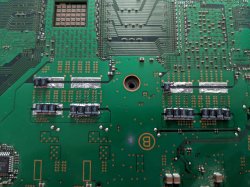
Following the advice, I ordered some 470 uF capacitors (Vishay Size B). I removed 4 out the 8 Tokins so I did not need any bridging wires. I found the easiest way to remove the Tokins was to remove the top cap by prying up from one corner. With the top removed, it was possible to use a blade to cut through solder enough to lift up the edge. Using a set of small pliers, you can then peel up on the lifted edge and remove the soldered strips.

I soldered the replacements directly to the board. The size B caps can be placed vertically between the traces without removing any solder mask but there is small tolerance for the placement. Fortunately, you can use the vias to solder onto if you have not placed them correctly. The width of the size B package means you can place 4 side by side but only if you leave the room for it.

IMG_20200718_172004-min.jpg
IMG_20200718_172500-min.jpg

I initially soldered 9 on each on the CELL and RSX (4230 uF total each) but this still resulted the occasional YLOD. I then decided to solder more so there was 15 on each (7050 uF total each) and have had no YLOD since. I have tested the console with TLOU and GT6 and have had no issues playing them so I am confident that this issue has been fixed. PS2 games also load and work without switching off.

I want to give a general thanks to everyone in this thread for sharing.
 
H
I initially soldered 9 on each on the CELL and RSX (4230 uF total each) but this still resulted the occasional YLOD. I then decided to solder more so there was 15 on each (7050 uF total each) and have had no YLOD since. I have tested the console with TLOU and GT6 and have had no issues playing them so I am confident that this issue has been fixed. PS2 games also load and work without switching off.

I want to give a general thanks to everyone in this thread for sharing.

Was there a middle ground while testing when u added more tant caps? using 11 caps on each BGA would have brought the total to 5170uF which should have been more than enough so curious to know if u tested in between when adding more caps? assuming u still have bad tokin caps on board since u needed to use so many?
 
w
Was there a middle ground while testing when u added more tant caps? using 11 caps on each BGA would have brought the total to 5170uF which should have been more than enough so curious to know if u tested in between when adding more caps? assuming u still have bad tokin caps on board since u needed to use so many?

I only tested the system with 9 and 15, nothing in between. Tbh, when 9 still caused YLOD, I got a bit annoyed so I decided to solder as many as would fit (15) so I wouldn't have to open the system again! I still have 4 of the Tokins on the other side of the board which are contributing some capacitance too so it's hard to know the true number that would have worked in my case (all I know is that 9 wasn't enough). The extra caps also add a bit of redundancy in case the tokins lose capacitance in the future.

Another point to note was most of the 9 caps I initially placed were on the side furthest from the BGA. Since these caps would have been more effective if they were closer to the BGA, I wonder if they had been on the other side they would have worked slightly better.
IMG_20200718_165318-min.jpg
 
if its the NEC/TOLKIN issue on a ps3 console then cover every thing else with thermal tape and only heating on them and testing the ps3 system will prove if its them causing ylod.

Its quite a good option before actually going into replacing process.
But question is how much heat must be applied to see if its really the NEC/TOKIN capacitor rendering ps3 system unusable
What do you say @Naked_Snake1995
 
For me, can be one of or even both.
Due the age of it and the caps buy now good chance it's the caps.
Don't rule out the solder balls as that was the main problem when the first ones began to fail.
 
Last edited:
YLOD will happen in the case of cracked solder balls but proving that it is the case is going to require physical evidence of shown cracked solder per case.

If one is willing to take the time to show that prior to repair by all means do it.

Otherwise I think it's safe to assume to change the caps as shown as a good way to fix them. Change Caps + Delid = the way to go.
 
atm Capacitor prices are insane compared to what they were earlier this year, needless to say I hope you all got some stockpiled. Cause the PS3 repair boom is happening.
 
YLOD will happen in the case of cracked solder balls but proving that it is the case is going to require physical evidence of shown cracked solder per case.

If one is willing to take the time to show that prior to repair by all means do it.

Otherwise I think it's safe to assume to change the caps as shown as a good way to fix them. Change Caps + Delid = the way to go.
What would delidding do, besides lowering temperatures once the system is working?

And another thing i would like to ask everyone, anyone know of a good tutorial on how to reflow the two main chips? And can it be done with a regular two setting heat gun? Thanks.
 
I don't think a heat gun is recommended. if you don't do it right, you could bake the motherboard and components.
I have a CECHH that i revived after replacing 1 RSX tokin that freezes and shows artifacts ten seconds after booting, responds to being pushed on the RSX chip, presumably because of cracked joints, so i don't really mind trying seeing as it's useless now.
 
I have a CECHH that i revived after replacing 1 RSX tokin that freezes and shows artifacts ten seconds after booting, responds to being pushed on the RSX chip, presumably because of cracked joints, so i don't really mind trying seeing as it's useless now.

don't really have much to lose. a reball would cost the same as a new, used system cfw compatible.
 
I piggybacked 4 caps I got off of Mouser on the bottom side of the board (1 cap per nec) and this CECH-A01 boots up! However it randomly freezes. I noticed the freezing is more consistent when I ask the system to do things (like pressing X on an option in the XMB). I inspected the board and noticed this on a trace, could this be the problem? If so any advice on how fix this anyone?

Edit: I already tried swapping hard drives and wiping this mess with rubbing alcohol. It's ingrained into the board, I can't remove it.

djLYptx.jpg
 
@Sampsonay Looks like humidity damage, but I'm not so sure. Get isopropyl alcohol and clean that with a toothbrush.

You're getting freezes 'cause the rest of the NECs aren't enough to power up the RSX normally. You need to add a few more to avoid the freezes, but you'll have problems when trying to play games. In this case you need to at least replace all the NECs from one side and test.

If it's an "A", then probaly you'll have to replace every NEC.
 
Back
Top
