
You are using an out of date browser. It may not display this or other websites correctly.
You should upgrade or use an alternative browser.
You should upgrade or use an alternative browser.
PS3 [Research] Impose plugin rco animations
- Thread starter DeViL303
- Start date

BRIAN-JESHUA
Member
@DeViL303
Code:
<Text name="impose_text_0" posX="0" posY="1" posZ="0" redScale="1" greenScale="1" blueScale="1" alphaScale="1" width="0" height="0" depth="1" scaleWidth="1" scaleHeight="1" scaleDepth="1" iconOffset="0x210000" onLoad="nothing" unknown17="0xc60d0000" unknown18="0xa10d6c00" unknown19="0x0" unknownInt20="0x0" unknownInt21="0x0" unknown22="0x0" text="text:msg_controller" font="nothing" unknownInt27="0x1" unknownInt29="0x1000000" size="10" topRed="1" topGreen="1" topBlue="1" bottomRed="1" bottomGreen="1" bottomBlue="1" spacingHorizontal="0" unknown37="0x0" unknown38="0x0" unknown39="0x0" spacingVertical="0" shadowX="4" shadowY="-5" shadowPerspective="0" shadowRed="0.25" shadowGreen="0.25" shadowBlue="0.25" shadowAlpha="1" unknown48="0x0" unknown49="0x0" unknown50="0x0" unknownFloat51="1" unknownFloat52="1" unknownFloat53="1" unknownFloat54="1" unknown55="0xffffffff" unknownInt56="0x14" unknownInt57="0x3" unknown58="0x0"></Text>I am sorry I did not express myself clearly.
Please attach a picture to better explain what I mean.
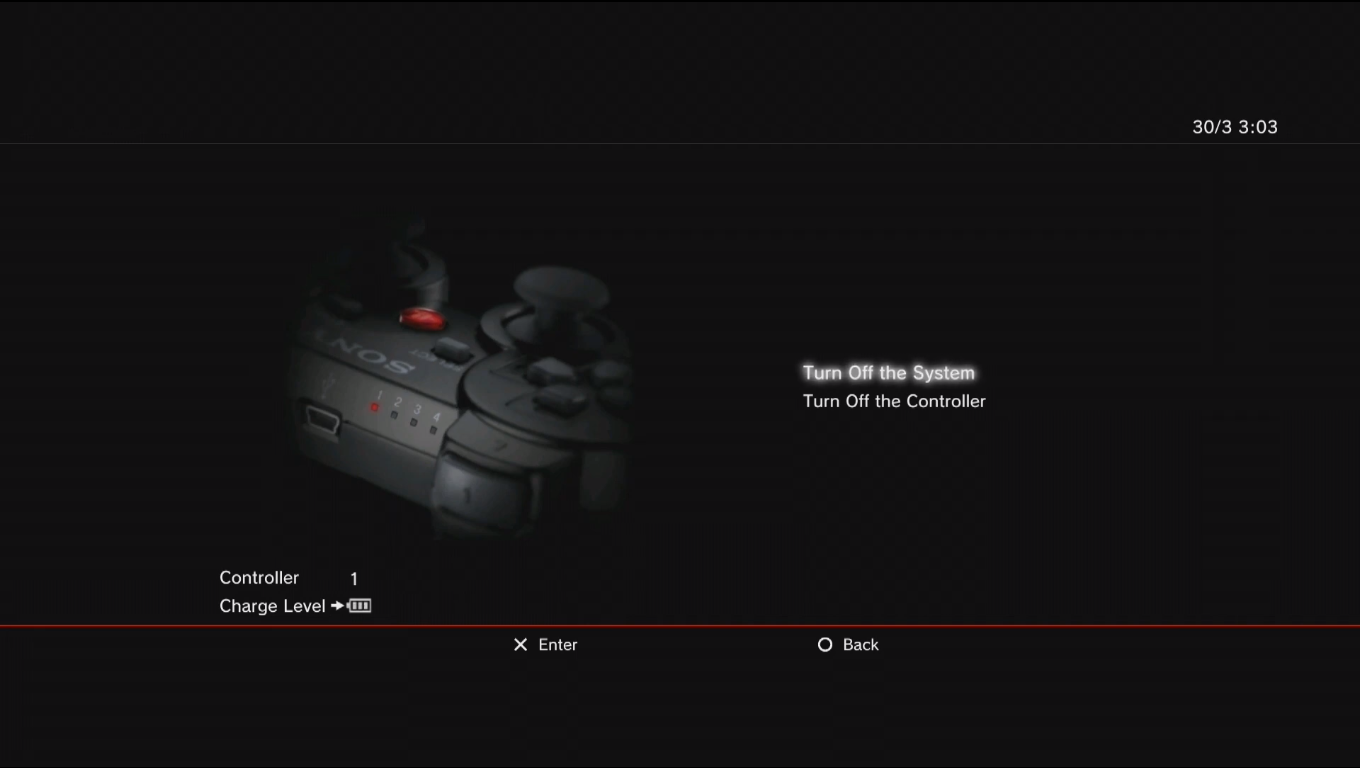
"turn off the system" is animated since its text has been selected, "turn off the controller" is not animated and will only animate if it is selected.
I think what gives those effects are the "shadow" shadowRed, shadowGreen, shadowBlue, shadowAlpha ..
the code fragment sent is corresponding to the text "controler" is identical to the "turn off the system", my big problem is to activate this function in a text without actions.
thank you so much for help me

Oh you mean the glowing effect. No that is not related to the shadow fields afaik.
These are just for the normal shadow you see on all the text on the XMB.

See the shadow on the characters here, this is what the shadow fields refer to, this text is not selectable.

The pulsing glow you are talking about is not in the rco. Its controlled by sprx at a lower level afaik.
You could probably recreate the pulsing glow effect in rco if you wanted to, but it would take a good bit of work, you would need to duplicate the text in the same place, then tweak the shadow a lot on the one in the background, and then have it flashing on its own animation script that adjusts the alpha channel.
These are just for the normal shadow you see on all the text on the XMB.
See the shadow on the characters here, this is what the shadow fields refer to, this text is not selectable.
The pulsing glow you are talking about is not in the rco. Its controlled by sprx at a lower level afaik.
You could probably recreate the pulsing glow effect in rco if you wanted to, but it would take a good bit of work, you would need to duplicate the text in the same place, then tweak the shadow a lot on the one in the background, and then have it flashing on its own animation script that adjusts the alpha channel.
Last edited:
BRIAN-JESHUA
Member
Oh you mean the glowing effect. No that is not related to the shadow fields afaik.
These are just for the normal shadow you see on all the text on the XMB.
View attachment 34049
See the shadow on the characters here, this is what the shadow fields refer to, this text is not selectable.
View attachment 34050
The pulsing glow you are talking about is not in the rco. Its controlled by sprx at a lower level afaik.
You could probably recreate the pulsing glow effect in rco if you wanted to, but it would take a good bit of work, you would need to duplicate the text in the same place, then tweak the shadow a lot on the one in the background, and then have it flashing on its own animation script that adjusts the alpha channel.
thanks devil it's a little bit clearer to me now, can't modify the sprx containing the glowing effect to at least change the color? It would be interesting to see the brilliance of other colors.
if possible, whats is the sprx ?to try to play around with it .. as for rco I decided to use an image with the brightness with blinking animation and it works fine ..
BRIAN-JESHUA
Member
perfect, I'll try with it. btw, is there a way to calculate the position of the "x" and "y" axes without having to compile the rco and do testing? It has become quite tedious for me, although what can be achieved is quite fascinating.It's probably related to explore_plugin.sprx or vsh.self if I had to guess.
BRIAN-JESHUA
Member
if I understand. It is tedious to fit the figures exactly when they are small, but nothing of another world .. I will go to do my tests I hope I am lucky ..Well for 1080p resolution it goes from -960 to +960 on the X axis, and -540 to +540 on the Y axis, not that hard to figure out really.,
Thank you very much for your help and your work in the rcos is fascinating, greetings.
BRIAN-JESHUA
Member
If you take a screenshot of what you are trying to edit, then open it in an image editor and just move the cursor around you can get fairly accurate coordinates.
View attachment 34060
Thank you very much, that will be very useful to me.
I have a motion simulation effect in progress consisting of 3 images that appear and disappear.
To achieve this, each image must exist 6 times, all of them are assigned size 0 and with the change in size one disappears and the next appears, we are talking about small images that occupy at least 1kb, the case is that almost at the end of animation has stopped working. The question is, is there any size limit in rco xml? Or was it just my mistake?
Sounds interestingThank you very much, that will be very useful to me.
I have a motion simulation effect in progress consisting of 3 images that appear and disappear.
To achieve this, each image must exist 6 times, all of them are assigned size 0 and with the change in size one disappears and the next appears, we are talking about small images that occupy at least 1kb, the case is that almost at the end of animation has stopped working. The question is, is there any size limit in rco xml? Or was it just my mistake?
It's tricky tbh, We do not fully understand it really. There is not a size limit exactly, as you can add a load of unused images to the rco and it will work fine. But there is some limit to how much you can use on screen. It also depends on the specific rco. The impose plugin is really limited as it's used in game too when there is very little RAM available..
Animation scripts can be massive, and we can have almost unlimited animations using just text fields. Also if you reuse an image you can have many versions controlled by different animation scripts. So its complicated.
What I like to do is start off with really small images at first, so lets say for example do something like work with 20x20 images when really I would like to have my images 200x200, but start of with 20x20 but set the scale to 10, then when its working you can start increasing the resolution and pushing it to the limit.
Also I have noticed strange behavior if I am right on the size limit, like changing the position of an image in the image tree can have an effect, sometimes if a small image is broken (showing a white square), if you move that image to the top of the image tree it will start working again. So not exactly sure what is going on, I imagine its a bit like Tetris and you need to fit the images into RAM or something like that.
It can seem like its based on the pixel count sometimes, so 200x200 will work, or 400x100 will work, but for 4 images at 100x100 would work etc. Using the right compression on your gims can take a bit of trial and error too, so if the specific image you are working with allows it, you can try to use images with no transparency and DXT1 compression. So for impose plugin it can sometimes work out to just use non transparent images on a black background where possible. Sorry I can not help more it's basically trial and error, start small and work your way up.
Slightly off topic, but I have also found that if we add images to the imagefont.bin (like large emojis) and call them like text objects, we can basically have unlimited images, up to a specific resolution, I forget the exact size now)
More info on that here https://www.psx-place.com/threads/i...tor-system-homebrew.33052/page-10#post-285371
Last edited:
BRIAN-JESHUA
Member
Sounds interesting
It's tricky tbh, We do not fully understand it really. There is not a size limit exactly, as you can add a load of unused images to the rco and it will work fine. But there is some limit to how much you can use on screen. It also depends on the specific rco. The impose plugin is really limited as it's used in game too when there is very little RAM available..
Animation scripts can be massive, and we can have almost unlimited animations using just text fields. Also if you reuse an image you can have many versions controlled by different animation scripts. So its complicated.
What I like to do is start off with really small images at first, so lets say for example do something like work with 20x20 images when really I would like to have my images 200x200, but start of with 20x20 but set the scale to 10, then when its working you can start increasing the resolution and pushing it to the limit.
Also I have noticed strange behavior if I am right on the size limit, like changing the position of an image in the image tree can have an effect, sometimes if a small image is broken (showing a white square), if you move that image to the top of the image tree it will start working again. So not exactly sure what is going on, I imagine its a bit like Tetris and you need to fit the images into RAM or something like that.
It can seem like its based on the pixel count sometimes, so 200x200 will work, or 400x100 will work, but for 4 images at 100x100 would work etc. Using the right compression on your gims can take a bit of trial and error too, so if the specific image you are working with allows it, you can try to use images with no transparency and DXT1 compression. So for impose plugin it can sometimes work out to just use non transparent images on a black background where possible. Sorry I can not help more it's basically trial and error, start small and work your way up.
Slightly off topic, but I have also found that if we add images to the imagefont.bin (like large emojis) and call them like text objects, we can basically have unlimited images, up to a specific resolution, I forget the exact size now)
More info on that here https://www.psx-place.com/threads/i...tor-system-homebrew.33052/page-10#post-285371
I achieved the animation almost completely, the problem is adding another line inside the animation .. so I am trying to find an error or some maneuver to achieve the final task.
As for the loading errors you mentioned, apparently the images load in order of priority, so the largest ones should come first, I have also noticed that some images do not load when pressing the ps button but do load when pressing within a game. I guess this is also due to the RAM load. Thanks for your help, it has been useful.
It sounds very interesting and could be useful to me, I'll take a look. I'll go do tests, I'll tell you the result obtained.
again, thanks for your help
BRIAN-JESHUA
Member
Double check everything I suppose, I have never noticed a line limit on animation scripts but rcos can be tricky. So I would not be surprised of anything really.
Here is my report of what was discovered, apparently is how I suspected there is a limit within the xml.
To try to omit it, i simplify the action from 6 copies per image to only 3, the movement is less natural but it is the best that can be achieved once simplified, i try adding 2 or 3 more images to give a little more movement to the character. talk of about 5 or 6 more lines inside the xml and it no longer works .. I left it for the peace because I achieved my initial idea, for those who want to try something similar in Notepad ++ my xml has 308 rows,maybe it can be of some use...

Here is my report of what was discovered, apparently is how I suspected there is a limit within the xml.
To try to omit it, i simplify the action from 6 copies per image to only 3, the movement is less natural but it is the best that can be achieved once simplified, i try adding 2 or 3 more images to give a little more movement to the character. talk of about 5 or 6 more lines inside the xml and it no longer works .. I left it for the peace because I achieved my initial idea, for those who want to try something similar in Notepad ++ my xml has 308 rows,maybe it can be of some use...
You can increase the rco limit by removing some unused text within the languages and summarizing the planes/object names (only the custom ones) and even summarizing the image names.
E.g I have a sysconf_plugin.rco with more than 1000 lines of animation, so I made my planes/animations/objects, two characters long and summarizing the language texts. ( i wish i could have even more space to use, if i add one more character to the main xml or language the system freezes).
System_plugin and impose.rco are the most limited rcos that i found. I managed to edit devil303's impose_plugin.rcos that are pretty much on its limits by summarizing plane names and objects, so i could add more animations and images to them.
BRIAN-JESHUA
Member
You can increase the rco limit by removing some unused text within the languages and summarizing the planes/object names (only the custom ones) and even summarizing the image names.
E.g I have a sysconf_plugin.rco with more than 1000 lines of animation, so I made my planes/animations/objects, two characters long and summarizing the language texts. ( i wish i could have even more space to use, if i add one more character to the main xml or language the system freezes).
System_plugin and impose.rco are the most limited rcos that i found. I managed to edit devil303's impose_plugin.rcos that are pretty much on its limits by summarizing plane names and objects, so i could add more animations and images to them.
in fact I started modifying inmose_plugin.rco from devil 303. I managed to add more images successfully and took it to its limit in images, animate everything as much as I could and simplify the added code, but it did not occur to me to eliminate excesses or reduce the name of the files. I can't erase too much, since different regions use my modifications and I don't want to them freeze console . but it's good for testing and getting the most out of it.
There is ton of stuff that could be removed to allow more lines of animations, for example like the shadows on all the tiny icons are barely noticeable, they could all be removed. Loads more stuff too.

If you was to make make different rcos for different regions you could remove loads more. Like you could have one rco specifically made for Asian countries and remove all the Asian entries from the other one. That kind of thing.

If you was to make make different rcos for different regions you could remove loads more. Like you could have one rco specifically made for Asian countries and remove all the Asian entries from the other one. That kind of thing.
BRIAN-JESHUA
Member
spectacular, let's see what I can achieve, with 10 more lines my animation would be complete. thanks a lot for your help guys
this is a little off topic but since it looks like there are rco geniuses at work here and it's still rco related, i think, i'll just ask. when you're in the game and hit the PS button then you get to the xmb_ingame.rco. now i have edited all the icons in there and the game categories rcos to make it look a little nicer since i use this screen all the time to exit my games. when you hit the button the game screen gets darker and the xmb icon show up and now the the question is where does the image come from that darkens the screen? is it even an image and if so in what rco is it? there is nothing in the xmb_ingame. i'd like to replace it with a transparent image so the screen does not darken at all. does anybody know?
Similar threads
-
 PS3 Using string viewer plugin to create new XMB items.
- Started by DeViL303
- Replies: 6
-
PS3 Updating HEN to new 3.2.2 Version has stuffed up HEN completely
- Started by extra_anchovy
- Replies: 1
-
PS3 Create Pixel Art using a custom imagefont.bin and a new tool (XMBML, SFO, RCO, Notifications)
- Started by DeViL303
- Replies: 52
-
PS3 [Research] Modifying the Coldboot/Gameboot Sequence (custom_render_plugin.sprx/rco)
- Started by DeViL303
- Replies: 729