
I don't know anything about raf files, never looked at them. Start a thread or something, this is not a help thread for users making raf files, its not related.

I don't know anything about raf files, never looked at them. Start a thread or something, this is not a help thread for users making raf files, its not related.

I told you how i converted my png. I dont have time to help everyone with their own mods. Like I said its probably too big, or you used the wrong settings on gimconv.for COLDBOOT and paf there is a program Easy Static RAF Converter v1.0a
but I need to do something like png logo
I told you how i converted my png. I dont have time to help everyone with their own mods. Like I said its probably too big, or you used the wrong settings on gimconv.


If you used rcomage with default settings it will not work. Do not convert gim to png with normal rcomage.I just replaced
tex_ps3logo.png
coldboot_multi.ac3
coldboot_stereo.ac3
and assembled the program rcomagegui.exe
you find it difficult to see the photo? what I threw off!
and help with an error. Because of what a white background in the place of the logo, the size matches your 500x233
If you used rcomage with default settings it will not work. Do not convert gim to png with normal rcomage.
try rcomage 1.9 by @RandomDude , First use it to dump and then compile your rco.
https://www.psx-place.com/threads/r...m-to-png-conversion-dump-compile-files.22867/

Another example of whats possible with these mods, POC only..
Also shows off a 4th particle hack which I call "crazy sparkles"
Amazing finally HahaNo wave mod sprx patch:
View attachment 19821
Everything else is normal, sparkles, colours etc. I like it.
Original theme:
View attachment 19822
Classic theme:
View attachment 19823


Yes as @sandungas said i edit al 12 dds to black background and still side menu colored by itself it read from another sprx as i thinkYes, the code that loads the colour dds files is in the sprx.
Code:lib/moyou/back_colours0.fpo.....lib/moyou/back_colours1.fpo.....lib/moyou/back_colours2.fpo.....lib/moyou/back_colours_cpy.fpo..lib/moyou/bg_copy.fpo...01.dds..02.dds..03.dds..04.dds..05.dds..06.dds..07.dds..08.dds..09.dds..10.dds..11.dds..12.dds..textures/month_bg/rgb/..textures/month_bg/night/........
I do not think you can colour the side menu differently though, they read from the same dds. You can mess with the monthly order etc in the sprx. There might be a way to get it load from another dds if used IDA to hack the sprx, not sure. Also you can make the background be black, and the side menu be coloured on its own etc.
Are you sure you have not modded the coldboot sound?I really impressive with this one

Are you sure you have not modded the coldboot sound?

RAYS
LIGHT FOV
LIGHT ASPECT
LIGHT POS X
LIGHT POS Y
LIGHT TARGET X
LIGHT DEPTH
SPEED 1
SPEED 2
SPEED 3
START
END
RAYS STRENGTH<Page name="page_null" pageMode="0x1101" pageOnInit="anim:anim_timer" pageOnCancel="nothing" pageOnContext="nothing" pageOnActivate="nothing"></Page><AnimTree>
<Animation name="anim_coldboot2">
<Fade object="object:text_05" duration="0" accelMode="0x0" transparency="0" />
<Fade object="object:text_10" duration="0" accelMode="0x0" transparency="0" />
<Fade object="object:text_15" duration="0" accelMode="0x0" transparency="0" />
<Fade object="object:text_20" duration="0" accelMode="0x0" transparency="0" />
<Fade object="object:text_25" duration="0" accelMode="0x0" transparency="0" />
<Fade object="object:text_30" duration="0" accelMode="0x0" transparency="0" />
<Fade object="object:text_35" duration="0" accelMode="0x0" transparency="0" />
<Fade object="object:text_40" duration="0" accelMode="0x0" transparency="0" />
<Fade object="object:text_45" duration="0" accelMode="0x0" transparency="0" />
<Fade object="object:text_50" duration="0" accelMode="0x0" transparency="0" />
<Fade object="object:text_55" duration="0" accelMode="0x0" transparency="0" />
<Fade object="object:text_60" duration="0" accelMode="0x0" transparency="0" />
<Fade object="object:text_65" duration="0" accelMode="0x0" transparency="0" />
<Fade object="object:text_70" duration="0" accelMode="0x0" transparency="0" />
<Fade object="object:text_75" duration="0" accelMode="0x0" transparency="0" />
<Fade object="object:text_80" duration="0" accelMode="0x0" transparency="0" />
<Fade object="object:text_85" duration="0" accelMode="0x0" transparency="0" />
<Fade object="object:text_90" duration="0" accelMode="0x0" transparency="0" />
<Fade object="object:text_95" duration="0" accelMode="0x0" transparency="0" />
<Fade object="object:text_100" duration="0" accelMode="0x0" transparency="0" />
<Fade object="object:scelogo" duration="0" accelMode="0x0" transparency="0" />
<FireEvent object="event:native:/anim_coldboot_ShowGUI" />
</Animation>
<Animation name="anim_timer">
<Fade object="object:text_05" duration="175" accelMode="0x0" transparency="1" />
<Delay time="500" />
<Fade object="object:text_05" duration="175" accelMode="0x0" transparency="0" />
<Fade object="object:text_10" duration="175" accelMode="0x0" transparency="1" />
<Delay time="500" />
<Fade object="object:text_10" duration="175" accelMode="0x0" transparency="0" />
<Fade object="object:text_15" duration="175" accelMode="0x0" transparency="1" />
<Delay time="500" />
<Fade object="object:text_15" duration="175" accelMode="0x0" transparency="0" />
<Fade object="object:text_20" duration="175" accelMode="0x0" transparency="1" />
<Delay time="500" />
<Fade object="object:text_20" duration="175" accelMode="0x0" transparency="0" />
<Fade object="object:text_25" duration="175" accelMode="0x0" transparency="1" />
<Delay time="500" />
<Fade object="object:text_25" duration="175" accelMode="0x0" transparency="0" />
<Fade object="object:text_30" duration="175" accelMode="0x0" transparency="1" />
<Delay time="500" />
<Fade object="object:text_30" duration="175" accelMode="0x0" transparency="0" />
<Fade object="object:text_35" duration="175" accelMode="0x0" transparency="1" />
<Delay time="500" />
<Fade object="object:text_35" duration="175" accelMode="0x0" transparency="0" />
<Fade object="object:text_40" duration="175" accelMode="0x0" transparency="1" />
<Delay time="500" />
<Fade object="object:text_40" duration="175" accelMode="0x0" transparency="0" />
<Fade object="object:text_45" duration="175" accelMode="0x0" transparency="1" />
<Delay time="500" />
<Fade object="object:text_45" duration="175" accelMode="0x0" transparency="0" />
<Fade object="object:text_50" duration="175" accelMode="0x0" transparency="1" />
<Delay time="500" />
<Fade object="object:text_50" duration="175" accelMode="0x0" transparency="0" />
<Fade object="object:text_55" duration="175" accelMode="0x0" transparency="1" />
<Delay time="500" />
<Fade object="object:text_55" duration="175" accelMode="0x0" transparency="0" />
<Fade object="object:text_60" duration="175" accelMode="0x0" transparency="1" />
<Delay time="500" />
<Fade object="object:text_60" duration="175" accelMode="0x0" transparency="0" />
<Fade object="object:text_65" duration="175" accelMode="0x0" transparency="1" />
<Delay time="500" />
<Fade object="object:text_65" duration="175" accelMode="0x0" transparency="0" />
<Fade object="object:text_70" duration="175" accelMode="0x0" transparency="1" />
<Delay time="500" />
<Fade object="object:text_70" duration="175" accelMode="0x0" transparency="0" />
<Fade object="object:text_75" duration="175" accelMode="0x0" transparency="1" />
<Delay time="500" />
<Fade object="object:text_75" duration="175" accelMode="0x0" transparency="0" />
<Fade object="object:text_80" duration="175" accelMode="0x0" transparency="1" />
<Delay time="500" />
<Fade object="object:text_80" duration="175" accelMode="0x0" transparency="0" />
<Fade object="object:text_85" duration="175" accelMode="0x0" transparency="1" />
<Delay time="500" />
<Fade object="object:text_85" duration="175" accelMode="0x0" transparency="0" />
<Fade object="object:text_90" duration="175" accelMode="0x0" transparency="1" />
<Delay time="500" />
<Fade object="object:text_90" duration="175" accelMode="0x0" transparency="0" />
<Fade object="object:text_95" duration="175" accelMode="0x0" transparency="1" />
<Delay time="500" />
<Fade object="object:text_95" duration="175" accelMode="0x0" transparency="0" />
<Fade object="object:text_100" duration="175" accelMode="0x0" transparency="1" />
<Delay time="500" />
<Fade object="object:text_100" duration="175" accelMode="0x0" transparency="0" />
<FireEvent object="anim:anim_timer" />
</Animation>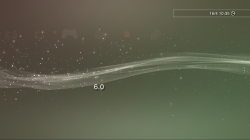
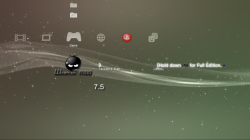
Can you show me what you have done, just the rco or animation script, I will try see if i can see mistake. I dont have time to start from scratch on it.@DeViL303 can u try to make a ps vita/ps4 style one? because i'm failing to get this too work, the white square always appears here even after fading it to alpha=0


