
You are using an out of date browser. It may not display this or other websites correctly.
You should upgrade or use an alternative browser.
You should upgrade or use an alternative browser.
PS4 [Research]PS2 emulator configuration on PS4
- Thread starter kozarovv
- Start date


Hello
I am trying to create a config file for Cold War (SLUS-20845) but it does not work as expected
for Pcsx2 it need vuClampMode = 2 (Extra right?)
my config file
and I tried write config in patches/SLUS-20845_cli.conf
graphics are still broken
I tried many combinations with other options for vu, cop2, fpu, and nothing helps
also, I find out that physics in the game broken too
in Pcsx2 there is round mode for FPU and default configuration works well
if change round mode to other values, the game physics broke similar but not exactly like in this emulator
I am trying to create a config file for Cold War (SLUS-20845) but it does not work as expected
for Pcsx2 it need vuClampMode = 2 (Extra right?)
my config file
Code:
--path-snaps="/tmp/snapshots"
--path-recordings="/tmp/recordings"
--path-vmc="/tmp/vmc"
--path-emulog="/tmp/recordings"
--config-local-lua=""
--load-tooling-lua=0
#--path-patches="/app0/patches"
#--path-trophydata="/app0/trophy_data"
#--path-featuredata="/app0/patches"
#--path-toolingscript="/app0/patches"
--ps2-title-id=SLUS-20845
--max-disc-num=1
--trophy-support=0
--gs-uprender=2x2
--gs-upscale=edgesmooth
--host-audio=1
--rom="PS20220WD20050620.crack"
--verbose-cdvd-reads=0
--vu0-clamp-operands=1
--vu0-clamp-results=1
--vu1-clamp-operands=1
--vu1-clamp-results=1graphics are still broken
I tried many combinations with other options for vu, cop2, fpu, and nothing helps
also, I find out that physics in the game broken too
in Pcsx2 there is round mode for FPU and default configuration works well
if change round mode to other values, the game physics broke similar but not exactly like in this emulator

kozarovv
Developer
I'm assuming that you mean Cold Winter game. vuClampMode = 2 is clamping for operands, and results. It should fix "rainbow" graphic. About game physics.. PS4 emu don't use Rounding, because developers used different approach to get correct results. For your game you need to use --fpu-accurate-range command. Finding correct offset for that command can be long process.Hello
I am trying to create a config file for Cold War (SLUS-20845) but it does not work as expected
for Pcsx2 it need vuClampMode = 2 (Extra right?)
my config file
and I tried write config in patches/SLUS-20845_cli.confCode:--path-snaps="/tmp/snapshots" --path-recordings="/tmp/recordings" --path-vmc="/tmp/vmc" --path-emulog="/tmp/recordings" --config-local-lua="" --load-tooling-lua=0 #--path-patches="/app0/patches" #--path-trophydata="/app0/trophy_data" #--path-featuredata="/app0/patches" #--path-toolingscript="/app0/patches" --ps2-title-id=SLUS-20845 --max-disc-num=1 --trophy-support=0 --gs-uprender=2x2 --gs-upscale=edgesmooth --host-audio=1 --rom="PS20220WD20050620.crack" --verbose-cdvd-reads=0 --vu0-clamp-operands=1 --vu0-clamp-results=1 --vu1-clamp-operands=1 --vu1-clamp-results=1
graphics are still broken
I tried many combinations with other options for vu, cop2, fpu, and nothing helps
also, I find out that physics in the game broken too
in Pcsx2 there is round mode for FPU and default configuration works well
if change round mode to other values, the game physics broke similar but not exactly like in this emulator
Not sure about entry point in that title, but try --fpu-accurate-range=0x100008,0x4acce0 at start.
Hello,
Can someone help me with Valkyrie Profile 2? Cutscenes works perfectly(CGI+ engine cutscenes) but during gameplay it's totally a mess. Graphical glitches is everywhere. Here my config.
Your config looks good. Try set uprender to 2x2 , and upscaler to EdgeSmooth. I know it sound weird, but can help.
Thank you for your reply. Game works a much better now. But still have a few issues. Screen is shacking sometimes (during menu constantly) and at the bottom of the screen rainbow effect and minor graphical glitches. FPS during battles is pretty solid but in first town and dungeon framedrops appear.Your config looks good. Try set uprender to 2x2 , and upscaler to EdgeSmooth. I know it sound weird, but can help.
kozarovv
Developer
Try add to fix gliches:Thank you for your reply. Game works a much better now. But still have a few issues. Screen is shacking sometimes (during menu constantly) and at the bottom of the screen rainbow effect and minor graphical glitches. FPS during battles is pretty solid but in first town and dungeon framedrops appear.
--fpu-clamp-results=1
--vu0-clamp-results=1
--vu1-clamp-results=1
--cop2-clamp-results=1
About frame drops, i'm not sure. There are not too many speedhacks, as $ony can always use different kernel.
Maybe try CL:
--gs-use-clut-merge=1
--gs-kernel-cl="clutmerge"
--gs-kernel-cl-up="clutmerge2x2"
Or maybe, but i'm not sure it apply only to accurate command or multiply overall:
--fpu-accurate-mul-fast=1
To be honest, VP2 can be hard to fix.
Thank you!I'm assuming that you mean Cold Winter game. vuClampMode = 2 is clamping for operands, and results. It should fix "rainbow" graphic. About game physics.. PS4 emu don't use Rounding, because developers used different approach to get correct results. For your game you need to use --fpu-accurate-range command. Finding correct offset for that command can be long process.
Not sure about entry point in that title, but try --fpu-accurate-range=0x100008,0x4acce0 at start.
Yes i mean Cold Winter, sorry my mistake
i tried this in config-emu-ps4.txt
Code:
--vu0-no-clamping=0
--vu1-no-clamping=0
--vu0-clamp-operands=1
--vu0-clamp-results=1
--vu1-clamp-operands=1
--vu1-clamp-results=1
--fpu-accurate-range=0x100008,0x4acce0accurate fpu helps with physics, but it's less than 1 frame per second
can you explain command --fpu-accurate-range what parameters mean for it?
kozarovv
Developer
Very valuable info. Thx!looks like vu clamp is off by default
Sure. --fpu-accurate-range sets emotion engine memory (start, end) range offsets where emulator is very accurate in calculations at cost of speed. Values that I gave you was very wide, that's cause of issue. With those values emulator work VERY accurate, but it was fastest way to check that issue is fpu calculations inaccuracy.an you explain command --fpu-accurate-range what parameters mean for it?
How to find correct offsets? Is easy, but sadly very time consuming. My way is to try halved offsets. So for example if --fpu-accurate-range=0x100008,0x4acce0 worked fine, then now try --fpu-accurate-range=0x100008,0x2acce0 , and --fpu-accurate-range=0x2acce0,0x4acce0 this way you eliminate unneeded half of memory, in 95% cases it physics will be fixed only in one of them. Then for example --fpu-accurate-range=0x100008,0x2acce0 is one that work. So you need to create another 2 configs with halved memory offsets. So --fpu-accurate-range=0x100008,0x1acce0 and other config with --fpu-accurate-range=0x1acce0,0x2acce0
You need to repeat this until game speed will be playable, and physics still will be fine. Like I said, is time consuming. Probably at the end you will finish with something like that --fpu-accurate-range=0x2acc08,0x2acce0 and fully working game at full speed.
In rare situations there will be need for two offset sets. It's harder to find correct values then. For example --fpu-accurate-range=0x2aac08,0x2acce0 work but is slow, but both of halved configs not work. Then you need to use this command two times with (for example) --fpu-accurate-range=0x2abc08,0x2acce0 and --fpu-accurate-range=0x2aac08,0x2abce0 . This rare cases double the amount of tests needed to find correct values.
Thank you very much, this is a very good explanation!Very valuable info. Thx!
Sure. --fpu-accurate-range sets emotion engine memory (start, end) range offsets where emulator is very accurate in calculations at cost of speed. Values that I gave you was very wide, that's cause of issue. With those values emulator work VERY accurate, but it was fastest way to check that issue is fpu calculations inaccuracy.
How to find correct offsets? Is easy, but sadly very time consuming. My way is to try halved offsets. So for example if --fpu-accurate-range=0x100008,0x4acce0 worked fine, then now try --fpu-accurate-range=0x100008,0x2acce0 , and --fpu-accurate-range=0x2acce0,0x4acce0 this way you eliminate unneeded half of memory, in 95% cases it physics will be fixed only in one of them. Then for example --fpu-accurate-range=0x100008,0x2acce0 is one that work. So you need to create another 2 configs with halved memory offsets. So --fpu-accurate-range=0x100008,0x1acce0 and other config with --fpu-accurate-range=0x1acce0,0x2acce0
You need to repeat this until game speed will be playable, and physics still will be fine. Like I said, is time consuming. Probably at the end you will finish with something like that --fpu-accurate-range=0x2acc08,0x2acce0 and fully working game at full speed.
In rare situations there will be need for two offset sets. It's harder to find correct values then. For example --fpu-accurate-range=0x2aac08,0x2acce0 work but is slow, but both of halved configs not work. Then you need to use this command two times with (for example) --fpu-accurate-range=0x2abc08,0x2acce0 and --fpu-accurate-range=0x2aac08,0x2abce0 . This rare cases double the amount of tests needed to find correct values.
I will try to find a correct fpu range for Cold Winter
After i done a lot of tests for Cold Winter, i figure out that actual game physics was fixed by vu0 clamp, not by fpu accuracy 
there a still minor issues
1. movies and loading bars flickering and stuttering
2. player doesn't stop and still moving after releasing a left stick, like floating (not present and i cant reproduce in pcsx2)
i tried options for accuracy fpu, vu, cop2 and nothing helps to solve floating
playable config with minor issues for Cold Winter
will try other games
there a still minor issues
1. movies and loading bars flickering and stuttering
2. player doesn't stop and still moving after releasing a left stick, like floating (not present and i cant reproduce in pcsx2)
i tried options for accuracy fpu, vu, cop2 and nothing helps to solve floating
playable config with minor issues for Cold Winter
Code:
-vu0-no-clamping=0
--vu1-no-clamping=0
--vu0-clamp-operands=1
--vu0-clamp-results=1
--vu1-clamp-operands=1
--vu1-clamp-results=1kozarovv
Developer
After i done a lot of tests for Cold Winter, i figure out that actual game physics was fixed by vu0 clamp, not by fpu accuracy
Very minor issue, but you can mess with cop2 clamping/no clamping to try fix it/1. movies and loading bars flickering and stuttering
This you can try clamping/no clamping for fpu to fix that.2. player doesn't stop and still moving after releasing a left stick, like floating (not present and i cant reproduce in pcsx2)
i tried options for accuracy fpu, vu, cop2 and nothing helps to solve floating
playable config with minor issues for Cold Winter
Game can require full clamping on Vector Units, while is possible that require no clapming for Floating Point Unit, etc.
Keep in mind that vuClampMode setting from pcsx2 include also COP2 (vu0 macro code). While on ps4 you need add manually cop2 clamping. Is worth to try:
--cop2-no-clamping=0
--cop2-clamp-operands=1
--cop2-clamp-results=1
i've tried this and nothing has changed--cop2-no-clamping=0
--cop2-clamp-operands=1
--cop2-clamp-results=1
kozarovv
Developer
Added clamping info in first post. Including settings from pcsx2, Point 2.

So probably other fix is needed, unknown for now.i've tried this and nothing has changed

Stayhye
Senior Member
Test config for DOA2 US (dvd) if anyone is interested. You need to add own txt config. This time full sound should work fine.
Does not boot with new config......It now does this:
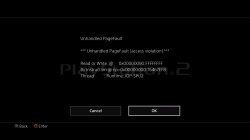
kozarovv
Developer
I hate this emuDoes not boot with new config......It now does this:
View attachment 11754
kozarovv
Developer
By addingI made some edits and managed to get it to boot, but still no fight sound fx.
eeInsnReplace(0x002b0868, 0x10400014, 0x10000014)
You completely removed loading tls driver. So it boot because iop modules are here but not used.
Can you try this?
Code:
apiRequest(0.1)

-- Possible fix for black screen SLUS-20071

eeInsnReplace(0x2B06EC, 0x24060001, 0x24060000)
iopInsnReplace(0x001D77E4, 0x2404002B, 0x27C40010) --TLSNDDRV fix
iopInsnReplace(0x001D77E8, 0x0C0032B3, 0x0C0032B7) --TLSNDDRV fix
iopInsnReplace(0x001D77EC, 0x27C50010, 0x00000000)
iopInsnReplace(0x001D75EC, 0xAFBE0008, 0x00000000)
iopInsnReplace(0x001DC6FC, 0x27BDFFF0, 0x03E00008)
iopInsnReplace(0x001DC700, 0xAFBE0008, 0x00000000)
iopInsnReplace(0x001E110C, 0x27BDFFF0, 0x03E00008)
iopInsnReplace(0x001E1110, 0xAFBE0008, 0x00000000)
iopInsnReplace(0x001E1164, 0x27BDFFF0, 0x03E00008)
iopInsnReplace(0x001E1168, 0xAFBE0008, 0x00000000)
iopInsnReplace(0x001E11BC, 0x27BDFFF0, 0x03E00008)
iopInsnReplace(0x001E11C0, 0xAFBE0008, 0x00000000)
iopInsnReplace(0x001E1FF0, 0x27BDFFF0, 0x03E00008)
iopInsnReplace(0x001E1FF4, 0xAFBE0008, 0x00000000)
Is kind of harcore patch.. But this emu is harcore, game name is harcore. So maybe..
Last edited:
Similar threads
-
-
-
PS4 How to play multiplayer (3-4 players) using PSX-FPKG?
- Started by PSXP_Kira
- Replies: 2
-
 PS3 [PS2] Gundam Warriors 2 FPU rounding fix
- Started by Low_Plankton_3329
- Replies: 0