
You are using an out of date browser. It may not display this or other websites correctly.
You should upgrade or use an alternative browser.
You should upgrade or use an alternative browser.
PS4 [Research]PS2 emulator configuration on PS4
- Thread starter kozarovv
- Start date


Stayhye
Senior Member
The VU1 interpreter in the PCSX2 is bugged and not maintained at all if I remember correctly.
What would be the PS4 equivalent? Also, how would one go about finding VU clamp values?
I have zero knowledge about the PS4 emulator. If it is caused by the bugged recompiler then not much can be done to fix it I think. The best way is to try reproduce the error in the various PCSX2 versions (for example the latest one, 1.4.0 and 0.9.4) by changing the VU rounding and clamping modes. If these settings trigger the bug then it will be likely fixed by emulator's commands.
Last edited:

Bergolino Gamer
Member
Saint Seiya The Hades / Cavaleiros dos Zodiacos Hades - SLES541.62
Emu ADK Damashi
Status: Excelent
Saint Seiya Chapter Sanctuary / Cavaleiros dos Zodiaco Santuário - SLES532.01
Emu ADK Damashi
Status: Playable
To speed up a little
TXT
--ee-cycle-scalar=2.0
--iop-cycle-scalar=2.0
Emu ADK Damashi
Status: Excelent
Saint Seiya Chapter Sanctuary / Cavaleiros dos Zodiaco Santuário - SLES532.01
Emu ADK Damashi
Status: Playable
To speed up a little
TXT
--ee-cycle-scalar=2.0
--iop-cycle-scalar=2.0
Last edited:

MadSaint1998
Member
Thank you all for fixing this games on PS4, i appreciate that besides not having the console it's always great to see them getting fixed 
Is it possible to atleast port all or some values of that GTA LCS config to the ps3 ? it's so good to see that game running full speed
Is it possible to atleast port all or some values of that GTA LCS config to the ps3 ? it's so good to see that game running full speed

nifengyuexia
Member
Saint Seiya The Hades / Cavaleiros dos Zodiacos Hades - SLES541.62
Emu ADK Damashi
Status: Excelent
Saint Seiya Chapter Sanctuary / Cavaleiros dos Zodiaco Santuário - SLES532.01
Emu ADK Damashi
Status: Playable
To speed up a little
TXT
--ee-cycle-scalar=2.0
--iop-cycle-scalar=2.0
Hello, I saw that you tested the Genji PAL version on your youtube homepage. There was no freeze in your test. What configuration did you use? As far as I know, both NTSC-U and NTSC-J will freeze!
nifengyuexia
Member
MEDAL OF HONOR: RISING SUN
All
TXT
About MEDAL OF HONOR: The solution to VANGUARD startup crash is that after you get the ISO, extract all the content in the ISO and rebuild it to solve it.
I tested both games, but I don't know much about these two games. The scene with too many enemies has a little stutter and frame drop, which needs to be debugged! It would be better if someone was willing to test!
JAKv2 emus
All
TXT
Code:
--vu1=jit-syncAbout MEDAL OF HONOR: The solution to VANGUARD startup crash is that after you get the ISO, extract all the content in the ISO and rebuild it to solve it.
I tested both games, but I don't know much about these two games. The scene with too many enemies has a little stutter and frame drop, which needs to be debugged! It would be better if someone was willing to test!
JAKv2 emus
Stayhye
Senior Member
MEDAL OF HONOR: RISING SUN
All
TXT
Code:--vu1=jit-sync
About MEDAL OF HONOR: The solution to VANGUARD startup crash is that after you get the ISO, extract all the content in the ISO and rebuild it to solve it.
I tested both games, but I don't know much about these two games. The scene with too many enemies has a little stutter and frame drop, which needs to be debugged! It would be better if someone was willing to test!
JAKv2 emus
Rising Sun always worked for me, It freezes in the first stage. Does "--vu1-jit-sync" fix that freeze?
nifengyuexia
Member
Where is it freezing? Didn't it crash after the PS2 logo before? This fixes the problem of not being able to start the game!Rising Sun always worked for me, It freezes in the first stage. Does "--vu1-jit-sync" fix that freeze?
nifengyuexia
Member
Can you start it with rogue v2 emu without adding any other configuration?It crashes during the first level. As you are running through the fire on the ship. This was on the rogue v2 emu..
I only tested it for a few minutes. If I use JAK V2emu, I can't even enter the game. I must add --vu1-jit-sync to ensure that it will not crash after the PS2 logo. You can test it if you are free.
Stayhye
Senior Member
Can you start it with rogue v2 emu without adding any other configuration?
Correct. No CLI, no LUA. Will crash later though
nifengyuexia
Member
Now both simulators are crashing. Strangely, there was no problem when I tested it yesterday. I'm testing it!Correct. No CLI, no LUA. Will crash later though
nifengyuexia
Member
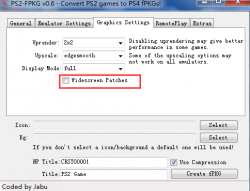
There is no problem with the configuration, please do not check the widescreen patch option, it is not in the numbered ELF, but in another file! The fire extinguisher did not freeze here either!
There will be some graphics problems after death, --vu0-di-bits=0,--vu1-di-bits=0 These two commands fix the problem of freezing for a few seconds. I don't have much time for debugging. It would be best if someone can continue.
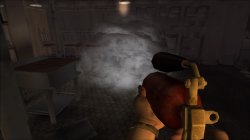
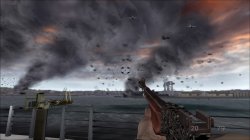
There will be some graphics problems after death, --vu0-di-bits=0,--vu1-di-bits=0 These two commands fix the problem of freezing for a few seconds. I don't have much time for debugging. It would be best if someone can continue.
Last edited:
nifengyuexia
Member
what widescreen patch option?
nifengyuexia
Member
Oh, I don't use that program.
Of course, if you want to debug and create a 1.01 patch, you won't need it.

Stayhye
Senior Member
WIP fix for Medal of Honor Rising Sun NTSC
emu used=jak xv2
Needs to be optimized. Widescreen works fine. Very much playable. Some stutter during intense scenes. "--vu1=jit-sync" caused severe slowdown in my test, but not needed to boot. Thank to @nifengyuexia for hint to change emu.
Don't mind extra crap in LUA. My jakx template taken from ps2 fpkg 0.6
CLI
LUA
Code:
--gs-uprender=2x2
--gs-upscale=EdgeSmooth
--gs-kernel-cl-up="up2x2tc"
--gs-progressive=1

--lopnor-config=1

--vu1-di-bits=0

--vif-ignore-invalid-cmd=1
Code:
-- Medal of Honor Rising Sun NTSC
-- Widescreen Hack
-- ported to PS4
-- emu used=jakx v2

apiRequest(2.2)

local gpr       = require("ee-gpr-alias")
local cpr       = require("ee-cpr0-alias")
local hwaddr     = require("ee-hwaddr")

local emuObj      = getEmuObject()
local eeObj       = getEEObject()
local gsObj       = getGsObject()
local eeOverlay    = eeObj.getOverlayObject()
local iopObj  = getIOPObject()

local thresholdArea = 600
local ThrottleOn = 0
local lightDef = {255, 254, 251}
local lightThr = {255, 0, 0}

emuObj.PadSetLightBar(0, lightDef[1], lightDef[2], lightDef[3])
emuObj.SetDisplayAspectWide()
gsObj.SetDeinterlaceShift(1)
--------------------------------------------------------
local ApplyVifCycleSettings = function()

eeObj.Vu1MpgCycles(100)
eeObj.SetVifDataCycleScalar(1, 2.6)
eeObj.SchedulerDelayEvent("vif1.dma", 0x6500)
end

ApplyVifCycleSettings()
--------------------------------------------------------
local widescreen = function()

--eeObj.WriteMem32(0x2015A15C,0x2C420001) --60fps

eeObj.WriteMem32(0x003a3910,0x3f100000)

eeObj.WriteMem32(0x001b9110,0x3c013f50)
eeObj.WriteMem32(0x001b9114,0x44810800)
eeObj.WriteMem32(0x001b9118,0x46016303)
eeObj.WriteMem32(0x001b911c,0xc4810e30)
eeObj.WriteMem32(0x001b9120,0x460c0832)
eeObj.WriteMem32(0x001b9124,0x45010008)
eeObj.WriteMem32(0x001b9128,0x00000000)
eeObj.WriteMem32(0x001b912c,0x46016034)
eeObj.WriteMem32(0x001b9130,0x45000004)
eeObj.WriteMem32(0x001b9134,0xe48c0e38)
eeObj.WriteMem32(0x001b9138,0x46006807)
eeObj.WriteMem32(0x001b913c,0x03e00008)
eeObj.WriteMem32(0x001b9140,0xe4800e3c)
eeObj.WriteMem32(0x001b9144,0xe48d0e3c)
eeObj.WriteMem32(0x001b9148,0x03e00008)
eeObj.WriteMem32(0x001b914c,0x00000000)


end
---------------------------------------------------------
local CheckInputs = function()

  local pad_bits  = emuObj.GetPad()
  local UP  = pad_bits &  0x0010
  local DOWN  = pad_bits &  0x0040
  local LEFT  = pad_bits &  0x0080
  local RIGHT  = pad_bits &  0x0020
  local Triangle  = pad_bits &  0x1000
  local Cross  = pad_bits &  0x4000
  local Square  = pad_bits &  0x8000
  local Circle  = pad_bits &  0x2000
  local L1  = pad_bits &  0x0400
  local L2  = pad_bits &  0x0100
  local L3  = pad_bits &  0x0002
  local R1  = pad_bits &  0x0800
  local R2  = pad_bits &  0x0200
  local R3  = pad_bits &  0x0004
  local Select  = pad_bits &  0x0001
  local Start  = pad_bits &  0x0008
  local Nothing = 1

  local onBtn1 = L3
  local onBtn2 = Start
  local onBtn3 = Nothing
  local offBtn1 = R3
  local offBtn2 = Select
  local offBtn3 = Nothing

  widescreen()

  if (onBtn1 ~= 0) and (onBtn2 ~= 0) and (onBtn3 ~= 0) and (ThrottleOn == 0) then
     emuObj.ThrottleMax()
     emuObj.PadSetLightBar(0, lightThr[1], lightThr[2], lightThr[3])
     ThrottleOn = 1
  elseif (offBtn1 ~= 0) and (offBtn2 ~= 0) and (offBtn3 ~= 0) and (ThrottleOn == 1) then
     emuObj.ThrottleNorm()
     emuObj.PadSetLightBar(0, lightDef[1], lightDef[2], lightDef[3])
     ThrottleOn = 0
  end

  if (ThrottleOn == 3) then
     if (onBtn1 ~= 0) and (onBtn2 ~= 0) and (onBtn3 ~= 0) then
       emuObj.ThrottleMax()
       emuObj.PadSetLightBar(0, lightThr[1], lightThr[2], lightThr[3])
     else
       emuObj.ThrottleNorm()
       emuObj.PadSetLightBar(0, lightDef[1], lightDef[2], lightDef[3])
     end
  end

end

emuObj.AddVsyncHook(CheckInputs)
----------------------------------------------------------------------------------
emu used=jak xv2
Needs to be optimized. Widescreen works fine. Very much playable. Some stutter during intense scenes. "--vu1=jit-sync" caused severe slowdown in my test, but not needed to boot. Thank to @nifengyuexia for hint to change emu.
Don't mind extra crap in LUA. My jakx template taken from ps2 fpkg 0.6
Last edited:
Similar threads
-
-
-
PS4 How to play multiplayer (3-4 players) using PSX-FPKG?
- Started by PSXP_Kira
- Replies: 2
-
 PS3 [PS2] Gundam Warriors 2 FPU rounding fix
- Started by Low_Plankton_3329
- Replies: 0