PS4 [Research]PS2 emulator configuration on PS4

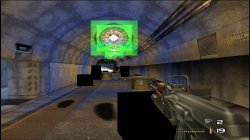
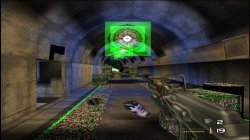
TimeSplitters PS2toPS4 Pack Test
TimeSplitters (2000) and TimeSplitters 2 (2002)
use --vu1=jit-sync for fix freeze at start of game (black screen) for both games + lua file from @mrjaredbeta for TimeSplitters 2
TimeSplitters 2 have alot graphical bugs issue in much parts of stage, but feels very playble!
 

Attachments

  • 01.jpg
    01.jpg
    670.7 KB · Views: 56
  • 02.jpg
    02.jpg
    795.3 KB · Views: 52
As an added note: you NEED(atleast this was the solution in my case as far as any converted/rebuilt with cb then converted ps2 title) to use the program depicted in a few posts up, the other one no matter what you do is likely to have issues with the converted PKG. After much todo using the other program was able to convert very few titles successfully, ones that did work were buggy at best.

Note2: Resident evil code veronica x works with codebreaker, as does soulreaver 2, Obscure the aftermath(must manually enter codes once) all with rebuilt iml-iso. THE HALF LIFE BLUE SHIFT port works without cb for those HL fans like myself. ALL SLUS.

Edit:I use win 7 x64, cdvdgen, iml-iso to rebuild titles with CB. Tested rebuilt iso in pcsx2, converted with the aforementioned unity based ps2 fpkg tool, every title I've rebuilt that booted with pcsx2 successfully works as an fpkg so far in my experience.
 
Last edited:
Just was adding that when I used one tool to convert ps2iso, it almost never worked, games ran like shiz if they ran at all. I tried again to convert and also add Codebreaker to isos, and convert those for PS4 use. I had to use "PS2-FPKG v0.6" specifically yo get ANY ps2 titles to work on the PS4 at all.

Ive injected Codebreaker into RE code veronica, Obscure the aftermath, and Soul Reaver 2 isos, and succesfully converted them and have them working so far without issue using that tool specifically was all I wanted to add to this, for anyone who had issues period getting even one title converted. The Homebrew port of Half-Life blue shift also works on PS4.
 
The problem that I have explained is not the need to encapsulate cheating ELF into ISO. This has nothing to do with us repairing the game, because the program used to extract the contents of the CD is different, which will cause errors when packaging to ISO. Some of them can run on PCSX2, but errors will occur on PS4, so we need to exclude This reason requires multiple tests! That's why I disassembled it and packaged it as ISO again to make it run, not all games need it! I also use cdvdgen and iml-iso to encapsulate ISO. Cheating should not be part of the discussion!
 
WIP fix for Medal of Honor Rising Sun NTSC

CLI
Code:
--gs-uprender=2x2
--gs-upscale=EdgeSmooth
--gs-kernel-cl-up="up2x2tc"
--gs-progressive=1

--lopnor-config=1

--vu1-di-bits=0

--vif-ignore-invalid-cmd=1
LUA
Code:
-- Medal of Honor Rising Sun NTSC
-- Widescreen Hack
-- ported to PS4
-- emu used=jakx v2

apiRequest(2.2)

local gpr       = require("ee-gpr-alias")
local cpr       = require("ee-cpr0-alias")
local hwaddr     = require("ee-hwaddr")

local emuObj      = getEmuObject()
local eeObj       = getEEObject()
local gsObj       = getGsObject()
local eeOverlay    = eeObj.getOverlayObject()
local iopObj  = getIOPObject()

local thresholdArea = 600
local ThrottleOn = 0
local lightDef = {255, 254, 251}
local lightThr = {255, 0, 0}

emuObj.PadSetLightBar(0, lightDef[1], lightDef[2], lightDef[3])
emuObj.SetDisplayAspectWide()
gsObj.SetDeinterlaceShift(1)
--------------------------------------------------------
local ApplyVifCycleSettings = function()

eeObj.Vu1MpgCycles(100)
eeObj.SetVifDataCycleScalar(1, 2.6)
eeObj.SchedulerDelayEvent("vif1.dma", 0x6500)
end

ApplyVifCycleSettings()
--------------------------------------------------------
local widescreen = function()

--eeObj.WriteMem32(0x2015A15C,0x2C420001) --60fps

eeObj.WriteMem32(0x003a3910,0x3f100000)

eeObj.WriteMem32(0x001b9110,0x3c013f50)
eeObj.WriteMem32(0x001b9114,0x44810800)
eeObj.WriteMem32(0x001b9118,0x46016303)
eeObj.WriteMem32(0x001b911c,0xc4810e30)
eeObj.WriteMem32(0x001b9120,0x460c0832)
eeObj.WriteMem32(0x001b9124,0x45010008)
eeObj.WriteMem32(0x001b9128,0x00000000)
eeObj.WriteMem32(0x001b912c,0x46016034)
eeObj.WriteMem32(0x001b9130,0x45000004)
eeObj.WriteMem32(0x001b9134,0xe48c0e38)
eeObj.WriteMem32(0x001b9138,0x46006807)
eeObj.WriteMem32(0x001b913c,0x03e00008)
eeObj.WriteMem32(0x001b9140,0xe4800e3c)
eeObj.WriteMem32(0x001b9144,0xe48d0e3c)
eeObj.WriteMem32(0x001b9148,0x03e00008)
eeObj.WriteMem32(0x001b914c,0x00000000)


end
---------------------------------------------------------
local CheckInputs = function()

  local pad_bits  = emuObj.GetPad()
  local UP  = pad_bits &  0x0010
  local DOWN  = pad_bits &  0x0040
  local LEFT  = pad_bits &  0x0080
  local RIGHT  = pad_bits &  0x0020
  local Triangle  = pad_bits &  0x1000
  local Cross  = pad_bits &  0x4000
  local Square  = pad_bits &  0x8000
  local Circle  = pad_bits &  0x2000
  local L1  = pad_bits &  0x0400
  local L2  = pad_bits &  0x0100
  local L3  = pad_bits &  0x0002
  local R1  = pad_bits &  0x0800
  local R2  = pad_bits &  0x0200
  local R3  = pad_bits &  0x0004
  local Select  = pad_bits &  0x0001
  local Start  = pad_bits &  0x0008
  local Nothing = 1

  local onBtn1 = L3
  local onBtn2 = Start
  local onBtn3 = Nothing
  local offBtn1 = R3
  local offBtn2 = Select
  local offBtn3 = Nothing

  widescreen()

  if (onBtn1 ~= 0) and (onBtn2 ~= 0) and (onBtn3 ~= 0) and (ThrottleOn == 0) then
     emuObj.ThrottleMax()
     emuObj.PadSetLightBar(0, lightThr[1], lightThr[2], lightThr[3])
     ThrottleOn = 1
  elseif (offBtn1 ~= 0) and (offBtn2 ~= 0) and (offBtn3 ~= 0) and (ThrottleOn == 1) then
     emuObj.ThrottleNorm()
     emuObj.PadSetLightBar(0, lightDef[1], lightDef[2], lightDef[3])
     ThrottleOn = 0
  end
 
  if (ThrottleOn == 3) then
     if (onBtn1 ~= 0) and (onBtn2 ~= 0) and (onBtn3 ~= 0) then
       emuObj.ThrottleMax()
       emuObj.PadSetLightBar(0, lightThr[1], lightThr[2], lightThr[3])
     else
       emuObj.ThrottleNorm()
       emuObj.PadSetLightBar(0, lightDef[1], lightDef[2], lightDef[3])
     end
  end

end

emuObj.AddVsyncHook(CheckInputs)
----------------------------------------------------------------------------------

emu used=jak xv2

Needs to be optimized. Widescreen works fine. Very much playable. Some stutter during intense scenes. "--vu1=jit-sync" caused severe slowdown in my test, but not needed to boot. Thank to @nifengyuexia for hint to change emu.

Don't mind extra crap in LUA. My jakx template taken from ps2 fpkg 0.6

This is very strange, it can run without --vu1=jit-sync, at least it is needed to run the game in the old version of PCSX2, but thank you for your tips!
 
WIP fix for Medal of Honor Frontline

CLI
Code:
--gs-uprender=2x2
--gs-upscale=EdgeSmooth
--gs-kernel-cl="h2lpool"
--gs-kernel-cl-up="h2lpool2x2"

--vu1-di-bits=0

--vu1-mpg-cycles=910

--fpu-no-clamping=1
--fpu-clamp-results=1
--vu0-no-clamping=0
--vu0-clamp-results=1
--vu1-no-clamping=0
--vu1-clamp-results=1

--ee-jit-pagefault-threshold=40
--ee-cycle-scalar=0.7
--iop-cycle-scalar=0.5

#emu used=jakx v2

emu used=jakx v2

Needs to be optimized. Graphical glitches fixed. Mostly full speed unless highly intense scenes. Widescreen code freezes emu when used in LUA, but works if ISO patched.
 
Fix for Deadly Strike (PAL)

CLI
Code:
--gs-uprender=2x2
--gs-upscale=edgesmooth
--gs-kernel-cl-up="up2x2skipinterp"

#--lopnor-config=1  #no benefit seen

--host-display-mode=16:9

#emulator used=psychonauts v2
LUA
Code:
-- emulator used=psychonauts v2

apiRequest(1.0)

local gpr       = require("ee-gpr-alias")
local cpr       = require("ee-cpr0-alias")
local hwaddr     = require("ee-hwaddr")

local emuObj      = getEmuObject()
local eeObj       = getEEObject()
local gsObj       = getGsObject()
local iopObj  = getIOPObject()

local patcher = function()

eeObj.Vu1MpgCycles(1000)
eeObj.SchedulerDelayEvent("vif1.dma", 0x5500)  


end

emuObj.AddVsyncHook(patcher)

emulator used=psychonauts v2

Fixes graphical lines. Works great! More testing needed.
 
Improvement fix v1 for 50 Cent's Bulletproof

CLI
Code:
--gs-uprender=2x2
--gs-upscale=EdgeSmooth

--gs-adaptive-frameskip=1

--host-audio-latency=2.030

--framelimiter=1
--framelimit-fps=60.0
--framelimit-scalar=1

--ee-cycle-scalar=1.5

# emu used=jakx v2
emu used=jakx v2

Attempt to smooth out the stutter. Much improved. More testing needed. Widescreen patch freezes emu in LUA but works if you patch the ISO.
 
Last edited:
Improvement fix v1 for 50 Cent's Bulletproof

CLI
Code:
--gs-uprender=2x2
--gs-upscale=EdgeSmooth

--gs-adaptive-frameskip=1

--host-audio-latency=2.030

--framelimiter=1
--framelimit-fps=60.0
--framelimit-scalar=1

--ee-cycle-scalar=1.5

# emu used=jakx v2
emu used=jakx v2

Attempt to smooth out the stutter. Much improved. More testing needed. Widescreen patch freezes emu in LUA but works if you patch the ISO.
I've had this game running perfectly for a long time without any stuttering in my collection. I used the unripped SLUS21315 version and only "ps2emuSTAROCEAN V2" without any additional configuration.
 
Psychonauts. Beginning Game PS2toPS4
At now game work very good! Performance and optimisations fix's added! Also Widescreen patch + forced 480p at start game and Remove post processing cheats added!
Thanks @Kugozx for share some files!
 
1. Fix for Army Men: Green Rogue

CLI
Code:
--gs-uprender=2x2
--gs-upscale=edgesmooth
--gs-kernel-cl-up="up2x2tc"

--host-display-mode=16:9
--host-audio-latency=1.020

--ee-cycle-scalar=2.1

--iop-cycle-scalar=0.9

--vu0-mpg-cycles=500, $000 
--vu1-mpg-cycles=1050
--vu1-di-bits=0
#emu used=psychonauts v2

emu used=psychonauts v2

Works Great! Still has slight slowdown in some heavy intense areas. Maybe another emu might clean up a little

2. Fix for Reservoir Dogs

CLI
Code:
--gs-uprender=2x2
--gs-upscale=EdgeSmooth

--host-display-mode=16:9

--vif1-instant-xfer=0

#emu used=ADK Damshii

emu used=ADK Damshii

No problems so far. Emu got past loading freeze. "--vif1-instant-xfer=0" fixes glitchy graphics
 
Last edited:
Colin McRae Rally 3 (SLES-51117)
Code:
apiRequest(0.1)
eeInsnReplace(0x246B90, 0x24040003, 0x24040001) -- set FFMD to 0 in SMODE2 register to disable field mode
eeInsnReplace(0x247A64, 0xFCC20000, 0x00000000) -- nop the switch to front buffer

Fixes the screen shaking in menus by enabling the full height back buffer. Image quality is better overall, because of no interlacing. Thanks @Vika23 for testing (KOF 2000 emu used).
 
Colin McRae Rally 3 (SLES-51117)
Code:
apiRequest(0.1)
eeInsnReplace(0x246B90, 0x24040003, 0x24040001) -- set FFMD to 0 in SMODE2 register to disable field mode
eeInsnReplace(0x247A64, 0xFCC20000, 0x00000000) -- nop the switch to front buffer

Fixes the screen shaking in menus by enabling the full height back buffer. Image quality is better overall, because of no interlacing. Thanks @Vika23 for testing (KOF 2000 emu used).
 
Fix for 7 Blades PAL

CLI
Code:
--gs-uprender=2x2
--gs-upscale=EdgeSmooth
--gs-kernel-cl="h2lpool"
--gs-kernel-cl-up="h2lpool2x2"

--host-display-mode=16:9

--vu1-no-clamping=0  #fixes missing graphics
--vu1-di-bits=0  #removes stutter in areas

#emu used=jak v1
LUA
Code:
-- 7 Blades [PAL] (SLES-50109)
-- Widescreen hack by Arapapa
-- ported to ps4 lua
-- emu used=jak tpl v1

local gpr = require("ee-gpr-alias")

apiRequest(1.0)

local eeObj = getEEObject()
local emuObj = getEmuObject()

local patcher = function()

eeObj.Vu1MpgCycles(600) -- fixes frozen fmvs

--Gameplay 16:9
--eeObj.WriteMem32(0x00396334,0x3C013FAB) --3C013F80 Zoom
--eeObj.WriteMem32(0x002EF7EC,0x3C013FAB) --3C013F80 Y-FOV

--X-FOV (Needs Render fix)
--eeObj.WriteMem32(0x002EF990,0x3C013F10) --3C013F40

end

emuObj.AddVsyncHook(patcher)

emu used=jak v1

Works great!
 
Last edited:
Fix for 7 Blades PAL

CLI
Code:
--gs-uprender=2x2
--gs-upscale=EdgeSmooth
--gs-kernel-cl="h2lpool"
--gs-kernel-cl-up="h2lpool2x2"

--host-display-mode=16:9

--vu1-no-clamping=0  #fixes missing graphics
--vu1-di-bits=0  #removes stutter in areas

#emu used=jak v1
LUA
Code:
-- 7 Blades [PAL] (SLES-50109)
-- Widescreen hack by Arapapa
-- ported to ps4 lua
-- emu used=jak tpl v1

local gpr = require("ee-gpr-alias")

apiRequest(1.0)

local eeObj = getEEObject()
local emuObj = getEmuObject()

local patcher = function()

eeObj.Vu1MpgCycles(600) -- fixes frozen fmvs

--Gameplay 16:9
eeObj.WriteMem32(0x00396334,0x3C013FAB) --3C013F80 Zoom
eeObj.WriteMem32(0x002EF7EC,0x3C013FAB) --3C013F80 Y-FOV

--X-FOV (Needs Render fix)
--eeObj.WriteMem32(0x002EF990,0x3C013F10) --3C013F40

end

emuObj.AddVsyncHook(patcher)

emu used=jak v1

Works great!
thats cool stuff:encouragement:
 
Colin McRae Rally 3 (SLES-51117)
Code:
apiRequest(0.1)
eeInsnReplace(0x246B90, 0x24040003, 0x24040001) -- set FFMD to 0 in SMODE2 register to disable field mode
eeInsnReplace(0x247A64, 0xFCC20000, 0x00000000) -- nop the switch to front buffer

Fixes the screen shaking in menus by enabling the full height back buffer. Image quality is better overall, because of no interlacing. Thanks @Vika23 for testing (KOF 2000 emu used).

Is there a version of this for NTSC?
 
NTSC version has no shaking menus but slow framerate with jakx v2 emu. I used "gsObj.SetDeinterlaceShift(1)" in LUA for simple no interlace in most games. "gsObj.SetDeinterlaceShift(0)" is default value.
 

Similar threads

Back
Top