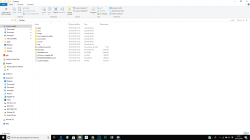
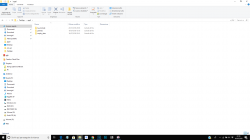
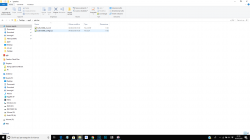
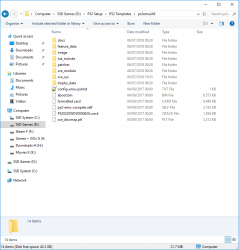
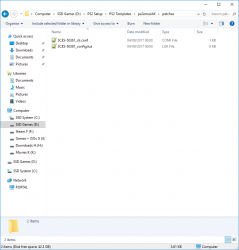
You don't create the App0 folder. The "App0" is basically the internal name for "root folder", basically whatever the CUSA-XXXXX or SLUS-XXXXX etc folder name is. Forget about App0. It's not for you, it's for Sony, all you need to worry about is putting these two files;
SLES-50366_cli.conf and SLES-50366_config.lua
Into the folder called PATCHES. Said "Patches" folder will be in the root of the game folder, next to all the others like sce_sys and sce_module.
That's it.
View attachment 12911 View attachment 12910
Btw @kozarovv since some time ago i been reading most of your mesages here and your edits in psdevwiki related with PS2 emulation on PS4 and i have noticed an "imprecission" that is going viral
When you guys talks about the different versions of the PS2 emulator you are calling them "jak emu" (in other words... you are labeling them with the name of the first game that included that specific version of the emu)
I think is better to use the version numbers of the emu... at least for wiki, eventually it will be needed to replace all that notes about "jak emu" by the accurate version number
I guess could be handy to have a table in wiki with all the versions of the emu (similar to the ones i tryed to do with emus for PS3)
What i dont know is if at this point you have some way to see the version of the emu, in the emus for PS3 it can be seen in the decrypted .elf but in PS4 i have no idea
I know, im being picky with details... but if this naming conventions for PS4 emus are going to change at some point (and i think eventually will change) is better to get used to them as soon as posible
In some way this im talking about using accurate version numbers is scene tactics for better organization![]()
Or name it by game name :Pif we can't get original emu version number maybe we can assign one
This require unpacking eboot, or nobody who use fself will ever know which is which.or identify based on md5 of the eboot
Too many of emus, to go this way.the sdk version
Yep, im used to that annoyance because wiki, sometimes is needed to create a table but keep some cells with question marks for a time (until someone finds that info)And if we can't get original emu version number maybe we can assign one or identify based on md5 of the eboot, the sdk version or whatever else.
| PS2 emu version | MD5 | Found in games: | Other Info from this emu version |
| ????? | ????? | JAK (TITLE_ID here) | etc... |
Im going to explain this so other people gets an overview of how it works on PS3, but before the explain is needed to mention sony uses some kind of "build bot" to compile the firmwares, this is some kind of automated process that compiles all code from source, and it includes the emulatorsFor now I have 32 different emus. I had more, but i lost some of them.. Not sure there is a number version anywhere. Only build date, but surprisingly sometimes two diff emus are build one day.
Build Job ID : %s-%s.Packaging/PackageBuild-BuildBinary.866. Build Date. : %s [%s].20160218.08 Mar 16. Git Branch : %s.titles/Bully. Git Date : %s.20160218-2.
On PS4 emulators are not compiled by build bot. People working on PS2 classics have access to emulator source code, and are able to change code if needed. For example Star Ocean 3 have included special per game runtime that exchanging some sound calls from game to calls from emulator, etc. Only available version info is for example:
Code:Build Job ID : %s-%s.Packaging/PackageBuild-BuildBinary.866. Build Date. : %s [%s].20160218.08 Mar 16. Git Branch : %s.titles/Bully. Git Date : %s.20160218-2.
Where BuildBinaryXXXX seems to be consecutive emu version. But in this case newer doesn't mean better, as emus are compiled per game, and actually newest available emu (.03.2018) is crap for us.
Getting back to topic. I like idea of documenting this for wiki emulation page, but i think it will be easier for user to call emus by game names for compatibility list usage.
Seems to be Package-Test-426.I find BuildBinary in Jak and some others eboot but not in the maxpayne one.
Maybe there is also:
![]()
That seems consecutive (SDK?) too
How can you extract / inject saves in the emu memory cards?
You did great job to get this game work.Hi, all!
New here and have hit a snag after a lot of learning, trial and error. I like learning before asking others to just fix things for me so know I've tried before coning here.
I learned what config files did for the emulator, how they were arranged, what each setting did etc.
The game I tested on is a notoriously odd to emulate sports game called NCAA Football 2011. It even has a hard time on PCSX2 but seeing how both are similar I looked into fixes for it and they translate to PS4 pretty well.
First, I had to get the game to display in 1080p from a boxed, native 480i. Config file fix and I'm there.
Second, the plays you call weren't displaying. After trial and error I find it's a Clamping issue. I add all 3 clamps to config file and plays now show!
Third, the game itself was unplayable due to heavy flickering on the football field. After a TON of editing I find it's a MipMaping issue. Flickering now at original PS2 levels.
The final issue is that Mip Maping has created a small visual issue.
Ok, so a (hopefully) easy question for ya:
1. After the config edits above, I now have an accurate, working game outside of one petty annoyance - everything looks a bit blocky or pixelated. Dark colors look especially blocky but the "blocks" are somewhat large in size.
It appears to be a smoothing issue of some kind but I can't seem to fix it. Could MipMapping have added this effect? Any suggestions?
Thanks for any help. I can update later with pics/vids if needed.
Thanks for the reply!You did great job to get this game work.Anyway. To help i need your full current config, and at least picture of issue.
Sorry we are getting intensive spam attacks lately, so new users can't post links, etc. I added video and picture to your post.Dang, it won't allow me to post links (or much of anything else). Says it's spam when I hit reply.