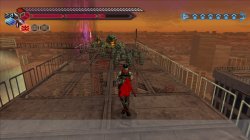
PS4 [Research]PS2 emulator configuration on PS4

If clamping on VU not help, then only full clamping can maybe help. Not really sure is worth to try. Is not first time when VU on that emu is pain in the ass :( Thanks for testing anyway.
It should not be of great help, I have tested it. The graphics problem of this game is the same as Mortal Kombat Shaolin Monk and Rush Mountain Bike. If this graphics problem is solved, it should be able to solve the two games I mentioned
 
Mortal Kombat Shaolin Monk
Is different, iirc is VIF unpack issue there. We have that issue also on PS3. This issue is closer to Baldurs Gate, or other Snowblind engine games than to Steambot
Rush Mountain Bike
You mean Downhill Domination, that is also totally different issue. Also closer to VIF1 than VU.
It should not be of great help, I have tested it.
Yeah, this need per game VU patch then, like Castlevania. Btw. You can compare issue of Steambot with PCSX2, just set VU clamping to None there, and it will be the same as on PS4. But like i said earlier ps2emu on ps4 sucks on VU. There is nothing that can be done remotely.
If this graphics problem is solved, it should be able to solve the two games I mentioned
Not at all. ;) Like i said above.
 
Is different, iirc is VIF unpack issue there. We have that issue also on PS3. This issue is closer to Baldurs Gate, or other Snowblind engine games than to Steambot

You mean Downhill Domination, that is also totally different issue. Also closer to VIF1 than VU.

Yeah, this need per game VU patch then, like Castlevania. Btw. You can compare issue of Steambot with PCSX2, just set VU clamping to None there, and it will be the same as on PS4. But like i said earlier ps2emu on ps4 sucks on VU. There is nothing that can be done remotely.

Not at all. ;) Like i said above.
I just judged the graphic similarity problem based on my intuition, which is not as precise as you pointed out, but I learned a lot:D
 
--vu0-const-prop=0
--vu1-const-prop=0
--vu1-jr-cache-policy=newprog
--vu1-jalr-cache-policy=newprog
--vu0-jr-cache-policy=newprog
--vu0-jalr-cache-policy=newprog
Do not use it for games with normal speed. I have tested several games with normal speed, but it will become slow after using this command
Do you remember which games? I want to try some at pcsx2.
 
SLAJ25031 This game itself will be slow when there are many enemies, but after applying this configuration, it will also become slow under normal circumstances. I don't know if it will be the same on PCSX2.
Ok, studio that created this game, created only 2 PS2 games. So this, and Shinobi will probably be affected. I will compile special pcsx2 version that allow changing all those values in realtime, and will start comparing. Maybe some of those settings in pcsx2 was just safe compromise.

Can you test some more games that run fine with those commands? Do they also slowdown. No rush, is long term research :D
Btw. Do you create new game pkg everytime you make new config? Because you can just create patch with config, is much faster testing way.
 
Ok, studio that created this game, created only 2 PS2 games. So this, and Shinobi will probably be affected. I will compile special pcsx2 version that allow changing all those values in realtime, and will start comparing. Maybe some of those settings in pcsx2 was just safe compromise.

Can you test some more games that run fine with those commands? Do they also slowdown. No rush, is long term research :D
Btw. Do you create new game pkg everytime you make new config? Because you can just create patch with config, is much faster testing way.
I will create a 1.01 patch for testing. I may be a bit obsessive-compulsive disorder. In many cases, when creating a game to run, I will replace many emu as a test. Some emu will fix some errors, so it may be hindered to create a 1.01 patch
 
I need to tell that remove jump caching at PCSX2 have innteresting result. Spiderman2 slow as hell, Powerdrome slower, Steambot Chronicles almost no difference. Now i will try sameprog.

Remove Jump Caching fix long time unplayable PCSX2 title 0_0
 
Last edited:
Whoa, this is something new. Sameprog on PCSX2 break graphic for Powerdrome (more than usual, this game have issues anyway), and cause slowdown.
On Spiderman2 it doesn't make some big difference.
Steambot Chronicles seems to work similar, maybe even little bit better on sameprog.
What's interesting, GUN (Tony Hawk engine) seems to hang little bit faste, before loading third micro program.

I think i will post here different PCSX2 version to make testing easier for people, no need to compile pkg to test, and redsult should be the same.
 
Whoa, this is something new. Sameprog on PCSX2 break graphic for Powerdrome (more than usual, this game have issues anyway), and cause slowdown.
On Spiderman2 it doesn't make some big difference.
Steambot Chronicles seems to work similar, maybe even little bit better on sameprog.
What's interesting, GUN (Tony Hawk engine) seems to hang little bit faste, before loading third micro program.

I think i will post here different PCSX2 version to make testing easier for people, no need to compile pkg to test, and redsult should be the same.
Like I said, it can't be used as the default configuration, and it 's different in every game:D
 
Like I said, it can't be used as the default configuration, and it 's different in every game:D
Well for now newprog show no noticeable slowdowns in any tested game. I realized i have Nightshade disc, so i will test that too. For now newprog seems to be best setting at default. But i will test my whole library to really compare.
 
Well for now newprog show no noticeable slowdowns in any tested game. I realized i have Nightshade disc, so i will test that too. For now newprog seems to be best setting at default. But i will test my whole library to really compare.
In many games, there will be a 0.2 to 1 second stuttering phenomenon, which can't be noticed without looking carefully. I wonder if this configuration will help?
 
In many games, there will be a 0.2 to 1 second stuttering phenomenon, which can't be noticed without looking carefully. I wonder if this configuration will help?
Hard to tell. By any chance you can test Kunoichi with this setting?

Code:
--vu1-jr-cache-policy=sameprog
--vu1-jalr-cache-policy=sameprog
--vu0-jr-cache-policy=sameprog
--vu0-jalr-cache-policy=sameprog

On pcsx2 it just black screen.
 
Hard to tell. By any chance you can test Kunoichi with this setting?

Code:
--vu1-jr-cache-policy=sameprog
--vu1-jalr-cache-policy=sameprog
--vu0-jr-cache-policy=sameprog
--vu0-jalr-cache-policy=sameprog

On pcsx2 it just black screen.
Ok, i'll test it immediately
 
Btw. Im curious that will show FPS. Will be nice to have something like that.

--host-graph=fps
Tested with this configuration, the game can be started, I do n't know if it 's my psychological effect, it should improve the speed, but it 's not too big, and I still get stuck after more enemies. Because I can't see the number of frames, now I will add this command and test between no configuration and configuration
 
Tested with this configuration, the game can be started, I do n't know if it 's a psychological effect, it should improve the speed, but it 's not too big, because I ca n't see the number of frames, now I will add this command after no configuration And configuration testing
Well is not 100% sure that will show fps. Maybe is debug only option.
 
Here is something new. This should bring minor (really minor) speedup in some games. It seems to be the same setting.

--vu-opt-sf-check=1

this is another pcsx2 default setting.

gsdx0.94.jpg
 

Similar threads

Back
Top