PS4 [Research]PS2 emulator configuration on PS4

Fix for Gungriffon Blaze
CLI

Code:
--gs-uprender=2x2
--gs-upscale=EdgeSmooth

--host-display-mode=16:9
--host-audio-latency=2.030
--vu1-mpg-cycles=700
--ee-cycle-scalar=1.3
--iop-cycle-scalar=1.4

#emu used=psychonauts v2
LUA
Code:
-- Gungriffon Blaze
-- emu used=psychonauts v2

local gpr = require("ee-gpr-alias")

apiRequest(0.1)

local eeObj = getEEObject()
local emuObj = getEmuObject()

local patcher = function()

--Widescreen hack 16:9

--X-Fov
eeObj.WriteMem32(0x00211684,0x3c013f40) --3c013f80 Menu

eeObj.WriteMem32(0x00212168,0x3c013f40) --3c013f80 Gameplay

end

emuObj.AddVsyncHook(patcher)

Works great! Testers needed. Didn't play into it too far
 
can someone tell me what this is doing? Is it something that I can port to LUA? What does the 0B command do?
Code:
3D 00 00 00 39 05 00 00 0B 00 00 00 03 00 00 00
69 02 00 00 78 00 00 00 04 00 00 00 10 00 00 07
45 00 00 07 00 0C 0D 00 78 05 00 00 04 00 00 00
10 00 00 07 45 00 00 07 BB 15 0D 00 F8 05 00 00
04 00 00 00 10 00 00 07 45 00 00 07 00 00 00 00
 
https://www.psx-place.com/threads/compatibility-list-ps2-on-ps3.1306/page-83#post-193407

It's an equivalent to the emuMediaPatch for the PS4 emulator. 0x0B syntax explained here:
PS2 Emulation - PS3 Developer wiki (psdevwiki.com)

Probably it would be faster to enable the mipmapping in the config instead.
mipmapping works fine. I'm looking for a bloom removal code or shadows. Project Snowblind is working great here with my config, but has a strange effect sometimes. Like streamers off of the characters(almost invisible SPS)?
Also, if used as is(ps3 config), it seems to do nothing.
 
WIP Fix for Project: Snowblind NTSC
CLI

Code:
--gs-uprender=2x2
--gs-upscale=edgesmooth
--gs-kernel-cl="mipmap"
--gs-kernel-cl-up="mipmap2x2"
--gs-use-mipmap=1

--vif1-instant-xfer=0
--vu1-di-bits=0
--vu0-no-clamping=0
--vu1-no-clamping=0
--cop2-no-clamping=0

--host-display-mode=16:9
#emu used=kinetica v2
LUA
Code:
-- Project - Snowblind (NTSC-U)
-- Widescreen hack by ElHecht
-- emu used=kinetica v2

local gpr = require("ee-gpr-alias")

apiRequest(1.0)

local eeObj = getEEObject()
local emuObj = getEmuObject()

local patcher = function()
-- 16:9 single player mode
eeObj.WriteMem32(0x0002ff80,0x00100000)
eeObj.WriteMem32(0x001d87b8,0x3c013fe3) --3c013faa
eeObj.WriteMem32(0x001d87bc,0x34218e39) --3421aaab

eeObj.WriteMem32(0x0002ffc0,0x00100000)
eeObj.WriteMem32(0x003327f0,0x3c013fe3) --3c013faa
eeObj.WriteMem32(0x003327f4,0x34218e39) --3421aaab

emuObj.ThrottleMax()
end

emuObj.AddVsyncHook(patcher)

Works good. Graphics fixed except for weird effect on the right of the screen. Looking for help on this one.....

 
Last edited:
Fix/Improvement for Clock Tower 3 NTSC
CLI

Code:
--gs-uprender=2x2
--gs-upscale=EdgeSmooth

--host-display-mode=16:9

--ee-cycle-scalar=1.0
--iop-cycle-scalar=1.0

#emu used=rogue v1
LUA
Code:
-- Clock Tower 3
-- emu used=rogue v1

apiRequest(0.1)  

local gpr = require("ee-gpr-alias")

local eeObj = getEEObject()
local emuObj = getEmuObject()

local patcher = function()
--gameplay by hyakki
eeObj.WriteMem32(0x01939d28,0x3f1fbe77)
--FMV's fix by nemesis2000
eeObj.WriteMem32(0x018bd568,0x3c026fa0)
eeObj.WriteMem32(0x018bd5b8,0x34028260)

eeObj.WriteMem32(0x018bcf38,0x3c026fa0)
eeObj.WriteMem32(0x018bcf84,0x34028260)
--black borders fix by nemesis2000
eeObj.WriteMem32(0x018f37e4,0x3c030000)
--remove black square near Panic Meter
eeObj.WriteMem32(0x2041C240,0x00000000)
--60FPS
eeObj.WriteMem32(0x218A8760,0x00000000)

end

emuObj.AddVsyncHook(patcher)

Works great! 60fps added with no notable penalty. More testing needed.
 
Last edited:
Fix/Improvement for Clock Tower 3 NTSC
CLI

Code:
--gs-uprender=2x2
--gs-upscale=EdgeSmooth

--host-display-mode=16:9

--ee-cycle-scalar=1.0
--iop-cycle-scalar=1.0

#emu used=ADK
LUA
Code:
-- Clock Tower 3
-- emu used=ADK

apiRequest(0.1)  

local gpr = require("ee-gpr-alias")

local eeObj = getEEObject()
local emuObj = getEmuObject()

local patcher = function()
--gameplay by hyakki
eeObj.WriteMem32(0x01939d28,0x3f1fbe77)
--FMV's fix by nemesis2000
eeObj.WriteMem32(0x018bd568,0x3c026fa0)
eeObj.WriteMem32(0x018bd5b8,0x34028260)

eeObj.WriteMem32(0x018bcf38,0x3c026fa0)
eeObj.WriteMem32(0x018bcf84,0x34028260)
--black borders fix by nemesis2000
eeObj.WriteMem32(0x018f37e4,0x3c030000)
--remove black square near Panic Meter
eeObj.WriteMem32(0x2041C240,0x00000000)
--60FPS
eeObj.WriteMem32(0x218A8760,0x00000000)

end

emuObj.AddVsyncHook(patcher)

Works great! 60fps added with no notable penalty. More testing needed.
lol u at fire today and much interesting games for me))
 
lol u at fire today and much interesting games for me))
HA!

Fix for Syberia PAL
CLI

Code:
--gs-uprender=2x2
--gs-upscale=EdgeSmooth

--host-display-mode=16:9

--vu1=jit-sync  #fixed black screen at boot

--ee-cycle-scalar=1.8  #remove stutter

#emu used=ADK
LUA
Code:
-- Syberia 
-- emu used=ADK

apiRequest(1.0)   

local gpr = require("ee-gpr-alias")

local eeObj = getEEObject()
local emuObj = getEmuObject()

local patcher = function()


emuObj.ThrottleMax()
end

emuObj.AddVsyncHook(patcher)

Works Perfectly so far!! Of course, testers needed
 
HA!

Fix for Syberia PAL
CLI

Code:
--gs-uprender=2x2
--gs-upscale=EdgeSmooth

--host-display-mode=16:9

--vu1=jit-sync  #fixed black screen at boot

--ee-cycle-scalar=1.8  #remove stutter

#emu used=ADK
LUA
Code:
-- Syberia
-- emu used=ADK

apiRequest(1.0)  

local gpr = require("ee-gpr-alias")

local eeObj = getEEObject()
local emuObj = getEmuObject()

local patcher = function()


emuObj.ThrottleMax()
end

emuObj.AddVsyncHook(patcher)

Works Perfectly so far!! Of course, testers needed
you really kidding....:eek new::eek new::eek new::eek new::eek new::welcoming:
 
Updating Compatibility list


Devil May Cry 1 NTSC

- Gameplay fine

Emu ADK

Ok was check it!

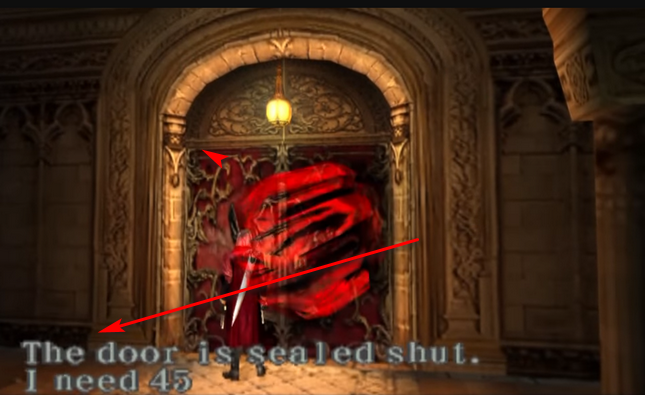
Before was alot Graphical bugs in cutscene but all looks clean! now! Another great find from u! Just some small annoy problem still - "text not appearing" issue! When u come to locked door, text not show up as in attached pic
Example.png

But game looks playble now! I try check some settings for text show up!
 
Fix for Syberia 2 PAL
CLI

Code:
--gs-uprender=2x2
--gs-upscale=EdgeSmooth

--host-display-mode=16:9

--vif1-instant-xfer=0  #fix for broken graphics 1
--vu1=jit-sync         #fix for broken graphics 2
--force-pal-60hz=1
--ee-cycle-scalar=1.8  #remove stutter

#emu used=ADK
LUA
Code:
-- Syberia II
-- emu used=ADK

apiRequest(1.0)

local gpr = require("ee-gpr-alias")

local eeObj = getEEObject()
local emuObj = getEmuObject()

local patcher = function()

emuObj.ThrottleMax()
end

emuObj.AddVsyncHook(patcher)

Broken Graphics fixed. Must choose 50hz. 60hz has graphical glitching at bottom of screen. Works great other-wise. More testing needed.
 
Last edited:
so it's not working. anyway thx for the fixes and keep up the good work.

WIP fix for Wild Arms 4
CLI
Code:
--gs-uprender=2x2
--gs-upscale=EdgeSmooth

--host-display-mode=16:9

--ee-cycle-scalar=2.22
--iop-cycle-scalar=1.51

--vu1-jr-cache-policy=newprog

--vu1-mpg-cycles=900

--cdvd-sector-read-cycles=150
--cdvd-sector-seek-cycles=2

Makes it in-game. Then freezes with the controller stuck?
 
Last edited:
WIP fix for Wild Arms 4
CLI
Code:
--gs-uprender=2x2
--gs-upscale=EdgeSmooth

--host-display-mode=16:9

--ee-cycle-scalar=2.22
--iop-cycle-scalar=1.51

--vu1-jr-cache-policy=newprog

--vu1-mpg-cycles=900

--cdvd-sector-read-cycles=150
--cdvd-sector-seek-cycles=2

Makes it in-game. Then freezes with the controller stuck?
The WA3 emu won't accept those options? I would try the Japanese release first to see, if it's also freezing there. Grab an older PCSX2 build to see if something is logged when you enter an area. Unknown vifcmd...stuff like that. This could be resolved with a combination of "-ignore-" commands in later emus.
 
The WA3 emu won't accept those options? I would try the Japanese release first to see, if it's also freezing there. Grab an older PCSX2 build to see if something is logged when you enter an area. Unknown vifcmd...stuff like that. This could be resolved with a combination of "-ignore-" commands in later emus.

It's because of this "--cdvd-sector-seek-cycles=2". Only later emus have that command AFAIK
 
WIP fix for Downhill Domination NTSC
CLI

Code:
--gs-uprender=2x2
--gs-upscale=EdgeSmooth

--host-display-mode=16:9
--mtap1=always

--vif1-instant-xfer=0  #broken graphics fix 1
--vu1=jit-sync         #broken graphics fix 2

--ee-cycle-scalar=0.8
--iop-cycle-scalar=1.9
--cdvd-sector-read-cycles=4000
--idec-cycles-per-qwc=8000

#emu used=star ocean v2
LUA
Code:
-- Downhill Domination (NTSC-U) [SCUS-97177]
-- Widescreen Hacks (by Aced14)
-- no interlacing by someother1ne
-- ported to PS4
-- emu used=star ocean v2

local gpr = require("ee-gpr-alias")

apiRequest(1.3)

local eeObj = getEEObject()
local emuObj = getEmuObject()

local patcher = function()

eeObj.Vu1MpgCycles(3300)
-- no interlace
eeObj.WriteMem32(0x00243D34,0x30420000)

local code_check1 = eeObj.ReadMem16(0xA095D0) --Conditional live memory fixes for Bike Shop menu
if code_check1 == 0x0002 then
eeObj.WriteMem32(0x20A095D0,0x3FAA3D71) --00000000 - Bike Shop Top HUD Width (Live Memory)
eeObj.WriteMem32(0x20A09610,0x3FAA3D71) --00000000 - Bike Shop Bottom HUD Width (Live Memory)
eeObj.WriteMem32(0x20A60038,0xC2DE0000) --00000000 - Bike Shop Shadow Shape/Width (Live Memory)
end

emuObj.ThrottleMax()
end

emuObj.AddVsyncHook(patcher)

--16:9 Widescreen
eeInsnReplace(0x101B9EF0, 0x3C01442C, 0x00004401) -- - Shell Menu Master X FOV

eeInsnReplace(0x2027F500, 0x438A8000, 0x434FC000) -- - Loading Screen Master X FOV
eeInsnReplace(0x2027F520, 0x3F15551D, 0x3F471C26) -- - Loading Screen Master Y FOV

eeInsnReplace(0x101B68F4, 0x3C01442C, 0x00004401) -- - Title Menu Master X FOV
eeInsnReplace(0x2026C5C0, 0x438A8000, 0x434FC000) -- - Tree Sprite Width #1
eeInsnReplace(0x2026C700, 0x438A8000, 0x434FC000) -- - Tree Sprite Width #2
eeInsnReplace(0x2026C758, 0x438A8000, 0x434FC000) -- - Tree Sprite Width #3

eeInsnReplace(0x101F8510, 0x3C01442C, 0x00004401) -- - Bike Shop Menu Goggles Default Master X FOV (added to close-up float by game engine to produce a "final" close-up X FOV)
eeInsnReplace(0x101F84F8, 0x3C014510, 0x000044D8) -- - Bike Shop Menu Goggles Close-up Master X FOV #1
eeInsnReplace(0x101F84FC, 0x34218000, 0x0000C000) -- - Bike Shop Menu Goggles Close-up Master X FOV #2
eeInsnReplace(0x2027F0A0, 0x3EF0A3D7, 0x3F206D3A) -- - Menu Master Y FOV

eeInsnReplace(0x1016BA30, 0x3C01438A, 0x0000434F) -- - 1P P1 Master X FOV #1
eeInsnReplace(0x1016BA34, 0x34218000, 0x0000C000) -- - 1P P1 Master X FOV #2
eeInsnReplace(0x101A8D4C, 0x3C01438A, 0x0000434F) -- - 1P P1 Replay Master X FOV #1
eeInsnReplace(0x101A8D50, 0x34218000, 0x0000C000) -- - 1P P1 Replay Master X FOV #2
eeInsnReplace(0x2027ECE0, 0x3F15551D, 0x3F471C26) -- - 1P P1 Master Y FOV

eeInsnReplace(0x2027EF00, 0x435E0000, 0x43268000) -- - 2P Vertical P1 Master X FOV
eeInsnReplace(0x2027EF20, 0x3F15551D, 0x3F471C26) -- - 2P Vertical P1 Master Y FOV
eeInsnReplace(0x2027EFC0, 0x435E0000, 0x43268000) -- - 2P Vertical P2 Master X FOV
eeInsnReplace(0x2027EFE0, 0x3F15551D, 0x3F471C26) -- - 2P Vertical P2 Master Y FOV

eeInsnReplace(0x2027ED80, 0x438A8000, 0x434FC000) -- - 2P Horizontal P1 Master X FOV
eeInsnReplace(0x2027EDA0, 0x3F155550, 0x3F471C6A) -- - 2P Horizontal P1 Master Y FOV
eeInsnReplace(0x2027EE40, 0x438A8000, 0x434FC000) -- - 2P Horizontal P2 Master X FOV
eeInsnReplace(0x2027EE60, 0x3F155550, 0x3F471C6A) -- - 2P Horizontal P2 Master Y FOV

eeInsnReplace(0x2027F140, 0x43520000, 0x431D8000) -- - 4P P1 Master X FOV
eeInsnReplace(0x2027F160, 0x3EF0A3D7, 0x3F206D3A) -- - 4P P1 Master Y FOV
eeInsnReplace(0x2027F200, 0x43520000, 0x431D8000) -- - 4P P2 Master X FOV
eeInsnReplace(0x2027F220, 0x3EF0A3D7, 0x3F206D3A) -- - 4P P2 Master Y FOV
eeInsnReplace(0x2027F2C0, 0x43520000, 0x431D8000) -- - 4P P3 Master X FOV
eeInsnReplace(0x2027F2E0, 0x3EF0A3D7, 0x3F206D3A) -- - 4P P3 Master Y FOV
eeInsnReplace(0x2027F380, 0x43520000, 0x431D8000) -- - 4P P4 Master X FOV
eeInsnReplace(0x2027F3A0, 0x3EF0A3D7, 0x3F206D3A) -- - 4P P4 Master Y FOV

eeInsnReplace(0x2027ECC0, 0x438A8000, 0x434FC000) -- - 2-4P P1-4 Paused Master X FOV

Testers needed. Very much playable now! No more crashing! Just trying to get full speed.....
 
Last edited:

Similar threads

Back
Top