RetroArch v1.7.2 vs v1.7.1 (Extended Version) Included Core Comparison

STLcardsWS

Administrator
Official v1.7.2
Extended v1.7.1

  1. fbalpha2012
  2. fceumm
  3. freeintv
  4. fuse
  5. gambatte
  6. gearboy
  7. gearsystem
  8. genesis_plus_gx
  9. gw
  10. handy
  11. mame2000
  12. mgba
  13. mednafen_ngp
  14. mednafen_pce_fast
  15. mednafen_vb
  16. mednafen_wswan
  17. nestopia
  18. nxengine
  19. pokemini
  20. prosystem
  21. prboom
  22. quicknes
  23. snes9x2010
  24. snes9x
  25. stella
  26. tyrquake
  27. tgbdual
  28. theodore
  29. vba_next
.
.
.
.
....
.
.
.
.
.
.
.
.
.
  1. 81
  2. 2048
  3. atari800
  4. bluemsx
  5. dosbox
  6. fbalpha
  7. fbalpha2012
  8. fceumm
  9. fmsx
  10. freeintv
  11. gambatte
  12. genesis_plus_gx
  13. gw
  14. handy
  15. hatari
  16. lutro
  17. mame2000
  18. mame2003
  19. mednafen_lynx
  20. mednafen_ngp
  21. mednafen_pce_fast
  22. mednafen_pcfx
  23. mednafen_snes
  24. mednafen_supergrafx
  25. mednafen_vb
  26. mednafen_wswan
  27. mgba
  28. nestopia
  29. nxengine
  30. o2em
  31. pokemini
  32. prboom
  33. prosystem_
  34. puae
  35. quicknes
  36. snes9x
  37. snes9x2005
  38. snes9x2010
  39. stella
  40. tyrquake
  41. vba_next
  42. vecx
  43. vice_x64
  44. virtualjaguar
 
Last edited:
GREEN= CORES WORKS WELL
ORANGE = CORES WORK CONTAIN MINOR TO MODERATE ISSUES.
RED = EXTREME ISSUES
BLACK = Untested


Cores in the Official Release but not in the Extended:

  • gearboy
  • gearsystem
  • fuse (untested)
  • tgbdual - Not Working (White Screen (no freeze) )
  • theodore (untested)

Cores that were in Extended release but not in 1.7.2 Official
  • 81 (Works but not compatible with all roms)
  • 2048
  • atari800 (details)
  • bluemsx (Works but changing of emulated systems is a pain with Core Options)
  • dosbox
  • fbalpha
  • fmsx (Black Screen on Games, this core may need more testing)
  • freeintv
  • hatari -- (Does contain some minor issues >> Details)
  • lutro- More testing needed, but emulation seemed off. (may need additional tweaking for PS3, random freezes would occur as well)
  • mame2003
  • mednafen_lynx (Between HANDY & Mednafen Lynx all/most Lynx games can play what one does not play has a chance to run on the other)
  • mednafen_pcfx (Poor Performance)
  • mednafen_snes (Poor Performance)
  • mednafen_supergrafx ( A Standalone, same emulation is within Mednafen_PCE_fast as well)
  • o2em >>> (Details )
  • puae >>> (Details)
  • snes9x2005
  • snes9x2010
  • vecx
  • vice_x64 (Major Issues Deletes RetroArch.cfg Among other issues >>>details<<<)
  • virtualjaguar (Low FPS 20)


Previous Official Cores that were in previous PS3 official builds are missing in RetroArch v1.7.1
  • 2048
  • fbalpha
  • mame2003
  • vecx
  • mednafen_lynx
 
Last edited:
If anyone is interested in testing these cores?
  • vecx (extended version) <<<< Should work
  • vice_x64 (extended version)
  • atarti800 (extended version)
  • freeintv (RA 1.7.2)
  • fuse (RA 1.7.2)
  • theodore (RA 1.7.2)

@JediKnight007 have you tested any of these cores?
 
Vecx worked in previous versions...not sure about 1.7.1 extended.

FreeIntv should be playable.

Have not messed with VICE (doesn't it mess up the retroarch.cfg file?)

Going to test FUSE next...didn't work previously, though.

Good luck finding software for the Thomson TO8D (Theodore core).

Have had no luck with Atari800...if I am able to get to the internal emulator menu, it eventually freezes. But most of the time I get a black screen, or a freeze. I've edited the atari800.cfg to point directly to the BIOS files (as listed in the Libretro docs), but no luck.
 
Good luck finding software for the Thomson TO8D (Theodore core).
.

Thomson TO7 software can be found .
Not sure if this is true and if the emu but

wikipedia (lol) said:
"It replaces its predecessor, the Thomson TO7/70 while remaining essentially compatible".

I am assuming it means the software is compatible ... ?


Edit:
(just a list/screens/info about the games)
https://www.video-games-museum.com/en/sys/71-thomson-to8/3/all
More BG on the system itself
http://www.old-computers.com/museum/computer.asp?c=238
Homebrew Game (not an ideal test candidate)
http://www.pouet.net/prod.php?which=58150
 
Last edited:
1. Stable
  1. 2048
  2. fbalpha
  3. fbalpha2012
  4. fceumm
  5. freeintv
  6. gambatte
  7. gearboy
  8. genesis_plus_gx
  9. gw
  10. handy
  11. mame2000
  12. mame2003
  13. mgba
  14. mednafen_ngp
  15. mednafen_pce_fast
  16. mednafen_vb
  17. mednafen_Supergrax
  18. mednafen_wswan
  19. nestopia
  20. nxengine
  21. pokemini
  22. prosystem
  23. prboom
  24. quicknes
  25. sne9x2005
  26. snes9x2010
  27. snes9x
  28. stella
  29. tyrquake
  30. vba_next
  31. o2em
  32. vecx

2. Mostly stable, but some issues users should be aware of - maybe briefly describe those issues, and link to a more in-depth post (if available)
  1. zx81
  2. Mednafen Lynx/Handy
  3. Hatari
  4. P-UAE
  5. blueMSX
  6. GearSystem (Reported Game Issue >> Details)

3. Working, poor speeds

  1. VirtualJaguar (Low speed about 25 FPS, some simple 2d games could perform better)
  2. mednafen_snes(Low Speed about 25 FPS max)
  3. mednafen pcfx (Low Speed)

4. Technically working, but MAJOR issues render it unplayable

  1. atari800 (details)
  2. DOSBox (Details)
  3. Lutra (When core is loaded prone to freezes and emulation seems a bit off)
  4. VICE (Details)
5. Unplayable
  1. Fuse (Freeze Issue)
  2. tgbDual (White Screen)
  3. fMSX

6. Nor tested
  • Theodore
 
Last edited:
@JediKnight007 / Anyone how does above post look?.
Would you agree and do you see anything missing or out of place.
Something that maybe is close to stable but has issues. HATARI and blueMSX but the emulation on bluemsx is fine just a process for that core.
 
Current PS3 Port Suggestions:
--------------------------------------------------------
  • Cores >>> Inclusion of all Stable Cores (Above post should help).
    • My personal suggestion include all the stable cores in the release and add all other ones in an add-on package (with modded .INFO files to suggest they are TEST Cores or something similar in the titles..
  • Shader's >>> Shader's currently in RetroArch are problematic (link) , using older pack most work for the ps3, There should be a truncated pack for the PS3 as @azidahaka is compiling a list . I am sure its just a matter of removing a few that give issues.
  • Overlays >>> Currently when you DL the overlays you get these (link), the effects and scanlines could be useful to some user's but a majority are no use to the PS3 (things like touch controls as one example). but this collection >>> Link are much more useful for the PS3 user;s but these are not available in RA or Download's of Overlays from the app.
 
Tried Fuse, got a frozen black screen (only tried 1 game, though). Previously, it just gave a "Failed to load content" error.

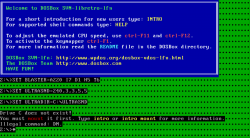
DOSBox boots, but there are glitchy graphics, and no way to interface with the command line.

BlueMSX can't play MSX games fully. Try playing Metal Gear (either one) - you won't get far, because you can't access the sub-menus (via F2, F3, and F4). fMSX has these keys mapped to the Retropad.

Found some issues with Gearsystem...

Space Harrier (both SMS and GG versions), Space Harrier 3D (SMS)
- missing sound effects when you die (AHHHHHH....Get ready!)

Star Wars (SMS)
- glitchy graphics, can't get past title screen
 
Last edited:
Tried Fuse, got a frozen black screen (only tried 1 game, though). Previously, it just gave a "Failed to load content" error.

DOSBox boots, but there are glitchy graphics, and no way to interface with the command line.

BlueMSX can't play MSX games fully. Try playing Metal Gear (either one) - you won't get far, because you can't access the sub-menus (via F2, F3, and F4). fMSX has these keys mapped to the Retropad.

Found some issues with Gearsystem...

Space Harrier (both SMS and GG versions), Space Harrier 3D (SMS)
- missing sound effects when you die (AHHHHHH....GeT READY!)

Star Wars (SMS)
- glitchy graphics, can't get past title screen


Updated the post with changes to your experiences. Thanks you always do a great job testing these,
Some of the Retro Computers is not my strong point. So your help has been tremendous. I am sure many are apperciating it and I am making sure it goes to good use.
 
If anyone is interested in testing these cores?
  • vice_x64 (extended version)
  • freeintv (RA 1.7.2)
  • DOSBOX (boots, but there are glitchy graphics, and no way to interface with the command line
If this is something that needs immediate-attention, I can test the above 3 for you...
Many years of experience with the inner-workings of both VICE and DOSBox (however I dont yet know if any differences exist in PS3-ports).
Will report back soon. ;)
 
If this is something that needs immediate-attention, I can test the above 3 for you...
Many years of experience with the inner-workings of both VICE and DOSBox (however I dont yet know if any differences exist in PS3-ports).
Will report back soon. ;)

With those there are extreme issues.
Vice will destroy retroarch settings CFG file
Dosbox needs some work as jediknight007 notes explain above.

Those two really do not need additional testing.
FUSE is one that does.
 
With those there are extreme issues.
Vice will destroy retroarch settings CFG file
Dosbox needs some work as jediknight007 notes explain above.

Those two really do not need additional testing.
FUSE is one that does.
O I C, no way to interface with the Command-Line and anything that will destroy a CFG-file :eek: are serious flaws indeed.

However, Jedi stated "Glitchy Graphics", but how would they know under those circumstances (unless they mean the Command-Line-Boot/Launch-Screen Itself perhaps)?

Sorry Cards, I dont even know what FUSE is, nor have any games for it. :(


@JediKnight007
Can I assume you have already tried adding-to/altering the following ( in the " DOSBOX.CONF " file ) ? :
" [autoexec] "

Which will auto-type your commands upon-initial DB-launch.

As to glitching, the following is where/what I myself would start/alter first:
[cpu]
core=dynamic
cputype=auto
cycles=auto
cycleup=10
cycledown=20
 
@UniqueUserName

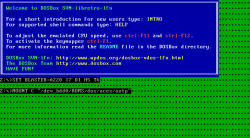
Yes, I have done that - I am rather well-versed in DOS, as seen here - http://www.psx-place.com/threads/ps3-dosbox-configuration-files.15178/. The start screen in DOSBox has weird lines on it - I'll post a screenshot when I get the chance. Mounting commands do not work.

EDIT - here is what happens when I try to load a .conf file (mounting commands in the autoexec section work in standalone PS3 DOSBox)...

test.PNG

And here is me trying to directly load a game (Aces of the Pacific)...

aces.PNG

@STLcardsWS

Perhaps you should break down the cores like this...

1. Stable

2. Mostly stable, but some issues users should be aware of - maybe briefly describe those issues, and link to a more in-depth post (if available)

-81
-Mednafen Lynx/Handy
-Hatari
-P-UAE
-blueMSX

3. Working, poor speeds

4. Technically working, but MAJOR issues render it unplayable

-atari800
-DOSBox
-Lutra
-VICE
-o2em

5. Unplayable

-Fuse (a freeze fest with my further testing)
-tgbDual
-fMSX

6. Not tested
- Theodore (I'm getting there...:) )
 
Last edited:
@UniqueUserName

Yes, I have done that - I am rather well-versed in DOS, as seen here - http://www.psx-place.com/threads/ps3-dosbox-configuration-files.15178/. The start screen in DOSBox has weird lines on it - I'll post a screenshot when I get the chance. Mounting commands do not work.

@STLcardsWS

Perhaps you should break down the cores like this...

1. Stable

2. Mostly stable, but some issues users should be aware of - maybe briefly describe those issues, and link to a more in-depth post (if available)

-zx81
-Mednafen Lynx/Handy
-Hatari
-P-UAE
-blueMSX

3. Working, poor speeds

4. Technically working, but MAJOR issues render it unplayable
-atari800
-DOSBox
-Lutra
-VICE

5. Unplayable
-Fuse (a freeze fest with my further testing)
-tgbDual
-fMSX

6. Not tested
- Theodore (I'm getting there...:) )

Good idea (made changes to post http://www.psx-place.com/threads/re...n-included-core-comparison.17683/#post-121080 )

More details need to be added for those problem cores but any issues on the cores or missing cores let me know.
THANKS !!!

Updated (Core Page in Guide)
Been awaiting to finish that section until some of this was stuff sorted was sorted since everything would fall in place from there.
http://www.psx-place.com/threads/retroarch-ps3-guide-2018-wip.17119/#post-112674
 
Last edited:
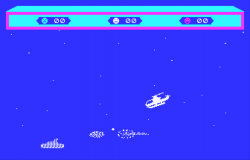
Got a game (Choplifter) to boot with Theodore...

choplifter.png

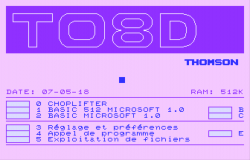
At this initial start screen, press Start to load the game (0 should be the active keyboard key, otherwise use Square/Triangle to scroll to 0).

choplifter_start.png

EDIT - this only applies to cartridge files. For floppies, press "B" (Cross by default).

Controls (quoted straight from the README on the core's Github, with my 2 cents marked with a "*")

A => "Fire" button *Circle on PS3

B => Simulates a keystroke on the 'B' key of the keyboard (allows to start most games without the need of a keyboard)
*Cross on PS3, use to advance through menus in games also (can be slow due to loading times
*In Choplifter, you have to keep this held down basically all of the time during gameplay

**Virtual keyboard feature:**
the Y/X buttons of the controller can be used to select a digit/letter/enter key (Y=go down, X=go up) and the start button simulates a keystroke on the selected key.
On controllers without Y/X keys, select can also be used to roll the virtual keyboard up.
The order of the keys in the virtual keyboard is: digits (0->9) then letters (A->Z) then "Enter".
*Y/X is Square/Triangle on PS3, active keyboard key appears in notification area

### Keyboard: mapping of special keys

| Thomson keyboard | PC keyboard |
| ------------- | ------------- |
| STOP | TAB |
| CNT | CTRL |
| CAPSLOCK | CAPSLOCK |
| ACC | ALT |
| HOME | HOME |
| Arrows | Arrows |
| INS | INSERT |
| EFF | DEL |
| F1-F5 | F1-F5 |
| F6-F10 | SHIFT+F1-F5 |

*Arrows are mapped to D-Pad/L-Stick.
*If the game needs any other key listed here, it won't be playable. (Example: Miner 2049er need to press ACC to get past select number of players screen).

Menus are in French (games might be too).

50 FPS, but it's a PAL computer.
 
Last edited:
Back
Top