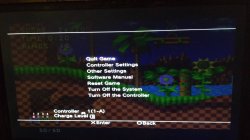
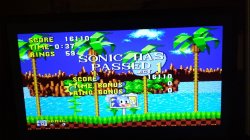
PS3 Sega Genesis (P-GEN) now playable on PS3Xploit HAN (via PS2 Emulation - uLaunchELF)

While there is no native PS3 Homebrew support with the release of PS3Xploit HAN (for 3k/4k models) , that is not stopping from other forms of homebrew from launching. Since the emulators of (PS1/PS2/PSP) are now unlocked,, this has open the possibility for custom pkg to use on the PS2 Classic Emulator. That means some homebrew's are capable of running on those newer PS3 console's. While there is limitations, PSP itself being the biggest as the PS3 simply at this time has been nable to boot much of any significant homebrew of the platform.. However that has not been the case for the PS2 and likely the PS1. First we seen SNES Station (Super Nintendo / Famicom Emulator) a PS2 Homebrew that has proved to work with HAN. Now psx-place user @NiHuShu has launched UlaunchELF (ps2 homebrew app) and has managed to get PGEN (Sega Genesis / Mega Drive) emulators (ps2 homebrew) running through the utility (a standalone package should work as well) working on those console's running PS3Xploit's "HAN". This release also contains SNES Station (unlike the other SNES Station released this will boot within ULaunchELF itself not from the XMB). View all the details along with instructions that may get even more PS2 homebrew running in the link provided at the bottom of the article.

7D9769096.jpg
  • PGen
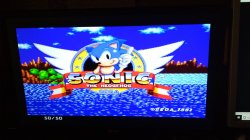
    • It works well did not find any bugs and games running 50 FPS.

    Few Random Screens from a PS3 Running PS3Xploit HAN
    IMG_20180318_194535.jpg IMG_20180318_195030.jpg IMG_20180318_184529.jpg

    Prepare P-GEN for use on PS3Xploit HAN:
    • Download This ISO (It's 1GB ISO packed to 23MB :D)
    • Download UltraISO
    • Open Downloaded ISO with UltraISO
    • Put Your Roms Inside Roms folder
    • You Can Test Other Emulators By Putting Them Into Emulators Folder
    • Then Save ISO
    • Conver It With PS2Classics GUI
    • Sign With Resigner
    • Transfer it To PS3
    • Install

    Controls
    • D-pad = D-pad
    • [ ] = A
    • O = B
    • X = C
    • / \ = X
    • R1 = Y
    • R2 = Z

Additional Details / Info about this release: @ psx-place.com

 
Last edited by a moderator:

Quick question, the PS3 Super Slim does not have a PS2 Emotion core. So, is it possible to run PS2 .pkgs on the PS3 SS ?
 
...GREAT JOB GUYS.......

....WOULD A +M.A.M.E+ ONE BE POSSIBLE...???????????

....P.S .. i thin k i already know the answer but...(answer-NO)
..IF SOO...MAKE KI and KI2 WORK......
 
By the the way maybe someone know who will use emulators from ps1 for SuperSlim PS3?

So far I have verified that imbNES 1.3.4 and PISS Sega Master System emulators work as PSX Classics. Probably other emulators for PS1 will work. Unfortunately just a few emus are good and only very old systems can be emulated decently on PS1.

To convert them I have used the method in this post.

NOTE: If the PSXISO only contains an executable like NES.EXE or EMULATOR.EXE, open the ISO with UltraISO, extract the executable to a folder, rename it to SLUS_123.45 (or similar), inject the file SLUS_123.45 to the root of the ISO and save it. Now you should be able to convert the ISO to EBOOT.PBP with PSX2PSP (Use compression: 0-None).

BTW, if a PSXISO is already mounted with Cobra via webMAN or a backup manager, unmount it before launch the PSX Classic. Otherwise the game currently mounted will be launched, instead of the EBOOT.PBP of the PSX Classic.

EDIT: This is a PoC of imbNES pkg with 2 freeware roms: https://www.sendspace.com/file/fomlc3 (pkg needs to be signed for HAN)
(I can't post the sms pkg because it contains non-freeware roms)
 
Wow....good news...
I suggest gettin those two titles to work....im pretty sure alot of ppl would be very satisfied. ..

Thanx community
 
So far I have verified that imbNES 1.3.4 and PISS Sega Master System emulators work as PSX Classics. Probably other emulators for PS1 will work. Unfortunately just a few emus are good and only very old systems can be emulated decently on PS1.

To convert them I have used the method in this post.

NOTE: If the PSXISO only contains an executable like NES.EXE or EMULATOR.EXE, open the ISO with UltraISO, extract the executable to a folder, rename it to SLUS_123.45 (or similar), inject the file SLUS_123.45 to the root of the ISO and save it. Now you should be able to convert the ISO to EBOOT.PBP with PSX2PSP (Use compression: 0-None).

BTW, if a PSXISO is already mounted with Cobra via webMAN or a backup manager, unmount it before launch the PSX Classic. Otherwise the game currently mounted will be launched, instead of the EBOOT.PBP of the PSX Classic.

EDIT: This is a PoC of imbNES pkg with 2 freeware roms: https://www.sendspace.com/file/fomlc3 (pkg needs to be signed for HAN)
(I can't post the sms pkg because it contains non-freeware roms)

How do I make it past the warning screen ?
 
How do I make it past the warning screen ?
did you mean first screen stop ??? if is stop it should pe you delete nes.exe you should keep two file and keep NES.EXE and SLUS_123.45 (or similar) i face that problem and fix it by add ing two files
NES.EXE and SLUS_123.45 don't delete NES.EXE and keep it in your cd
 
did you mean first screen stop ??? if is stop it should pe you delete nes.exe you should keep two file and keep NES.EXE and SLUS_123.45 (or similar) i face that problem and fix it by add ing two files
NES.EXE and SLUS_123.45 don't delete NES.EXE and keep it in your cd

Okay
 

Similar threads

Featured content

Trending content

Latest posts

Back
Top