
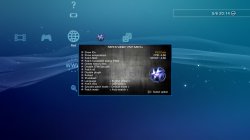
PS3 Hombrew developer Evilnat has released a very impressive update to his popular SEN Enabler Application / Plugin. With this release marked as version 5.8.3 there has been new spoofing abilities for the recent 4.75 Firmware release. Also an option to install themes, while creating a SEN Enabler Theming tool for user's to create their own themes, Also in this update and following the PS3 VSH Menu of 3141card and his own optimazation to the vsh menu he has incorporated a very nice VSH menu for use with the SEN Enabler plugin.[break]ss[/break] As seen in the included pic it provides some nice eye candy and alot of funtionality to your XMB. Checkout all the details for this impresiive and large update by the developer below:

WARNING!
WARNING!
Evilnat said:Don't enable SEN access on PS3ITA CFW 4.65 DEX, it will brick your PS3 and i don't know why, next release will block this on DEX
I DON'T RECOMMEND USING PUBLIC IDS
Improvements found in version 5.8.3 of SEN Enabler
- Online works again with OFW 4.75
- Added support for CFWs 4.75
- Added option to install themes
- SEN Plugin updated to v1.7
- VSH Menu in SEN Plugin from 3141card's POC
- Added image version from 4.75 in Custom spoof option
- Added version from 4.75 in Custom spoof option
- Updated patches on SEN Options
- Improved code
Thanks to 3141card for PS3 VSH Menu, Alexander for CFW 4.75 to test it, xllBIGGBOSSllx [YOUTUBE STReeT poRKs], GeopByteSs [TWITTER], RevilingDante [WIISOS], franzes80 [GAMESONIC], zrandi [ZRANDISCENE] and Misterkio for his help
Finally i updated SEN Enabler to version 5.8.3, it took me some days of full work because Sony released OFW 4.75, need to update it quickly
This version has the requested option to install custom themes, SEN Enabler only have one default theme installed from memory, if you want to install your custom theme the default one will be omitted and will show your theme when SEN Enabler is starting. This option is in Settings menu in page 4, under the name of Themes options. Here are theme all options:
- Themes: This option will show all available themes to install, it depends of Source option, if USB is selected will search in an USB device it and if HDD is selected will search in SEN Enabler's themes folder, when a theme is installed will be on SEN Enabler's theme folder
- Restore original theme: Restores default SEN Enabler theme
- Delete installed themes: Deletes all installed themes on SEN Enabler's themes folder
- Source: Select where SEN Enabler need to look for themes, USB or SEN Enabler's theme folder (HDD)
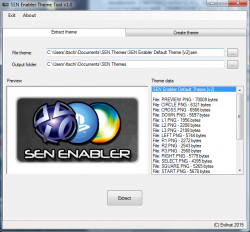
I added two themes along with SEN Theme Tool in the RAR file, SEN Enabler Default Theme [v1].sen and SEN Enabler Default Theme [v2].sen, the first one is old theme and second one is the current theme
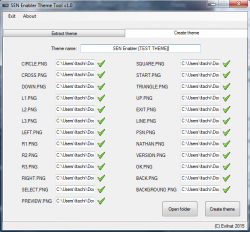
SEN Theme Tool
SEN Theme Tool is the only app to make themes for SEN Enabler, it can create and extract themes, for extract them you need to select theme file and output directory, and to create a theme you need all PNG files from a directory (will search necessary files automatically), put a name and create the theme, you can use one theme as base for your custom theme
SEN Enabler Plugin
Thank so much to @3141card for his POC of PS3 VSH Menu, i improved it to load PNG from memory instead from files on USB/HDD, if you didn't see it here is the Source Code and SPRX, i'm using it as base for my plugin, you can use it and add your tasks or improve it
These are all the options:
+
: Open/close SEN Plugin options menu
: Performe selected option
- Show IDs: Show current MAC/CID/PSID
- Show temperature: Show current CPU and RSX temperature
- Patch MAC: Patch current MAC
- Patch ConsoleID and/or PSID: Patch CID or PSID, depend what you want to patch with patch files
- Delete history files: Delete files sent to Sony
- Disable CFW/Syscalls: Disable CFW's syscalls
- Patch all: Patch CID/PSID, hide syscalls, delete history files and disable plugin
- Disable plugin: Disable SEN Plugin
- Reboot: Reboot PS3 system
- Shutdown: Shutdown PS3 system
- Language: Select language (English only for now)
- Patch files: Select source of patch files (USB only for now)
- Syscalls patch mode: Patches syscalls with mode Default/1/2/3
- Patch mode: Select option to patch IDs, auto search will find IDs on LV2/LV1 instead use offsets
It has his own configuration file, the old versions used SEN Enabler cfg, now you can use it without SEN Enabler installed on your PS3, and languages will be updated quickly along with other options
To all who spoof CID, be careful because you can be banned quickly now, SPOOF CID AT YOUR OWN RISK
For those who doesn't know how to enable SEN access, go to SEN/PSN Options and select Enable SEN/PSN access (pressingbutton three times in main menu) and not Custom spoof, 9.99 Spoof is not created to go online, so if you are using it DON'T LOG IN ON SEN UNDER ANY CIRCUMSTANCES AND NEVER ENABLE PS3'S NETWORK!!
Remember to use Charles Proxy now along with SEN Enabler and block three URLs (you can add more if you want), this software will minimize ban risk, but a ban is not 100% avoided on CFW
URLs to block said:Block all these URLs on Charles or similar:
- https://es.np.adproxy.ndmdhs.com:443 (Maybe you need to change "es" to your region, "us", etc...)
- https://nsx.sec.np.dl.playstation.net:443
- xmb-e.dl.playstation.net
IF YOU FIND ANY BUG, PLEASE LET ME KNOW
Last edited by a moderator:







