
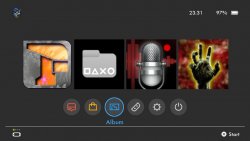
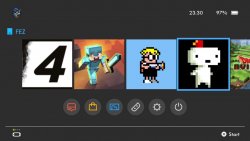
As mentioned a few days ago in PSX-Place's The FEED, VitaHEX Games has a new homebrew for exploited PSTV / VITA that is influenced by the popular Nintendo Switch. SwitchView UI is a homebrew app that allows you to launch HOMEBREW from a Switch like interface as seen in the provided screenshots. This app (powered by Lua Player Plus (lpp)) will only show homebrew (games/apps) stored in "ux0". Perhaps the LiveArea is not your favorite area to launch homebrew then here an option for you, check it out and give the developer some feedback or even idea's on future projects
-
Something very different this time. SwitchView UI will turn your PS Vita in to a Nintendo Switch! (kinda...)
The title of the app is SwitchView UI. I started this project for fun and for personal use but in the process it turned out to something really great so I decided to share it with you. It's a simple homebrew app (or game launcher) that gives you an interface to launch your games and apps.
It is not a replacement for the Vita's Livearea it is just a homebrew app. It lists all the games/apps in your ux0 location (not system apps), and shows them in a menu very similar to the Switch UI.
As you can see I tried to make all the graphics similar to the Switch dark theme. I also tried to keep the PS Vita buttons and icons the same. The buttons bellow the main game thumbs are the system apps like the PS Store, Photos, Settings app etc.
With a little customization you can turn this in to a PS4 or Xbox One interface by simply replacing the images and adjusting the positions.
It's very simple at it's current state but it does the job.
Features:
- High quality icons and interface
- Lists all your games/apps and displays their icon
- Clock and battery percentage display on top right corner
- Navigation using the arrow keys and select with X
Known Issues:
- System protected apps or nonpdrm games will not display their icons because of protection. A blank thumbnail will be displayed instead
- Launching any system app from the apps listed in the second row like the PS Store, Photos, Settings app etc. will give you an error C2-12570-5. You can just ignore it and launch the app again manually
- Developed by VitaHEX games.
Credits:
- Rinnegatamante for Lua Player Plus
Remember to leave your comment with your impressions/suggestions about the app.
VitaHEX Games
Want to see more homebrew apps like this? Support my work by becoming a Patron:
https://www.patreon.com/vitahex
Last edited:







