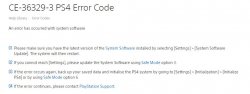
System Error

ricardo

Member
Hi everyone, my PS4 Slim is presenting a system error CE-36329-3,I already changed the internal HD, I no longer use the external one and I have only 2 games installed.I have already used up to option 7 of recovery mode .
I did some research, and read that it may be PSN server problem, others say it's on my account. Any help is welcome.
 
you can check the account on sony entertainment's website.

I'm not familiar with that error. it could be on psdevwiki.

oh, btw, you can check the status of psn. maybe look that up via google. I know that a website, perhaps done by sony themselves, will tell you this information.
 
you can check the account on sony entertainment's website.

I'm not familiar with that error. it could be on psdevwiki.

oh, btw, you can check the status of psn. maybe look that up via google. I know that a website, perhaps done by sony themselves, will tell you this information.
I have read the support tips from Sony, I have already followed all the steps, but it does not work. I believe that the problem may be on my account, I received 3 Arabic messages from a stranger, so I deleted them, it seems that a lot of people have problems with these messages. I really do not know what I can try.
print.JPG
 
I'm not sure. there was some sort of malware going about via messages on the ps4.

you can tell if something is up with your account by signing in on your computer.

this is a legit system? if not, you can't sign in to psn at all without updating.
 
I'm not sure. there was some sort of malware going about via messages on the ps4.

you can tell if something is up with your account by signing in on your computer.

this is a legit system? if not, you can't sign in to psn at all without updating.
My PS4 has always been blocked, I have 110 digital games, so I can not delete the account :apathy:
 
I have a few games tied to my account, but I've f pkg'd all of them. the only loss I've suffered is dlc which is deleted if you insert a retail game to dump or the other way around with a digital game. I have like 76 digital games on my wii u, since I'm too lazy to swap discs. :-P I plan to go all digital with the switch as long as my refurbished system works. I mean it's not like I play too little or too much. ;)

I'm not entirely sure how the entire licensing process works with the ps4. I believe it uses rif and an act.dat, just like the ps3 does. in fact, orbis has a debug rif to it. there may be some sort of xregistry as well, in case you wanted to spoof accounts. however, I don't know which file that is. I'd suggest f pkging all games you have. if you've signed in to psn, you should be able to export saves, then import them to a new account with save wizard. 0'ing out the keystone will allow those saves to work. I've done this several times, no errors.

 
I have a few games tied to my account, but I've f pkg'd all of them. the only loss I've suffered is dlc which is deleted if you insert a retail game to dump or the other way around with a digital game. I have like 76 digital games on my wii u, since I'm too lazy to swap discs. :-p I plan to go all digital with the switch as long as my refurbished system works. I mean it's not like I play too little or too much. ;)

I'm not entirely sure how the entire licensing process works with the ps4. I believe it uses rif and an act.dat, just like the ps3 does. in fact, orbis has a debug rif to it. there may be some sort of xregistry as well, in case you wanted to spoof accounts. however, I don't know which file that is. I'd suggest f pkging all games you have. if you've signed in to psn, you should be able to export saves, then import them to a new account with save wizard. 0'ing out the keystone will allow those saves to work. I've done this several times, no errors.
Some people have solved the problem by playing with a secondary account, but the problem is that all my trophies are in my primary account, I do not really like switching from one account to another. I have some games on disk with DLC purchased on PSN, Street Fighter V, I bought 6 packs of clothes, there might be some problem between mixing physical media content with digital, maybe ID, I do not know. There are so many theories that this reminds me of coffee :D.
From the hundreds of topics I read, they report server error, Internal HD, Account, Processor, Firmware.
I do not understand much of the PS4 scene, I understand more of PS3, I do not know how I could do your method, if there is any article in the forum, I would like an indication of the topic
 
afaik, content can't be transferred. I'm not sure of a second account, but I did have have a ps3 game not work on my main account, then suddenly worked on a secondary one. is this an error installing pkg or an update? does this happen whenever you turn your system on or when you start a game?
 
afaik, content can't be transferred. I'm not sure of a second account, but I did have have a ps3 game not work on my main account, then suddenly worked on a secondary one. is this an error installing pkg or an update? does this happen whenever you turn your system on or when you start a game?
I would have to download the game on the main account to play in the secondary. Any time I wanted a new game, I would have to repeat the method.
The error is regardless of me being in the game, yesterday I received the code twice, I did not play, I was surfing on PSN, Christmas promotion. I changed my HD recently, I put one of 1tb, the other one had 500gb and it seemed to me defective,
it was doing a lot of noise and the cache had only 32MB
 
It means that an error has occurred with your system software, please make sure you have the latest version of the System software installed by selecting Settings > System Software Update.
If you cannot reach settings, update the system software using safe mode.
 
you might have to reset to factory default or even format the hdd.
I've already used option 7 in recovery mode twice, with different HD, but I always have the error. But I noticed that it happens inside the PSN store or in the XMB, never inside the game. The XMB gets extremely slow, and then the screen darkens, everything freezes, then comes back.
You are on latest firmware?
Yes, the PS4 is in version 6.20, I used the PUP of almost 1GB when I changed the HD.
 

Similar threads

Back
Top