PS2 [Testers Needed] Open PS2 Loader with exFAT support (files above 4GB on USB)

My trashed USB (from WinXP era, without case now and USB port looks like it will separate from PCB) started to load games even better, less stuttering in MGS 2 for example. :D Continue your great work devs!
 
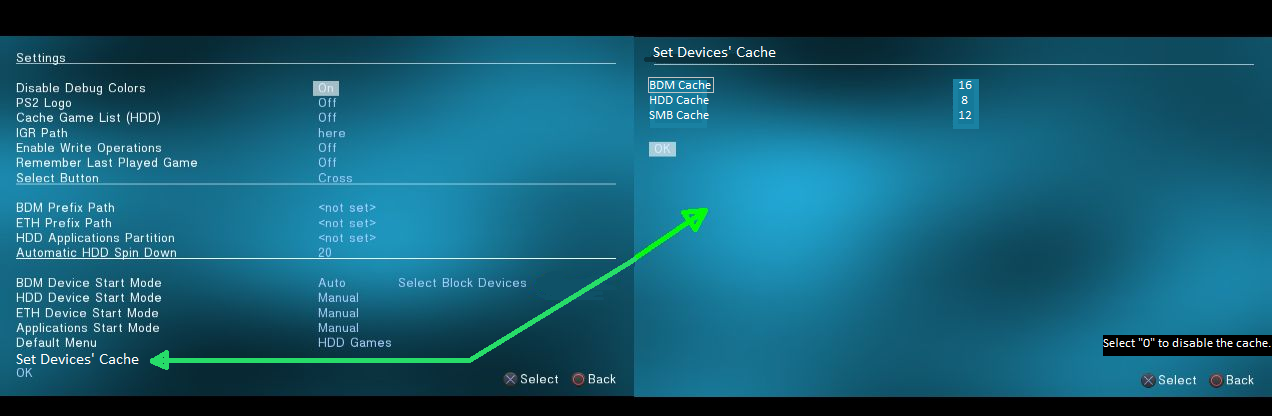
Set cache to 0 to disable it. Other than that it's a good idea.
Here is how it could look like (With an additional hint to disable the cache):
BDM-devices-cache2.png


I have tested OPL 1886: https://github.com/ps2homebrew/Open-PS2-Loader/actions/runs/2477172598.

There is something wrong with covers on consoles with HDD (e.g. SCPH-50004)...
The way to reproduce the issue:
  1. HDD support has to be enabled at boot (HDD Device Start Mode -> Auto)
  2. Enter Display Settings
  3. Turn On\Off in Cover Art
  4. OPL will freeze while you try to browse through games
 
Why not putting everything on one screen but with scrolling? Teleport to almost blank screen with three options alone looks strange.
 
You know that e.g. Block Devices (Select Block Devices) also only have three options?

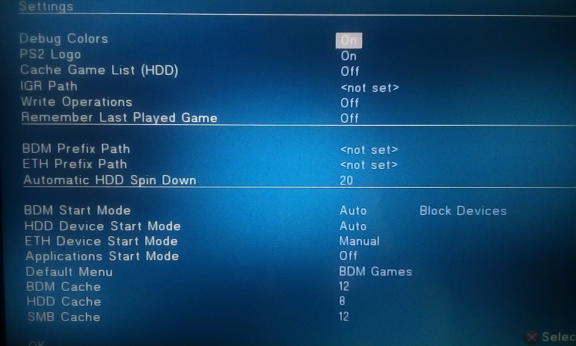
Here is how it currently looks like:
opti-opl.png

Most of noobie users will not even know how to use these values for cache...
Also these options take a bit space...
It is only my humble opinion that all cache settings can be moved into a separate sub-menu.

"We" can also move all options from BDM Start Mode to SMB Cache into "Device settings" as I think @TnA mentioned (here), but what about Block Devices?
A sub-menu into a sub-menu?
...Settings -> Device settings -> Block Devices...
 
I know. And reason didn't change. More handy is all of them on one screen but this demand also scrolling implementation and scroll visible element. Quite a lot of work.

Argument about noobie users is not valid because almost all those options is black magic for them. They simple need to learn that some stuff they do not touching if not understanding (on all consoles, pc or mobile devices). That's the main reason why commercial software is completely castrated from most possible options in GUI. But this is scene, and creating buffer (the guardian) between commercial world and scene users leading to limiting them and/or functionality. In this specific case, it is no big deal anyway, I just point that the way how it looks like could be better and newbie users doesn't even care.

Why sub menus? Categories are separated by underline. Or didn't I understood something?
 
TBH scrolling can lead into let's say "strange situations".
Now everybody will notice that you can scroll. It happened for me a few times in other software...

An argument with noobie users can be valid, because most of advanced settings can be let's say hidden,
or can be activated when you select "Enable advanced settings".
That is why I suggested a sub-menu for cache.
E.g. when you click onto "Devices' Cache" and you will have only three options with different values most of us will think:
"What the f%^& is that?. I will not touch it because I can f^&* something up".
When you have all options on almost main screen:
"Hmm, what does this option do? Maybe I can change something, it will not impact on anything... right?!"

I am not sure is there enough space for separation by underline...
 
Last edited:
Personally I'm against any "advanced settings hidden". All settings here are for advanced users. ;) And if someone have such attitude from second sentence, well, mr. Darwin have something to say about that. ;)

There is not, that's why scrolling is needed in that approach.
 
I noticed MX4SIO doesn't load games from exFAT but lists them and shows covers etc., any compatible game hangs on black screen. Not to mention SD card 'defragmented' shown only games from CD folder, I tested few SD cards, and the same cards when copy-paste without fragmentation work as intended untill try to run game happens. It doesn't happen with FAT32 drives for me.
 
Hello, tested opl in western digital black 2T exfat gpt and not working.
Tested in pendrive kingston 15GB exfat mbr and working fine.
 
Actually, i filled a 32GB stick formatted to exFAT and i wasn't asked to defragment.. yet . I think when you have larger file size the fragmentation is smaller . That could be useful for FAT32 , using ISOs as much as possible .
 
Last edited:
Hello, tested opl in western digital black 2T exfat gpt and not working.
Tested in pendrive kingston 15GB exfat mbr and working fine.
Hi, Even a normal usb device won't work with Gpt, try converting the Gpt partition to exFAT Mbr if you want.
 
Hi, Even a normal usb device won't work with Gpt, try converting the Gpt partition to exFAT Mbr if you want.
There is no such thing like "Gpt partiton" or "exFAT Mbr"...
exFAT is a filesystem and have nothing to do with partition table like MBR or GPT.

And yes, none of the PS2 homebrew support devices with GPT or without any partition table. It must be MBR.
 
western digital black 2T exfat gpt is favtory settings, i have ps2 ps3 and pc games (700 GB).
can be changed gpt io mbr without formatting external disk?

Ease us partition master changed gpt a mbr easy and fast without formatting external disk.

Now working western digital black 2T exfat in ps2 and ps3.
 
Last edited by a moderator:
Without formatting it is technically possible if You have only one partition (max 4) but I don't know if any tool doing that. Try diskmgmt.msc. Choose disk, click on it ppm and choose convert to MBR. But be prepare of loosing data, I don't know how this app doing it.

2T exfat gpt
2TB... exFAT... GPT...
 
There is no such thing like "Gpt partiton" or "exFAT Mbr"...
exFAT is a filesystem and have nothing to do with partition table like MBR or GPT.

And yes, none of the PS2 homebrew support devices with GPT or without any partition table. It must be MBR.
I answered a simple question with the same simplicity, that's all. The answer given is consistent with the way the question was asked.
It's not nice to be treated like an ignorant. Of course, I know all of this.
I'm so glad exFAT is here, I wanted to help with testing, so I've been visiting the forum a lot lately. I will remain a silent user.
 

Similar threads

Back
Top