
Our good friend and developer @kozarovv has recently shared with us two projects from developer Jabu . Recently we seen the first tool and that was PS2-FPKG and that is a tool that converts your PS2 games easily for use on the PS4 (jailbroken) system, now with that tool residing at version 0.3 the tool is becoming a popular choice fast. Some of the features and support include converting PS2 ISO/BIN files. The tool comes equipped with some customization like changing the Game Icon, Backgrounds, Multi-disc creation and also several other customization that include emulator choice custom Configs and more can be seen in the details of this tool in the first tab below:
To follow that release up there is a tool called PSX-FPKG and this one is to convert PS1 games for use on a jailbroken PS4 (Currently only 6.72 is supported with the only 6.72 exploit is one that very buggy and not recommenced at this time as its very unstable and seems not to be tested well or properly debugged before release to the public - UPDATE: Now 5.05 is supported as well!) . This tool is only at v0.1 but has some great features out of the gate as outlined in the 2nd tab, see all details in the tabs below for each tool
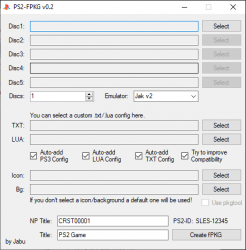
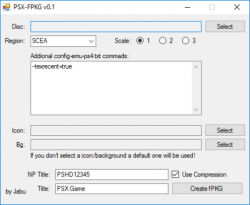
(PS2-FPKG (left) / PSX-FPKG (right) )
(PS2-FPKG (left) / PSX-FPKG (right) )
-
PS2-FPKG v0.3 by Jabu
This app convert PS2 ISO/BIN games to fPKG which can be installed directly on PS4.
How to use:
- Run ps2-fpkg.exe
- Select the ISO of the PS2 game in "Disc1"
- Click "Create fPKG" and choose a storage location
- Install created fPKG on PS4 and play
Optionally you can:
- change the game icon (Icon),
- change background graphic when starting the game (Bg),
- create a multi-disc game (up to 5 iso)
- add your own config txt,
- add your own config lua,
- select the emulator to be used by the game (by default there are 2 known to be most compatible, you can throw more here)
Program automatically adds configs (config-emu-ps4.txt), ps3 (gameid_lopnor.cfgbin), lua (gameid_config.lua) if they exist in application database.
Yes, this application comes with unique ready to go PS2 game configs that will be added automatically!
Known bugs:
- Few games not follow SYSTEM.CNF standard layout, for this games app will fail to find ID (partially fixed, only CD games affected now)
- If program has any problems with creating fPKG, you can try to run it as an administrator, it should help.
- App will fail to create pkg if path to save pkg is root of drive, like C:\ E:\. Fix it by creating pkg to for example E:\pkg
How to add more emulators:- Put the folder with emulator files into the "emus" folder, restart ps2-fpkg, new emulators should show up on the list, that's all.
A short demonstration of the program operation can be seen here:
CHANGELOG:
v0.3
- added compression support
- added PS2 CD .bin support(app wil auto-add LIMG sector)
- fixed DVD game ID searching code, it's fast now
- limited "Try to improve compatibility" option to JAK v2 emu, Rogue emu not support that option
v0.2 - initial release
Files used:- TXT and LUA Configs - https://github.com/kozarovv/PS2-Configs
- PS3 Configs- https://github.com/Zarh/ManaGunZ/tree/master/pkgfiles/USRDIR/sys/CONFIG
- List of PS2 Game IDs - https://github.com/Veritas83/PS2-OPL-CFG/blob/master/test/PS2-GAMEID-TITLE-MASTER.csv
Used programs:- Image Magic - https://imagemagick.org/
- 7-Zip - https://7-zip.org/
- DiscUtils - https://github.com/DiscUtils/DiscUtils
-
PSX-FPKG v0.2 by Jabu
This tool can convert ps1 .bin's to ps4 fpkgs.
How to use:
- Select a disc image(.bin file)
- Select a region(region auto-detection coming soon!)
- Select the scaling mode(1=1280x720, 2=1920x1080, 4=3840x2160)
- Type in a NP Title(id auto-detection coming soon!)
- Type in a Title
- Press "Create fPKG"
Optional stuff you can do:- select a game icon
- select a startup image
- add addional commands to config-emu-ps4.txt(just put the commands into the big textbox)
TODO:- game id detection
- region detection
- title detection
- some other stuff idk
Downloads:
Last edited:


 Now someone can think that you need both firmwares to make it work.







