
So boys and girls it seems Mr. Gas and Major Tom have revealed a huge tid bit of info for all Vita/PSTV users. How to read and write to the Vita's file system. This means custom theme's, through analysis of file structure (without the need of hardware to dump NAND) and so much more even custom themes and removing that nasty limitation on the PSTV that limit's which games we can and can't play. I think this will send sales through the [break]sss[/break] roof for the system. Note this works for 3.52 and below and if you wish to use any of this do not update past 3.52 as both devs stated this can and will be patched upon the next firmware update. This is all possible due to a huge flaw in Sony's email application much like the PKG Installer we have all known about for a long time. I will stop wasting your time and get to the meat and potato's of this article but here is some of what we can now do thanks to these talented devs. But for now we can install the new PSTV custom whitelist, custom themes and dump the entire Vita filestructre from the NAND, carts and even internal memory. Here is more on that below.
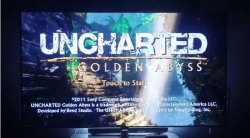
Previously unplayable Uncharted Golden Abyss working on PSTV with custom whitelist

Previously unplayable Uncharted Golden Abyss working on PSTV with custom whitelist
What this upcoming pack can do and includes the following tricks :
-= BASICS =-Reading
- Dump ux0
- Dump any file (blind)
- Dump cartridge
Writing
- Write to ux0
- Write to any partition (except RO partitions, e.g: vs0)
Delete
- Delete in ux0
- Delete in other partitions
-= TRICKS =-All models
- Custom themes
- Full bubble customization (PSP/PSVita)
- Bubble spawning (Hidden apps)
- ePSP bubble creation (re-birth)
- Package installation
- Cartridge backup installation
- Free trophies
PSTV
- Run unplayable games
Registry edit
- Switch PSN account
- Make CMA backups for anyone (without linked PSN account)
- Fake region
- Semi-debug
How to dump files with Vita Email application
If you are familiar with pkg installer through the email app, you can modify the link to
Instead ofCode:"email:send?attach=ur0:shell/db/app.db."
you can also change the link to whatever file you want here is the list of most filesCode:"psgm:open?titleid=NPXS10031"
There are a few restrictions to dump those files like:1- limited to 2MBalso (don't forget the dot at the end)
2- you can't dump files located far more than 7 directories
like ux0:1/2/3/4/5/6/7.txt
How to Write to Vita File System
First u need to overwrite the the email app database by using the EML Write Tool v0.4 (which now has drop and drag support!!) to install our needed writer.eml
to do this send writer.eml to your email then receive it in your PSTV or Vita then click the image and close the app (don't click the error message)
To write a file to the Vita's filesystem you need to create a new e-mail on your PC and set the path you want the file to be installed as subject.
The actual file you want to write needs to be renamed to #0 or x (without any file-ending) and set as attachment. Send it to your Vita! Now that the app is ready to write files if u want to write a file all u want is to rename that file to
#o
Then simply attach it to the message and write the path you want in the subject and send!!
For all who don't know how to send EML to email application
- Open writer.eml with Thunderbird (can use portable version as well)
- Go to Message -> Edit as new Message (Ctrl + E)
- Enter your email and send to device
Also for adding attachment in email (when added right click on it and rename)
PSTV Custom Whitelist Patch Installation
Fire up your EML Writer and use the custom list_launch_vita.dat to this directory
ur0:game/launch/list_launch_vita.dat
to bypass the PSTV whitelist. After that reboot and enjoy most of your Vita games on the PSTV. Not all Vita games will work after this hack but most do, however all PSP and PS1 titles now work. For the Vita limitations this is due to the proper flag not being set in the SFO file. We have no way to edit this for now till the key is found and released to resign the files just like the PS3 keys. Good news is most games do work and already have this flag set in the SFO. If it doesn't work after this all you can do is patiently wait and enjoy your new games for now. All I have tested work like Ys, Uncharted, Street Fighter X Tekken, Netflix (must be installed via EML Writer and PKG Install method) and more!!
PSX-Place Disclaimer
NOTE PLEASE BACKUP THE ORIGINAL FILES PRIOR TO DOING THIS CUSTOM WHITELIST.
Use the above mentioned dumping method to do this. Some users have reported error C2-15413-4 after install and did not back up the original thus making their PSTV useless. Good news is it has worked just fine for me but I also don't have the original on the system I am using but I do have three more. I will post it once I get home for those that can't follow instructions so all hope is not lost. Just save yourself some heartache nd mod responsibly. Always backup and don't proceed useless you are comfortable with the mod and can be reversed, if not doint be the test subject and wait till more advanced users have reported back and all is safe and well. PSX-Place is not responsible if you make a paperweight out of your PSTV, we are just here to spread the word. But if a mishap should occur it is 100% fixable with a proper re-write or to simply pull the power and restart. NOTE PLEASE BACKUP THE ORIGINAL FILES PRIOR TO DOING THIS CUSTOM WHITELIST.
| Developer: mr.gas & Major Tom | Source: Hackinformer.com/ (mr.gas) |
Last edited:


 if you don't update







