webMAN MOD

PS3 webMAN MOD - General Information Thread 1.47.48q

All
Please verify if the image is too big to be loaded in memory. ICON0.PNG has restrictions in the size allowed.

If the rom is named "mygame.zip", the image should be "mygame.png". If the cover is .jpg, the ICON0.PNG will not be replaced.

All .png I have used have more less the same size (50-70kb), and yeah, I know that It needs the sale name as the rom. I have added 50 .png (one for each rom). All works except this one, the only one I changed (the first I used worked).

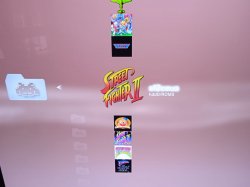
It's this .png, btw:

 

Attachments

  • sf2ceua.png
    sf2ceua.png
    57.2 KB · Views: 31
All


All .png I have used have more less the same size (50-70kb), and yeah, I know that It needs the sale name as the rom. I have added 50 .png (one for each rom). All works except this one, the only one I changed (the first I used worked).

It's this .png, btw:

I've tested your .png replacing the ICON0.PNG on one homebrew on my system and the image showed fine.

Take in count that the memory of XMB is very limited. If you have many games listed in the XML, the icons are loaded in memory consuming memory and at some point they stop loading.

The size for ICON0.PNG is 320x176. Your image is 400x224, which is 60% larger.
If you use smaller dimensions (e.g. 160x88 or 240x132), the image is stretched to 320x176 and you'll have more chances to load more images.
 
I've tested your .png replacing the ICON0.PNG on one homebrew on my system and the image showed fine.

Take in count that the memory of XMB is very limited. If you have many games listed in the XML, the icons are loaded in memory consuming memory and at some point they stop loading.

The size for ICON0.PNG is 320x176. Your image is 400x224, which is 60% larger.
If you use smaller dimensions (e.g. 160x88 or 240x132), the image is stretched to 320x176 and you'll have more chances to load more images.

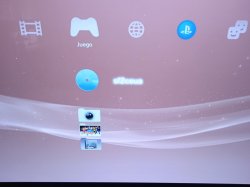
Ok, I've checked all those +50 PNG I added for my ROMs, and yes, there were some with larger size (not in dimension, but some were 32bits. Saved with 8bits and now its size in kb is much smaller. But maybe this 32/8 bits thing doesn't matter and it only matters it's dimension). But that sfceua.png still does not appear when I mount it (It appears only in the ROMs folder, but not when mounted, as you can see in the attached pics).

EDIT: Anyway, It doesn't matter anymore. It's a small issue that doesn't worth wasting more of your time and mine. I have the habit of always wanting to know why something doesn't work, but this small one does not worth more time.
 

Attachments

  • IMG-20221217-WA0001.jpg
    IMG-20221217-WA0001.jpg
    66.5 KB · Views: 54
  • IMG-20221217-WA0000.jpg
    IMG-20221217-WA0000.jpg
    59.8 KB · Views: 47
Last edited:
Ok, I resized the .PNG dimensions (not only changing the 32bit/8bit thing), and now.. It works and It loads the .png when mounted. Thanks @aldostools !!

That makes me think about this: I have installed a few PS2 games, with the PS2Classics GUI tool. In that games, I've added my custom pics when created the .pkg file with PS2Classic tools. My question is: if I added a big size/dimension files in those .pkg and then are installed in my dev_hdd0/games folder (the ICON0.PNG and the PIC1.PNG for each game), that big size also affects this XML memory limit?

If the answer is yes, as I guess, I also guess that I should simply resize and replace manually those ICON0.PNG and PIC1.PNG for each game, to free some XML memory. I'm right?

EDIT: I've checked one of those ICON0.PNG of my PS2 installed games, and its size is 320×176, which I'm sure I didn't set, so I guess that PS2Classics tool already sets the proper dimension and I don't need to change anything in my PS2 installed games.
 
Last edited:
Ok, I resized the .PNG dimensions (not only changing the 32bit/8bit thing), and now.. It works and It loads the .png when mounted. Thanks @aldostools !!

That makes me think about this: I have installed a few PS2 games, with the PS2Classics GUI tool. In that games, I've added my custom pics when created the .pkg file with PS2Classic tools. My question is: if I added a big size/dimension files in those .pkg and then are installed in my dev_hdd0/games folder (the ICON0.PNG and the PIC1.PNG for each game), that big size also affects this XML memory limit?

If the answer is yes, as I guess, I also guess that I should simply resize and replace manually those ICON0.PNG and PIC1.PNG for each game, to free some XML memory. I'm right?

EDIT: I've checked one of those ICON0.PNG of my PS2 installed games, and its size is 320×176, which I'm sure I didn't set, so I guess that PS2Classics tool already sets the proper dimension and I don't need to change anything in my PS2 installed games.

I suggested you to resize the icons. It helps to save memory in XMB.

If all your games are showing fine, there is no need to change anything.
 
I suggested you to resize the icons. It helps to save memory in XMB.

If all your games are showing fine, there is no need to change anything.

Ok, I'll do It. What about those PIC0.PNG, PIC1.PNG... the background ones. I see that some of them are 1920×1080 size. Does this ones also eat XMB memory and should I resize them or directly delete them? I don't need most of them, and if It save memory...

I saw, when I press Select+Start, that the message in the right up corner, the bottom line, It says: "Memory 1812 KB free [Full]". Is that 'Full' the XMB memory you are talking?
 
Last edited:
You can mount a game from dev_usb0 on a 12GB console . I was trying to redirect dev_hdd0/game to dev_usb0/game but i see no option, is it possible ? Closest thing is toggling the external game data, but it must be done at each reboot ;/
 
You can mount a game from dev_usb0 on a 12GB console . I was trying to redirect dev_hdd0/game to dev_usb0/game but i see no option, is it possible ? Closest thing is toggling the external game data, but it must be done at each reboot ;/

You can use a script like /dev_hdd0/autoexec.bat to map /dev_hdd0/game=/dev_usb000/game

Or use SELECT+SQUARE to map /dev_hdd0/game to /dev_usb000/GAMEI
 
Im having issues with WebMan Mod (Latest) crashing the system w/ any/every game. Disabled it from launching and games dont crash but once I enabled it crashes the whole system.

I couldnt tell if it was something with WebMan it self or ram usage.
 
Im having issues with WebMan Mod (Latest) crashing the system w/ any/every game. Disabled it from launching and games dont crash but once I enabled it crashes the whole system.

I couldnt tell if it was something with WebMan it self or ram usage.
If the issue is memory, try using the lite edition of webMAN MOD to check if the games don't crash with that version.

If you're on HEN, the issue could be related to the dynamic fan control. Try using syscon or manual mode.

If you're on DEX kernel, there is a known issue with VSH CEX loading webMAN MOD full or standard editions
 
@aldostools

Quel est le combo qui permet de passer rapidement de la version "lite" à la version "full" sur une console en CFW "Rebug-4.84.2-REX"?

Merci par avance.

What is the combo that allows you to quickly switch from the "lite" version to the "full" version on a console in CFW "Rebug-4.84.2-REX"?
Thanks in advance.
 
Merci beaucoup car j'avais oublié cette commande si simple et facile à utiliser.

Je n'oublie pas de te souhaiter mes plus sincères souhaits de passer une excellente année 2023 et que la Noël ai été un moment très réussi dans ta famille et ton entourage proche.

Merci mon ami, Merci pour tout ce que tu fais et fera encore et encore pour nos PS3.

A très bientôt.


In English via G-Trad :

Thank you very much because I had forgotten this command so simple and easy to use.
I do not forget to wish you my most sincere wishes for an excellent year 2023 and that Christmas was a very successful moment in your family and your close entourage.

Thank you my friend, Thank you for all you do and will do again and again for our PS3.

See you soon.
 
Merci beaucoup car j'avais oublié cette commande si simple et facile à utiliser.

Je n'oublie pas de te souhaiter mes plus sincères souhaits de passer une excellente année 2023 et que la Noël ai été un moment très réussi dans ta famille et ton entourage proche.

Merci mon ami, Merci pour tout ce que tu fais et fera encore et encore pour nos PS3.

A très bientôt.


In English via G-Trad :

Thank you very much because I had forgotten this command so simple and easy to use.
I do not forget to wish you my most sincere wishes for an excellent year 2023 and that Christmas was a very successful moment in your family and your close entourage.

Thank you my friend, Thank you for all you do and will do again and again for our PS3.

See you soon.

Merci pour vos bons voeux. Bonne année 2023 !
Mes meilleures salutations mon cher ami.
 
webMAN MOD 1.47.43 is out!

Changelog:
  • Added detection of the newest Evilnat 4.89.3 PEX (DEX mode)
  • Fixed issue with noBD patches applied at startup on CFW noBD (Thanks to @Evilnat)
  • PS2 config database updates with fixes by @mrjaredbeta, @agrippa, @kozarovv
  • Cumulative update (includes over 86 commits to the suite of tools after 1.47.42)
If you like webMAN MOD, then feel free to contribute with a *small donation* at:
paypal.me/aldostools or donate.aldostools.org (Funds are mainly to cover the high server costs)

Other stuff: Covers Pack [PS3]Covers Pack [PSX/PS2]Retro Arch CEWiki [Documentation]
 
wMM includes FPS counter 2.6. It supports the yaml config. It is found in /dev_hdd0/tmp/wm_res

Please use the online updater to make sure that you're using the latest build.

The FPS plugin is maintained by its author.
If you have issues, you should report it in https://github.com/TheRouletteBoi/RouLetteVshMenu/tree/standalone-fps-counter-v2
@aldostools hi aldo, the tempertature in the fps counter from webman mod is only shown in "F". i couldn't figure out how to switch the tempreature to "C". is it possible?
 
Back
Top