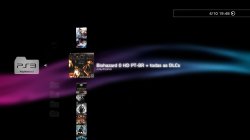
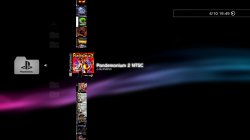
PS3 webMAN MOD v 1.43.36 - NEW support to DL & Auto Install PKGs, + additional changes

Following deank's latest release of multiMAN Stealth the PS3 community has another popular project that seen an update as developer @aldostools is back with another update to webMAN MOD with the release of v1.43.36. This release contains an extensive list of changes ranging from various bug fixes and new functionality, there was alot of new features in this version of the plugin. Developer Aldo Vargas (aka aldostools) has added support for download & auto Installing of pkgs with a variety of options that surrounds this functionality Full list of changes can be seen in the changelog provided:

webMAN-MOD_1_43_36.jpg


    • Added support for download & auto install pkgs. Syntax: /install.pkg?url=<url-of-pkg>
    • Install PKG combo now auto-install all pkgs in hdd0/packages
    • /install.ps3 now deletes the pkg after installation
    • Use /install_ps3 to keep the pkg after installation
    • Added conditional install of pkg: /install.ps3<pkg_path>?
    • Added support for download .xm! as .xml
    • Pkgs are now downloaded to a temporary folder then moved
    • Limited delete pkg after install to hdd0 only
    • Added support to install local theme files (*.p3t)
    • Added online covers to lite edition
    • Added scan in ISO folder for covers named as <title_id>.JPG
    • Added list of last games to root of file manager
    • Icon sizer value now is retained after close the browser
    • Changed algorithm for covers scanning to: ISO folder > MM Covers > ICON0
      (instead of MM > ISO > ICON0)
    • Added support for sorting directories by date/size/name
    • Added support for wildcards in ftp directory listing
    • Fixed ftp navigation using the browsers
    • Changed PASV mode in ps3mapi to work in the same way as the ftp server
    • Added mount by name: /mount.ps3?<name>
    • Added support for filter file listing using: /path?<name>
    • Added /restart.ps3?min to reboot & show min fw version
    • Added swap buttons commands (the system is rebooted):
      /pad.ps3?cross=enter, /pad.ps3?circle=enter, /pad.ps3?cross=swap
    • Added ability to set default restart mode. e.g. /restart.ps3?quick$
    • Added link from /TROPDIR/NPWR* to trophy dir of current user
    • Added link from /LICDIR to home to savedata dir of current user
    • Removed selection of user account from /setup.ps3
    • /copy.ps3 now uses the home folder of the current user
    • Changed behavior of /copy.ps3 (for faster copy)
    • Now existing files with the same file size are not overwritten
    • /copy_ps3 overwrite the existing files (formerly /copy.ps3)
    • /copy.ps3 from hdd0 now copies to the first usb drive * previously the default usb drive was usb000
    • Added 'Copy & overwrite' option to fm.js (popup menu)
    • Removed support for droidMAN in lite edition
    • Removed polling of wm_request file (due performance impact)
      • Combos still use wm_request file, but it's processed directly
    • Removed buggy code added recently for psx audio processing
    • Added offline mode that disable network when games start
    • Added exception list /dev_hdd0/tmp/wm_online_ids.txt for auto-disable network
    • Now the fan speed is increased critically only if the temperature warning is enabled in /setup.ps3 and the temperature is > 85°C
    • Updated webMAN_IT.xml (thanks to smikk)
    • PARAM.SFO multi5 of updater & prepNTFS (thanks to smikk)
    • Re-added standalone plugin video_rec.sprx
    • Added disc icon with link to /bdvd to the bottom of all the pages
    • Changed link in 'size column' of /app_home to home of user in File Manager
    • Added keyboard shortcuts to /setup.ps3
    • Added combo l2_r2
    • Several code optimizations and bug fixes.


  • Plugin Installer
    Optional webMAN MOD Add-ons
    Source Code

    Official webMAN MOD website (offers useful links/features for webMAN MOD):


Download: webMAN_MOD_1.43.36_Updater.pkg

 
Last edited by a moderator:
Yes or you can use the XMB screenshot combo:
XMB_SCREENSHOT // screenshot XMB using L2 + R2 + SELECT + START
Edit: this combo is not listed in the setup page but it works..
When I tried to launch it, it triggered another combo used to swap Cobra/Original ps2emu files L2 + R2 + SELECT.
So I unchecked the PS2 Switch combo at the bottom of the setup page, saved the configuration. After that the xmb screenshot combo worked just fine...[emoji6]

If you prefer to keep the PS2 switch combo (useless for most people), you could create a custom combo in the setup page, just type this query string in the custom combo textbox.
Code:
GET /browser.ps3$screenshot_xmb
Save the configuration.
Then use R2+square to take the screenshot.


In both cases, using the original XMB Screenshot combo or the custom combo, the resulting bitmap can be found at the root of /dev_hdd0.
 
Last edited:
Tip: as you have the Full version of WebMAN Mod , you can hold select to bring up vsh menu, then go to number 6 to take a screen shot, then you will find the screen shot on the root of your HDD, can just FTP/Copy it off. Full 1080p BMP ;)
I did not know that the VSH Menu works within of webMAN.
Thank you,the tip is well cool.
I'm with a doubt, this new version of webMAN could already list all covers in XMBPD? I used one that did not show, only appeared blue covers
 
I did not know that the VSH Menu works within of webMAN.
Thank you,the tip is well cool.
I'm with a doubt, this new version of webMAN could already list all covers in XMBPD? I used one that did not show, only appeared blue covers

Im not sure if you mean Launchpad covers or Webman covers (XMBPD doesn't really have anything to do with covers except for the cover pack pkg which can be downloaded via XMBPD if its webman/MM covers you need). There are multiple settings for webman covers so that could also be the problem, Someone else would be better answer that. If its Launchpad covers you mean then they should be working for you with the full version installed.

If you just mean one cover in particular that didn't show in launchpad I can add it if you tell me the title ID or even the game name/region.
 
Last edited:
I did not know that the VSH Menu works within of webMAN.
Thank you,the tip is well cool.
I'm with a doubt, this new version of webMAN could already list all covers in XMBPD? I used one that did not show, only appeared blue covers
vsh_menu is installed with the Full Edition of wMM. It's in fact a webMAN-MOD version of the original vsh_menu, much more advanced & interfacing with webMAN-MOD. The plugin is named wm_vsh_menu.sprx It uses skins of sorts so you can change its appearance as well. [emoji6]
You should actually see a pop up on boot telling you wm_vsh_menu is loaded.

The covers feature has seen some changes in implementation in recent versions.
You need to read the changelogs in the webMAN-MOD general thread to get more info.
If you are talking about the Launchpad then @DeViL303 is your man.
Otherwise it all depends what you want to use for covers.
You can use Multiman covers (you could download the big pkg of covers & install it), Online Covers (downloaded directly from the Internet) or the pics extracted from the game itself (icon0...).
You need to choose the appropriate settings in the setup page according to the way you want to get the covers.
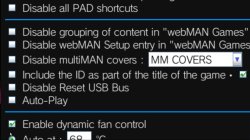
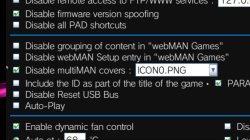
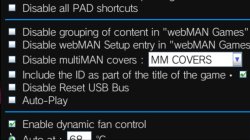
Either check/uncheck the option "Disable multiMAN covers" & choose the correct entry in the combo box next to it.
You will need to save the configuration after making changes then it's safer to reboot. You should refresh XML again after reboot to ensure the covers changes are effective. If you still get anomalies, don't hesitate to delete the wmtmp folder contents again using the delete link besides the profile combo box in the setup page then refresh xml.

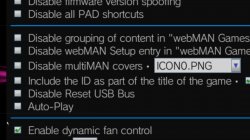
ATM according to your screenshots, you don't use the Launchpad, you disabled the multiman covers but you are trying to use the ICON0.PNG files from the games.

Personally, I prefer to use the multiman covers. It contains the PS3/PS2/PSX covers for most games (EU/US/JP). Any game you install will get its cover from those files. The covers will install into your multiman app directory (Normal, stealthMAN..) & you will never have to bother with covers again.
If you choose to do this, download then install the covers pkg, leave the "Disable multiMAN covers" option unchecked & choose multiman covers in the combo box.
Save/Reboot/Refresh XML.
That's it.
 
Last edited:
I agree, local covers are best. Get the cover pack from the NEW XMBPD if you want (not the old one) and it includes 1000+ more covers I added (thanks to aldostools).
 
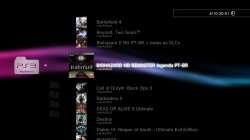
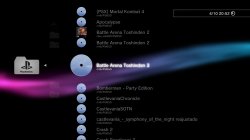
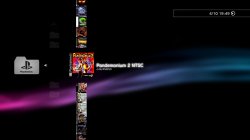
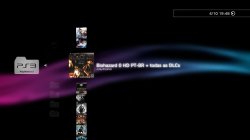
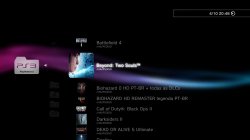
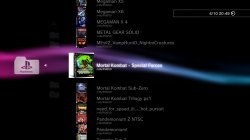
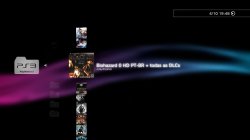
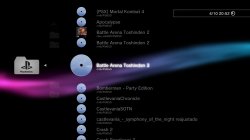
One problem that was happening to me about skins, has a few images here that maybe I can explain better if in setup and MM COVERS enable, is as shown in the pictures
 

Attachments

  • screenshot_2016_10_04_20_50_09.jpg
    screenshot_2016_10_04_20_50_09.jpg
    318.2 KB · Views: 420
  • screenshot_2016_10_04_20_51_41.jpg
    screenshot_2016_10_04_20_51_41.jpg
    461.9 KB · Views: 342
  • screenshot_2016_10_04_20_52_06.jpg
    screenshot_2016_10_04_20_52_06.jpg
    430.1 KB · Views: 355
in webman 1.43.33 I could put ICON0. PNG and don't check the option "Disable multiMAN covers" and had the result we wanted, from the webmaan 1.43.35 I can't have these options
 

Attachments

  • screenshot_2016_10_04_19_52_34.jpg
    screenshot_2016_10_04_19_52_34.jpg
    333.1 KB · Views: 304
  • screenshot_2016_10_04_19_49_35.jpg
    screenshot_2016_10_04_19_49_35.jpg
    426 KB · Views: 322
  • screenshot_2016_10_04_19_48_55.jpg
    screenshot_2016_10_04_19_48_55.jpg
    418.5 KB · Views: 371
Im not sure if you mean Launchpad covers or Webman covers (XMBPD doesn't really have anything to do with covers except for the cover pack pkg which can be downloaded via XMBPD if its webman/MM covers you need). There are multiple settings for webman covers so that could also be the problem, Someone else would be better answer that. If its Launchpad covers you mean then they should be working for you with the full version installed.

If you just mean one cover in particular that didn't show in launchpad I can add it if you tell me the title ID or even the game name/region.
Currently I am no longer using the Launchpad,i not was able to integrate the list of games of webMAN at Launchpad and the covers did not appear, but I really like the Launchpad,your design is very cool, but i dont know why dont worked for me, I used the full version of webMAN as recommended.
 
vsh_menu is installed with the Full Edition of wMM. It's in fact a webMAN-MOD version of the original vsh_menu, much more advanced & interfacing with webMAN-MOD. The plugin is named wm_vsh_menu.sprx It uses skins of sorts so you can change its appearance as well. [emoji6]
You should actually see a pop up on boot telling you wm_vsh_menu is loaded.

The covers feature has seen some changes in implementation in recent versions.
You need to read the changelogs in the webMAN-MOD general thread to get more info.
If you are talking about the Launchpad then @DeViL303 is your man.
Otherwise it all depends what you want to use for covers.
You can use Multiman covers (you could download the big pkg of covers & install it), Online Covers (downloaded directly from the Internet) or the pics extracted from the game itself (icon0...).
You need to choose the appropriate settings in the setup page according to the way you want to get the covers.
Either check/uncheck the option "Disable multiMAN covers" & choose the correct entry in the combo box next to it.
You will need to save the configuration after making changes then it's safer to reboot. You should refresh XML again after reboot to ensure the covers changes are effective. If you still get anomalies, don't hesitate to delete the wmtmp folder contents again using the delete link besides the profile combo box in the setup page then refresh xml.

ATM according to your screenshots, you don't use the Launchpad, you disabled the multiman covers but you are trying to use the ICON0.PNG files from the games.

Personally, I prefer to use the multiman covers. It contains the PS3/PS2/PSX covers for most games (EU/US/JP). Any game you install will get its cover from those files. The covers will install into your multiman app directory (Normal, stealthMAN..) & you will never have to bother with covers again.
If you choose to do this, download then install the covers pkg, leave the "Disable multiMAN covers" option unchecked & choose multiman covers in the combo box.
Save/Reboot/Refresh XML.
That's it.
Thanks you bguerville for your explanation,she was great.
I used a time the covers pkg,because I did not know that was possible automatically download of covers using the multiMAN.
i not understand very well of root,but I'm trying to force myself not to get lost in conversation,i am happy for knowing that there are people like you who have the will to help the next ;)
 
Thanks you bguerville for your explanation,she was great.
I used a time the covers pkg,because I did not know that was possible automatically download of covers using the multiMAN.
i not understand very well of root,but I'm trying to force myself not to get lost in conversation,i am happy for knowing that there are people like you who have the will to help the next ;)
No problem. You are welcome. [emoji6]
Do your testing & if ever you still have problems or have another question, don't hesitate, we are here to help.
 
Thanks you bguerville for your explanation,she was great.
I used a time the covers pkg,because I did not know that was possible automatically download of covers using the multiMAN.
i not understand very well of root,but I'm trying to force myself not to get lost in conversation,i am happy for knowing that there are people like you who have the will to help the next ;)

IRISMAN or multiMAN can be used also to download the covers locally.

webMAN MOD also has the "ONLINE COVERS" option that show the covers from DeViL's server if a local cover is not found.

The covers pkg is another option.

in webman 1.43.33 I could put ICON0. PNG and don't check the option "Disable multiMAN covers" and had the result we wanted, from the webmaan 1.43.35 I can't have these options

If you want to show ICON0.PNG you should put a check mark in "Disable multiMAN covers".
 
IRISMAN or multiMAN can be used also to download the covers locally.

webMAN MOD also has the "ONLINE COVERS" option that show the covers from DeViL's server if a local cover is not found.

The covers pkg is another option.


If you want to show ICON0.PNG you should put a check mark in "Disable multiMAN covers".
But if I do that the ps3 animated covers won't show up, will look like this
PSX are ok, on NTFS drive
 

Attachments

  • screenshot_2016_10_04_20_40_36.jpg
    screenshot_2016_10_04_20_40_36.jpg
    358.2 KB · Views: 500
  • screenshot_2016_10_04_20_48_53.jpg
    screenshot_2016_10_04_20_48_53.jpg
    387.1 KB · Views: 353
  • screenshot_2016_10_04_20_49_17.jpg
    screenshot_2016_10_04_20_49_17.jpg
    491.3 KB · Views: 349
What's the problem?
From your explanations & screenshots, I would say webMAN-MOD works exactly as expected!
The PS3 Games are showing with the ICON0.PNG as required by your setup. When you decide to use ICON0.PNG, you will always see the game icon extracted from the game itself, not the cover.

As to the PSX games, prepNTFS caches the covers in wmtmp along with ntfs shortcuts. Those covers are then used by webMAN-MOD.
 
Last edited:
It's strange that @ricardo does not get any covers with this exact setting though. At least it's this setting in the screenshots post #41.

@ricardo If you notice... the buttons and the brackets near [Slider] and [PS3MAPI] have no text... that means that the settings is corrupted and it is not reading the labels correctly. My suggestion is: to delete /dev_hdd0/tmp/wmconfig.bin and save the settings again.

uaXlsN4.jpg


The technical reason of this corruption is due an important change in the way the settings are stored in 1.43.36:

In earlier builds the webMAN was using the compilation option __attribute__((packed)) to store the settings. As result, the NULL bytes are compressed to use less space. However, that option produce an object code that is larger than the space actually saved (1KB vs 4KB in object code).

So now the settings are stored unpacked, to save approximately 4KB in footprint memory, but it is required to be saved at least one time again.


But if I do that the ps3 animated covers won't show up, will look like this
PSX are ok, on NTFS drive

If you want to show the covers, you should uncheck "Disable multiMAN covers" and select "MM COVERS" or "ONLINE COVERS".

MM COVERS will look up the covers locally and show a disc icon when not found.
ONLINE COVERS will look up the covers locally first and show the online version only when the icon is not found locally.[/Slider]
 
Last edited:
Ok.
I suggested to delete wmconfig already in post #38. This isn't the first user having to do that.

Thanks Aldo for the technical explanation, I really appreciate those. [emoji6]
 
Last edited:
@ricardo If you notice... near [Slider] and [PS3MAPI] there is no text... that means that the settings is corrupted and it is not reading the labels correctly. My suggestion is: to delete /dev_hdd0/tmp/wmconfig.bin and save the settings again.

uaXlsN4.jpg


The technical reason of this corruption is due an important change in the way the settings are stored in 1.43.36:

In earlier builds the webMAN was using the compilation option __attribute__((packed)) to store the settings. As result, the NULL bytes are compressed to use less space. However, that option produce an object code that is larger than the space actually saved (1KB vs 4KB in object code).

So now the settings are stored unpacked, to save approximately 4KB in footprint memory, but it is required to be saved at least one time again.


If you want to show the covers, you should uncheck "Disable multiMAN covers" and select "MM COVERS" or "ONLINE COVERS".

MM COVERS will look up the covers locally and show a disc icon when not found.
ONLINE COVERS will look up the covers locally first and show the online version only when the icon is not found locally.[/Slider]
[Slider]
It will happen that the images.
PSX to NTFS does not show covers.
ps3 ok[/slider]
 

Attachments

  • screenshot_2016_10_04_19_48_55.jpg
    screenshot_2016_10_04_19_48_55.jpg
    418.5 KB · Views: 301
  • screenshot_2016_10_04_20_52_06.jpg
    screenshot_2016_10_04_20_52_06.jpg
    430.1 KB · Views: 331
1.43.35 or 1.43.36 when active ICON0. PNG, automatically disable tag multiMAN covers and that didn't happen in the previous version for me I can only get the desired result in the current summer like this:
delete everything in the folder wmtmp, NTFS/PSXISO change extension jpg or png for PNG.
SETUP enable MM WBMAN COVERS.
Run prepNTFS 1.15. Have to put PNG, because if it doesn't work, I tested several times and I could only solve so I don't know if it's the right thing to do. ...
 

Attachments

  • screenshot_2016_10_04_20_50_09.jpg
    screenshot_2016_10_04_20_50_09.jpg
    318.2 KB · Views: 284
  • screenshot_2016_10_04_19_48_55.jpg
    screenshot_2016_10_04_19_48_55.jpg
    418.5 KB · Views: 267
  • screenshot_2016_10_04_19_49_35.jpg
    screenshot_2016_10_04_19_49_35.jpg
    426 KB · Views: 262
Back
Top