
PS3 Developer Aldostools does it again with yet another impressive update to webMAN MOD (+ wM VSH menu), as we celebrate the 9th anniversary of the PS3. The homebrew dev has been detailing his progress and supplying the users in the forums here at psx-place.com with his latest update and progresses of this update in recent days. With this update a number of impressive features and changes have been applied to the plugin. The VSH Menu continues to evolve adding a fully functional File Manager and also a new Plugin Manager from the VSH Menu [break]ss[/break]. Which is a very cool feature to see added to wM VSH Menu by aldostools.. Additional details about the update and its progress that took place in recent days here in the psx-place.com can be seen below in the information provided below:

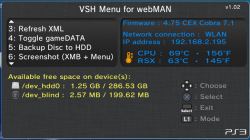
via Github (Matsumot0 said:Changelog for webMAN MOD v1.43.16
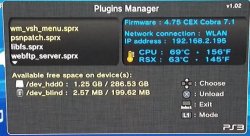
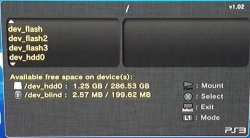
- Added File Manager & Plugins Manager to VSH Menu
- Added Cut/Copy/Paste to File Manager
- File manager & /cpursx.ps3 now show if progress of copy
- Added support to copy additional file types (including coldboot, .rco and others)
- Syscall 8 is now disabled if webMAN is unloaded and syscalls were disabled
- /dev_bdvd now shows the mounted file
- icon0 is shown in file manager when possible
Aldostools (via psx-place.com forums on 11/4/15) said:Build 1.43.16 is on my server with the following changes:
- VSH Menu now uses http network interface to execute webMAN commands (it must be faster & some commands must be now compatible with vanilla edition)
- Added option to browse URL on PS3 to the slider menu (mobile.html)
- webMAN.xml now open the web pages using webKit, except "CPU & RSX temperatures" that uses silk mode.
- Unmount & Insert Disc now auto-closes
- In Lite Edition: Added: remove syscalls. Removed: fix game & support for fake isos generated by IRISMAN: ntfs[FILE]. Binary is now smaller.
- Video Recording now can use custom settings for audio & video formats/size/bitrate.
- Use R2+SELECT+L3 to change the settings values
- Use L2+SELECT+L3 to choose the settings to be changed
- Current recording video & audio formats now are displayed in the popup
- The video & audio formats can be configured via /setup.ps3
- Removed video_rec.sprx from updater
- Added option to disable custom syscalls 200, 201, 203, 204 (ccapi) through syscall.ps3mapi.
- Syscall 1022 (prx loader) is now disabled by [online] tag and R2+/\ combo.
- SRC: Moved some files to cobra/unused
- SRC: Changed 8 to constant SC_COBRA_SYSCALL8 in Cobra modules. So it can be changed easily to another syscall number in the future.
- [BGM] toggler is now shown in /cpursx.ps3 if a game is running. (Only available in the test build. It may hang the console returning to XMB)
- Test build: Added /sysbgm.ps3 and swap kernel (not included in the updater)
In a side note: I have been trying to add ntfs library to the project (to support FTP transfers to/from NTFS). But the project throws errors when I compile it. Maybe some dev could assist me in make it compile.
Now the question is: should I also add syscalls 200, 201, 203, 204 (ccapi) to the combo that disable the syscalls?
IMO they should be disabled too for safer access to PSN... but if I do it probably I'll have more haters than usual... especially the cheaters.
 |  |
Downloads:Aldostools (via psx-place.com forums on 11/11/15) said:BTW It's party time!!:peek: :present: :dcheese: :dancestraw: :chewy: :dchick: :ttree dance:
Today is 9th PS3 Anniversary and the birthday of a great MAN that did a lot for us... in celebration I'm releasing this gift for everyone
http://aldostools.org/temp/test/wm_vsh_menu.sprx
It's a test build of VSH Menu for webMAN 1.02...
What's new? It has a plugin manager and a file manger that let you browse the file system, mount files and folders, copy to/from hdd0/usb000 and delete files.
To delete files/folders use L2+SQUARE.... some files like .rco and coldboot are flashed directly, instead of copy them to usb0.
Enjoy it!... and please report any issue







