PS3 What can I do if my PS3 is on OFW 4.83

Its hard to understand you lol, google isn't the best translator lol.

If your on 4.82 OFW then all the HAN feature's should work for you and I would personally would back up these files in case anything happens.
 
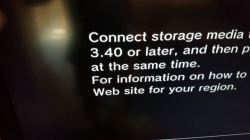
Impossible that this is causing the issue. The game backup is not recognising the firmware version if your getting this message.

As you have seen from the pics i have posted, all my games are backed up on my PS3. So something else is causing the problem, possibly the firmware itself or because Multiman is 4.82 mot 4.83. I haven't updated my firmware to 4.83 as I use REBUG and there is no need to as I can still play online with 4.82.2 D-REX I personally find all the other firmware's are rubbish after i have ripped them apart file by file and went through the code and have lots of compatibility issues and bugs.

Personal I feel these first 4.83 firmware's were rushed out after the Official update and people panicked about loosing PSN access and rushed to update to a 4.83 CFW.

I have never lost PSN access with REBUG or had any issues with game backups or getting errors like you are. I stayed on 4.80 D-REX until 4.82.2 D-REX was released earlier this year. (2 years on a lower firmware and never lost PSN access without using a proxy) No issues with loading and playing backups.

Again I ask what 4.83 Firmware are you using?


And when the game freezes go back on it it just shows update again
 
  1. This thread has been mislabelled. And is actually about, i think as the topic has changed so many times, CFW 4.83 not HAN.
As far as i know if you are on 4.83 OFW and use HAN many of the webkit xpliots are patched and not working on 4.83OFW. you need to stay on 4.83OFW to use HAN propery, I don't know as i don't use HAN.

Please refer to this tread for info:

http://www.psx-place.com/threads/official-ps3-firmware-system-updates-logs.57/


So now I'm poting the 2 games back to HDD witch takes 1 hour then going to delete them again and see if it loads again without displaying a update message
 
Its hard to understand you lol, google isn't the best translator lol.

If your on 4.82 OFW then all the HAN feature's should work for you and I would personally would back up these files in case anything happens.
 

Attachments

  • 41696F46-C91F-440A-848F-46CAB2E0BD94.png
    41696F46-C91F-440A-848F-46CAB2E0BD94.png
    2.6 MB · Views: 346
You still haven't answered my question?????
I can't help if you just keep giving me vague random one line comments and not answering what I am asking you.

I will ask one last time as I have my own PS3 project to finish and release today.

What Custom Firmware are you using? FERROX, Overflow or Spy????????


From that pic your firmware or HDD is corrupted. Before I help anymore I need to know what firmware your using as this could be part of the problem. Either way from that pic you need to re-install you most firmware not the game!

This problem has nothing to do with the game. Now please answer my question.
 
You still haven't answered my question?????
I can't help if you just keep giving me vague random one line comments and not answering what I am asking you.

I will ask one last time as I have my own PS3 project to finish and release today.

What Custom Firmware are you using? FERROX, Overflow or Spy????????


From that pic your firmware or HDD is corrupted. Before I help anymore I need to know what firmware your using as this could be part of the problem. Either way from that pic you need to re-install you most firmware not the game!

This problem has nothing to do with the game. Now please answer my question.


Rebug 4.81 DEx
 
Thank you.

First of all you need to re-install your firmware. You should not get any problems with this firmware but it sometimes doesn't install correctly so Re-install it 2 times in a row. and it might be the mods as well if you don't have an RTM tool installed. Either the one you have or download and use the one I the updated REBUG 48.2.2 D-REX or REX up to you.

Make sure that QA flags are enabled in rebug toolbox before you do this. After you have reinstalled your firmware 2 times in a row to make sure its done correctly. I will guide you through the process of all the installs and patches and help you set your PS3 up exactly like I have mine set up.

Also while you are installing the Firmware make sure you have download or have install these apps:
  1. MultiMAN v4.82
  2. PSN Patch 2017.02/B
  3. REBUG Toolbox
  4. CCAPI Control Console API 2.80 (DEX) by Enstone (MUST HAVE FOR BLACKS OPS 2 MODDING!!!)
  5. IDPS Set 0.88
After you have done all this let me know.

 
Thank you.

First of all you need to re-install your firmware. You should not get any problems with this firmware but it sometimes doesn't install correctly so Re-install it 2 times in a row. and it might be the mods as well if you don't have an RTM tool installed. Either the one you have or download and use the one I the updated REBUG 48.2.2 D-REX or REX up to you.

Make sure that QA flags are enabled in rebug toolbox before you do this. After you have reinstalled your firmware 2 times in a row to make sure its done correctly. I will guide you through the process of all the installs and patches and help you set your PS3 up exactly like I have mine set up.

Also while you are installing the Firmware make sure you have download or have install these apps:
  1. MultiMAN v4.82
  2. PSN Patch 2017.02/B
  3. REBUG Toolbox
  4. CCAPI Control Console API 2.80 (DEX) by Enstone (MUST HAVE FOR BLACKS OPS 2 MODDING!!!)
  5. IDPS Set 0.88
After you have done all this let me know.

Well it's something to do with the version in muitman but I bypassed it and if it freez then go back on game get update message and can't update when the game is updated because I can go online so what's the problem because it's going to Brick my system
 

Similar threads

Back
Top