Why isnt there more XMB mods!

I did for a friend for several different firmwares, works fine, no problem, the XMB auto-adjusts properlly for the new width

From memory...
Is needed to edit xmb_normal.rco ...and... xmb_ingame.rco (or whatever are named one for main xmb and the other for ingame)
In the rcoxml generated when you extract the contents of the .rco locate the line with the label named "xmenu", it has an attribute named "itemscount" with the value 0xa

Under the line with the label "xmenu" you have his "childrens", one line for every child (settings, photo, video, music, game, etc... 10 lines in total)
You just need to delete the lines you dont want to be displayed, and then modify the value 0xa

The 0xa is the number of main icons in XMB (0xa = 10 by default)... depends of how many you are going to delete you need to reduce it
For my friend i removed: photo, music, video, network, psn, friends (intended to be a "offline gaming only" PS3, heheh)


Btw
The problem you mention about a trailing "blank" space is a mistake, is the consequence of deleting one of the childrens of "xmenu" but not reducing the value 0xa of the attribute "itemscount"
So the line where "xmenu" is defined is reserving an space in the screen bigger than the humber of his childrens, is not a bigger problem though (no firmware crash or anything bad noticed) but is wrong

Very interesting, Thanks for that explanation.

I have seen a few people mention that the patch for removing a category (TV I think) in MFW Buildier doesn't do the job correctly and leaves a blank space, I wonder could a new working patch be developed for that by someone here. Removing entire categories is something I have seen people asking about..
 
LOL, Im just reading through some warnings in the explore plugin full rco, its quite funny:
Avoid prolonged use of the PS3™ system. Take a 15-minute break during each hour of play.
Avoid prolonged use of the DUALSHOCK™3 Wireless Controller. Take a break at about 30-minute intervals.
Use in a well-lit area and keep as far away as possible from the television screen.
Avoid large screen televisions. Use the smallest television screen available.
Stop using the system immediately if you begin to feel tired

Is there anyone out there who actually pays any attention to this shit? Imagine someone Sitting as far away as possible from the smallest TV available, with timers to keep track of their breaks.."oh quick..its been 30minutes, need to give my hands a break from the controller".."but dam..I need to stop again in 20minutes as Ive been looking at the TV for too long!". :D
 
LOL, Im just reading through some warnings in the explore plugin full rco, its quite funny:


Is there anyone out there who actually pays any attention to this shit? Imagine someone Sitting as far away as possible from the smallest TV available, with timers to keep track of their breaks.."oh quick..its been 30minutes, need to give my hands a break from the controller".."but dam..I need to stop again in 20minutes as Ive been looking at the TV for too long!". :D
I only payed attention when i read the epilepsy-warning, but thanks to the removal in my current cfw i can continue playing while having a seizure :);)

BTW you should edit these warnings slightly (maybe just turn it into the opposite or something)... i might start reading them :D
 
I only payed attention when i read the epilepsy-warning, but thanks to the removal in my current cfw i can continue playing while having a seizure :);)
Yeah Im glad that warning is gone too, cos I actually have epilepsy (not photosensitive thank god) :)
 
Yeah Im glad that warning is gone too, cos I actually have epilepsy (not photosensitive thank god) :)
Sorry to hear that, i think you actullay mentioned it before (or someone else here has it too). I had a bad feeling you (or somebody else) would be offended by my joke. But i wasn't joking about the condition but how $ony thinks people with photosensitive epilepsy would continue playing if it wasn't for that warning.
Also sorry for going offtopic :confused:
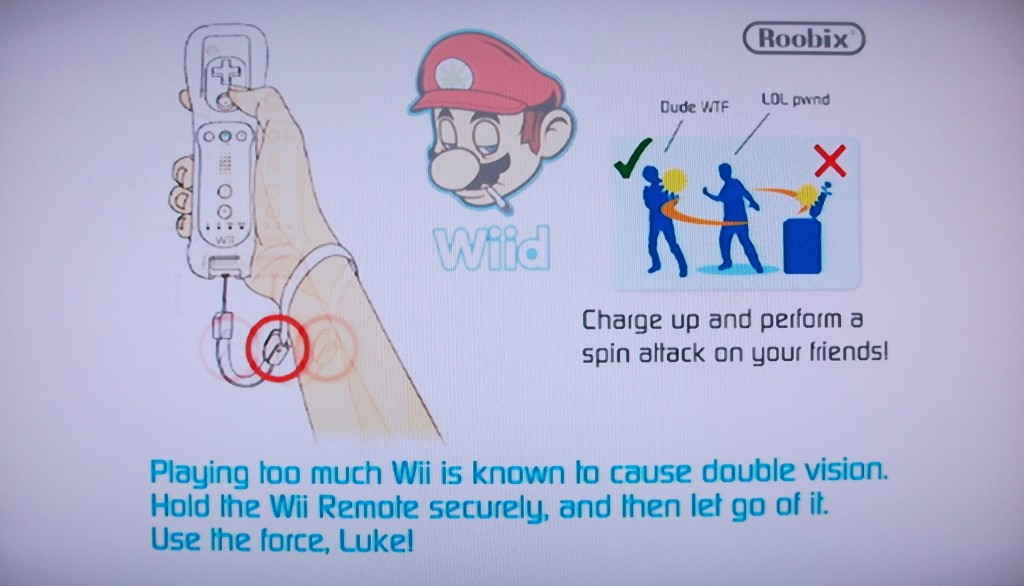
B2t: Maybe changing those warnings would confuse some users though, but i was thinking about this:
DSCF1053-1024x586.jpg

(found in Mario Kart Black)

It took me and a friend quite a while until we could start playing, 'cause we laughed so hard :D
 
Sorry to hear that, i think you actullay mentioned it before (or someone else here has it too). I had a bad feeling you (or somebody else) would be offended by my joke. But i wasn't joking about the condition but how $ony thinks people with photosensitive epilepsy would continue playing if it wasn't for that warning.
Also sorry for going offtopic :confused:
B2t: Maybe changing those warnings would confuse some users though, but i was thinking about this:
DSCF1053-1024x586.jpg

(found in Mario Kart Black)

It took me and a friend quite a while until we could start playing, 'cause we laughed so hard :D

I remember that wii photo. lol my bootup screen on the wii looks like the wii is smoking a joint as there's smoke coming from the disc slot. ;)
 
I wonder could a new working patch be developed for that by someone here. Removing entire categories is something I have seen people asking about..
i think there could be something done about modifying main xml in mfwbuilder...(not sure though)
btw, i have done this to my mfw as well for ingame xmb, where i have removed every category except game, settings and photo like the one from jfw firmware. there it was buggy, cause they didn't modified this rco value/items and i only got to know about this from @sandungas
 
removing entire categories - the patch is messed up. u can see an image of it in my ps3 tutorials thread. I did the patch. it removes the category, but the space where it's sitting is still there, so u can scroll over to it iirc, just nothing will be displayed. u may be able to remove it with the icons.qrc file. that has values for where the icons sit. that's just a guess though. the original patch is in a sprx file, not rco or xml.
 
removing entire categories - the patch is messed up. u can see an image of it in my ps3 tutorials thread. I did the patch. it removes the category, but the space where it's sitting is still there, so u can scroll over to it iirc, just nothing will be displayed. u may be able to remove it with the icons.qrc file. that has values for where the icons sit. that's just a guess though. the original patch is in a sprx file, not rco or xml.

Well you could update the tutorial now maybe? @sandungas has posted the correct info for removing categories entirely and properly, see the last page.
 
the last page of what? the hex edit was taken from mfw which has a lot of incomplete patches. I think @kozarovv sent me the hex change in the tutorials. the photo isn't in one of the tutorials though, just someone asked me if I knew how to do it. I could write a tutorial on hex editing sprx sometime though, and I could use the removal of categories as the example. it could be consolidated with the removal of items on the xmb via xml edits.
 
the last page of what? the hex edit was taken from mfw which has a lot of incomplete patches. I think @kozarovv sent me the hex change in the tutorials. the photo isn't in one of the tutorials though, just someone asked me if I knew how to do it. I could write a tutorial on hex editing sprx sometime though, and I could use the removal of categories as the example. it could be consolidated with the removal of items on the xmb via xml edits.

I meant the last page of this thread but forgot that you might have it set to show more or less posts. Check out post 40 of this thread, sandungas pretty much explains how to do it via RCO edit. I havnt tested it but I will some day when im not busy,
 
I meant the last page of this thread but forgot that you might have it set to show more or less posts. Check out post 40 of this thread, sandungas pretty much explains how to do it via RCO edit. I havnt tested it but I will some day when im not busy,

I'll try it out when I'm near my ps3 again. I'm still dumping klicenses, so I'll see what happens when I make that edit while I'm doing that. I seem to recall that xml line. it's in the main xml, the same one with the clock edit (digital and box) r located.
 
Btw, trying to answer the thread title, the reason why there are not so much xmb mods is because the brick risk

For some files the brick risk is controlled, but when you start digging in how the firmware works you will realize there are lot of interconnections between different files and is a mess

Without knowing what exactlly does every file is risky to "put your hands on it", and because the firmware is a mess is hard to know if what you want to modify is critical for the console to boot (maybe doesnt looks like critical but is related with some function you could not even imagine)

To solve this at the beginning of the scene there was a tool made by jaicrab named "usb firmware loader" iirc that was able to load a complete set of of dev_flash files from usb
But at some point it felt in the forgiveness and stopped being updated for newer firmwares

So well... not having a tool like that is one of the reasons why not much people started messing with the XMB


--------------
But if you compare with the start of the PSP scene we should shy
In PS3 if you brick at least you can unbrick with a flasher, but in PSP installing a flasher was an oddisey and very expensive, but still there was lot of people risking a permabrick just for trying some experiment
With pandora battery and the CTF themes this brick risk was reduced a lot in PSP scene, but before that all mods was a bit kamikaze, lol
 
Last edited:
yeah, there is that brick risk, but u do have a safety net for most of them with the recovery menu. I've modified a lot of things with the ps3. it's not so simple with say the 360 and the wii. I have a modified boot animation on the 360 which I've posted. one of my friends, who fixes and modifies 360s, said that a lot of people's including his own 360 - the NAND got corrupted from using that. that's never happened to me though. the system works perfectly. that's, as I told @bguerville , the reason I made the same temp thresholds on both it and the ps3. the wii, which loads one ios at a time, is especially fragile. u have Xell/Xellous on the 360 which acts like a recovery menu, and u have priiloader on the wii which does the same. anyway, I modified the boot screen as well as the os to turn it into a dark menu. I've never had issues with that either, but I've heard there's a brick risk with it. I didn't realize that until after the fact. sorry...having trouble sleeping...
 
there's nothing like that with the vWii on the Wii-U, but it's unlikely u'll brick if u make a NAND backup and backup all IOS. though, now u can use redNAND to backup the Wii U. it's basically emuNAND, but it uses the smallest NAND chip size available to backup the system. I haven't tried that yet. I will this weekend though. again, sorry...I need to force myself to sleep. lol
 
Very interesting, Thanks for that explanation.

I have seen a few people mention that the patch for removing a category (TV I think) in MFW Buildier doesn't do the job correctly and leaves a blank space, I wonder could a new working patch be developed for that by someone here. Removing entire categories is something I have seen people asking about..

I'll write a tutorial extension in my removing content from the xmb tomorrow. the additional categories don't bother me. what's interesting is possibly adding more categories. I forgot the sprx responsible for enabling each category. it's probably in my ps3 tutorials thread though, 'cause I remember using the mfw patch for that particular sprx.
 
I used jaicrab's tool ages ago so I know I have it somewhere.. Not sure if source was ever available to update it though...
I don't think it was ever update past 3.55 (and a simple resign doesn't work) & as far as I remember he never released source

I'll write a tutorial extension in my removing content from the xmb tomorrow. the additional categories don't bother me. what's interesting is possibly adding more categories. I forgot the sprx responsible for enabling each category. it's probably in my ps3 tutorials thread though, 'cause I remember using the mfw patch for that particular sprx.
Awesome cause I love your tutorials
 

Similar threads

Back
Top