PS2 wLaunchELF Release Thread

Hi sp193,

thanks for the speedy response, i'm a bit more up to speed now. iv'e soft modded my MC now and just need to update LaunchELF to one that supports a 2tb hdd (which everything appears to be pointing me to a 4.3a version), I just got confused and thought the "2018/07/23" would be the latest and greatest to use. my bad ^_^.
 
Hi sp193,

thanks for the speedy response, i'm a bit more up to speed now. iv'e soft modded my MC now and just need to update LaunchELF to one that supports a 2tb hdd (which everything appears to be pointing me to a 4.3a version), I just got confused and thought the "2018/07/23" would be the latest and greatest to use. my bad ^_^.

The so-called "2TB edition" is outdated - all latest uLE builds has 2TB support since a while.

Edit : last builds are here : http://www.psx-place.com/resources/wlaunchelf.713/ - but I don't know which one is considered as the latest stable one.
 
This is a bit sad to say, but I found a 5-year old bug in USBHDFSD, which might explain the strange, low performance when reading small amounts of data, that we've been getting for a long time. :(
On the bright side, it doesn't put anybody's data at risk, just that the cache has been more or less useless since the day the mistake was made. Due to this mistake, the cache could not evict the least recently used block. In fact, it sometimes selected a recently used block, causing cache thrashing.

All because of this little boi that spawned in commit 53385fb, made in late 2014:
unsigned int minTax = 0x0FFFFFFF;

As for why this extra "unsigned" became a problem, the explanation goes deep, deep within the C standard, to what happens when we assign a signed value to an unsigned variable and interpret it. @_@

Some numbers, when deleting a 128MB file on my 4GB thumb drive (more hits = reduced reading/writing from the USB device):

Bugged:
  • Misses: 65643
  • Hits: 594
Fixed:
  • Misses: 108
  • Hits: 66129
EDIT: as USBHDFSD will only use the cache for reading & writing very small amounts of data, "small amounts" refers to 1 <= n <= sector size (typ. 512 bytes). It's also used for filesystem-level operations, hence why its problems haven't really been too obvious (until we delete/rename files).

Yes, I waited about 30 seconds but no more because for a file of 8MB (VMC) or 64MB (VMC too) it's the same, wLE crashes and the LED of the key USB remains flashing. It is too long !!! uLE-4.42ev is much faster in this kind of removal regardless of the size of Clusters (key 16, 32, 64 GB). These keys have been formatted by my Win-7 but the problem is the same if it is the Mac-Mini that does.
I worked in Industrial IT in a large French company and I was also a good "hacker" in the past.

Thanks for bringing this up. Although I think it is really strange that we're only feeling its effects in recent years, when the bug first appeared sometime in 2014. :eek:
 
Last edited:
This problem should affects also users with org NA, NA with SATA mod, 3rd party NA?
By latest wLe, you mean 1c8a005 (04\01\2019)?

Yes, that version but it also happens with the last 8 versions :(

I have Sony NA with SATA mod, I haven't tested other configurations.
 
Yes, that version but it also happens with the last 8 versions :(

I have Sony NA with SATA mod, I haven't tested other configurations.

I have org NA without any modifications.
I can enter HDD Manager in wLe 1c8a005 (04\01\2019).
Is there anything particular that I can also test?
 
I feel like it's related to using a large SATA HDD with many partitions because if I remember correctly it works fine with my small 40Gb testing SATA HDD.

But I will check again later.
 
SCPH-50002

Ah ok, so our setups are slightly different… With the 5000X you can do everything :D ...Unfortunately with my 39004 I can't do nothing for Ps1 games swapping :(

I tried the Wlaunchelf version from FMCB 1966, it's good for your test?? I launched the HDD Manager and it's all ok.
 
I tried the Wlaunchelf version from FMCB 1966, it's good for your test?? I launched the HDD Manager and it's all ok.

Hmmm that's weird.

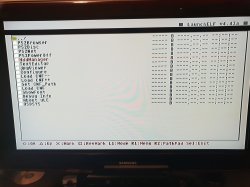
With the last 8 builds of wLE when I launch HDD Manager it reads HDD information then scans maybe 1/3 of the partitions and the console locks up like this:
Webp.net-resizeimage.jpg

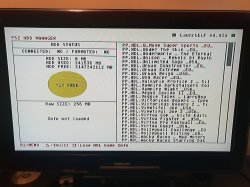
If I use wLE 04/07/2018 commit 59a4962 it reads HDD information, scans all the partitions and I get into HDD Manager but it looks like this:
Webp.net-resizeimage-1.jpg

The HDD information is incorrect, it says HDD Connected NO / HDD Formatted NO, it only shows the last 120 partitions that were scanned and if I press Triangle or Square the console locks up.

Sorry about the crap photos, I moved all my consoles into another room and haven't set up my capture device yet.
 
Are you using LaunchELF from FMCB? AKuHAK's buildbot does not always have the latest PS2SDK, so I would appreciate it if you could double-check with the LaunchELF bundled with FMCB v1.966.

Can I confirm with you that OPL is able to correctly list and access all games, even games that exist towards the end of the HDD (if you can tell)? If so, then it means that the APA driver we have is likely not the problem, and the fault is likely within LaunchELF.
I have not changed how the partition manager works, so perhaps it is a long-running problem. You might have too many partitions and LaunchELF could be missing the necessary error-handling.

(Particularly how the connected & formatted status are both "NO", when this status is determined by HDD.IRX at boot and the HDD was accepted by the system).

I'm still using Ule 4.42d 'cause it's pratically bug free :D

Only visibly so. Under the hood, it has problems and does not actually support the HDD unit for itself.
He's also unable to use such an ancient version of LaunchELF because it used to not support such large disks.

Personally, I believe that the old USB drivers from back then also had problems. At least with non-ASCII filenames, as my USB disks used to get corrupted by it. I do know that the old USB drivers lacked sufficient error handling, which sometimes caused LaunchELF hang as well. It will also have this bug, unless it is not actually possible for this to be a problem (but nobody told me otherwise).

Damn I am too late for prototype #4. Game list cache is really sweet! also, new APPS scheme seems more practical too, sad that OPL proto #4 is down, i couldnt test it.

The link was replaced a few times, due to the file being changed: https://www.sendspace.com/file/vpnnae

But is really nice, I wouldnt mind moving all my ELFs to the APPS folder, also i read that opl_apps,conf is still supported, so its good for people who dont want to mess with their apps list, which is not my case. I hope these changes are merged in main OPL repo and available through OPL beta builds bot.

Thanks for the plenty of improvements to OPL )

Thanks. For now, backward-compatibility for opl_apps.conf does not seem to work properly, but this will be fixed before the feature is merged into OPL.
 
Last edited:
Are you using LaunchELF from FMCB? AKuHAK's buildbot does not always have the latest PS2SDK, so I would appreciate it if you could double-check with the LaunchELF bundled with FMCB v1.966.

Tested with wLE 04/01/2019 commit 1c8a005 bundled with FMCB v1.966, the issue is present.

Can I confirm with you that OPL is able to correctly list and access all games, even games that exist towards the end of the HDD (if you can tell)? If so, then it means that the APA driver we have is likely not the problem, and the fault is likely within LaunchELF.

As far as I can tell, OPL can list and access all games.

I have not changed how the partition manager works, so perhaps it is a long-running problem. You might have too many partitions and LaunchELF could be missing the necessary error-handling.

(Particularly how the connected & formatted status are both "NO", when this status is determined by HDD.IRX at boot and the HDD was accepted by the system).

I think you are right because if memory serves, I formatted the HDD with uLE bundled with FMCB v1.953. This was back when OPL wasn't properly creating the +OPL partition on internal HDD. (I remember @jolek posting about it in the Official OPL thread on PSX-Scene and then you fixing it).

So with a freshly formatted HDD I went into HDD Manager, created the +OPL partition and made it 2048Mb. Everything seemed fine.

After installing all the games, if I tried to launch HDD Manager it would scan all the partitions and then lock up when it got to the last one.
 
I think you are right because if memory serves, I formatted the HDD with uLE bundled with FMCB v1.953. This was back when OPL wasn't properly creating the +OPL partition on internal HDD. (I remember @jolek posting about it in the Official OPL thread on PSX-Scene and then you fixing it).

Oh man, it was so long ago that I was having a problem with finding it:
http://psx-scene.com/forums/f150/op...ions-releases-156209/index13.html#post1214408.
It has been fixed in r1023:
http://psx-scene.com/forums/f150/op...ions-releases-156209/index16.html#post1215234.
 
Tested with wLE 04/01/2019 commit 1c8a005 bundled with FMCB v1.966, the issue is present.


As far as I can tell, OPL can list and access all games.


I think you are right because if memory serves, I formatted the HDD with uLE bundled with FMCB v1.953. This was back when OPL wasn't properly creating the +OPL partition on internal HDD. (I remember @jolek posting about it in the Official OPL thread on PSX-Scene and then you fixing it).

So with a freshly formatted HDD I went into HDD Manager, created the +OPL partition and made it 2048Mb. Everything seemed fine.

After installing all the games, if I tried to launch HDD Manager it would scan all the partitions and then lock up when it got to the last one.

Please try this version: https://www.sendspace.com/file/6fcsxo
Indeed, there was no limit on the partition count, even though it can only record 500 (main) partitions. I have enforced the limit and increased the maximum to 600.
 
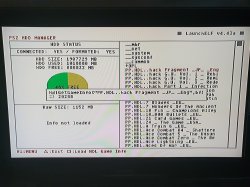
It seems to work perfectly now. (Although like you said it only lists the first 600 partitions).

Webp.net-resizeimage-2.jpg

Also, I like the way it now only loads the HDD Modules if required. That's a nice touch :)
 
It seems to work perfectly now. (Although like you said it only lists the first 600 partitions).

Does this mean that you got "HDD Information Read (truncated)" instead of just "HDD Information Read", after all partitions are loaded?
I chose 600 because we have to draw a line somewhere, but I haven't decided if we needed it as high as 800, for example. I know you wrote that you have approximately 1100 partitions, but how many games do you have installed?

Also, I like the way it now only loads the HDD Modules if required. That's a nice touch :)

Thank you guys for reminding me how LaunchELF was supposed to be like! At some point, it was loading the HDD modules all the time, as it was changed to always access the HDD.
 
Does this mean that you got "HDD Information Read (truncated)" instead of just "HDD Information Read", after all partitions are loaded?

Yes, "HDD Information Read (truncated)"

I chose 600 because we have to draw a line somewhere, but I haven't decided if we needed it as high as 800, for example. I know you wrote that you have approximately 1100 partitions, but how many games do you have installed?

I think it's fine, it's only necessary to access the +OPL partition and I think everyone should create it before installing games. I did it because I remember reading it somewhere a long time ago. (Probably PSX-Scene).

I was only reminded about this bug because @TnA and @Peppe90 were discussing having the + OPL partition at the end of the drive to test loading times.

1100 games installed. I have a lot of those CD games made by low budget publishers.

Thank you guys for reminding me how LaunchELF was supposed to be like! At some point, it was loading the HDD modules all the time, as it was changed to always access the HDD.

It's much better now IMO because the majority of the time I'm booting ELFs from USB and MC, especially when testing.
 

Similar threads

Back
Top