PS2 wLaunchELF Release Thread

Is there anyway to change timezone in wLe?
I mean when I set GMT+1:00 timezone in system settings, save any file e.g. at 8:00,
wLe will show me "delay" that the file was created 16:00 (+8 hours).

8.00 (in BOOTROM)-- PS2 System Configuration
16:00 in wLE ---------- 8 hours difference

This question was originally inspired by @mrozilla.

I remember that similar situation is with Linux.
In BIOS I have 6:00 while OS is showing me 8:00.

The only difference is that I can change time zone in Linux,
while I cannot do it in wLe.
 
Last edited:
It may be more complicated than that.

Since the PlayStation 2 was from Japan and they did not set the clock to UTC, the time is saved in JST (UTC+9). A number of IOP device drivers use the input from the RTC as it is, which is in JST.

On file systems like FAT, the file timestamps do not record the timezone and it is assumed that the timezone is the same as the host's. So if you save a file with your PC (with UTC+1) and read it on the PS2 (UTC+9), the timestamp will be 8 hours behind. And vice-versa.

So as you can see, even if one adds code to the UI to display the time in the timezone set by the user, there is ambiguity over the timezone of files on some devices like USB disks. This is not a problem for some other (newer) filesystem, like NTFS etc.
 
Can be added check or something to wLE that will prevent me to copy more data (obviously it stops when limit reached) than is available in partition/device? Also, was FTP finally fixed? I heard different opinions. :D
 
There is any chance to implement icon support from LBFn? Project is still in development? If yes, would be awesome to also support text *.sys and partition attribute area injection.

Any chance to maybe also allow user to delete or rename "__*" and displaying "__net" like in kHn mod?
 
Hi, i'm having a problem with ulaunchelf 4.43a, the version that came with FMCB 1.966. I'm trying to copy a .psu save file into VMC, but when i try to psuPaste it inside the VMC .bin, the console freezes. The workaround i got was to decompress the .psu to my memory card and then copy the save to VMC, and this worked flawlessly. The problem is that now i have to do the same with a larger save file, and don't have space in the memory card to decompress it (~4MB). I've also tried to decompress it in the usb stick, but it freezes too.
 
  • Like
Reactions: TnA
PSU doesn't use any kind of compression. So can You say that You packed or unpacked *.psu. ;)

Could You try the same procedure but with VMC located at "mass:/" (or "hdd0:/" if You doing it on USB)?

While this will not fix Your problem, there is alternative solution: import *.psu into *.vmc on PC (via i.e Dual MyMC application).
 
  • Like
Reactions: TnA
PSU doesn't use any kind of compression. So can You say that You packed or unpacked *.psu. ;)

Could You try the same procedure but with VMC located at "mass:/" (or "hdd0:/" if You doing it on USB)?

While this will not fix Your problem, there is alternative solution: import *.psu into *.vmc on PC (via i.e Dual MyMC application).

Yes, what i tried to say was unpack.
The VMC is located in internal hdd, first i tried this way, it freezed. After a few tries i moved the .bin to my usb stick, try to do the same procedure and freezed again when unpacking.
The VMC i created is 8MB and my MCs are are original 8MB
 
Forgot to mention: if Dual MyMC will not launch for You (i.e on my Win7 x64 doesn't) try older project: mymc v2.6 on which is based. However, it support only ECC cards, while OPL using none-ECC cards. Those can be converted by one of the tools ffgriever wrote in ancient times (just drag & drop VMC on app and file should be "enlarged" by error correction codes). I forgot the app name but is in PS2 AIO under memory card tools category (in Windows section of course).

You could also check if last version of "old uLE" (v4.42d) have the same issue.
 
  • Like
Reactions: TnA
Forgot to mention: if Dual MyMC will not launch for You (i.e on my Win7 x64 doesn't) try older project: mymc v2.6 on which is based. However, it support only ECC cards, while OPL using none-ECC cards. Those can be converted by one of the tools ffgriever wrote in ancient times (just drag & drop VMC on app and file should be "enlarged" by error correction codes). I forgot the app name but is in PS2 AIO under memory card tools category (in Windows section of course).

You could also check if last version of "old uLE" (v4.42d) have the same issue.

Ok, thank you very much for your help!!
 
AFAIR "MyMC Dual" works on Win10 as well!

I already had Win10, when the app got released and either it just works or it worked with compatibility-modes.
 
So I've been trying to tonyhax, even though I've UniROM+caetla just like to compare and 'pimp' my slim..?

The author inform that some wLE may corrupt save USB>memory card and to go use old elf, still I can't get tonyhax to run

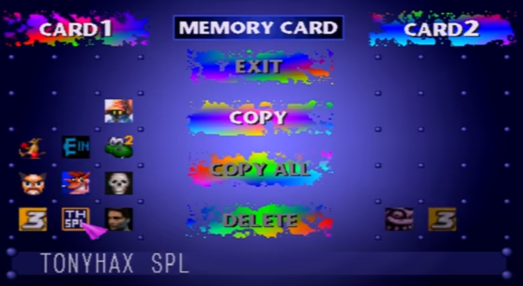
I did notice a corrupted save don't know if maybe was always there but only saw the blue block through the PS2 BIOS? But I MC Annihilator twice re-format and I've THPS3 NTSC and the SPL raw saves in the card and just freezes on Create Skater even to my fat 7501 PS1 model it does not budge
 
Loader and/or save exploit haven't icon so it is normal that PS2 Browser will show it as corrupted data. Just FYI.

Last old uLE was 4.42d on which PSX saves imported/exported from/to USB works for sure.
 
Nope the corrupted file was wrong identifier wrong SLUS not related to tonyhax and both of them appear fine just won't execute

Will try v4.42d tomorrow and have THPS4 on its way
 
Corrupted Data is a way how OSDSYS displaying icon when cannot parse it... In case of PSX saves, the bitmaps written on specific addressess on save. In case of PS2 saves, the 3D icons (*.ico/*.icn) and/or meta files (icon.sys) describing them (name, light etc.).
 
Are you using a PS1 or a PS2 memory card for tonyhax?
This exploit will not work with a PS2 memory card.

With a PS1 memory card it should look like that:
hax2a.png


EDIT: Never mind, I did not read the full story about this issue.
 
Last edited:
DdfHGRy.jpg


But might be being corrupted somehow? No idear, hope better luck when THPS4 gets here

EDIT: Sheesh, so I went to uLE v4.42d for copy tonyhax and THPS3 still chokes on tryna exploit >.<
 
Last edited:
I have a strange problem where anything launched by wLaunchELF can't access USB mass storage until I replug the USB device. wLaunchELF itself can access it fine, but when I launch kernelloader or a different version of LaunchELF from USB, they won't see the drive until I replug it.

My console is an SCPH-75004 with a Matrix Infinity chip. wLaunchELF is booted from mc0:/BOOT/BOOT.ELF by the chip.

Is this a known issue or is there anything I can do to fix it? It happens with both the latest release from the resources section as well as an ancient build (4.38) from 2009.
 

Similar threads

Back
Top