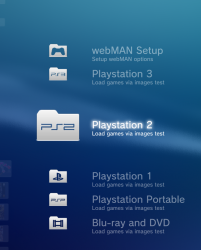
Seems like a lot of extra work for nothing when we already have a perfect trigger in the log with the file being accessed, not sure why we would go for a complicated method like creating arrays and tracking movement of the pad to try to figure out which item is selected. This is meant to be a simple method letting the system do all the work and using it as trigger.
Yeah, it was a bad idea, i was trying to imagine a way to create that "grid" with code to mimick what the user have in screen
Dunno, this could be useful codewise at some point is like having a table composed of rows and columns with the name of a cover in each cell
This way you could "capture" the dualshock X press at the same time the firmware is trying to open the real image (or before opening the real image if you intercept the X press)
Anyway, im thinking in a scenario where my idea of monitoring the dualshock goes out of control, if the user press (and holds) the d-pad vertically the images starts scrolling very fast, we dont know that speed, trying to calculate it is not going to work well... so at this point we lost the position of the cursor :/
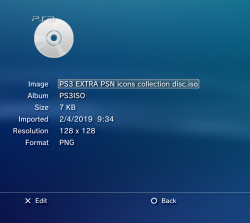
Yeah. TBH I kind of like it when the image goes big when you pick a game. It's like a splash screen to say which game is mounted, and nearly looks official in a way.
See here at the end of this video, imagine the image comes up like that, then it stays for a split second, then goes back to the list and "xxxx Mounted" comes up as a notification, I think it's fairly neat and actually nicer even than what we have now?
Yeah. TBH I kind of like it when the image goes big when you pick a game. It's like a splash screen to say which game is mounted, and nearly looks official in a way.
See here at the end of this video, imagine the image comes up like that, then it stays for a split second, then goes back to the list and "xxxx Mounted" comes up as a notification, I think it's fairly neat and actually nicer even than what we have now?
Yes, it looks good, the problem i see is i guess if you try to send a order to cobra to load a game with the image opened at full screen maybe the firmware is going to complain (some kind of error), so i was trying to avoid that
But i guess it can be solved by sending 2 fast "phantom" presses of the dualshock circle button inmediatly before loading the game
The first circle press closes the full screen image view mode... the second takes you out of that "photo viewer mode"... so you are back in main XMB
Btw, i liked this idea a lot since beginning but not mentioned it before
The good thing i see from it is... what we need to display in screen is a lot of game cover images, and that photo view mode probably is focused in performance, actually this is why it uses that thumbnails and why everything is stored in the database
But the database usage could be a pro and a contra at the same time, i guess the database can handle thousand of images but im not sure where is the limit and how well the mainteinance service cleans the garbage from deleted items
As far i could see i had a lot of info in mine from deleted homebrews, also lot of areas overlapped on top of other disaligned areas from other contents (this means the area at bottom was marked as "available" at some point because the item was deleted but the area was not filled with zeroes), the database looks dirty so im not sure how relliable is it, and im wondering if copying and deleting all that thousand of images could create some problem
Anyway, i dont think that database is going to "explode" (lol) just because images... in the worst scenario what is going to happen is some of that images are going to become "orphan" but should be identifyed when you do a "rebuild database", im also wondering if there is be some warning message advising you that "you reached the limit of images availables to be indexed in the database"
In short... i guess if some of this kind of errors im mentioning happes are not critical
Btw, couple of hours ago i was reading the other thread where you was talking about this with aldo, and you mentioned the "src" code line you are using in the xmbml files to trigger this "photo image viewer" mode
This is copyed from the other thread, you are still doing it this way or you changed something in the xmbml after that ?
Yes, it looks good, the problem i see is i guess if you try to send a order to cobra to load a game with the image opened at full screen maybe the firmware is going to complain (some kind of error), so i was trying to avoid that
But i guess it can be solved by sending 2 fast "phantom" presses of the dualshock circle button inmediatly before loading the game
The first circle press closes the full screen image view mode... the second takes you out of that "photo viewer mode"... so you are back in main XMB
Yeah, we can exit the image easily i would say. I don't think it would be an issue, I think Cobra or webMAN or whatever plugin will still have full access even while viewing an image full screen.
The good thing I see from it is... what we need to display in screen is a lot of game cover images, and that photo view mode probably is focused in performance, actually this is why it uses that thumbnails and why everything is stored in the database
But the database usage could be a pro and a contra at the same time, i guess the database can handle thousand of images but im not sure where is the limit and how well the mainteinance service cleans the garbage from deleted items
Well, I have only tested so far with about 11,300 images, So I can't say anything more than it's fine with that many so far, been messing with that many for a while now with no issues and excellent performance tbh. It even remembers where you were when you exited the folder.
I'm not sure if the database would become corrupted over time, I guess not as some people must already have large image collection on their consoles and we don't hear of issues really. It so easy to recopy a folder of images from USB too that its not a big issue I think.
TBH, if it has issues with more than 11300 I am not too bothered. If you have that many games then you need 2 PS3s
Btw, couple of hours ago i was reading the other thread where you was talking about this with aldo, and you mentioned the "src" code line you are using in the xmbml files to trigger this "photo image viewer" mode
This is copyed from the other thread, you are still doing it this way or you changed something in the xmbml after that ?
That is still how I am doing it, have not looked at that since. I suspect some mods to registory.xml can help with some stuff. Do you have any ideas for this area?
Well, I have only tested so far with about 11,300 images, So I can't say anything more than it's fine with that many so far, been messing with that many for a while now with no issues and excellent performance tbh. It even remembers where you were when you exited the folder.
I'm not sure if the database would become corrupted over time, I guess not as some people must already have large image collection on their consoles and we don't hear of issues really. It so easy to recopy a folder of images from USB too that its not a big issue I think.
TBH, if it has issues with more than 11300 I am not too bothered. If you have that many games then you need 2 PS3s
Wow, thats a lot, lol, but my worry was not much about the number, but about the "updates" of them, as mentioned i found in my database info from tenths of managunz beta versions that was experimental, lol, i just booted them 1 time but it seems the database kept a record of them forever, im not sure if at some point that deleted entryes can be updated, overlapped or whatever, but initially looks a bit dirty
I guess the same is going to happen with images, and eventually (if at some point all this concept becomes something usable) is going to be he typical problem reported in forums as a "bug" or an annoyance
The problem is we are sharing a database file for images and for all the hdd contents all together
It could be awesome to have a database file dedicated only for this, it would be perfect, but this is only a dream, it seems imposible
Anyway, as mentioned, even in the worst scenario what is going to happen is the firmware is going to advise to rebuild database, so is not critical, and by now doesnt looks probable to happen
That is still how I am doing it, have not looked at that since. I suspect some mods to registory.xml can help with some stuff. Do you have any ideas for this area?
Nice, then i know how to filter images to display only a few using search patterns to search in the database file
Im looking at it... lets say... i see 2 different ways to do it
The one that is going to work for sure is by "registering" a new entry in the registory.xml
Also, i guess is needed to add the inverse filter in the default photo view mode (to display the game covers only in the hacked viewer)
I would like to be able to exclude either some image folders, or some image filetypes from the game menu, so we could have differnet images showing in photo compared to game, I'm not sure if this is possible. For example if we could have it so only MPO images showed in game. Then exclude MPO from the photo category and we can add this new view and only lose MPO support in the photo category, not bad. Or some other method where we end up with 2 different photo menus.
Yes, i thik is posible since you wrote your first post about it but i had my doubts, now im more confident to say that i think is posible to filter contents in many ways
Look, this is just a overview
The thing starts by using this query in category_game.xml
Is doing a query in registory.xml looking for:
root ---> view_selected ---> photo
I just copyed the related lines, the <Table key="view_photo"> is the responsible to do a real search in the database (the file metadata_db_hdd), and i only copyed the line with the <Pair key="album"> because you are diplaying the covers inside "user created" albums (the folders you created for PS3, PS2, PS1, PSP)
In that line you can see how is used the function "xcb://localhost/query?"
Im sure you know this one well, because you used it in lot of your previous mods
Basically, what you need is to abuse of the conditionals (named "cond") https://www.psdevwiki.com/ps3/XMBML_Functions#xcb:.2F.2Flocalhost.2Fquery.3F
That are describen in wiki as a "Combination of XMB database object fields using logical operators"
The database objects could be a bit confusing, i could help you a bit with that eventually (at this point i reversed a good part of how it works, hihhihi) but probably you dont need my help because you can make some tests and discover by yourself what is worthy to search for and what not
Basically, you need to abuse of them to make your search more precise, keep in mind are used together with conditionals, so is like saying... show me the items that satisfyes: condition1 and condition2, and condition3 but not condition4 neithercondition5 and so on as many times you want (but try to make it in a efficient way to dont hit performance)
There are some conditions that allows wildcards btw... not sure how many allows for this, but i remember in XMB+ there is some search for TITLE_ID just by indicating a couple of characters
Right now im not sure how could be the best way to filter them, but i think it can be made by messing around with all this
That is one area of xml I know nothing about really. I would not know where to start with the syntax for trying to include/exclude an image based on its location or file type. It is an area I will need to check out though.
Just an example of how to filter the database, lets say we need this 2 conditions:
&cond=Ae+Photo:Photo.width 320
&cond=Ae+Photo:Photo.height 180
The Ae means "And equal" (in other words... is only true if the value is exactly the one im indicating)
The Photo:Photo.width and height indicates the access path for this attribute inside the database
By using this 2 conditions is going to display only images of 320x180 pixels size
Hmmm. this could be used to create hard coded folders for each game type, as each cover will have different dimensions, interesting. resolution could even be used as main exclusion/inclusion variable. We could have it so only specific sizes show in game. Odd sizes like 364x182 for example. Anyway its not the best way but it's an option maybe.
I just mentioned the width and height because it was the first thing that came to mind of how could be filtered, there are another 2 for the thumbnail width and height btw that belongs to the "common fields"
As mentioned, that common fields are used by all the objects, is just is made in a selective way but im guessing some of them are going to be more interesting than the ones specific for photo
To exclude them from the normal view mode is the same, but using the logical operator An
---------------------
Anyway, incase this filtering works (and it should), and incase of editing the registory.xml for this mod i think is better to do it by adding a new custom entry, what you are using to "jump" into the registory.xml is:
Code:
src="sel://localhost/ex?root.view_selected.photo"
I guess that names are not restricted, so you could try to change it to
Lol, i just realized there is a perfect way to filter them, and im thinking in the way how is going to work and is funny and very comvenient incase it works as im imagining
There is a value from the common fields named ***:Common.tags
The asterisk i wrote represents the "owner" object because all objects could use the common fields
In this case im completly sure the "Photo" entries in the database have a value named "tags" because this is the internal codename of that custom album names allowed to be created by the official firmware, and it can be seen you are using them in your screenshots
Basically, the value of the "tags" is the text string you enter when you create the custom albums, in this case you created custom albums named "PS1", "PS2", and "PS3", and you created that albums using the official functions
When you include an image inside a custom album the name of the album is stored together with the info of the image under:
Photo:Common.tags
I guess the name of the album is stored also in:
PhotoList:Common.tags
Initially i think is better to make the search individually to all the images (to the "Photo" instead of the "Photolist"), but im just mentioning that can be made to the Photolist too because in the official code is doing the search on the "PhotoList" fork of the tree, and in the previous example i posted i added another condition with a search in the "Photo"
Im wondering if is more efficient to make all the searchs in the "Photolist"
So.. that seems to be the perfect pattern to search in the database
What im suggesting now is to make the search for the "tags" in the "Photo" this way: &cond=Ae+Photo:Common.tags PS3
The funny thing is if you exclude them by "tags" in the standard photo viewer is going to work this way:
-initially the photos appears in the standard photo viewer
-if you click in triangle in them ---> assing to a custom folder (PS3 in this example) they will dissapear from the standard photo viewer and will appear in the custom one
-now in the custom photo viewer you have the image inside the folder PS3.. if you click triangle in it and remove the "tags" it will dissapear from the custom photo viewer and will return to the standard viewer
I used a modded version of Mamba 8.01, loaded in kernel mode with new 4.84.2 Rebug's kernel plugins implemented by @habib.
So to test this, need to disable Cobra... It will boot directly to Mamba, so it's like a secondary Cobra mode I love this new feature.
The PKG also installs the webftp_server.sprx into /dev_hdd0/plugins and the /dev_hdd0/boot_plugins_nocobra.txt
To use the PhotoGUI feature, create the folder /dev_usb000/PICTURE and refresh the XML using +
It will copy the covers to that folder grouped by type. After the scan complete, go to Photo column, browse the USB device and copy the photos to /dev_hdd0. Browse the pictures stored in HDD0 and press START for a few seconds to mount the game.
It's suggested to have auto-play enabled
Note: If you don't want the covers auto-copied to /dev_usb000/PICTURE, remove that folder or go to /setup.ps3 and put a check mark onto the option /USB0/PICTURE or LaunchPad.xml that appears next to "Disable scan for content at startup".
EDIT: Ok I verified the files and re-uploaded the PKG
I used a modded version of Mamba 8.01, loaded in kernel mode with new 4.84.2 Rebug's kernel plugins implemented by @habib.
So to test this, need to disable Cobra... It will boot directly to Mamba, so it's like a secondary Cobra mode I love this new feature.
The PKG also installs the webftp_server.sprx into /dev_hdd0/plugins and the /dev_hdd0/boot_plugins_nocobra.txt
To use the PhotoGUI feature, create the folder /dev_usb000/PICTURE and refresh the XML using SELECT+R3.
It will copy the covers to that folder grouped by type. After the scan complete, go to Photo column, browse the USB device and copy the photos to /dev_hdd0. Browse the pictures stored in HDD0 and press START for a few seconds to mount the game.
It's suggested to have auto-play enabled
Note: If you don't want the covers auto-copied to /dev_usb000/PICTURE, remove that folder or go to /setup.ps3 and put a check mark onto the option /USB0/PICTURE or LaunchPad.xml that appears next to "Disable scan for content at startup".
@aldostools Wow, Nice job. Its mounting ISO's perfectly based on the images selected. I love the copying to USB feature too, makes it simple.
Also due to the way the PS3 hides the image extensions, its looks like the ISOs are actually on the XMB. Nice
If they could be used while on USB to mount games that would be cool. As then a user could plug in a new drive with games on it. wMM could then copy the images to that same drive. Then without rebooting they can be mounted, with no extra copying required if the user does not want to.
Couple of small things you probably know about, but anyway:
I'm not sure if holding start is the best way to do it, as it also triggers a slideshow while mounting. If it could just be done with X and an auto press of circle to exit the full screen image, or something like that.
Can wMM create the PICTURES folder on USB too if PhotoGUI is enabled, It's just 1 less step for the user.
The auto play commands don't seem to match up for me, it re enters my ISO image folder after a few seconds. I need to do more testing, It might be due to some mod I have forgotten about or my other albums.
If we could use mamba for this with Cobra still enabled, or just use cobra (if possible?) that would be cool as I'm missing my socat output and it will put people off using it if they lose features. Or is there a version of Mamba with debug output?
Off topic: Has anyone noticed that the reload XMB app seems to hard crash the PS3 sometimes? I think it might be due to FTP still being active if that is possible? Can someone please try transfer a file to dev_blind, then within a few seconds of the file transfer being finished, run Reload XMB and see if it works OK.
Lol, i just realized there is a perfect way to filter them, and im thinking in the way how is going to work and is funny and very comvenient incase it works as im imagining
There is a value from the common fields named ***:Common.tags
The asterisk i wrote represents the "owner" object because all objects could use the common fields
In this case im completly sure the "Photo" entries in the database have a value named "tags" because this is the internal codename of that custom album names allowed to be created by the official firmware, and it can be seen you are using them in your screenshots
Basically, the value of the "tags" is the text string you enter when you create the custom albums, in this case you created custom albums named "PS1", "PS2", and "PS3", and you created that albums using the official functions
When you include an image inside a custom album the name of the album is stored together with the info of the image under:
Photo:Common.tags
I guess the name of the album is stored also in:
PhotoList:Common.tags
Initially i think is better to make the search individually to all the images (to the "Photo" instead of the "Photolist"), but im just mentioning that can be made to the Photolist too because in the official code is doing the search on the "PhotoList" fork of the tree, and in the previous example i posted i added another condition with a search in the "Photo"
Im wondering if is more efficient to make all the searchs in the "Photolist"
So.. that seems to be the perfect pattern to search in the database
What im suggesting now is to make the search for the "tags" in the "Photo" this way: &cond=Ae+Photo:Common.tags PS3
The funny thing is if you exclude them by "tags" in the standard photo viewer is going to work this way:
-initially the photos appears in the standard photo viewer
-if you click in triangle in them ---> assing to a custom folder (PS3 in this example) they will dissapear from the standard photo viewer and will appear in the custom one
-now in the custom photo viewer you have the image inside the folder PS3.. if you click triangle in it and remove the "tags" it will dissapear from the custom photo viewer and will return to the standard viewer



 +
+