

STLcardsWS
Administrator
-
X-PROJECT V1.5 & ESP V1.5
LATEST V1.5: https://mir.cr/0W7KDJ5R (MD5: 51ECF0147231F55D959A48C5086EBCC9)
LATEST ESP V1.5: https://mir.cr/1UYGJMBN (MD5: BBCC6FD9FDE4F5EAD3F0DCE6C12224BF)
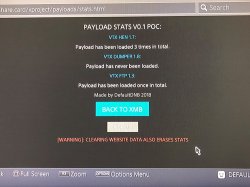
(Screenshot of Payload Stat Page (from POC))
V1.5 CHANGE LOG:
BOTH VERSIONS:
- - Removed ARCADE section
- + Added payload stats - activity log style tracker
- + Added firmware detection - bottom right
- + Added time/date to xmb display - top right
- + Added browser information including online status - bottom left
- + In XMB press L1 for QUICK HEN
- + In XMB press R1 for QUICK FTP
- + Click the top left "5.0X PAYLOAD HOST": for X-Project debug mode toggle & instructions.
- + updated some USB tools to latest versions.
ESP SPECIFIC:
- + Size Reduced to fit within 4MB! Original X-Project is 91MB:
- + GZ compression on every file and re-mapped for speed.
- + ESP Caching (cache in userguide or web or both if you want to use in both: takes under 30 seconds each!)
- - Removed MEDIA Player (No space on 4MB flash for MP4's lol)
- - Removed APPLICATIONCACHE (Too large, others available)
- - Removed PS4API 1.0 (PS4API 1.1 is smaller)
- - Removed Linux (Eeplinux is smaller)
- - Removed ALL GTA payloads except APII V2 INTENSE 2.5 1.00 & 1.27 (smallest and most functional)
ESP FAQ:
- How do I put this on my ESP: Flash it to your ESP8266 device using NodeMCU PyFlasher: https://github.com/marcelstoer/nodemcu-pyflasher/releases
- ON PS4: Go to Settings > Network > Custom > WIFI-SSID = X-Project Host > Pass: 12345678 > IP: Auto > DHCP: Do Not Specify > DNS: Auto > MTU: Auto > Proxy: Do Not Use > Press O (no need to test connection).
- TO USE: Open USER GUIDE, or WEB BROWSER and navigate to http://7.7.7.7/index.html.
- CACHING: Cache it in USERGUIDE or WEB BROWSER or BOTH if you want to use in both: takes under 30 seconds!
.
Normal version: Host as usual or follow the hosting section here: >>> gbatemp.net
Props to @Leeful for helping me massively with the ESP conversion
Source: gbatemp.net


