XMB Package Downloader (XMBPD)

PS3 XMB Package Downloader - An XMB MOD that intergrates a Homebrew Store on the XMB v0.70

I really like the style.

Thanks. It's a metal variation, when I will finish all, also I will show more neutral style (neutral to XMB and user wallpaper).

I have one small problem though, since I was talking to you last this has expanded a bit, Im now up to 28 icons (see here) and not 14, Be great to have the top level done with yours anyway as they look great, but would also be nice to have a full set the same if possible. I don't think Im going to add any more really.. for a while at least. I under stand if you are busy and no pressure.

I checking the topic from time to time, so don't worry, I have them all. ^^

BTW: Why there is no set up different color to hover in forum CSS? I don't see a hiperlinks. Thanks God someone invent Snap Links addon. ;p

But they look good on the XMB IMO, I will probably do the same thing to show which style is enabled and to show the update status, in fact that Im thinking of doing full icon packs in different colours just for fun (not now but in a while), to be available from the Style Settings of XMBPD.

IMO it's a bad idea for coloring on/off choices. When I first saw it, I was thinking that this is indicator for download complete/failed. I don't how they are named in RCO but remember that interfaces building not programmers but behaviorists, so programmers can give filename not proper to it's function (in logic meaning), or it's just legacy from beta releases. Maybe You are suggested by this, I don't know, it's just my reflection. ;]

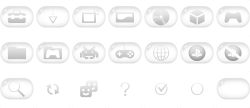
Anyway, if this is possible, I have made something for complete/incomplete downloads:

xmbpd_metalskin_led.png

- - -

I like your talent :)

Thanks.
 
I checking the topic from time to time, so don't worry, I have them all. ^^

Wicked! Nice one. :)

BTW: Why there is no set up different color to hover in forum CSS? I don't see a hiperlinks

Yeah I noticed this, its a little annoying, its on the list of things to fix I think since the switch to xenforo.

IMO it's a bad idea for coloring on/off choices. When I first saw it, I was thinking that this is indicator for download complete/failed. I don't how they are named in RCO but remember that interfaces building not programmers but behaviorists, so programmers can give filename not proper to it's function (in logic meaning),

Yeah, you are right, What I was considering doing instead is maybe having 2 versions of each icon but all the same colour. I already have the xml set up with working code to do the icon swaps for each mode.

So I was thinking of having:

tex_xmbpd_download_install_delete_enabled.png
tex_xmbpd_download_install_delete_disabled.png
tex_xmbpd_download_install_keep_enabled.png
tex_xmbpd_download_install_keep_disabled.png
tex_xmbpd_download_only_enabled.png
tex_xmbpd_download_only_disabled.png

(I use these descriptive names for my own reference or I will get confused when writing the code for switching them)

The enabled ones would be exactly the same as disabled except the would have a "tick" or something like that to show its the current option, here is a bad example of what I mean:
zEsUWFL.png


Anyway, if this is possible, I have made something for complete/incomplete downloads:

I don't think its possible to have indication icons for failed downloads. Good idea though. My hope is that by the time we get to v1.0 there will not be any failed downloads.
 
Last edited:
Yeah standard checkbox's might be the way to go, Im no good at this kind of thing so I am happy to let others decide. They all look great btw. ;)
 
oh, I forgot to mention: above there is two versions of icon for retro. IMHO SNES joypad is better than asteroids alien but maybe because my age (I growing up on NES and SNES era).
 
oh, I forgot to mention: above there is two versions of icon for retro. IMHO SNES joypad is better than asteroids alien but maybe because my age (I growing up on NES and SNES era).

I noticed that, The NES one is cool. I would actually like to keep both, as I was planning to add a "homebrew games" category at some point in the future, seperate from retro games, so I could use the space invaders one for that.
 
So the icon must be different because SNES joypad have nothing to do with homebrew games. ;)

Oh, I just noticed that screwed bubbles. They will looks ok only on dark backgrounds. Well, anyway, this is just some kind of preview to hear feedback what is good and what is bad.
 
The feedback is all good anyway :)

Yeah icon can be the same or different for homebrew games, I dont mind, I was just thinking as you had it made already it would be a good use for it.
 
Just came across THIS old thread with us talking about icons (I was googling for a thread on here about icons but forgot to search for "psx-place") has Bitsbubba, Berion, Atreyu187 and me posting there about XMBM+ back in 2012 :)

Nice comment from you Berion regarding GR! ;)
 
Last edited:
Oh, I completely forgot about this prj. Damn, so many years have passed. And I still don't like GR. Especially his avatars (flag of Soviet Union). ;p

But hmm... I don't remember that I ever registered on MaxConsle but I recognize my broken English. Strange. ;p

In attachment is all icons which I have. I will not back to work on it earlier than in end of next week. So, feel free to test. ^^"

And BTW: I don't understand why Blu-Ray icon looks good on white backgrounds, and be cut on dark ones. WTF? Bug in Matrix?
 

Attachments

Last edited:
Looking good man.

You mean the small cut at the bottom of the bluray icon? yeah that's weird it seems to only be cut on dark background, I wouldn't have noticed if you hadn't mentioned it though so its fine really.

The checkboxes are good. I will use them to show which theme is enabled aswell. could even use them to show if its up to date or not, or maybe have one with an "X" to show its not up to date. Just ideas.
 
Perfectionist eh! :) cool.

Would be great if you could do the same/similar style for CFW Settings / WebMAN MOD someday, I bet users would love that. IMO the CFW settings icons are not great as they are now.
 
I agree, those could do with a make over...
I am sure Joonie would welcome a nice set of icons...

Yeah he would, I already mentioned it to him on Skype ages ago that I might make some as I thought I could do better than the current ones, but with the quality of Berions icons Im sure they will be straight in there, and it saves me doing it badly.
 
So, feel free to test. ^^"

Here are some screen shots of the new icon set on the XMB. Looking real good. :)

BtEBwgw.png

ZdY7nDx.png

JbN2b5h.png

AAXybtX.png

My2iFFl.png

wzeZSZL.png

One thing I would like to change is the "note" icon inside the about section, I only really used the magnifying glass as it was the best I could find quickly, really I think an info sign like a little "i" would be better or maybe someone has a better suggestion.

Need to figure out the icons to use for the emulators, retro games and homebrew game categories (the last one doesn't exist yet), the NES pad icon or the Space invaders icon could be used for any of them, and then there is the ps3 pad icon (currently used for retro games in these screenshots), so i would welcome suggestions on what to use where.

My suggestion would be:
Emulators: NES PAD
Retro Games: Space Invaders
Homebrew Games: PS3 Pad

Also the Tools/mods section and the XMBPD Settings are using the same icons for now in the screen shot, need to decide what to do there too, Im not sure of an icon for tools/mods, a spanner maybe.

BTW: Berion , the icons only need to be 178x178, I somehow ended up with my ones at 179x179 but its not exactly right. I could resize them but probably better if you output them from editor at correct res. sorry about that.
 
Last edited:
Cheers.

Not sure about where you are , but slim PS3s can be got fairly cheap now if you can flash them yourself with an e3 (easy). I got a slim 160gb a while back for €110 with 23 games, cashed the games in at a local shop for €50, so I got the console and controller for €60. Well worth the investment. ;)
 
Back
Top