
You are using an out of date browser. It may not display this or other websites correctly.
You should upgrade or use an alternative browser.
You should upgrade or use an alternative browser.
PS3 Xmb waves
- Thread starter malk4days
- Start date

Louay
Senior Member
Like thisyes, the wave is a collection of files or in this case configuration files.
Louay
Senior Member
Okey Man


sandungas
Developer
Sorry @Louay , what i said before about... (im quoting myself)
https://www.psx-place.com/threads/o...s-4-80-4-84-cfw-only.22252/page-5#post-196113
I wrote it a couple of days ago, and today when i noticed you quoted me here i thought it was the same thread, but now i just realized are different
Anyway, take a read at what i said at the other thread... there is a value in all the PARTICLES.mnu for the global alpha
The official firmware have several places where this value is = 0 (so the wave is invisible)
And others where there is a positive value
If you replace all them by 0 the wave will be hidden everywhere
*And btw, download the file made by @Cypher_CG89 from the other thread if you want to compare and take a look at what he did
I was talking about what i wrote here in post #94 of this thread:...is needed to replace the alpha values by zero so the particles becomes fully transparent (invisibles)
https://www.psx-place.com/threads/o...s-4-80-4-84-cfw-only.22252/page-5#post-196113
I wrote it a couple of days ago, and today when i noticed you quoted me here i thought it was the same thread, but now i just realized are different
Anyway, take a read at what i said at the other thread... there is a value in all the PARTICLES.mnu for the global alpha
The official firmware have several places where this value is = 0 (so the wave is invisible)
And others where there is a positive value
If you replace all them by 0 the wave will be hidden everywhere
*And btw, download the file made by @Cypher_CG89 from the other thread if you want to compare and take a look at what he did

Cypher_CG89
Senior Member
@Louay , in the overides > partlicles.mnu.js set all - GLOBAL ALPHA:float: 0
This will make the sparks invisible where ever you set it.
Also when messing on with waves make minor corrections at a time and test. set too many values to something they cannot be and you will end up with more than a softbrick> trust me I nearly bricked one of my PS3s setting some values slightly to high or low.. even the recovery options didn't work correctly and kept crashing> only a full system reset saved the PS3 and that crashed 4 time's in a row at 20% before finally working.
I have just uploaded a new wave to the gameboot thread @sandungas linked will all sparks disabled with the exception of the Gameboot sparks. Take a look at that for what to do...
Be VERY carefull when modding the lines.qrc file.
This will make the sparks invisible where ever you set it.
Also when messing on with waves make minor corrections at a time and test. set too many values to something they cannot be and you will end up with more than a softbrick> trust me I nearly bricked one of my PS3s setting some values slightly to high or low.. even the recovery options didn't work correctly and kept crashing> only a full system reset saved the PS3 and that crashed 4 time's in a row at 20% before finally working.
I have just uploaded a new wave to the gameboot thread @sandungas linked will all sparks disabled with the exception of the Gameboot sparks. Take a look at that for what to do...
Be VERY carefull when modding the lines.qrc file.
Louay
Senior Member
Louay
Senior Member
Cypher_CG89
Senior Member
Look on the dev wiki, there should be a script linked to the icons.qrc part that can extract and handle this file.

pinky
Retired
cut the first 8 bytes (00-07) of the lines.qrc in a hex editor. paste the content into a new file, and name it whatever will be easy to remember (I used first_char). save both files. then, decompress the lines.qrc with simply zip. when you're done making changes, compress with simply zip and paste+insert the first 8 bytes again. not doing that will cause a soft brick.
Louay
Senior Member
i know that and i talk about icons.qrc not lines.qrc and i get icons file with QRCF in first hex and now i decompile it with CXML Decompile v4 python script i want to edit the side menu color and see if i can create animationcut the first 8 bytes (00-07) of the lines.qrc in a hex editor. paste the content into a new file, and name it whatever will be easy to remember (I used first_char). save both files. then, decompress the lines.qrc with simply zip. when you're done making changes, compress with simply zip and paste+insert the first 8 bytes again. not doing that will cause a soft brick.
Look on the dev wiki, there should be a script linked to the icons.qrc part that can extract and handle this file.
i saw the source code ,copy it and save it in script.py and run it from cmd and it create many BIN files
Last edited:
Louay
Senior Member
Does it change side color from this bmp ? when user change color in theme settings it use this file to change the side color ??

i change all color to yellow cause i made all day and night rgb in lines yellow color n10 to be the same but it only make the XMB icon to always yellow not the side menu !!

i change all color to yellow cause i made all day and night rgb in lines yellow color n10 to be the same but it only make the XMB icon to always yellow not the side menu !!
Last edited:
sandungas
Developer
Yes, you can use the CXML decompiler script (needs python v2.7) to extract the files individuallyi know that and i talk about icons.qrc not lines.qrc and i get icons file with QRCF in first hex and now i decompile it with CXML Decompile v4 python script i want to edit the side menu color and see if i can create animation

The image have 12 horizontal lines, 1 line for every month, the line at top is january, second is february, and so onDoes it change side color from this bmp ? when user change color in theme settings it use this file to change the side color ??
View attachment 19334
i change all color to yellow cause i made all day and night rgb in lines yellow color n10 to be the same but it only make the XMB icon to always yellow not the side menu !!
View attachment 19335
The colors of the lines matches with the default monthly wallpapers
And every line have 16 pixels that corresponds to the "sunlight" hours
I think the way how they imagined it is like this...
If you divide the 24 hours of a day by 3 you have 2/3 of the day where the light changes (16 hours of sunlight), and 1/3 of the day where the light doesnt changes (8 hours at night)
*This colors are applyed as "ambient light" and affects the main icons, but also the side menu (and i guess a lot other images)
*Btw, the image needs to have 192 indexed colors (because... 16 * 12 = 192)... in photoshop before saving it you need to change it in tab [Image] > [Mode] > [Indexed] and select 192 (and no transparency)
Last edited:
Louay
Senior Member
I change the colors in amb.bmp and that only change the color of XMB icons so what left is for side menu but i don't know the files to edit to make side menu color static and with animationYes, you can use the CXML decompiler script (needs python v2.7) to extract the files individually
The image have 12 horizontal lines, 1 line for every month, the line at top is january, second is february, and so on
The colors of the lines matches with the default monthly wallpapers
And every line have 16 pixels that corresponds to the "sunlight" hours
I think the way how they imagined it is like this...
If you divide the 24 hours of a day by 3 you have 2/3 of the day where the light changes (16 hours of sunlight), and 1/3 of the day where the light doesnt changes (8 hours at night)
*This colors are applyed as "ambient light" and affects the main icons, but also the side menu (and i guess a lot other images)
*Btw, the image needs to have 192 indexed colors (because... 16 * 12 = 192)... in photoshop before saving it you need to change it in tab [Image] > [Mode] > [Indexed] and select 192 (and no transparency)
Louay
Senior Member
Color option menu still change where is the location of the responsible file ?
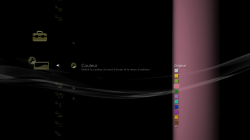
and i want to restore the Trophy Collection in Game Category i get it to work in XMB but in game no text and spining Icon
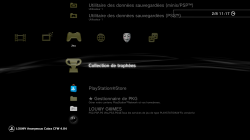

and @pinky @sandungas i want to change the Trophy icon like this in XMB in Icontex.qrc but i can't get to work in XMB
I want to make this trophy icon

in this XMB display
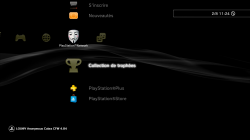
and i want to restore the Trophy Collection in Game Category i get it to work in XMB but in game no text and spining Icon
and @pinky @sandungas i want to change the Trophy icon like this in XMB in Icontex.qrc but i can't get to work in XMB
I want to make this trophy icon
in this XMB display
Last edited:

Naked_Snake1995
Senior Member
Sharing is caring ? Don't want to share that wave? [emoji23][emoji23]Color option menu still change where is the location of the responsible file ?
View attachment 19344
and i want to restore the Trophy Collection in Game Category i get it to work in XMB but in game no text and spining Icon
View attachment 19340
View attachment 19341
and @pinky @sandungas i want to change the Trophy icon like this in XMB in Icontex.qrc but i can't get to work in XMB
I want to make this trophy icon
View attachment 19342
in this XMB display
View attachment 19343
I need to do a wave contest, which ones its better and your opponent its @Cypher_CG89 [emoji23]
Sent from my G8141 using Tapatalk
Last edited:
Cypher_CG89
Senior Member
Sharing is carrying?
Think you need to turn auto correct off on your phone lmao....
Sharing is carrying....? WFT is this lol> " Sharing is caring "> you defo haven't had your coffee and went straight for the Guniness...lol
Naked_Snake1995
Senior Member
Damn, you got me, i think ill need some 1st grade English classes again, how the f@@k i missed that [emoji23][emoji23]Think you need to turn auto correct off on your phone lmao....
Sharing is carrying....? WFT is this lol> " Sharing is caring "> you defo haven't had your coffee and went straight for the Guniness...lol
Sent from my G8141 using Tapatalk
sandungas
Developer
Ops, then i dont know, i thought the amb.bmp is applyed globallyColor option menu still change where is the location of the responsible file ?
View attachment 19344
Maybe @LuanTeles knows
If i remember right... @DeViL303 tryed it and doesnt works because when you move the trophies to a different category there are some functions that stops workingand i want to restore the Trophy Collection in Game Category i get it to work in XMB but in game no text and spining Icon
View attachment 19340
View attachment 19341
Not sure though
It should be in explore_plugin.rco ... and maybe also explore_plugn_game.rco (in old firmwares when the trophies was located in game) and explore_plugin_psn.rco (for new firmwares)and @pinky @sandungas i want to change the Trophy icon like this in XMB in Icontex.qrc but i can't get to work in XMB
I want to make this trophy icon
View attachment 19342
in this XMB display
View attachment 19343
Similar threads
-
-
-
 PS3 PS3 Firmware 4.93 - Update is Live! (CFW and HFW Released)
- Started by LuanTeles
- Replies: 38
-
PS3 Can you customize XMB waves on a HEN PS3 (NOT CFW)
- Started by BigFatHedgehog
- Replies: 0