PS3 4.80 FERROX (COBRA v7.3) CFW

Developer Alexander has released another 4.80 Custom Firmware for the PS3, but this go around he has added COBRA v7.3 to his base firmware of 4.80 FERROX. This release has all the features from 4.80 FERROX Standard CEX v1.00 and the addition of COBRA v7.3. Full details can be seen in the tabs below:


Ferrox.png

  • Here we are !!!! We promised a nice surprise not ??!
    Well, more surprise than this one can not Directly from CyberModding, our friend and Developer Alexander delights us with this new version of its FERROX! Yes, we speak exactly the new Custom Firmware 4.80 FERROX COBRA 7.3 !! The Perfect Custom Firmware is now also COBRA version

    It is no COBRA Lite, like some old FERROX.
    This new version implements the new Patch COBRA 7.3 updated Developer from Habib.

    Let's go see the features of this brand new CFW;
    (see next tab for features )

  • FEATURES;
    • Built on the basis of 'OFW 4.80
    • PSN / SEN Enabled.
    • Update from any possibility of CFW (CEX).
    • Ability to Upgrade from OFW 3.55.
    • Ability to Downgrade from any CFW with QA active Flags.
    • QA Flags active if previously enabled.
    • NEW FEATURE - Added COBRA PATCH 7.30!
    • NEW FEATURE - New look of the XMB (See below).
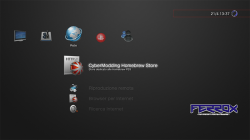
    • NEW FEATURE - Introduced 'CyberModding HomebrewStore' the web column.
    • NEW FEATURE - Brand new Coldboot FERROX COBRA.
    • FEATURE - Compatibility PS2 games.
    • FEATURE - Compatibility with the 'latest version of ReactPSN.
    • FEATURE - RSOD Bypass Screen Console sufferers RSOD.
    • FEATURE - 4.80 Key to start games signed with 4.80 keys.
    • FEATURE - app_home / PS3_GAME.
    • FEATURE - XMB Support In-Game Screenshots.
    • FEATURE - Support Remote Play.
    • FEATURE - Integrated Package Manager, replaces the classic Install Package Files.
    • PATCH - LV1: Patched to remove the LV2 protection.
    • PATCH - LV1: Patched the CoreOS Hash Check to prevent Brick Console Downgradate non-Dehashed.
    • PATCH - LV1: Peek & Poke.
    • PATCH - LV2: Peek & Poke.
    • PATCH - PS3 BT Remote Patch.
    • PATCH - PS3 BluRay Disc Patch.
    • PATCH - Disabled Epilepsy Message to Boot.
    • PATCH - Disabled Cinavia protection.

    The Developer Alexander is keen to thank the dear Joonie86 for some very valuable advice on some Patch !!
    Thanks also to all of us

    In the Dev Github Alexander, it is the Source Code of the 'whole Porting of COBRA 7.3.
    Follow THIS LINK!

  • NEW LOOK OF XMB;

    From this version, the FERROX takes a new look.
    Ideas realized by dear MiZiO90, who worked to make the coolest FERROX CFW around!
    It is not a theme.

    It is some internal changes.
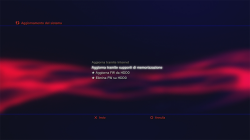
    Changes were introduced to 'clock, the horizontal lines in the screens, in colored lettering, to' Full Banner at the top right, in the section 'System Upgrade', to the menu screen that appears when holding down the PS button, and a new logo FERROX pulsing during uploads.

    A large lavorone!

    You want to see the screen?
    Open the spoiler to make a 'better idea of the new look !!
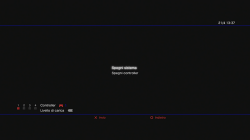
    333.png 222.png image.png

    Combined with the new Look with your theme you prefer.
    Or maybe combined with a Wave!
    It comes out a XMB fear
    cool.png


    PS. The Logo FERROX bottom right, is only visible to 1080p resolution.
    I think we all still play with the 'HDMI. Then no problem!

  • MODELS TESTED;
    • CECH2004A - Tested and Working - (Thanks @ MiZiO90 )
    • CECH2004B - Tested and Working - (Thanks @ Red Dead )
    • CECH2104A - Tested and Working - (Thanks @ LIZZO )
    • CECH2504 DataCode OC - Tested and Working - (Thanks @ TSUTEJ1 )
    • 2 CECHG - Tested and Working - (Thanks @ Red Dead and @ LIZZO )
    • CECHK - Tested and Working - (Thanks @ TSUTEJ1 )
    • Also thanks to @ Orion90 for Test on some Build


  • Tips INSTALLING THE CFW from the developer;
    • Download the CFW at the bottom. Rename the File .pup exactly: PS3UPDAT.PUP and confrontatene the 'MD5 with what you find at the bottom! You can use the Tool md5sums.
    • Take a USB FAT32 formatted, and create a new folder called PS3, inside this create another 'other still called UPDATE, and inside latter' inseriteci the PS3UPDAT.PUP File, which would be the custom firmware.
    • Insert the USB in the far right of the PS3 port.
    • Be sure to: Remove any disc from the player Ps3, Remove any games loaded with any Manager, Disable Internet Connection.
    • Ok. You can choose to install the CFW from the XMB or from Recovery.
    • On the XMB will just go into 'Settings' column, then 'System Upgrade' and choose 'With storage media'. Select the CFW and will start the process.
    • To enter Recovery Instead, turn off the console. Turn it back on by holding down the Power button until the console is turned off again. Now turn it back on by holding down the Power button until you hear two beeps very close. Then release the Power button! Recovery time from the menu, select 'System Update' and follow the instructions.
    • For a clean installation, you can install 2 times the CFW. You can also go back into Recovery and click Options for Rebuilding the Database and Restore the System File. So you'll have a setup more than clean and safe.

DOWNLOAD 4.80 FERROX COBRA 7.3
MD5: 37238780c8a8f26b49f609aa0d813acd
Source: Cybermodding.it
 
Last edited:
Yea really think it could habe more. I do like what has been deemed as needed and not needed though. Recall when Cobra was enabled from the get go? Everyone gave them so much unneeded guff.
 
Sure. I remember.
I mean the whole subject is extremely subjective. I suppose it's difficult to please everyone.
As long as features are disabled by default, I honestly don't see the problem.

Still I have suffered from that same feeling myself. To go back to Ferrox for instance, to me this CFW has been the best standard CEX out there for quite some time. Because of that I don't particularly enjoy a Ferrox release with additional features because I rely on it to be standard CEX with no mods..
For Rebug it's the opposite.. I would like it to have it all... I use it for development, for testing, for playing & as a media player. For me the more integrated features there are the better.

Sent with Tapatalk
 
I'm with a problem.
I used Sen Enabler 6.0.2 and after restarting the PS3, did not return the Package Manager, but yes the install package Files. :concern:
 
I always advise caution when using SEN Enabler. It's a very powerful tool with many options & one wrong setting can mess your system up...
Above all, never change several settings at once otherwise you may not remember how to reverse resulting problems...

Sent with Tapatalk
 
choose if when ur done with sen enabler. u can do it before or after u restart ur system- it doesn't matter. it's a bug with the app. I'm not sure if everyone is affected. it could just be certain systems.
 
I always advise caution when using SEN Enabler. It's a very powerful tool with many options & one wrong setting can mess your system up...
Above all, never change several settings at once otherwise you may not remember how to reverse resulting problems...

Sent with Tapatalk
I did just two steps
I Deleted the history and too put the PS3 at OFW.
then i restarted the PS3 by Sen Enabler and the Package Manager had been replaced by the Install Package Files.
 
I did just two steps
I Deleted the history and too put the PS3 at OFW.
then i restarted the PS3 by Sen Enabler and the Package Manager had been replaced by the Install Package Files.
If you restart with SEN Enabler you apply all the settings. It was a mistake because by default you probably applied ofw setting.
Launch SEN again & choose CFW instead. Then apply.
In the future don't use SEN to restart....

Sent with Tapatalk
 
choose if when ur done with sen enabler. u can do it before or after u restart ur system- it doesn't matter. it's a bug with the app. I'm not sure if everyone is affected. it could just be certain systems.
Congratulations on discovery, I would never imagine it would be this.
Maybe only a few systems are affected, because my friends did not have the same problem
 
If you restart with SEN Enabler you apply all the settings. It was a mistake because by default you probably applied ofw setting.
Launch SEN again & choose CFW instead. Then apply.
In the future don't use SEN to restart....

Sent with Tapatalk
Thank you my friend for the advice.
I think I'm reading things wrongs in others places,in Youtube too.
Why the people who taught me,are doing the same.
 
did that work?
It did not work,
I acess the Sen Enabler and i activated the Full CFW, but when I came back in XMB was not the Package Manager.
Only the Install Package Files as before.
The Sen too showed the message that the SYSCALL was disabled,but i not disable the SYSCALL for OFW.
 
Don't trust YouTube or even forums you are not sure about & always double check your info. [emoji6]

Sent with Tapatalk
Sometimes we rely on some channel on Youtube just because have multiple views, but this is a mistake .
I almost had a brick because of a conversion of DEX for CEX who sombory taught me wrong.
 
Oh dear...
I did the same thing as you a long long time ago... Back then I ended up reinstalling the CFW....

You have changed the settings to CFW & restarted via SEN? Syscalls are still disabled after that?

It's normal that syscalls get disabled when on OFW mode, that's the whole point of OFW mode... [emoji6]

Sent with Tapatalk
 
u can transfer category_game.xml to get package installer back. that should work for sure.
 
Yes it would I was going to suggest it but first we need to find out what else is wrong... Syscalls are disabled so category_game.xml is not the only problem seemingly...

Sent with Tapatalk
 
syscalls still being disabled is not normal. I only use sen enabler when transferring vita games. I've never had this problem. the problem with sen enabler on my part is that it messes up alphabetizing dlc. a normal, unmodified category_game.xml is what is replaced.
 
Oh dear...
I did the same thing as you a long long time ago... Back then I ended up reinstalling the CFW....

You have changed the settings to CFW & restarted via SEN? Syscalls are still disabled after that?

It's normal that syscalls get disabled when on OFW mode, that's the whole point of OFW mode... [emoji6]

Sent with Tapatalk
Guess I'll have to reinstall CFW again or change the Category.
The options Cobra are enabled,
everything is normal, the less the Package Manager which has been replaced by the Install Package Files.
When i enter in the Sen and active CFW Full he agree,but when I go back to XMB and restart the PS3, the Package Manager does not return.
 

Featured content

Trending content

Back
Top