It looks like the 4.85 landscape is starting to take shape now as developer's around the scene have been updated the homebrew, utilities and tools that require updates (not all things require updates) and now the PS3Xploit Team released one of the missing pieces. The Flash Writer for 4.85 HFW has now arose and now you can make the jump from 4.85 OFW >> 4.85 HFW >> Execute Flash Writer >>> Install a 4.85 CFW. This release (utility) is ONLY for PlayStation 3 models that can install a Custom FirmWare, if your model can not install a CFW then look at PS3HEN as the next best alternative to cfw, which the team has an update around the corner as well (stay tuned for that soon), but back to the Flash Writer, If your are new to the tool that is executed from the PS3 Internet Browser, it simply provides those cfw capable models with the ability to install a Custom Firmware after the tool has done its magic to your console's internal flash. However, you must follow all instructions for a clean installation to avoid any issues during the process on the fully softmod exploit..

FLASH WRITER v2.0.2 - 4.85 HFW SUpport
FLASH WRITER v2.0.2 - 4.85 HFW SUpport
-
Frequently Asked Questions
Is my PlayStation 3 Model Compatible for Custom Firmware (cfw) Install & Which Flash Writer does my console need (NOR or NAND)?
Flash Writer PS3 Model Compatibility (PHAT):
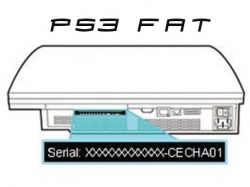
- CECH A01 NAND
- CECH B NAND
- CECH C NAND
- CECH E NAND
- CECH G NAND
- CECH H NOR
- CECH J NOR
- CECH K NOR
- CECH L NOR
- CECH M NOR
- CECH P NOR
- CECH Q NOR
- Note this covers all FAT MODELS....
Flash Writer Model Compatibility (SLIM):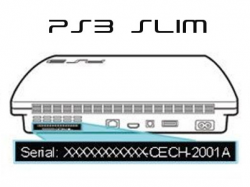
- 20XX NOR
- 21XX NOR
- 25XX NOR (3.56 and Lower)
- How do i know for sure if my PS3 Model is compatible ?
- You must have a PS3 Console that has a Factory Firmware of 3.56 and below. To check, its easy with this simple tool for OFW, Download minverchk PUP Then place the .pup file on a FAT32 USB Flash Drive in a PS3/UPDATE folder (create path if needed) Now on the PS3 XMB goto Setting ->> System Update >>> Update via Media Storage Once shown on the list select the PUP and install, shortly after there will be a message showing the factory firmware the console was shipped,
For this we want 3.56 and below. ANYTHING HIGHER THEN 3.56 IS NOT ABLE INSTALL A CFW,. Sorry this will not work for your console, but you can use PS3HEN (Homebrew Enabler) possible for running homebrew and other CFW like features for those nonCFW models.,
PlayStation 3 Console's - NOT COMPATIBLE
(SLIM Models not compatible for CFW installs):
- 25XX NOR (3.60 and Higher Factory Firmware Installed, check w/ minverchck)
- 3XXX NOR
- THESE MODELS CAN USE PS3HEN
(SUPERSLIM Models not compatible for CFW installs):
- 4XXXA EMMC
- 4XXXB NOR
- 4XXXC NOR
- THESE MODELS CAN USE PS3HEN
.
Can I install a CFW before 4.85, such as Rebug 4.84 or an earlier CFW?
- Yes, however you must Toggle QA Flag. Once the Token is activated you have the ability to then freely jump CFW versions. (see below for details)
- How do I Toggle QA Flag?
- When on a CFW download & install >>> QA TOGGLER (Standalone), (Note: Will just show a black screen then reboot the PS3 and returns to xmb. A Restart is Required. After toggling QA, cfw syscalls will be disabled (meaning your CFW patches will be disabled until the next boot, so a reboot is required after the Toggler exits back to the XMB.) Additional Info about Q/A flag can be seen here ( & also @ PS3Devwiki)
Should i use the "999 Downgrader" vs "Toggle QA" to install a different CFW from an earlier firmware?
- NO, installing the "999 downgrader" PUP can cause various issues like on a 3.56 minver console, it can brick the console, simply just Toggle the Q/A Flag (see above question) and play it safe and is so simple to move from CFW versions (up and down from version to version) once toggled (and you only have to do it your console ONE time with togging Q/A Flag and its set for lifespan of console)
What is the basic purpose of the Flash Writer & Flash Dumper Tools Release?
- The Flash Dumper is to get a backup of the NAND, NOR, and eMMC chip
- Recommendation perform a dump of the internal flash before exploiting, in-case of problems or a bad install a clean backup will be helpful for reviving a console and for other means. Having a clean backup on file is good practice, more then likely will never need it but can be helpful if you in a spot. Warning never share your backups in public as they contains SENSITIVE information about you and your console.
- The Flash Writer is to jailbreak your console. (Adding a patch to OFW to allow CFW installation)
Do I have to setup my own web server or can (has) someone host this exploit?
- You can use **ps3xploit.com >Domain no Longer owned by team** (ps3xploit.me =new) unless the site is e experiencing slowdown issues on server, then you can download local files using dropdown menu on top on the **ps3xploit.com >Domain no Longer owned by team** (ps3xploit.me =new) website.
Where can i find the latest 4.85 CFW?
- This thread in the psx-place.com forums.
Where can i find PS3 Homebrew?
The console shut down and beeped when using the exploit, however I'm getting an error when trying to install cfw? (provided by @lord3490)
- There are a couple of possible reasons for that:
- 1. Did you make sure you flashed the correct file (nand/nor)? See q/a above
- 2. Try different 4.85 CFWs and make sure the md5 is correct after copying to fat32 thumb drive.
- 3. Try a different USB thumb drive or reformat it.
- 4. Install HFW 4.85 two times in a row then apply the patch using the PS3Xploit flash writer & finally install a 4.85 CFW. That should always solve the issue.
- 5. As a last resort, make a backup and format internal HDD (I just read that solved the problem for one user).
Should I install Custom Firmware (CFW) or PS3HEN on my PS3 Console?
- A: The answer depends on your console, if your a listed model above can install Custom Firmware, then go that route. As that is the best exploit on the PS3, however the nonCFW models listed above PS3HEN is a powerful homebrew enabler that will allow for many PS3 Homebrew to run and contains other CFW like features, but it has limitations not seen on CFW so the better option is CFW if your model can install. See listed models above
Do i need to install 4.85 HFW or can i do this from 4.85 Official firmware (OFW)?
- You must install 4.85 HFW first, In the past or to be more precise v4.82 OFW only we could use the PS3Xploit Flash Tools directly from OFW, since that time Sony pushed a patch (released in v4.83 OFW) to restrict the execution of the PS3Xploit Tools, but developer's ( @Joonie ) stumbled on a way to inject those file back into OFW and thus HFW (Hybrid Firmware) was born which could be installed on a unmodified PS3. This simply re-injected the hole used in 4.82 OFW. Now since we are on 4.85 currently, we have a 4.85 HFW ready to go and that is what is needed to execute the PS3Xploit Tools (so be sure to install that prior to using), as the Official firmware 4.83, 4.84, 4.85 and beyond will restrict PS3Xploit Tools from OFW directly. HFW is the bridge and could get patched in the future (we are not sure why it has not yet) but was not patch on the previous firmware update of 4.85. Stay tuned what will 4.86 bring?
What should i do if we see a future firmware update?
- DO NOT UPDATE until developer's have investigated the firmware for any changes or potential patches that have been made to restrict Homebrew/Exploits.
-
What does the Flash Writer do?
The Flash Writer (once executed) will provide the ability to install a CFW afterwards. (model must be compatible)
4.85 Flash Writer Help
4.85 HFW Only Supported
WE NO LONGER SUPPORT THE 4.84 WRITER, AND RECOMMEND UPDATING TO 4.85 HFW (Hybrid Firmware)!
IMPORTANT WARNINGs - USE THE PROVIDED flash_485.hex/flash_485.jpg AS IS.
- ***** DON'T PATCH IT OR MODIFY IT OR YOU WILL BRICK *****
- DO NOT USE ON CFW (Custom Firmware) (Only Supports HFW)
- DO NOT USE IF MINVER CHECK REPORTS 3.60 OR HIGHER
- DO NOT USE ON PS3 Models 3xxx/4xxx (aka SuperSlims / Late Slim models) YOU WILL BRICK THOSE CONSOLES!
- USE ONLY ON 4.85 HFW
- Verify flash_485.hex file on a flash drive and in the selected usb/card port.
- Make sure to use TRIANGLE and save flash.jpg to HDD first if using HDD option!
- flash_485.hex/flash_485.jpg MD5: 2D74B066E7453E6B1336E36C410FB1EB
INSTALLATION PROCESS - Please Read Carefully :
.-
For best results with the flash writer, here are the recommended steps.
- Install 4.85 HFW twice on the console you wish to flash to avoid the potential corruption error during CFW installation.
- Open the browser & browse to the **ps3xploit.com >Domain no Longer owned by team** (ps3xploit.me =new) website, go to the page of the exploit you need. Set the current page as browser homepage. Don't launch the exploit initialization. Close the browser.
- Open the browser. The exploit page will load automatically. Choose your path option or download the flash_485.jpg file if you use the hdd edition.
- Press the exploit initialization button & wait until initialization succeeds. If it fails, follow the refresh/reload instructions on screen.
- Trigger the exploit.
- On success, load the **ps3xploit.com >Domain no Longer owned by team** (ps3xploit.me =new) dumper, dump the flash memory & check it with py checker tool. Don't restart if ever the validation tool gives you errors/warnings in both ros0 & ros1 or risk a partial brick.
- Restart your console & install a 4.85 CFW.
Usage Tips:
j- Try using a LAN connection or a solid WiFi connection during exploitation. A weak signal can cause problems.
- If the exploit takes more than 5 minutes to work, reload page, browser, or restart console and try again.
- If you are using a LAN connection and experience network issues, make sure all cables to router are in working order.
Additional Warning:
f- Due to the lack of proper checks after exiting the ROP chain, it is possible in some cases to obtain a success message despite an operation failure. For instance, if you choose a path where no device is plugged in, a dumper page will still display a success message despite the fact the dump save could not work. This limitation has already been addressed, the added operation checks will be part of an update to these PS3Xploit tools which will be released in the coming weeks, that update will be final, no more will come after it.
-
What does the Flash Dumper do?
- The dumper provides a dump of your PS3 Flash, which is a good idea to do before you start exploiting to have a clean dump handy. They can be useful if an error would ever occur and can help revert bricks with right hardware/software.
Flash Dumper Help
4.10 - 4.85 Firmware Supported
For best results with the flash dumper, here are the recommended steps.
.- Open the browser & browse to the **ps3xploit.com >Domain no Longer owned by team** (ps3xploit.me =new) website, go to the page of the exploit you need. Set the current page as browser homepage. Don't launch the exploit initialization. Close the browser.
- Open the browser. The exploit page will load automatically. Choose your dump path option or download the dump.jpg file if you use the hdd edition.
- Press the exploit initialization button & wait until initialization succeeds. If it fails, follow the refresh/reload instructions on screen.
- Trigger the exploit.
- On success, check your dump with the py checker tool.
Usage Tips using Flash Dumpers:
.- Try using a LAN connection or a solid WiFi connection during exploitation. A weak signal can cause problems.
- If the exploit takes more than 5 minutes to work, reload page, browser, or restart console and try again.
- If you are using a LAN connection and experience network issues, make sure all cables to router are in working order.
Additional Warning:
Due to the lack of proper checks after exiting the ROP chain, it is possible in some cases to obtain a success message despite an operation failure. For instance, if you choose a path where no device is plugged in, a dumper page will still display a success message despite the fact the dump save could not work. This limitation has already been addressed, the added operation checks will be part of an update to these PS3Xploit tools which will be released in the coming weeks, that update will be final, no more will come after it.
Additional Resources / Downloads:
- 4.85 Flash Writer NOR/NAND References Files
- MD5 Checksum: 2D74B066E7453E6B1336E36C410FB1EB
- 4.85 HFW (hybrid firmware) - Required to run PS3Xploit Tools in 4.85
- Q/A Toggle (by Habib) pkg - Optional pkg - Move to previous firmware from 4.85 (if you done this in the past you do not need to do it again)
- 4.85 CFW/Homebrew & General Info: thread via psx-place.com
Exploit Site @: **ps3xploit.com >Domain no Longer owned by team** (ps3xploit.me =new)
Official Support & Help @ Ps3Xploit Forum: via psx-place.com
Last edited: