Anyone Can Help with XML edits?

I'm not sure if you can move the clock and still have it work.. well, you can move it, but afaik it creates a vibration effect that pulsates every minute or so or if you install a pkg. I've never personally tried it, but I believe it's the busy (face), busy long (minute), or busy short (hour). they're in the system_plugin.iirc. be careful with that one, 'cause it will soft brick you if mess up.
 
I'm not sure if you can move the clock and still have it work.. well, you can move it, but afaik it creates a vibration effect that pulsates every minute or so or if you install a pkg. I've never personally tried it, but I believe it's the busy (face), busy long (minute), or busy short (hour). they're in the system_plugin.iirc. be careful with that one, 'cause it will soft brick you if mess up.

The clock is movable, as well as the plane that handles the pulse animation, just change its grid overrides :P

Also the pulsating effect can easily be disabled by specifying a texture that is a blank & transparent ;) as long as you don't physically delete the plane from the rco


Sent from my iPhone using Tapatalk
 
Tried notepad++ for editing xml but i have no experience with it or editing xml . I remember back in college we had to manually write html code then a lot of web design templates appeared which did the code in the background , while i did the visual stuff . Is there anything similar for xml ?
 
hmm...I know you can add icons also. I made a green, blue, and yellow battery indicator, since each call was to the same image. you just need to add the icon to the icon tree and copy and paste of the line of code with the new icon. I'm not sure if that works for everything, but it does with the impose_plugin.rco that one is a bit tricky though. if the led size isn't correct (think 1.45KBs), then it will result in blinking white boxes over everything. maybe it's due to being an icon within an icon.
 
hmm...I know you can add icons also. I made a green, blue, and yellow battery indicator, since each call was to the same image. you just need to add the icon to the icon tree and copy and paste of the line of code with the new icon. I'm not sure if that works for everything, but it does with the impose_plugin.rco that one is a bit tricky though. if the led size isn't correct (think 1.45KBs), then it will result in blinking white boxes over everything. maybe it's due to being an icon within an icon.

Yeap i had some trouble with it, i use red, blue, green, yellow.

Seems like every rco has a size limit, like explorer full,if i add one more Byte on it all parts of xmb becomes blinking white.

There is anyway to bypass it? in psp i could add wherever i want without problems,, ps3 that i was expecting big things,it's shit
 
Seems like every rco has a size limit, like explorer full,if i add one more Byte on it all parts of xmb becomes blinking white.

There is anyway to bypass it? in psp i could add wherever i want without problems,, ps3 that i was expecting big things,it's shit
Im trying to imagine if you hitted with some kind of "max limit" of something, but i dont get it
It could be many things, the max number of images, max total size of all images, max number of "objects" entries under "ObjectTree", etc...

Can you explain better what problem you found and what you tryed to solve it ? (even if the experiments was unsuccessfull it could give a hint of what is happening)
 
Tried notepad++ for editing xml but i have no experience with it or editing xml . I remember back in college we had to manually write html code then a lot of web design templates appeared which did the code in the background , while i did the visual stuff . Is there anything similar for xml ?

No, xml's are basic layouts of the ps3. This is not wix.com for inserting templates and writing text down.
Good way to grasp the basics is just decompile some of the visual mods for ex: dazaxX clock Ui & compare it with the original.xml.
 
Im trying to imagine if you hitted with some kind of "max limit" of something, but i dont get it
It could be many things, the max number of images, max total size of all images, max number of "objects" entries under "ObjectTree", etc...

Can you explain better what problem you found and what you tryed to solve it ? (even if the experiments was unsuccessfull it could give a hint of what is happening)

Seems like every rco has a limit (for example in sysconf.rco i added petals animation in side menus using only one image for it
and setting it to show 40 animation petals (not the real number, i don't remember right now) in a side menu,so it worked, but if i add the same number in the next system settings side menu it freezes. So i figured out a Max number of animations entries, eg 40 so i divided it by the number of side menus and i got a number to use in each side menu ( I really wanted to use more).

In system plugin i only was able to add a small ps logo, if i add other thing to it, something would break like blank XMB icons or even affecting other things like Impose.rco, i remembering adding one more thing to system the Impose.rco all icons gone blank, some things in game xmb too.

Adding the ps4 sounds too. I could add the full quality ones in a p3t theme file, but using it in the rco it doesnt work, i had to test it many many times, lowering the quality, making it mono, shrinking the maximum that i could and they didnt work. I got them working using many programs to shrink down the size and the quality ( i'm not satisfied with the current xmb sounds in my actual mod). its like a maximum of 300 kb in about 15 sound files, i had to have them with 7kb, 20kb, 50kb and etc (really ridiculous size).

This all gave me a pain in the ass, cuz when i added a thing here it breaks a thing in there, to get all things working took me almost a year.

And on the psp ( it had a limit too, but i could add tons of things to reach the max limit, about 20x more than the ps3)
 
Last edited:
@dazzaXx can u help me?

As you are now familiarized with the positionsOverrides and SizesOverrides

http://www.mediafire.com/file/v51ju5mfmls7dxh/system_plugin.rco/file

Here is my System_plugin it have animations on :but x::but tri::but square::but cir: buttons and a PS Logo Boost Mode too

The Buttons workes good, but in 720 p and 480 they become so big, and the Boost Mode doesnt show in 720p and 480 ( i think they are offscreen in those resolutions)

can u make them work? i'm without ps controller just a move one, and i couldnt make the layouts working

i using default buttons overrides gets them too big in 720, 0x0 the became OK but not that ok
 
Last edited:
Btw... you can calculate the positions and sizes for 1920x1080 resolution (most probably the one you are working with)
And for the others you can make a rought approximation by applying the same "scale factor" for all the values

Lets say... if you have something located at x=270 for 1080 width resolution (and the zero coordinates is at the center of the screen)... you can use a formula to find the proportional value at the other screen resolutions
In the example i used x=270 because this is located at 3/4 of the total screen width in 1080
(270*4=1080 so im dividing the screen horizontally in 4 quarters)

I never did this, so right now i cant write the formula to find the scale factors for every resolution, but i guess it should look fine
 
@dazzaXx can u help me?

As you are now familiarized with the positionsOverrides and SizesOverrides

http://www.mediafire.com/file/v51ju5mfmls7dxh/system_plugin.rco/file

Here is my System_plugin it have animations on :but x::but tri::but square::but cir: buttons and a PS Logo Boost Mode too

The Buttons workes good, but in 720 p and 480 they become so big, and the Boost Mode doesnt show in 720p and 480 ( i think they are offscreen in those resolutions)

can u make them work? i'm without ps controller just a move one, and i couldnt make the layouts working

i using default buttons overrides gets them too big in 720, 0x0 the became OK but not that ok
I know how to use the positionOverrideX and Y, i've not yet experimented with the sizeOverridesX and Y yet but i'd assume its the same, specify and line number in hexidecimal and it should read them as it does with the pos overrides.
 
@sandungas I still don't know how to figure out the coordinates lol,
You've gave me an image although that wouldn't be accurate as in the Plane of clock it says this

<Text name="clock" positionX="0" positionY="-12" positionZ="0" colorScaleR="1" colorScaleG="1" colorScaleB="1" colorScaleA="1" sizeX="0" sizeY="0" sizeZ="1" sizeScaleX="1" sizeScaleY="1" sizeScaleZ="1" anchorMode="0x3200" onInit="nothing" positionOverrideX="0x700" positionOverrideY="0x700" positionOverrideZ="0x0" sizeOverrideX="0x0" sizeOverrideY="0x0" sizeOverrideZ="0x0" textMessage="nothing" textFontStyle="nothing" textFontMode="0x1000002" textUnk29="0x1" textFontSizeY="10" textTopColorScaleR="1" textTopColorScaleG="1" textTopColorScaleB="1" textBottomColorScaleR="1" textBottomColorScaleG="1" textBottomColorScaleB="1" textLineSpacing="0" textUnk37="0x0" textUnk38="0x0" textUnk39="0x0" textCharacterSpacing="0" textShadowOffsetX="4" textShadowOffsetY="-5" textShadowOffsetZ="0" textShadowColorScaleR="0.25" textShadowColorScaleG="0.25" textShadowColorScaleB="0.25" textShadowColorScaleA="1" textUnk48="0x0" textUnk49="0x0" textUnk50="0x0" textUnkFloat51="1" textUnkFloat52="1" textUnkFloat53="1" textUnkFloat54="1" textResizeMode="0xffffffff" textOverrideUnk56="0x13000000" textOverrideUnk57="0x3000000" textOverrideUnk58="0x0"></Text>

if x = 0 & y = -12 it must be extremly close to the center of the screen right?
 
I wrote an small "tutorial" here at post #6
https://www.psx-place.com/threads/anyone-can-help-with-xml-edits.22678/#post-160304
And some handy examples at post #23
https://www.psx-place.com/threads/anyone-can-help-with-xml-edits.22678/page-2#post-160557

Basically, you should ignore the... positionX, positionY, positionZ, sizeX, sizeY, and sizeZ... because was intended for PSP
For PS3 you need to use the attributes i named "overrides"... positionOverrideX, positionOverrideY, positionOverrideZ, sizeOverrideX sizeOverrideY, and sizeOverrideZ... because this ones are specific for the PS3
 
Im going to show you an example with the values you posted in that line... what you need is to "translate" this values:
positionOverrideX="0x8e020000"
positionOverrideY="0x8f020000"
positionOverrideZ="0x0" <--- Z is zero, so lets forget about it

The first thing you need to do is to keep in mind the value is composed by 2 groups of 2 bytes each (in other words "cut" the value at half)
positionOverrideX = 8e02 (first group) and 0000 (second group)
positionOverrideX = 8f02 (first group) and 0000 (second group)

The second group is unknown
Btw, the other day i found how works that "unknown" value of the second group ;)

Is another override... but the value indicates a line of the factor tables !!!
And what i said about the valid values for this second group to be always 0 or 1 was wrong
I was lucky to find an object in a ancient official firmware where the value is used, and actually it allows for any value... and it works exactly in the same way than the other overrides

The only difference in the 2 override values is... the first one is a pointer to a line in the grid table, and the second is a pointer to a line in the factor table

In simple words... in this example:
positionOverrideX="0x8e020000"
Is composed by 2 values:
positionOverrideX="grid_override_pointer, factor_override_pointer"

-----------------
How the value in the "factor" table affects the other value in the "grid" table ?... this is something im not so sure though
Initially i thought it was simply a multiplyer... but at this point im not so sure, it seems to be a bit more tricky

FYI @dazzaXx ;)
 
Take a look at this sample, is a section taken from impose_plugin.rco 4.84
This same "objects" exists with the same name ("impose_page" and "impose_battery_info") since pre-retail firmwares, and in some of them is even more obvious how this overrides are working, im just posting this example using 4.84 firmware because this way you can check yourself

The 4 "planes" named "led_red_1", "led_red_2", "led_red_3", and "led_red_4" are the tiny red icons that appears in left-bottom corner (with a text number next to them 1,2,3,4), indicating the number assigned to the dualshock controller... in the black screen that appears when you press PS button on XMB
In that screen, if you connect the dualshock by USB to the PS3 this icons does a "tilting" animation indicating the battery is being charged
Code:
<?xml version="1.0" encoding="iso-8859-1"?>
<!-- This XML representation of an RCO structure was generated by Rcomage v1.1.2 -->
<RcoFile UMDFlag="0" rcomageXmlVer="1.1" type="ps3" minFirmwareVer="unknownId0x130">
	<MainTree name="impose_plugin">
		<ObjectTree>
			<Page name="impose_page" pageMode="0x1101" pageOnInit="nothing" pageOnCancel="nothing" pageOnContext="nothing" pageOnActivate="nothing">
				<Plane name="impose_battery_info" positionX="0" positionY="0" positionZ="0" colorScaleR="0" colorScaleG="0" colorScaleB="0" colorScaleA="0" sizeX="0" sizeY="0" sizeZ="0" sizeScaleX="1" sizeScaleY="1" sizeScaleZ="1" anchorMode="0x0" onInit="nothing" positionOverrideX="0x4000100" positionOverrideY="0x5000100" positionOverrideZ="0x0" sizeOverrideX="0x7000000" sizeOverrideY="0x8000000" sizeOverrideZ="0x0" planeImage="nothing" planeResizeMode="0x0">
					<Plane name="numbers_icon" positionX="0" positionY="1" positionZ="0" colorScaleR="1" colorScaleG="1" colorScaleB="1" colorScaleA="1" sizeX="0" sizeY="0" sizeZ="0" sizeScaleX="1" sizeScaleY="1" sizeScaleZ="1" anchorMode="0x1100" onInit="nothing" positionOverrideX="0xc90d0000" positionOverrideY="0xa10d7000" positionOverrideZ="0x0" sizeOverrideX="0xc70d0000" sizeOverrideY="0xc80d0000" sizeOverrideZ="0x0" planeImage="image:tex_controller_number" planeResizeMode="0x0"></Plane>
					<Plane name="led_red_1" positionX="1" positionY="1" positionZ="0" colorScaleR="1" colorScaleG="1" colorScaleB="1" colorScaleA="1" sizeX="0" sizeY="0" sizeZ="0" sizeScaleX="1" sizeScaleY="1" sizeScaleZ="1" anchorMode="0x0" onInit="nothing" positionOverrideX="0xc90d7200" positionOverrideY="0xa10d7100" positionOverrideZ="0x0" sizeOverrideX="0xca0d0000" sizeOverrideY="0xcb0d0000" sizeOverrideZ="0x0" planeImage="image:tex_red" planeResizeMode="0x0"></Plane>
					<Plane name="led_red_2" positionX="1" positionY="1" positionZ="0" colorScaleR="1" colorScaleG="1" colorScaleB="1" colorScaleA="1" sizeX="0" sizeY="0" sizeZ="0" sizeScaleX="1" sizeScaleY="1" sizeScaleZ="1" anchorMode="0x0" onInit="nothing" positionOverrideX="0xc90d7300" positionOverrideY="0xa10d7100" positionOverrideZ="0x0" sizeOverrideX="0xca0d0000" sizeOverrideY="0xcb0d0000" sizeOverrideZ="0x0" planeImage="image:tex_red" planeResizeMode="0x0"></Plane>
					<Plane name="led_red_3" positionX="1" positionY="1" positionZ="0" colorScaleR="1" colorScaleG="1" colorScaleB="1" colorScaleA="1" sizeX="0" sizeY="0" sizeZ="0" sizeScaleX="1" sizeScaleY="1" sizeScaleZ="1" anchorMode="0x0" onInit="nothing" positionOverrideX="0xc90d7400" positionOverrideY="0xa10d7100" positionOverrideZ="0x0" sizeOverrideX="0xca0d0000" sizeOverrideY="0xcb0d0000" sizeOverrideZ="0x0" planeImage="image:tex_red" planeResizeMode="0x0"></Plane>
					<Plane name="led_red_4" positionX="1" positionY="1" positionZ="0" colorScaleR="1" colorScaleG="1" colorScaleB="1" colorScaleA="1" sizeX="0" sizeY="0" sizeZ="0" sizeScaleX="1" sizeScaleY="1" sizeScaleZ="1" anchorMode="0x0" onInit="nothing" positionOverrideX="0xc90d7500" positionOverrideY="0xa10d7100" positionOverrideZ="0x0" sizeOverrideX="0xca0d0000" sizeOverrideY="0xcb0d0000" sizeOverrideZ="0x0" planeImage="image:tex_red" planeResizeMode="0x0"></Plane>
				</Plane>
			</Page>
		</ObjectTree>
	</MainTree>
</RcoFile>

This is the same code but keeping only the positions, sizes, and overrides to have a better overiew of the values that matters for this explain, also i added some linebreaks to separate each attribute in a line
Code:
<?xml version="1.0" encoding="iso-8859-1"?>
<!-- This XML representation of an RCO structure was generated by Rcomage v1.1.2 -->
<RcoFile UMDFlag="0" rcomageXmlVer="1.1" type="ps3" minFirmwareVer="unknownId0x130">
	<MainTree name="impose_plugin">
		<ObjectTree>
			<Page name="impose_page">
				<Plane name="impose_battery_info">
					<Plane name="numbers_icon"
					positionX="0"
					positionY="1"
					positionZ="0"
					sizeX="0"
					sizeY="0"
					sizeZ="0"
					sizeScaleX="1"
					sizeScaleY="1"
					sizeScaleZ="1"
					positionOverrideX="0xc90d0000"
					positionOverrideY="0xa10d7000"
					positionOverrideZ="0x0"
					sizeOverrideX="0xc70d0000"
					sizeOverrideY="0xc80d0000"
					sizeOverrideZ="0x0"
					>
					</Plane>
					<Plane name="led_red_1"
					positionX="1"
					positionY="1"
					positionZ="0"
					sizeX="0"
					sizeY="0"
					sizeZ="0"
					sizeScaleX="1"
					sizeScaleY="1"
					sizeScaleZ="1"
					positionOverrideX="0xc90d7200"
					positionOverrideY="0xa10d7100"
					positionOverrideZ="0x0"
					sizeOverrideX="0xca0d0000"
					sizeOverrideY="0xcb0d0000"
					sizeOverrideZ="0x0"
					>
					</Plane>
					<Plane name="led_red_2"
					positionX="1"
					positionY="1"
					positionZ="0"
					sizeX="0"
					sizeY="0"
					sizeZ="0"
					sizeScaleX="1"
					sizeScaleY="1"
					sizeScaleZ="1"
					positionOverrideX="0xc90d7300"
					positionOverrideY="0xa10d7100"
					positionOverrideZ="0x0"
					sizeOverrideX="0xca0d0000"
					sizeOverrideY="0xcb0d0000"
					sizeOverrideZ="0x0"
					>
					</Plane>
					<Plane name="led_red_3"
					positionX="1"
					positionY="1"
					positionZ="0"
					sizeX="0"
					sizeY="0"
					sizeZ="0"
					sizeScaleX="1"
					sizeScaleY="1"
					sizeScaleZ="1"
					positionOverrideX="0xc90d7400"
					positionOverrideY="0xa10d7100"
					positionOverrideZ="0x0"
					sizeOverrideX="0xca0d0000"
					sizeOverrideY="0xcb0d0000"
					sizeOverrideZ="0x0"
					>
					</Plane>
					<Plane name="led_red_4"
					positionX="1"
					positionY="1"
					positionZ="0"
					sizeX="0"
					sizeY="0"
					sizeZ="0"
					sizeScaleX="1"
					sizeScaleY="1"
					sizeScaleZ="1"
					positionOverrideX="0xc90d7500"
					positionOverrideY="0xa10d7100"
					positionOverrideZ="0x0"
					sizeOverrideX="0xca0d0000"
					sizeOverrideY="0xcb0d0000"
					sizeOverrideZ="0x0"
					>
					</Plane>
				</Plane>
			</Page>
		</ObjectTree>
	</MainTree>
</RcoFile>
If you are a newcomer to the thread and you are reading this post before reading the previous talk, at this point i have to insist again in reading the small "tutorial" at post #6
https://www.psx-place.com/threads/anyone-can-help-with-xml-edits.22678/#post-160304
And some handy examples at post #23
https://www.psx-place.com/threads/anyone-can-help-with-xml-edits.22678/page-2#post-160557

Im not going to convert all the values of this sample... the key concept you need to remember is everyone of the "overrides" is composed by 2 values. Lets say... if we have an:
positionOverrideX="0x11223344"
What we need to "translate" the values is to split it in half and flip the bytes, this way:
-First value is 0x2211 (grid table override)
-Second value is 0x4433 (factor table override)

Now scroll a bit in the list of attributes i just posted above, and keep an eye at the second value (last 2 bytes most at right in the overrides)

We have 0x0071, 0x0072, 0x0073, 0x0074, 0x0075
This is because the values has been "stored" consecutivelly inside the "factor tables" (by the firmware automated official build/compile scripts)
To know the line where the value is stored in the .txt file you need to convert them to decimal and add +1... so we know in 4.84 firmware are stored in line 114, 115, 116, 117, 118 (of the factor tables)
dev_flash/vsh/etc/layout_grid_table_1080.txt
dev_flash/vsh/etc/layout_factor_table_1080.txt
dev_flash/vsh/etc/layout_grid_table_720.txt
dev_flash/vsh/etc/layout_factor_table_720.txt
dev_flash/vsh/etc/layout_grid_table_480.txt
dev_flash/vsh/etc/layout_factor_table_480.txt
dev_flash/vsh/etc/layout_grid_table_272.txt
dev_flash/vsh/etc/layout_factor_table_272.txt
 
Last edited:
@sandungas

I understood all that But I don't know where the screen coordinates are located

For ex I want to place the Avatar on the top left corner.

How would I know it's coordinates?

Ty for helping btw..
 
@sandungas

I understood all that But I don't know where the screen coordinates are located

For ex I want to place the Avatar on the top left corner.

How would I know it's coordinates?

Ty for helping btw..
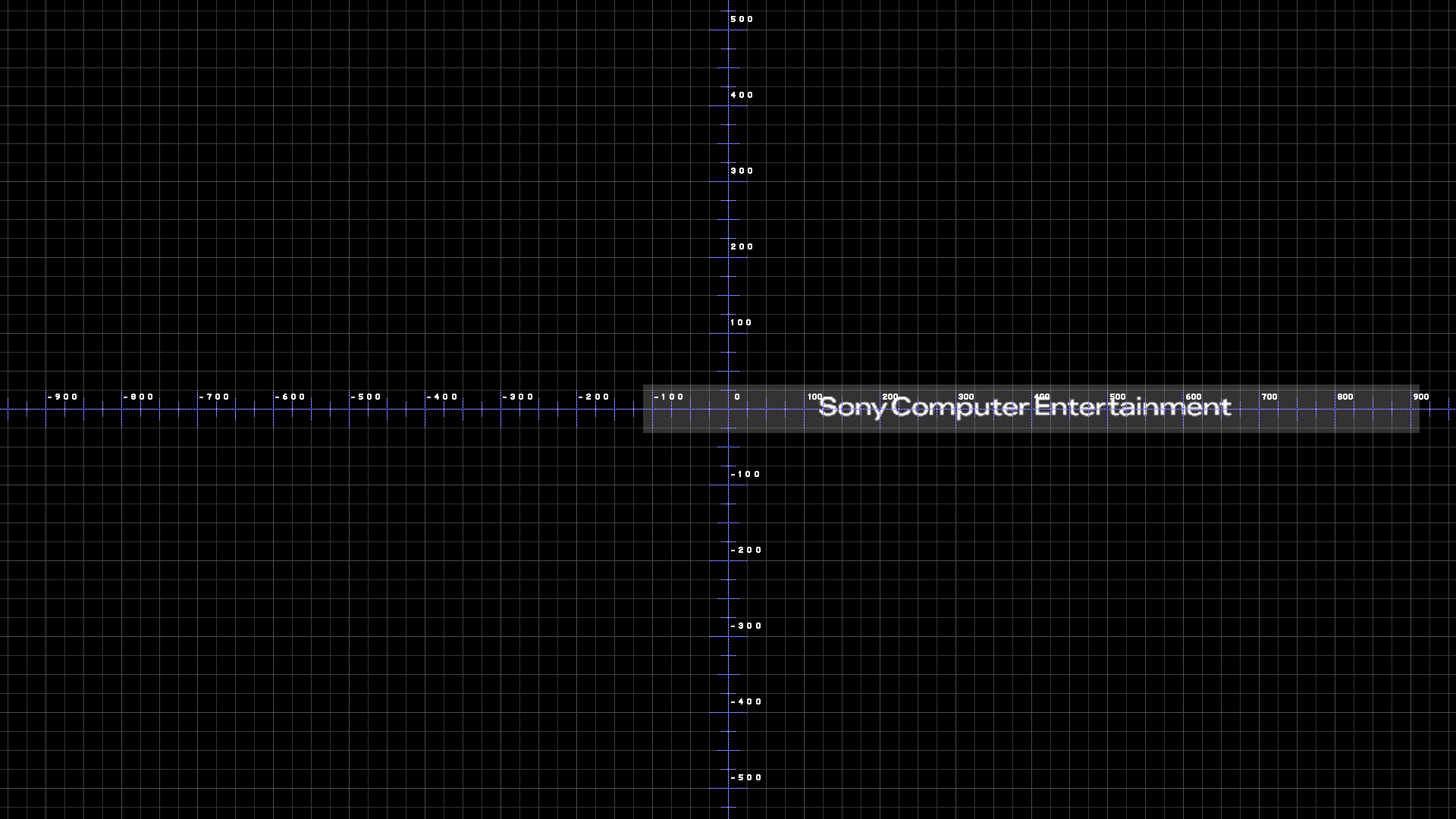
The coordinates are different for every resolution, thats the main reason why all this thing is so tricky, the PS3 loads the values from the .txt files (and not from inside the rcos like in PSP) because this way they can define different sizes and positions for every screen resolution
In the PSP there was only one screen resolution (the screen of the PSP itself), but in PS3 the screen can have different resolutions (included one for the PSP when you do remote play)

The positions (and his overrides) = 0 are the center of the screen for all screen resolutions
In this image every pixel of the image is a pixel of the TV screen, you can use it as a pattern for initial tests
Page_coldboot_1080.png
 
I wrote an small "tutorial" here at post #6
https://www.psx-place.com/threads/anyone-can-help-with-xml-edits.22678/#post-160304
And some handy examples at post #23
https://www.psx-place.com/threads/anyone-can-help-with-xml-edits.22678/page-2#post-160557

Basically, you should ignore the... positionX, positionY, positionZ, sizeX, sizeY, and sizeZ... because was intended for PSP
For PS3 you need to use the attributes i named "overrides"... positionOverrideX, positionOverrideY, positionOverrideZ, sizeOverrideX sizeOverrideY, and sizeOverrideZ... because this ones are specific for the PS3

Works now. I haven't paid attention to when you said position x y and z are for PSP. Thanks a lot!
 
Hmmmm, i just realized about something new, hold down and get ready for the brainstorming (yeah, im learning too, some of this is still unknown but im in the road since time ago, i know what im saying) :P

In this sample im going to keep only the attributes that matters for this brainstorming...
Code:
<?xml version="1.0" encoding="iso-8859-1"?>
<!-- This XML representation of an RCO structure was generated by Rcomage v1.1.2 -->
<RcoFile UMDFlag="0" rcomageXmlVer="1.1" type="ps3" minFirmwareVer="unknownId0x130">
	<MainTree name="impose_plugin">
		<ObjectTree>
			<Page name="impose_page">
				<Plane name="impose_battery_info">
					<Plane name="numbers_icon"
					positionX="0"
					positionY="1"
					positionZ="0"
					positionOverrideX="0xc90d0000"
					positionOverrideY="0xa10d7000"
					positionOverrideZ="0x0"
					>
					</Plane>
					<Plane name="led_red_1"
					positionX="1"
					positionY="1"
					positionZ="0"
					positionOverrideX="0xc90d7200"
					positionOverrideY="0xa10d7100"
					positionOverrideZ="0x0"
					>
					</Plane>
					<Plane name="led_red_2"
					positionX="1"
					positionY="1"
					positionZ="0"
					positionOverrideX="0xc90d7300"
					positionOverrideY="0xa10d7100"
					positionOverrideZ="0x0"
					>
					</Plane>
					<Plane name="led_red_3"
					positionX="1"
					positionY="1"
					positionZ="0"
					positionOverrideX="0xc90d7400"
					positionOverrideY="0xa10d7100"
					positionOverrideZ="0x0"
					>
					</Plane>
					<Plane name="led_red_4"
					positionX="1"
					positionY="1"
					positionZ="0"
					positionOverrideX="0xc90d7500"
					positionOverrideY="0xa10d7100"
					positionOverrideZ="0x0"
					>
					</Plane>
				</Plane>
			</Page>
		</ObjectTree>
	</MainTree>
</RcoFile>
The theory is... if what i said is right, so the positionOverride's are completly replacing the position's values
Then why in this sample there are some values of position = 1 ? o_O

Take a look at how is used here positionX, it seems to use only 2 posible values, 0, or 1
And it looks like a "flag" that indicates if the override is loading a value externally from the factor tables

In the "plane" named "numbers_icon" is using positionX="0" because the positionOverrideX="0xc90d0000" (second value is 0x0000)
In all the others positionX="1" because the second value of the overrides (pointing to a line of the factor tables) are:
0x0072 + 1
0x0073 + 1
0x0074 + 1
0x0075 + 1

Just a theory
 
Last edited:
Im having one of that moments
779507368_860479.gif

D2Q0JJH.png

Study the image and all the values, i think this is the best example you are going to find about how the overrides works

What i said before was partially right, the overrides are composed by 2 values, the first value is a line of the layout_grid_table_*.txt file/s and the second value is a line of the layout_factor_table*.txt file/s
Initially i thought the value of the "factor" files was a multiplyer, but you can see in this example that the only thing you need to do is to sum them

As example, the image "tex_controller_number" is located at an absolute position X = -835 and Y = -340 + 82
And is using an anchorMode="0x1100" (top-left corner)... so the Y is the top border of the image

The 4 "tex_red" icons are drawn "from center" by using anchorMode="0x0"
All them are located at an absolute Y = -340 + 43
The center of the first icon is at absolute X = -835 + 16... second at -835 + 60... third at -835 + 104 ... and fourth at -835 + 148
The distance in between centers is 44 pixels (16--->60--->104--->148)


-----------
As you can see.... there are several coordinates where is needed to "move" to the "grid" value, and then make a displacement of the "factor" value
I think the purpose of this is to align objects... you can use the coordinates of other object and then display stuff on top of it by using "relative" displacements

Basically... in this example there are 5 images, and the positions are using as "base" coordinates X= -835 and Y= -340 (loaded from the "grid" .txt files) + the displacements (loaded from the "factor" .txt files)
 
Last edited:

Similar threads

Back
Top