PS3 Artemis PS3 (r6.3): Cheating system updated with 4.8x CFW Support & New Features added

Developer @dnawrkshp originally ported Lazy Bastards's Artemis to the PS3. The PlayStation 3 port is a cheating system for applying cheat to games utilized on CFW/HEN enabled console's that also comes with a companion plugin (sprx) for additional functionality. @bucanero who you may recall is the developer who ported PKGi recently to the PS3. has now turned attention to updating Artemis-PS3 for 4.85 use and the developer has added two new features to go along. First, we have an Online Cheat Database that will allow you keep your cheats up to date with a simple online download and also a Local Database Update feature has also been incorporated into the system. Also a shoutout to @Berion who's designs still looks great in the GUI :) .
-STLcardsWS

main.png

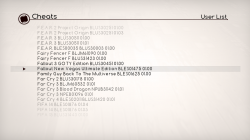
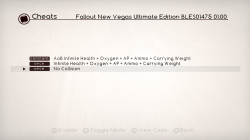
  • games.png cheats.png

    Hello,

    As a little side project, I've forked Artemis PS3 and added the following network features:
    • Online Cheat Database: access to the latest cheats for over +2300 games online.
    • Local Database Update: download and update your local cheat database with the latest codes.

    on the UI, these are the new features available:
    • Added Online DB option (main menu)
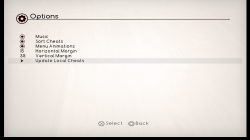
    • Added Update local cheats (options menu)
    • Added :but l1:/:but r1: triggers to improve game list browsing
    • Added user confirmation dialog when unloading the plugin ( :but square: on the main menu)
    • Added exit to XMB without changes ( :but cir: on the main menu)

    I've also included the modded Artemis plugin from vr5 (by @haxxxen ).

    Find more information at https://bucanero.github.io/ArtemisPS3/

    Submitting cheat codes to the online database

    To share new games and cheat codes with the community:
    1. Fork the repository and add your changes to this folder.
    2. Submit a pull request so the updated cheats are available to every Artemis user.

    Source code available on GitHub

  • Artemis r6.3
    https://github.com/bucanero/ArtemisPS3/releases/tag/r6.3

    Added

    • Alternative Joker Select plugin
    • Code Type 5 support using Joker plugin (See notes)
    Fixed

    • Fix online database URL
    Misc

    • Update offline cheat database with latest codes

    .Artemis r6.2
    https://github.com/bucanero/ArtemisPS3/releases/tag/r6.2

    Added
    • Analog stick support
    • Uses PS3MAPI for plugin management
      • Detects if internal/external plugin is loaded
      • External plugin can be loaded via boot_plugins.txt, wMM, etc.
    • New and updated cheat codes
    • Added "Installed games" filter option
    Removed
    • Remove MAMBA/PRX Loader
    Changes
    • Uses original Artermis r5 plugin as default

    .Artemis r6.1
    https://github.com/bucanero/ArtemisPS3/releases/tag/r6.1

    Added
    • Local Cheat DB installer on first run
    • New version check and auto-update
    • New "Clean local cache" option
    • New plugin selector option
    • New loading screen transitions
    • Shortcut to Main screen from Cheats screen by pressing START
    Fixed
    • Improved game list parsing (detect Title-IDs and versions)

    .Artemis r6.net
    https://github.com/bucanero/ArtemisPS3/releases/tag/r6.net

    Added
    • Added network features:
      • Online Cheat Database: online access to the latest cheats for over +2300 games.
      • Local Database Update: download and update your local cheat database with the latest codes.
    • Added L1/R1 triggers to improve game list browsing
    • Added user confirmation dialog when unloading the plugin (SQUARE on the main menu)
    • Added exit to XMB without changes (CIRCLE on the main menu)
    • Updated to MAMBA PRX Loader 4.84.2
    • Updated Artemis .sprx plugin to vr5 version by @haxxxen

  • ArtemisPS3
    options.png
    An Open Source Playstation 3 Hacking System created under the Project Artemis initiative (http://www.gamehacking.org/artemis)​

    Your PS3 must be running CFW 3.55 or above (DEX and CEX supported)!

    Installing Artemis PS3


    Installing cheat codes

    • Choose between installing the .ncl file on a flash drive or in the Artemis installation directory
    • For the flash drive make a new folder on the root called USERLIST
    • Inside the folder place any .ncl files inside it
    • Insert the usb drive into the right usb slot of your PS3 and launch Artemis PS3
    • For the installation directory method launch an FTP server on your PS3 (multiman)
    • Navigate to /dev_hdd0/game/ARTPS3001/USRDIR/USERLIST/
    • Place any .ncl files inside the folder and launch Artemis PS3

    Using Artemis

    • Launch Artemis from the XMB and selected your codes
    • Once you have selected your codes Press X on Start in the main menu
    • You should hear a single beep (if you hear three MAMBA failed to install)
    • From here you can launch the game or launch homebrew to mount the game
    • When the game has launched, a notification will appear telling you to press Start to attach
    • Once you are ready to use your codes in the game, open the in game XMB by pressing the PS button
    • HOLD Start until Artemis says that it has attached
    • At this point any codes chosen to constant write will be constantly writing
    • For any single write codes you wish to write again, just enter the in game XMB again and hold Start
    • If you wish the detatch (and therefore stop constant writing), enter the in game XMB and HOLD Select

    Creating cheat lists (.ncl)

    • NetCheat List Files are built into NetCheat PS3
    • Download and run NetCheatPS3
    • In the codes tab create a new code and name it as you wish
    • Within the textbox enter any NetCheat PS3 codes (or use the Codelist by clicking the square on the bottom left)
    • Finally click Save All and specify a save location for the new .ncl

    Creating advanced cheat lists (.ncl)


    New in Artemis PS3 is the ability to add option tags.
    These tags enable you to specify options for a code that has multiple effects for one address.
    Using tags instead of multiple codes condenses the overall cheats list.
    The format for an option tag is very specific and must be used exactly as described.
    A tag begin with brackets that surround an ID ([Z]).
    This ID must be a collection of capital Z's.
    For instance, a tag such as [ZZZZ] has an ID of ZZZZ. [zz] is not a valid ID.
    Following the opening tag are the elements, or options.
    Each element begins with the value that the option represents, an equal sign (=), and the name of the option.
    Elements are separated by semicolons (;).
    So right now an option tag would look something like this: [ZZ]0010=This is 0x10;0020=This is 0x20
    But now we have to end the tag. To end an option tag you simply add a forward slash (/) in front of the ID and surround that with brackets ([/Z]).
    Finally to actually implement this as a value for a code, simply put the ID of the tag anywhere in the code you'd like.
    For instance, in Jak 1 there are 4 different types of eco states you can be in. Red, blue, green, and yellow.
    Each uses the same line. So the appropriate code using option tags would be:
    0 201FEE08 ZZ
    0 201FEE18 FFFFFF7F
    0 201FEE0C 00000040
    [ZZ]01=Yellow;02=Red;03=Blue;04=Green[/ZZ]


Last edited:
read my messages with Aldo. This is a quick fix, you must do it manually.

I'll test your eboot.bin and report back

I was thinking about this because it will require the user to do 2 extra steps.

1- Select webMAN MOD from Artemis options.
2- Check Artemis checkbox in webMAN MOD Setup.

Maybe when you select the codes and press the button to go back to xmb, it might ask if it should use webMAN MOD or artemis plugin.

but the prompt will also need to check that the webMAN MOD is running, otherwise it will not show the prompt and load artemis.sprx directly
 
I'll test your eboot.bin and report back

I was thinking about this because it will require the user to do 2 extra steps.

1- Select webMAN MOD from Artemis options.
2- Check Artemis checkbox in webMAN MOD Setup.

Maybe when you select the codes and press the button to go back to xmb, it might ask if it should use webMAN MOD or artemis plugin.

but the prompt will also need to check that the webMAN MOD is running, otherwise it will not show the prompt and load artemis.sprx directly
That is too much hassle. The user just need to configure that once. There is no need for prompt or check settings.

The user should decide what they want to do and configure the apps accordingly.
 
That is too much hassle. The user just need to configure that once. There is no need for prompt or check settings.

The user should decide what they want to do and configure the apps accordingly.


Aldo, i'm thinking in a XMBML menu like this for webman
Cheat Engine /

Enable Cheat Engine: /write.ps3/dev_hdd0/tmp/wm_config.bin&t=01&pos=0x0E; /netstatus.ps3?start-artemis
Disable Cheat Engine: /write.ps3/dev_hdd0/tmp/wm_config.bin&t=00&pos=0x0E; /netstatus.ps3?stop-artemis
Cheat List: http://ps3.aldostools.org/codelist.html
Edit Active Cheat: http://localhost/artemis.ps3

And in your list a button be added to download it to art.txt


Edit: Unfortunately http://ps3.aldostools.org/codelist.html doesn't work correctly on ps3 (webrender and webbrowser), the search doesn't work and we can't click on game titles =S
pZ31uvd.png
 
Last edited:
Aldo, i'm thinking in a XMBML menu like this for webman
Cheat Engine /

Enable Cheat Engine: /write.ps3/dev_hdd0/tmp/wm_config.bin&t=01&pos=0x0E; /netstatus.ps3?start-artemis
Disable Cheat Engine: /write.ps3/dev_hdd0/tmp/wm_config.bin&t=00&pos=0x0E; /netstatus.ps3?stop-artemis
Cheat List: http://ps3.aldostools.org/codelist.html
Edit Active Cheat: http://localhost/artemis.ps3

And in your list a button be added to download it to art.txt


Edit: Unfortunately http://ps3.aldostools.org/codelist.html doesn't work correctly on ps3 (webrender and webbrowser), the search doesn't work and we can't click on game titles =S
pZ31uvd.png
Yes I know.

The patching engine only works in-game. If you start it from XMB, it will exit immediately.

However the codelist database, /netstatus.ps3?start-artemis or /netstatus.ps3?stop-artemis can be used from a laptop, tablet or smartphone as a secondary command screen.

Also /artemis.ps3 or /artemis.ps3<ncl-path> can be used to start the patching engine (if it's not running) and open /dev_hdd0/tmp/art.txt in the web editor.

It can be useful for quick edition of the codelist patches while playing the game. The engine needs to be restarted with START button to reload the codelist file.

Additionally the web commands /getmem.ps3mapi, /gameplugin.ps3mapi, /peek.lv2?<address> or /hexview.ps3<file> can be used as complementary remote editors.
 
@aldostools tried using WM's Artemis plugin, but I couldn't get it worked. What I did was simply checked Artemis in WM and select WebMAN Mod in Artemis. Using Artemis r5 plugin worked like charms as usual. Is there any step other than the 2 steps I just mentioned?
 
@aldostools tried using WM's Artemis plugin, but I couldn't get it worked. What I did was simply checked Artemis in WM and select WebMAN Mod in Artemis. Using Artemis r5 plugin worked like charms as usual. Is there any step other than the 2 steps I just mentioned?

1-The codelist file should exist with the code in /dev_hdd0/tmp/art.txt
(This is normally created by Artemis)

2- You should have webMAN MOD full edition installed.

3- Artemis setting should be check marked in http://0/setup.ps3 (if it isn't, check it and *save* the settings)

4- Launch the game.

5- After about 15 seconds you should see a popup message saying Artemis PS3 / Start To Attach.

6- Press PS button to access XMB and press START button to attach the game. It should show "Artemis PS3 / Attached"

7- Press PS button again to return to the game. The patches should be applied.

8- Press PS button to access XMB and press SELECT button to detach the game. It should show "Artemis PS3 / Detached"

9- Return to XMB and Artemis game patch engine will finish automatically.
 
1-The codelist file should exist with the code in /dev_hdd0/tmp/art.txt
(This is normally created by Artemis)

2- You should have webMAN MOD full edition installed.

3- Artemis setting should be check marked in http://0/setup.ps3 (if it isn't, check it and *save* the settings)

4- Launch the game.

5- After about 15 seconds you should see a popup message saying Artemis PS3 / Start To Attach.

6- Press PS button to access XMB and press START button to attach the game. It should show "Artemis PS3 / Attached"

7- Press PS button again to return to the game. The patches should be applied.

8- Press PS button to access XMB and press SELECT button to detach the game. It should show "Artemis PS3 / Detached"

9- Return to XMB and Artemis game patch engine will finish automatically.

Weird, those are exactly what I do, but does not seem to work for me. I have checked /dev_hdd0/tmp/art.txt, it exists and contains list of activated cheats for a game. The message "Artemis PS3 / Attached" was shown, but the code did not seem to be injected and no cheat was activated :/

Will recheck and redo steps above, I will report back the result. Thanks a lot btw
 
Weird, those are exactly what I do, but does not seem to work for me. I have checked /dev_hdd0/tmp/art.txt, it exists and contains list of activated cheats for a game. The message "Artemis PS3 / Attached" was shown, but the code did not seem to be injected and no cheat was activated :/

Will recheck and redo steps above, I will report back the result. Thanks a lot btw

I just downloaded a random PSN game to test it, it was After Burner Climax NPUB30151, i donwloaded the cheat file from Aldo's database and put it on dev_hdd0/tmp/art.txt

I attached the codes, but none of them worked


EDIT: Loaded with artemis plugin the codes worked

Test 2: Used the same art.txt that artemis generated that worked with artemis plugin and didn't work.

I also noticed that webMAN only says Attached and artemis plugin says Attached and codes wrote.

BUG REPORT, if we press SELECT to detache it, a notification NOT IN XMB will be displayed.
SznuhfK.png
 
Last edited:
i donwloaded the cheat file from Aldo's database and put it on dev_hdd0/tmp/art.xml
Not sure if its a typo or you named it wrong but shouldn't it be
/dev_hdd0/tmp/art.txt
so .txt instead of xml ? could be part of the problem (or i could be totally wrong)
 
Ok here's the update. Kinda weird.
  1. Using Artemis plugin, using art.txt generated by Artemis itself or copy directly from Aldo's database always work
  2. Using WebMAN MOD plugin, using art.txt generated by Artemis never works. Tho copy directly from Aldo's database yields undetermined result, sometime it works, sometime it does not. When it works, "Attached and Wrote" message shows (Is this mix up from Artemis plugin?)
I used Mercenaries 2 World in Flames (BLUS30056), with NC code
Code:
Infinite Ammo
1
CodeFreak/PS3UserCheat
0 0041EC58 39290001
#

EDIT: I will try repro the case where using WM Mod plugin and it works. Kinda hard to repro and do not know how
 
Weird, those are exactly what I do, but does not seem to work for me. I have checked /dev_hdd0/tmp/art.txt, it exists and contains list of activated cheats for a game. The message "Artemis PS3 / Attached" was shown, but the code did not seem to be injected and no cheat was activated :/

Will recheck and redo steps above, I will report back the result. Thanks a lot btw
Thank you for your report. I will verify again and report back if there is a fix.
 
keep in mind, the arts.txt file generated by Artemis GUI is a reduced (simplified) version of the complete .ncl file.
I think I have already posted in one of these few Artemis threads, how art.txt does look like if you want to make it manually

(valid) example: Metal Gear Solid Ground Zeroes BLUS31369 1.0

Code:
NoPSN
1 -> this can be 0 for single write or 1 for constant write
0 006080D4 60000000
#
Weapons Have Supressor
1
0 00BCE834 38A00091
0 00BCE838 90A30520
0 00BCE83C B0A30408
#
Infinite Ammo/Grenades/Suppressor L3+UP=ON L3+DOWN=OFF
1
D3 31D4F518 00001400
0 00A1C148 38800001
0 00A1C14C 989D0204
0 00BCE840 30A40000
D3 31D4F518 00002400
0 00A1C148 60000000
0 00A1C14C 889D0204
0 00BCE840 30A4FFFF
#
No Alert & Invisible L3+LEFT=ON L3+RIGHT=OFF
1
D2 31D4F518 00004400
0 004904BC 48000030
0 00A77000 48000048
D2 31D4F518 00008400
0 004904BC 41820030
0 00A77000 41820014
#
Max Camo R3+LEFT=ON R3+RIGHT=OFF
1
D1 31D4F518 00004800
0 00B4F0B4 3C807000
D1 31D4F518 00008800
0 00B4F0B4 38800000
#
Invincible R3+UP=ON R3+DOWN=OFF
1
D6 31D4F518 00001800
0 00B0EE70 8065001C
0 00B0EE74 2C030000
0 00B0EE78 41810008
0 00B0EE7C 38800001
0 00BED9B4 4800001C
0 00B0ECB0 60000000
D6 31D4F518 00002800
0 00B0EE70 38604E20
0 00B0EE74 9065001C
0 00B0EE78 90650020
0 00B0EE7C 90650024
0 00BED9B4 4182001C
0 00B0ECB0 4BA2160D
#
Never Wake Up L2+R2+UP=ON L2+R2+DOWN=OFF
1
D1 31D4F518 00001030
0 00A8244C 609F0000
D1 31D4F518 00002030
0 00A8244C 7FE4F814
#
1-Hit Kill/Stun L2+R2+LEFT=ON L2+R2+RIGHT=OFF
1
D1 31D4F518 00004030
0 0058B01C 38800000
D1 31D4F518 00008030
0 0058B01C 7C862014
#
(null)
 
Detach notification is working now but codes still not

Thank you for your feedback. Actually there was a bug in a new function for converting hex to integer.

To be sure that the patch engine is working I added a kind of basic debugger.
So now I write to a log file the lines processed and the mem writes. The log file is /dev_hdd0/tmp/art.log

The log file is truncated when it exceeds 2MB or when the process is attached..

The log can be accessed easily from the code list editor /artemis.ps3
 
Last edited:
Thank you for your feedback. Actually there was a bug in a new function for converting hex to integer.

To be sure that the patch engine is working I added a kind of basic debugger.
So now I write to a log file the lines processed and the mem writes. The log file is /dev_hdd0/tmp/art.log

The log file is truncated when it exceeds 2MB or when the process is attached..

The log can be accessed easily from the code list editor /artemis.ps3

Aldo, in the new build everything is working now =)

Forgot to tell you, but the "attached" notification shows twice, is that intentional?

How can i set a code for a pkg file? i'm creating the art.txt file manually, is there anyway to make webMAN mount it just like ISO and JB folders? maybe putting the ncl file inside the psn game folder?
 
Aldo, in the new build everything is working now =)

Forgot to tell you, but the "attached" notification shows twice, is that intentional?

How can i set a code for a pkg file? i'm creating the art.txt file manually, is there anyway to make webMAN mount it just like ISO and JB folders? maybe putting the ncl file inside the psn game folder?

I tried to reproduce the "attached" notification showing twice, but I couldn't.
Maybe you confused these 2 messages: "Artemis PS3/Start To Attach" & "Artemis PS3/Attached"

The first shows when the game process id is detected internally.
the second is shown when the user attaches the patcher to the game process.

About the second question, I added the option to load the art.txt automatically copy the codelist file from the game's folder or from a centralized repository when the game is started:
- /dev_hdd0/tmp/artemis/<titleid>.ncl
- /dev_hdd0/game/<titleid>/artemis.ncl
or when mounted from <iso-path> + .ncl or <jbfolder-path> + .ncl

This should work if the user starts a PKG game.
 

Similar threads

Featured content

Trending content

Back
Top