PS3 Brunolee Updates Tools (XMB Mod Manager / Custom Gameboot and more) Plus a new XMB PKG Maker

Developer Brunolee stops by the PSX-Place.com forums and leaves us with some updated tools and even a new tool for PS3 Custom Firmware user's. First we will tell you about the updates, as XMB Mod Manager (+ Portuguese Version), PS3 Custom Gameboot (be sure to checkout this new plugin Gameboot Cycle plugin by MixeryMaxe), PS3 Revision1C Control. Then also brunolee releases a new tool to easily create Priority ON and OFF packages, what the Priority packages do is they will stick your PS3 Icons atop of the Game Column [break]ss[/break]. View more details and info on these tools and the links provided.



BrunoleePS3tools.png


xmbmod.jpg

XMB MOD Manager (Rev1C) Update.pkg
&
XMB MOD Manager PT (Rev1C) Update.pkg (Portuguese)

**Note install the
BASE package if you do not have a version of XMB MOD Manager installed/
Install Full: FULL Version - Then New Update Package (found below)


UPDATE - XMB MOD Manager (Rev1C) Update.pkg

-
updated webMAN 1.42
- updated webMAN REBUG 1.42


UPDATE - XMB MOD Manager PT (Rev1C) Update.pkg
- updated webMAN PT 1.42
- updated webMAN PT REBUG 1.42


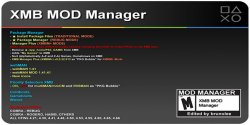
About XMB Mod Manager:

This tool has alot of great uses for customizing your XMB, includes 3 coldboots, 10 waves and 4 gameboots, adds in-game Screenshot, Package Manager (REBUG, XMBM+, Traditional), Custom webMAN catagory icons for My Games (aka webMAN Games) and many other customizations.


Included XMB Mods
Coldboots
Gameboots
XMB Waves

  • COBRA

  • Classic

  • Electric Blue Purple

  • PS3 (default)

  • COBRA

  • Electric Green Yellow

  • REBUG

  • NONE (default)

  • Gold

  • REBUG

  • Kamo

  • PS3 (default)

  • PSP

  • Rainbow

  • Smoke

  • Vertic

  • Zebra

Supported Custom Firmware:

All Cobra CFW (4.21 / 4.30 / 4.41 / 4.46 / 4.50 /4.53 / 4.60 / 4.65 / 4.66 / 4.70


View additional details about XMB MOD Manager--> LINK

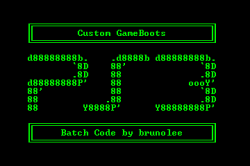
PS3 Custom Gameboots.png

PS3 Custom Gameboots

About

  • Creates gameboots for various CFWs (3.55, 4.21, 4.30, 4.41, 4.46, 4.50, 4.53, 4.55, 4.65, 4.70)
  • Creates installation forms (ZIP, PKG) or manual

Update v1.3
Added 4.70 CFW Support


View additional Details & Tutorial about PS3 Custom Gameboot Tool ---> LINK

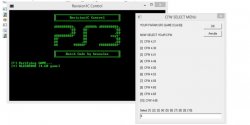
revision.jpg

PS3 Revision1C Control v0.3.rar

Update:
- added 4.66 to the list


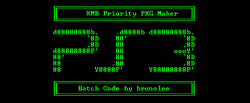
XMB Priority PKG Maker App.PNG

NEW TOOL -- XMB Priority PKG Maker.rar


About:


  • [*=center]Auto change a copy of one PARAM.SFO, and make 2 PKGs (Priority ON and OFF)

With Priority ON the App will stay atop of your Games List on the XMB, very useful for Managers, Toolbox Apps, or anything you want Priority on top. Then to simply remove the Priority use the Priority Off package this tool also creates.


*Note that when you update an app, you will have to re-install the Priority ON PKG.


Downloads:


Source: PSX-Place.com

Checkout the PSX-Place News Archive for any releases and news you may of missed --> LINK
 
Love the priority idea. I always rename stuff to get it to the top of xmb.
May I ask how exactly this works? Can we manually change something in the sfo?
Also, would it be possible to have priority levels?
Thanks for the tools.
Nice work.
 
The link for PS3 Revision1C Control is not correct though. It's same as the one for XMB MOD Manager (Rev1C) Update.

Anyway, I really like this app - an easy way to make game updates compatible with lower firmwares.
 
The link for PS3 Revision1C Control is not correct though. It's same as the one for XMB MOD Manager (Rev1C) Update.

Anyway, I really like this app - an easy way to make game updates compatible with lower firmwares.

PS3 Revision1C Control v0.3
Code:
http://www.mediafire.com/download/obs5y8z7h58arlc

And missing in this thread XMB MOD Manager PT (Rev1C) (BASE/Full Version)
Code:
http://www.mediafire.com/download/kum6w37zo6d6kwk
 
PS3 Revision1C Control v0.3
Code:
http://www.mediafire.com/download/obs5y8z7h58arlc

And missing in this thread XMB MOD Manager PT (Rev1C) (BASE/Full Version)
Code:
http://www.mediafire.com/download/kum6w37zo6d6kwk

Do you have the font used for your Rebua Cobra coldboot? It looks like an uppcase "B" looks like a backwards "3". I want to use it as my system font if you have it or if you or anyone knows where to find it hook me up please.
 
Do you have the font used for your Rebua Cobra coldboot? It looks like an uppcase "B" looks like a backwards "3". I want to use it as my system font if you have it or if you or anyone knows where to find it hook me up please.
I used PhatBoy Slim font, but I had to change it to stay as it is on my themes, coldboot and gameboot.
 
I used PhatBoy Slim font, but I had to change it to stay as it is on my themes, coldboot and gameboot.

Bow would one go about making that coldboot into color? I have made my own with normal PNG images but is there a way to reverse that so I can color it and repack the RAF file
 
Do you have the font used for your Rebua Cobra coldboot?
[STRIKE]yes use PhatBoy Slim Bold but instead of the "B" use the "3", that's how i did it when I was trying to recreate REBUG font[/STRIKE]

[MENTION=7]atreyu187[/MENTION], So apparently I was wrong the REBUG font is actually a mix between 2 fonts "PhatBoy Slim" and "The Rave is in Your Pants". The R is a cross between the P and R from "PhatBoy Slim" while the E and B are from "The Rave is in Your Pants" (trimmed to fit) back to "PhatBoy Slim" for the U and G which has been altered a bit. Here's my best recreation to date:

REBUG.png

Edit: if you really look at the logo you will notice "PhatBoy Slim" font was the only one used to write Rebug on the PS3

REBUG2.png
 
Last edited:
Hey guys,

does the Priority ON/OFF stuff only work on recent firmwares? When I tried installing the latest multiMAN with Priority ON (made by myself and also downloaded from Brewology) the mM icon just disappeared. When I installed the Priority OFF fix from Brewology the icon appeared again at its usual place. I deleted and reinstalled mM and the Priority fix multiple times but I couldn't get it to work.

I left my PS3 at my parent's house because I don't really have the time to play atm, so when I visited them there wasn't a lot of time for me to play around with it and figure out what's wrong.

My PS3 still has Rebug 4.46.1 installed (was waiting for that 'soon to be released' updated 4.70 Rebug but oh well).
 
[STRIKE]yes use PhatBoy Slim Bold but instead of the "B" use the "3", that's how i did it when I was trying to recreate REBUG font[/STRIKE]

[MENTION=7]atreyu187[/MENTION], So apparently I was wrong the REBUG font is actually a mix between 2 fonts "PhatBoy Slim" and "The Rave is in Your Pants". The R is a cross between the P and R from "PhatBoy Slim" while the E and B are from "The Rave is in Your Pants" (trimmed to fit) back to "PhatBoy Slim" for the U and G which has been altered a bit. Here's my best recreation to date:

View attachment 3219

Edit: if you really look at the logo you will notice "PhatBoy Slim" font was the only one used to write Rebug on the PS3

View attachment 3221

Neither font is compatible with the PS3 XMB so I'm just sticking with my plain old Spidey font but thanks!!
 
[MENTION=33]brunolee[/MENTION] i made the package for lastgame played and it went to the top but after useing it the next time or after reboot its way down the games collumn any ideas
Running rebug 4.46/cobra
 

Featured content

Trending content

Back
Top