PS3 CFW Settings v0.1 {xai_plugin) by Mysis

Developer Mysis is back with yet another impressive release for the PlayStation 3 (PS3) Hacking Community, the developer has released CFW Settings v0.1 {xai_plugin), This modified (xai_plugin) plugin adds a ton of functionality right to the XMB, DumpIDPS from the XMB, Remarry BD (no need to downgrade with this method), Set dev_flash from USB, Toggle Factory Service Mode , Check FileSystem, Toggle Recover and more straight from the XMB with this new XMB Mod that contain various XML/RCO edits and a modified xai_plugin. Checkout all the details of the CFW Setting in the included details that have been reformatted (see original txt version via the source link or in the downloads included Read Me.


gMfyIgb.jpg


  • CFW Settings -- xai_plugin by mysis - Release 0.1

    Features:
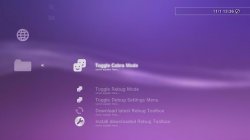
    • XMB Icons for nice cfw tasks, nicely listed in network column
    • XMB-Actions without the need for webbrowser for each step
    • Simply select and its executed!
    • No Thread waiting for controller input!
    • No additional CPU time stolen!
    • BD Remarry without downgrading!
    • Enter Factory Service Mode up to latest Firmware without Dongle!

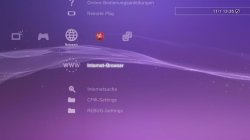
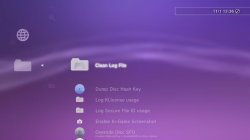
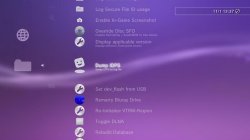
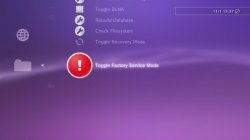
  • ScreenShots
    gMfyIgb.jpg UlRugJ9.jpg R9EVrX8.jpg 1HAeHoO.jpg RE3ZkSP.jpg

  • CFW Settings
    =CFW-Settings=
    • Clean Log File
    • Gives you the option to delete the Log-File
    • Dump Disc Hash Key
    • This Option will write retrieve disc hash key from an ORIGINAL game disc and save it to log file This works without running the actual game!
    • Log Klicense usage
    • Games that use klicense for accessing edat-files this option will save filename and klicensee to log file.
    • Log Secure File ID usage
    • This will log save data name and file id key
    • Enable In-Game Screenshot
    • This will only Enable for current system runtime.
    • Override Disc SFO
    • Will apply SFO Attribute (0xA5) Remoteplay and SystemBGM to Disc Games. It will prolly not work with its Updates.
    • Display applicable version
    • Tells you the minimum downgrade version of your system
    • Dump IDPS
    • Prints your IDPS in cfw-settings.log
    • Set dev_flash from USB
    • Jailcrab code for writing Lv2Kernel redirecting /dev_flash/ access to a mounted /dev_usb/
    • Remarry Bluray Drive
    • Remarries the bd drive to the System
    • Re-Initialize VTRM-Region
    • Aka RSOD-Fix if VTRM not a hw problem
    • Toggle DLNA
    • Turns DLNA Media Server On/Off, usefull for DEX
    • Rebulid Database
    • Reboots with Database rebuilding flag set
    • Check Filesystem
    • Reboots and allows you to check and repair filesystem
    • Toggle Recovery Mode
    • Reboots into Recovery Mode
    • Toggle Factory Service Mode
    • Reboots into Factory Service Mode without Dongle

  • REBUG Settings
    =REBUG-Settings=
    • Toggle Cobra Mode
    • Enables or if active disables Cobra Mode
    • Toggle Rebug Mode
    • Enables or if active disables Rebug Mode
    • Toggle Debug Settings Menu
    • Switches between "CEX QA" and "DEX" Debug Settings
    • Download latest Rebug Toolbox
    • Install downloaded Rebug Toolbox

  • =Note=
    • Should not be fw dependant, tested on 4.46 and 4.7x and does not use hardcoded offset patches
    • Requires peek+poke (sc6+7+8+9) for few options
    • Log File path: /dev_hdd0/tmp/cfw-settings.log
    • (Note: in FSM its /dev_usb/cfw-settings.log + hidden + system file flagged)
    • If you are using another xai_plugin for ex. rebooting, it can lead to incompatibility to prevent that, change the actual module action in (probably) category_user.xml (?) to:
    Code:
    "<Pair key="module_name"><String>xai_plugin</String></Pair>"
        "<Pair key="module_action"><String>soft_reboot_action</String></Pair>"          // soft reboot
    or
    Code:
         "<Pair key="module_name"><String>xai_plugin</String></Pair>"
        "<Pair key="module_action"><String>hard_reboot_action</String></Pair>"          // hard reboot

  • =Installation=

    1) Copy "xai_plugin.sprx" AND "videorec.sprx" to "/dev_blind/vsh/module/"
    2) Copy "xai_plugin.rco" to "/dev_blind/vsh/resource/"
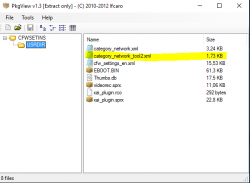
    3) Copy "category_network.xml", (cfw-settings added for CEX xmb) "category_network_tool2.xml" and (cfw-settings added for DEX xmb) "cfw_settings_en.xml" (contains cfw-settings and rebug-settings xmb-folders) to -> "/dev_blind/vsh/resource/explore/xmb/"

  • =BD Remarry=

    1) Toggle Factory Service Mode (should be easy now)
    2) Put "eid_root_key" that belongs to the console to /dev_usb/
    3) Select Remarry Bluray Drive in Network->cfw-settings->Remarry Bluray Drive
    4) If everything went fine it should have notified: "CEX_drive_init() succeeded"
    5) Dont forget to repair CRL/DRL if you need to fix it

    Successfully remarried /dev_usb/cfw-settings.log should look like:
    Code:
    2011-12-31 19:00:24 [xai_plugin] :  : _xai_plugin_prx_entry()
    2011-12-31 19:00:24 [xai_plugin] : 1 : xai_plugin_init()
    2011-12-31 19:00:24 [xai_plugin] : 1 : xai_plugin_start()
    2011-12-31 19:00:24 [xai_plugin] : ACT0 : xai_plugin_action(remarry_bd)
    Looking for lv1 offset
    Found lv1 code @0xac574
    EID2 P-Block decrypted
    EID2 S-Block decrypted
    sys_storage_open(bdvd) = 0
    stg BDVD Auto Request Sense OFF success = 0
    Identified Drive = SONY    PS-SYSTEM   302R4154                
    ps3rom_lv2_mode_select(2) = 0
    ps3rom_lv2_write_buffer(2,60) = 0
    ps3rom_lv2_mode_select(3) = 0
    ps3rom_lv2_write_buffer(3,670) = 0
    ps3rom_lv2_mode_select(4) = 0
    ps3rom_lv2_write_buffer(4,8000) = 0
    CEX_drive_init() succeeded
    2011-12-31 19:01:20 [xai_plugin] : ACT0 : xai_plugin_action(service_mode)
    Product Mode Disabled

  • = Thanks =
    @sandungas - for the xml adding and rco
    @Joonie

Download: cfw-settings 0.1 rar
Mirrors: PSX-Place DLs


Last edited:
very impressive indeed, I have played with it a bit, it was fun seeing F/S mode after all this time :) thanks @Mysis
 
interesting new plugin and impressiv work @mysis how you find all this stuff you really have skills man

so i understand it right [MENTION=6]bitsbubba[/MENTION] i can for example boot into factory service mode without risks (with this plug-in) and on next boot everythings is normal like always?
 
so i understand it right [MENTION=6]bitsbubba[/MENTION] i can for example boot into factory service mode without risks (with this plug-in) and on next boot everythings is normal like always?
I used the "Toggle F/S mode option, it rebooted into F/S mode & then from F/S mode I chose the option again for it to reboot normally
 
I used the "Toggle F/S mode option, it rebooted into F/S mode & then from F/S mode I chose the option again for it to reboot normally

ok fine thanks you for the reply [MENTION=6]bitsbubba[/MENTION]
its always good to understand what i do so i dont make mistakes again only because i am curious...
 
I was wondering when something like this would be available,it looks like an awesome plugin. A lot more features than I was thinking of, that just makes it that much more impressive, can't wait to try this out.One feature I noticed was the toggle rebug mode, this interest me because I recently upgraded rebug 4.70 rex to habib 4.76 and I forgot to disable rebug mode and since then I have been having problems with games needing 4.76 firmware, multiman always says the game needs 4.76 blah blah, and do I want to fix it for my current 4.75 firmware, lol, most notable WWE 2k16. I have tried saying no and booting the game anyway, and it actually boots tries to load the data but never finishes loading and I have waited for hours and hours just to be sure, lol. So anyway I went ahead and installed rebug 4.76 lite but it still does the same. Now here is the crazy thing the problems are coming from the game on the internal drive, but from my pc with net server it loads and plays fine except for having a wireless connection that disconnects sometimes. So I am going to see if I can use this plugin to disable rebug mode and hope that resolves the problem, regardless this is an awesome plugin, thank you.
 
it freezes my console whatever options i chose in CFW Settings folder such as toggle recovery mode and FSM,.. i'm on Rebug 4.46.1 REX spoofed to 4.76,.. anyone?

EDIT: solved by msyself
 
Last edited:
So i tried to install this and i got soft bricked and I ll let you guys know how
1. I am on Rebug 4.75.3 D-REX and I had debug menu type on CEX QA in rebug toolbox so I can use system update debug. And i had a reboot from XMB mod installed under user category.
2. I copyed all the files as the instructions said.
3. The settings did not show up under network. So i proceeded to to reboot with the XMB Mod and i got sent to recovery but i just read from the readme.txt that you can change it in the category_user.xml to make it work.
4. I went to rebug toolbox and switched debug menu type to DEX and tried to copy everything again but it wouldnt let me copy the cfw_settings_en.xml for some reason nor the vidrec.sprx in /dev_rebug/vsh/module.
5. So i went to hard reboot in rebug toolbox and it sent me to recovery but i thought i messed up in the XML somehow so i ignored it.
6. Boot back to XMB, stays on for 3 seconds and then i am stuck on recovery
7. I got out of the soft brick but can anyone guess why it didnt work for me?
 
Last edited:
[MENTION=2]STLcardsWS[/MENTION] This is a simple Installer that i have made and it owrks very well on CFW 4.76 DEX Rebug

Link
 
has anyone tried to remarry option yet? I left my console at 3.55 cfw just because of a bad drive. I'm excited to give this a try.
 
[MENTION=2]STLcardsWS[/MENTION] This is a simple Installer that i have made and it owrks very well on CFW 4.76 DEX Rebug

Link

Just tested this on REX 4.76.1, it only works with retail xmb, debug xml is a no show (maybe you forgot to add category_network_tool2.xml to the package?)
 
Just tested this on REX 4.76.1, it only works with retail xmb, debug xml is a no show (maybe you forgot to add category_network_tool2.xml to the package?)
Not i tested it in CFW 4.76.1 DEX and works very well

Cattura.PNGCattura.PNG

This is the problem:

Code:
int main()
{

    sys_fs_mount("CELL_FS_IOS:BUILTIN_FLSH1", "CELL_FS_FAT", "/dev_blind", 0);
	
	u64 type;
	lv2syscall1(985, (uint64_t)&type);
	
	CopyFile("/dev_hdd0/game/CFWSETINS/USRDIR/xai_plugin.sprx", "/dev_blind/vsh/module/xai_plugin.sprx");
	CopyFile("/dev_hdd0/game/CFWSETINS/USRDIR/videorec.sprx", "/dev_blind/vsh/module/videorec.sprx");
	CopyFile("/dev_hdd0/game/CFWSETINS/USRDIR/xai_plugin.rco", "/dev_blind/vsh/resource/xai_plugin.rco");
	
	[COLOR="#FF0000"]if(type == 1)
		CopyFile("/dev_hdd0/game/CFWSETINS/USRDIR/category_network.xml", "/dev_blind/vsh/resource/explore/xmb/category_network.xml");
	else if(type == 2)
		CopyFile("/dev_hdd0/game/CFWSETINS/USRDIR/category_network_tool2.xml", "/dev_blind/vsh/resource/explore/xmb/category_network_tool2.xml");[/COLOR]
	
	CopyFile("/dev_hdd0/game/CFWSETINS/USRDIR/cfw_settings_en.xml", "/dev_blind/vsh/resource/explore/xmb/cfw_settings_en.xml");
	
    sys_reboot();
	return 0;
}

This code write the file category_network_tool2.xml only if kernel is DEX,i will update the code in the next minutes
 
Last edited:

Trending content

Back
Top