PS3 Compatibility List - PS2 on PS3

IIrc I split many titles there per region, maybe even DB series.

I did it because there are many Asian users that use wiki list. Not everyone will know that Dragon Ball Z: Sparking! Meteor will be Dragon Ball Z: Budokai Tenkaichi 3 in EU/NA. Similar situation with Naruto Shippuuden: Narutimate Accel, that here is know as Naruto Shippuden: Ultimate Ninja 4

Slightly different situation is with Fatal Frame series. In EU known as Project Zero, in JP known as Zero. I think here JP and EU can be merged. But i'm still fan of split them.

Anyway, if you wasn't aware even about one of those titles that I described above. Then common JP gamer also can be not aware that his favorite game have different name somewhere in the world.
For the dragon ball games i added was easy, i added the names like this:
Code:
Dragon Ball Z: Budokai Tenkaichi 3 / Dragon Ball Z: Sparking! Meteor
Both names in the same line and inmediatly after, separated with a /
instead of that it could be made separating them with a <br> this way every name is in one line (but all them inside the same table cell), this mades lines shorter

I said with this game was easy because both starts with "dragon"... but yeah you are right for other games is weird because starts with different name (like in the example of fatal frame / proyect zero)... where should be located that game... under character "F" or "P" ? :eek:

But separating them is confusing too... lets say someone that doesnt knows the dragon ball games and wants to see how many there are... by reading them in separated lines it looks like there are more

So this seems to be the case where we can do things using method A... or method B... but there is no way to find an intermediate solution that satistyes everyone because there is no alternative in between A and a B :)
Personally this is when i apply the rule i mentioned before that the oppinion of the people that is editing the page frequently has more weight

I dont care much because im very used to search in wiki by doing this:
1) Press keyboard keys: CTRL + F
2) Type name to search: persona
3) Press repeatedlly keyboard key: F3 (to navigate the matches on the page)

When trying to find info in wiki thats a must, lol... lot of times when im searching something in wiki first i start using the search engine of wiki... then i open 6 or 7 pages and i do that in all them :)

------------
How is made in the game compatibility list in PCSX2 emulator btw ? (i dont remember the link)
I guess this list is the biggest one in internet, and in some way has become "legacy" (so has created an standard)... maybe we should copy the style of it
 
@STRATOS198XAD - Actually everyone is free how to add their Games on the List but I recommend the following syntaxes since we did a lot of work to keep it unified:

  • If a Game has a different Name for each region, I would add them as follows ...
  • Both the Names for the PAL and NTSC-U/C Release can be added at the "Name" tag while I recommend to choose one as the first and the second one is titled "(bracketed)".
  • Example: "Bully (Canis Canim Edit)" --> http://www.psdevwiki.com/ps4/PS2_Classics_Emulator_Compatibility_List#B
  • "Bully" is the Name for the NTSC-U/C release and "Canis Canim Edit" is the Name for the PAL release
  • You can choose which one you want to name it first and which one gets "(bracketed)".
  • If a Game has an additional Release like a "Limited Edition" for example, then please don't add the Game twice. You can use the same trick with "(brackets)" like above mentioned.
  • Example: "Final Fantasy XII (International Zodiac Job System) " --> http://www.psdevwiki.com/ps4/PS2_Classics_Emulator_Compatibility_List#F
  • Here we have even both, the "International Zodiac Job System" was an additional Release for NTSC-J only.
  • If a Game has also a different Name for the NTSC-J region, then I would add them as follows (but this is only a bonus - there is no necessary but it's always welcome) ...
  • If the Game has a NTSC-J release only, than the "Name" has to contain the Game Title in "Latin Capital Letter" but the "Kunrei-Shiki" System can be added additionally "(bracketed)" again in "Romaji Letters".
  • If the Game has a NTSC-J release but also one for PAL and/or NTSC-U/C, then we choose the "Name" from the "Western Releases" and the NTSC-J Release can be added at the "Notes" section.
  • If you want to add the Name at the "Notes" section, then the "Latin Capital Letters" are minimum but if you have both, then better.
  • Example: "Wild Arms 3" --> http://www.psdevwiki.com/ps4/PS2_Classics_Emulator_Compatibility_List#W
  • The "Notes" section contains: "Known in Japan as Wild Arms Advanced 3rd (ワイルドアームズ アドヴァンスドサード)"
Regarding the "PS2 Classics" on the PS3 List. The Problem is, the Idea for the "PS2 Classics" syntax was added on the PS4 Version right in the beginning, but since there existed already the PS3 Version from that list, that was later included in that list. So yes this means that if someone used the syntax "{{playable}}", it could also mean that its a "PS2 Classics". @kozarovv was so kind to change most of them to "{{official}}" but there are probably still some left based on the old system. This can be recognized when the "Notes" section contains something like "Official PS2 Classic" but the "{{playable}}" syntax is still used. Thanks for understanding.
 
Last edited:
Awesome, clears up the Hot Shots Golf/Everybody's Golf dilemma I had. Added my previously tested games to the wiki and will keep testing. Thanks!

EDIT: Oh jeez, I added them to the PS2 on PS4 wiki by mistake...my bad. Fixing now.
 
Last edited:
Awesome, clears up the Hot Shots Golf/Everybody's Golf dilemma I had. Added my previously tested games to the wiki and will keep testing. Thanks!

EDIT: Oh jeez, I added them to the PS2 on PS4 wiki by mistake...my bad. Fixing now.
I made the same mistake yesterday :D
I was reading roxanne explains here and at the same time looking at the links she posted to PS4 wiki, but i thought the link i was clicking was PS3 wiki, so i edited PS4 wiki thinking it was the PS2 compatibility list for PS3 oooops

Wiki keeps a record of all edits (by clicking at top of the page in the tab view history)
So dont worry, if at some point you "break" something it can be reverted back or fixed, and nobody is going to get angry with you because is easy to know if it was a mistake ... or just trolling
Incase is a mistake dont worry, i made so many, the important thing is to fix them when you realize, or to fix the mistakes of others (if they doesnt realizes) :)

PS3 and PS4 wikis are hosted together and shares the same user database btw, doesnt matters in which one you registered, you can use the same account in both and edit both
And you can edit both without having a registered user account, in this case wiki keeps a record of the IP in the "history" of the page
 
When 7680 × 4320 pixels will be a standard resolution for computers and laptops, then we can talk about a new list combining both PS3 and PS4 due to a lot of scrolling :P
 
Hi guys. I'm led to believe that this is the right place to discuss compatibility issues of PS2 games when run on a PS3, specifically in netemu on my 4.82.2 REBUG PS3 Slim.

The game in question is "Dot Hack Infection", PAL (SLES-52237). I'm already using the .config file (from ManaGunZ) which seems necessary to prevent early-game crashes. My issue today pertains to a sub-class of in-game text in the German version. I've taken some comparison photos from PCSX2 and from the PS3: https://imgur.com/a/EYi7Ho3

There are (roughly) 3 types of in-game text:
  • Small Font (used in most menus, for the out-of-game emails, the BBS etc.)
  • Large Font (used for character dialogue, and for in-game notifications)
  • Pre-rendered (used for news articles and some other places)
It's the 2nd of these ("Large Font") which is affected here. Some letters appear to have a "column" of their bitmap font double-thick, or have a column entirely missing. This makes the text uncomfortable to read, and sometimes leads to pseudo-typos like the letter O appearing like a C. When playing in PCSX2, all in-game text renders seemingly correctly.

As far as I'm aware, the issue isn't exhibited in the other languages, but this is something I'd need to check again. I'm pretty sure this issue is not exhibited on an original PS2, though I won't be able to get photographic proof until I have a chance to dig my video cables back out.

If anyone would like me to clarify this further, please don't hesitate to ask. :)

Speculation: It's almost as if the in-game (bitmap) text is being rendered nearest-neighbour style to grid which does not actually match the pixel grid size of the video output, leading to a kind of "rounding" error on the text. If I'm right about it only happening in German, it would mean that the other languages' bitmap font sizes happen to "fit" exactly into this, whereas the German font was perhaps made slightly larger/smaller (e.g. to account for ß and äöü legibility) which breaks some tacit rendering assumption somewhere.
 
I've done some further testing and can confirm some things:
  • The issue is not exhibited on a real PS2 in any of the languages in the PAL version. (Neither via composite nor component cables.)
  • The issue is exhibited in all languages here on the PS3 - it's just a matter of finding affected textboxes, which differ for each language.
  • The issue is neither "random" nor does it specifically affect all instances of a particular character - it's more like it affects some characters if-and-only-if they're also in particular places on the screen.
  • All languages seem to use the 3 different text "sizes", so my hypothesising about the German-only stuff is moot.
I will add additional photos to my original Imgur upload demonstrating these findings. Furthermore, I wanted to clarify that I'm running the games from ISOs mounted via webman-mod, and that my ISOs are redump-verified good dumps, and indeed I've used the same ISOs on PS2, PCSX2 and PS3.
 
I tried the 3 versions of Haunting Ground (Demento in JPN), and the results were funny.

NTSC-U: Only have 1 problem. As the wiki indicates, the sound of the cutscenes in real time it´s delayed, but in itself it is not the sound in general, it is only the voices.

NTSC-J: Everything works fine (Classic). I have not tried it personally, but this video shows that it works correctly.

PAL: Contains 3 modes.
  • 50 Hz: Everything works fine, but the game runs slower due to the loss of 10 Hz.
  • 60 Hz: Same as the american version.
  • Progressive mode: Same as the american version.

Result: If you want to play the game optimally, you have to play the PAL (50Hz) in exchange for a subpar gameplay or the NTSC-J version. (It has dubbing in English natively)

If the classic version contains a config, maybe it could fix the problems of the american version.
 
Last edited:
@sandungas Irrelevant question, but what browser do you use? I try to edit in the wiki but after pressing "save changes", the page loads and redirects me to a blank page. I tried at different hours but it seems not to be solved

I see that the Haunting Ground part was modified, so I guess it was your doing.
 
@sandungas Irrelevant question, but what browser do you use? I try to edit in the wiki but after pressing "save changes", the page loads and redirects me to a blank page. I tried at different hours but it seems not to be solved

I see that the Haunting Ground part was modified, so I guess it was your doing.
I been having that problem too, i noticed it some days ago, and again yesterday
I dont know why is happening, but im sure is related with the content of the page (because it doesnt happens in other pages)... soooo i cant imagine how to solve it :/

What i did yesterday to add the info from haunting ground (thx btw) after tenths of failed attempts to edit the section for character "H"... was to edit the whole page (by clicking "edit" at most top of the page)
It seems it did work... but not as a normal edit, it still took lot of time to "save and reload" the page when i clicked in "save changes"

I have clear that this is a growing problem that is going to bite us in the ass soon than later, for some reason we are reaching a point where that page is going to "break" miserably

FYI @kozarovv (i remember reading you talking about this problem, now im sure you was right) @Roxanne @mysis
 
FYI @kozarovv (i remember reading you talking about this problem, now im sure you was right)

Yeah I had this problem while i tried to edit one letter in comp list. When i edited full page, it worked too.

Zettai Zetsumei Toshi 2: Itetsuita Kioku Tachi is official ps2 classic game, https://store.playstation.com/ja-jp/product/JP0025-NPJD00079_00-0000000000000000
but the iso cant run smooth,but psn version can like this video

Turn off smoothing in options.
 
Turn off smoothing in options.

i already tried.speed dont improve.u can look at the video,smooth is on,and speed is normal....
so i am curiose.psn version may config sth....
 
Gran Turismo 4 (USA) ISO has glitch and low frame rate...

Is there anyway to fix that? (Like specific .Config or something like that)
 
Turn off smoothing in options.

i already tried.speed dont improve.u can look at the video,smooth is on,and speed is normal....
so i am curiose.psn version may config sth....
Please post here game ID (SLPS-XXXXX), then i try to create config.
 
Please post here game ID (SLPS-XXXXX), then i try to create config.

SLPS-25851 thx!
or u can crack the psn version?

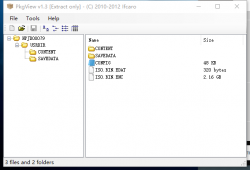
i found a CONFIG file in PSN PKG,i don't know it's useful or not.
i upload it.u can check it.
 

Attachments

  • NPJD00079.rar
    NPJD00079.rar
    48.3 KB · Views: 136
  • FNTW`6}5EGAG)O_}2P@M)YJ.png
    FNTW`6}5EGAG)O_}2P@M)YJ.png
    20.8 KB · Views: 233
Last edited:
@sandungas Irrelevant question, but what browser do you use? I try to edit in the wiki but after pressing "save changes", the page loads and redirects me to a blank page. I tried at different hours but it seems not to be solved

I see that the Haunting Ground part was modified, so I guess it was your doing.

Hmm, I never saw this but I will have an eye about that problem.
 
Primal Image vol. 1 (SLPS_200.13) has a low frame rate and freezes as soon as you take a picture.

Dog of Bay (SLPS_200.57) has very bad graphical glitches in menu. Changing the v-sync delay in debug options changes the display glitches but none seems to fix it. Gameplay seems unaffected. This could maybe be fixed with a config.

Will add these to wiki soon.
 

Similar threads

Back
Top