PS3 FERROX 4.82 v1.01 COBRA 7.55 by Alexander

New CFW build released from developer @Alexander, in this build we can find the introduction of the new 7.55 COBRA This updated version of COBRA includes a bug fix for deleting PKGs and Game Updates that was present in v7.54. Alexander & Beta Tester's (@ CyberModding,it) discovered this problem during a late test session before release of FERROX v1.01. There are also other fixes contained in this new build as outlined in the release note provided below for 4.82 FERROX COBRA (v7.55) CFW v1.01

ferrox2017.png


  • CHANGELOG v1.01:
    • COBRA 7.54 - Fixed the installation of Packages and game updates with Syscalls disabled. Credits to Alexander, Aldo Vargas, Joonie
    • COBRA 7.55 - Fixed deleting Homebrews / Apps / Game updates with Syscalls disabled. Credits to Alexander
    • Fix PSP DRM & Fix PSX. So now PSP PKGs and PSX PKGs runs correctly
    • Fix BlueRay ISO
    • Added support to download unsigned PKG from XMBPD - Credits to DeViL303, Bobby_Downgrades

  • CFW Features are the same as v1.00.
    • Built from the base of OFW 4.82
    • Can be installed from every CEX CFW and 3.55 OFW and 4.82 OFW via PS3Xploit
    • QA Flags enabled if already enabled, so there is the possibility to Downgrade to every Fw version
    • COBRA 7.55
    • Optional Graphic mods can be installed, along with HB Store. Read under the features.
    • PS2, PSX, PSP ISO / Minis / Remasterred Compatibility
    • ReactPSN Compatibility
    • RSOD Screen Bypass
    • App_home/PS3_GAME
    • XMB In-Game Screenshot
    • Remote Play Compatibility
    • Package Manager replaces the classic Install Install Package Files
    • CPU & RSX Temperature are now shown on XMB In-Game while playing PS2 Games
    • LV1: Patched to remove PS2 LV2 Protection
    • LV1: Patched coreOS Hash Check to prevent Brick non non-Dehashed consoles
    • LV1: Peek & Poke
    • LV2: Peek & Poke
    • Disabled Epilepsy message
    • CINAVIA completely Disabled

  • Optional Install (FERROX MOD Installer): You will find the PKG always available in Package Manager - Internal Storage. Thanks to XMBM+ for the installer base!

    Here is a video (from Ferrox 4.80) showing the mods available .

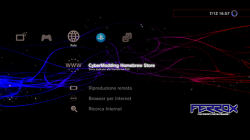
    Results after installing Mods (Click pic for larger view)
    1.png 2.png 3.png
    The custom wave is not included.

Many tests have been done before release this version. Tested PS3, PS2, PSP, PSX and BD in various formats. If you find any bugs, please report in the comments!! Do you want to install this CFW but you have an Original Firmware (4.82 OFW)? Follow this guide and you will able to install it (ONLY if your model is Compatible): PS3Xploit Guide

Ah, and in the future there will be good news for Ferrox users. ;)
- LizZo


MD5: 4ea0375a93cd888afbdf8797bb1a9d4f

Update: bug fixed in version 1.01
Link
 
Last edited by a moderator:
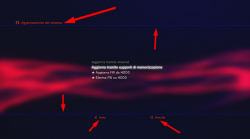
the red / orange color you see is the month. Once the blue color is set, at bootlogo, the first ps3 will have the color of the month (red) and then return to the color you set.
 
Im starting fresh on my console with this CFW (fresh install, don't want any trace of my psn account/content on the console), and since the HD is pretty big, im just gonna run my backups off the internal. which backup manager should i go with? (sman, webman mod, multiman....)

Thanks for the help and all the hard work!
 
Im starting fresh on my console with this CFW (fresh install, don't want any trace of my psn account/content on the console), and since the HD is pretty big, im just gonna run my backups off the internal. which backup manager should i go with? (sman, webman mod, multiman....)

Thanks for the help and all the hard work!

I'd recommend using multiMAN along with sMAN.
 
Im starting fresh on my console with this CFW (fresh install, don't want any trace of my psn account/content on the console), and since the HD is pretty big, im just gonna run my backups off the internal. which backup manager should i go with? (sman, webman mod, multiman....)

Thanks for the help and all the hard work!
Intall sMAN or webMAN MOD for the dynamic fan gesture at first ! Your PS3 will appreciate ;)
 
Intall sMAN or webMAN MOD for the dynamic fan gesture at first ! Your PS3 will appreciate ;)

installed webman mod (cuz i wanted to use "CFW_Extras_Category_v1.01") and on first boot it sounded like the console was gonna take off like an airplane and scared the crap outta me cuz the fan was so loud!! But it has just been sitting there collecting dust for the past 2 years lmao. Whats a good base setting to start at for the fan?

Also, ive been installing my backups as PKG, and since they show up on the XMB when installed, do i really need the webmanmod folder? and does sMan have better features? (i know my questions are all over the place, sorry lol)

ohhh, and is there any easy way to remove icons from the XMB? think theres one called quickflix (i got rid of stupid sing star lol), and amazon and hulu?
 
installed webman mod (cuz i wanted to use "CFW_Extras_Category_v1.01") and on first boot it sounded like the console was gonna take off like an airplane and scared the crap outta me cuz the fan was so loud!! But it has just been sitting there collecting dust for the past 2 years lmao. Whats a good base setting to start at for the fan?

Also, ive been installing my backups as PKG, and since they show up on the XMB when installed, do i really need the webmanmod folder? and does sMan have better features? (i know my questions are all over the place, sorry lol)

ohhh, and is there any easy way to remove icons from the XMB? think theres one called quickflix (i got rid of stupid sing star lol), and amazon and hulu?

1. There is one model of phat ps3 which might run the fan at high speed on boot. It's a well known issue, you should search for the many mentions of it in this forum.
But overall, increasing fan speed is normal if current temps are higher than max value.

2. Temps settings in webMAN-MOD/sMan should be set around those values for room temp at 25C:
* Dynamic fan control
* Max temperature 68 to 70C
* PS2 emulation fan 40 to 45%

Of course, it's only an indication. Your ps3 could heat up more than average, less than average etc.. The figures above might need tweaked. In any case, your CPU & RSX temps should always remain under 70C in temperate places, or say 75C max in a very hot country...

3. Unless you absolutely need features that exist only in wMM. I would recommend using sMan tbh as it's webman's replacement & works very well. But it's a question of taste and needs I suppose..

4. Except for Singstar with wMM, there is no automated option to get rid of any icons on xmb. Many can be removed manually however by tweaking the category xml files in /dev_flash/vsh/resource/explore/xmb. But I don't recommend you mod /dev_flash files until you learn to recover from a soft brick.
 
Last edited:
1. There is one model of phat ps3 which might run the fan at high speed on boot. It's a well known issue, you should search for the many mentions of it in this forum.
Probably that pesky K model it did that on me when installing CFW & webMAN MOD. The trunk was to go into webMAN setting/Setup make sure Dynamic fan was on and hit save real fast lol
 
Actually its a slim model, not a phat. but ive adjusted the settings and its more quiet.

If I go from wMM to sMan, how do I completely remove wMM?
And can I still use CFW_Extras_Category_v1.01 without wMM (on install it says it's required.)

And I think I'm gonna stay away from editing XML files, I'll just deal with the eyesores lol.

Thanks again everyone for all your help, planning on gifting the console to my son for his 7th bday (after I backup all the disks so I don't have to worry about him scratching them lol), and want to have it set perfectly for him.
 
Alexander I was thinking now, will that problem with PSP games on PS3, not because I use the Control Fan Utility 3.08, to speed up the cooler, before loading the PSP Launcher, and it a variation on the compatibility of ps3? may be coincidence, but when I tested the PSP games in February and ran, I did not use the Control Fan Utility.
 
I have problem with this CFW. I not update game and application. Netflix not update, games not update i have error. Ferrox PS3 Custom Firmware 4.82 Standard v1.01 by Alexander work perfect.
 
Alexander I was thinking now, will that problem with PSP games on PS3, not because I use the Control Fan Utility 3.08, to speed up the cooler, before loading the PSP Launcher, and it a variation on the compatibility of ps3? may be coincidence, but when I tested the PSP games in February and ran, I did not use the Control Fan Utility.
I do not think so. I have tried many PSP games and apart from some glitches (due to the lack of compatibility). I had no problems.
 

Similar threads

Featured content

Trending content

Back
Top