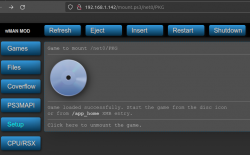
1- ps3netsrv must be running before turning on the PS3 and the PKG folder must exists in the shared directory of ps3netsrv.
The PKG folder must be visible from webMAN MOD if you visit
http://0/net0/PKG from the PS3 Internet Browser.
2- webMAN MOD must be running and configured in /setup.ps3 to see the ps3netsrv
For more information:
https://github.com/aldostools/webMAN-MOD/wiki/~-PS3-NET-Server
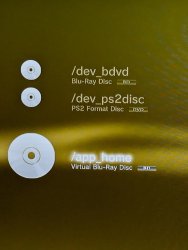
3- When you mount the remote PKG folder a bluray disc icon should appear on XMB as Data Disc.
The content of the remote directory should be visible on
/dev_bdvd from any File Manager
The folder will be converted on-the-fly to a virtual ISO. If the content of the folder is too big, it could cause errors building the virtual ISO
You can mount the remote PKG folder using http://<ip-address-of-your-ps3>/mount.ps3/net0/PKG from the PC
NOTE: The remote folder can has *any* name. The name PKG is used only for convenience.
4- The Package Manager > Install Package Files has a
Standard installation folder (if you press TRIANGLE it should show a side menu). That option will list the packages from the root directory of any storage device including /dev_bdvd or USB devices.
As the remote
PKG folder is mounted as /dev_bdvd the remote files should be listed and you can proceed to install the files.
5-
/dev_hdd0/PKG is generally
NOT used, unless you have a custom Package Manager
6- The option
PS3 System Storage looks for the packages in /dev_hdd0/packages
7- The option
Package Directory looks for the packages in the external USB devices.
The folders are: /dev_usb000/packages and /dev_usb001/packages

until you see "Mount /net_host/PKG as /dev_bdvd/". If successful you will see a popup notification in the upper right corner of the screen that reads "PKG Loaded"