GUIDE: How to Install A PKG File from your PC using PS3 NET Server (ps3netsrv)

Then Scroll to "Initialize FTP server" , Press ::dir right: until you see "Mount /net_host/PKG as /dev_bdvd/". If successful you will see a popup notification in the upper right corner of the screen that reads "PKG Loaded"

The latest IRISMAN v4.82 by various doesnt have this options.
What do?
 
Edit: Joonie helped me in irc
1. Go to webman settings and enable dev_blind
2. download http://www.mediafire.com/download/gixenmhiey7sahq/webftp_server.sprx
3. place it via ftp in /dev_blind/vsh/module/ and restart
4. Mounting PKG files under "Install Packages" with R2+SELECT+SQUARE works now

You're a magician Joonie :)

I was wondering about the speed though. Installing a 1gb game via USB / HDD took only a couple of seconds. via ps3netsrv it took about 5 minutes (measured^^)
FTP Speed to the ps3 is 20megabyte/s so the network should not be at fault. Why is it so slow?
I tracked the speed over the resource monitor of windows and it takes about 60 seconds to reach 13.000.000 Bytes/s and then goes quickly down to 5-6 and stays there, which takes pretty long for big games.
With some PKG Files that appear in the xmb as installer later it gets stuck at "Please Wait" and only transfers data with 2-3mb/s

I know this thread is old but I need help. I followed your steps and it worked at first but now it's not... When I mount net/0 it says loaded but my PKG isn't showing in standard install. Also when I look in my FTP program on the PC dev_bdvd isn't there... It's like it's not mount it correctly... Please help..
 
Works great! With MultiMan MOD, you can set up the server address and port through the web configuration and mount the PKG folder through the setup in XMB. I like this method because I don't need twice the storage in the PS3 for the pkg to install. As illfated said, it is somewhat slow. But hey! It does work. :)
 
In the webMAN.xml (available through XMB) there is an option to mount /net0/PKG as /dev_bdvd. So the change is not really needed.

Although the change proposed by Joonie works fine, the combos mount the root of "/net0" or "/net1" to allow the concurrent access to other folders like "/VIDEO", "/MUSIC", "/PICTURE", etc.

If the .pkg files are placed in the shared folder "packages" (in lower case), they should be listed on XMB (although it will depend if the xml for ★ Package Manager contains the listing for /dev_bdvd/packages or /app_home/packages)

Also mounting the shared folder "PKG" through PS3 Net Server GUI will mount that folder as the root of /dev_bdvd, and the .pkg files should appear fine on ★ Package Manager (or ★ Install Package Files)


PS. It seems that the tutorial needs an update ;)

Hi aldostools, I'm using ps3netserv on ubuntu and I have the following situation:
- iso's in PS3ISO are found perfectly (and I assume all other iso folders work fine as well)
- packages I put in in PKG are not found or partly found. I mounted net0/PKG via ps3.aldostools.org/?ip=<my-ps3-ip-address>. Under Install packages > Standard package only 1 of the three packages shows up. Sometimes even none show up. In the browser in the webman mod window I can see that all packages are visible in the root under dev_bdvd though.

Further I was wondering what the 'Standard' folder means under Install packages? Is it by default devhdd0/packages or can you somehow configure it's path? And also do you have any idea why I only see part of the packages under PKG?

My aim is to batch install packages from PC at once, user the Install all packages option from the Standard folder install (when you press triangle).

Regards

Edit: another thing that's peculiar is this:
I have some .pkg files in devhdd0/packages

When I startup the ps3 and ps3netsrv is not running and I go to * Install Packages > Standard Install, there are no packages.

When I mount /net0/PKG from
via ps3.aldostools.org/?ip=<my-ps3-ip-address> then after that the packages from
devhdd0/packages are visible in he Standard Install and can be multi installed.

I only don't get why packages from
devhdd0/packages are visible when /dev0/PKG is mounted. I would only expect packages from the remote PKG folder to show up there
 
Last edited:
Hi aldostools, I'm using ps3netserv on ubuntu and I have the following situation:
- iso's in PS3ISO are found perfectly (and I assume all other iso folders work fine as well)
- packages I put in in PKG are not found or partly found. I mounted net0/PKG via ps3.aldostools.org/?ip=<my-ps3-ip-address>. Under Install packages > Standard package only 1 of the three packages shows up. Sometimes even none show up. In the browser in the webman mod window I can see that all packages are visible in the root under dev_bdvd though.

Further I was wondering what the 'Standard' folder means under Install packages? Is it by default devhdd0/packages or can you somehow configure it's path? And also do you have any idea why I only see part of the packages under PKG?

My aim is to batch install packages from PC at once, user the Install all packages option from the Standard folder install (when you press triangle).

Regards

Edit: another thing that's peculiar is this:
I have some .pkg files in devhdd0/packages

When I startup the ps3 and ps3netsrv is not running and I go to * Install Packages > Standard Install, there are no packages.

When I mount /net0/PKG from
via ps3.aldostools.org/?ip=<my-ps3-ip-address> then after that the packages from
devhdd0/packages are visible in he Standard Install and can be multi installed.

I only don't get why packages from
devhdd0/packages are visible when /dev0/PKG is mounted. I would only expect packages from the remote PKG folder to show up there

1- ps3netsrv must be running before turning on the PS3 and the PKG folder must exists in the shared directory of ps3netsrv.
The PKG folder must be visible from webMAN MOD if you visit http://0/net0/PKG from the PS3 Internet Browser.

2- webMAN MOD must be running and configured in /setup.ps3 to see the ps3netsrv
For more information: https://github.com/aldostools/webMAN-MOD/wiki/~-PS3-NET-Server

3- When you mount the remote PKG folder a bluray disc icon should appear on XMB as Data Disc.
The content of the remote directory should be visible on /dev_bdvd from any File Manager

The folder will be converted on-the-fly to a virtual ISO. If the content of the folder is too big, it could cause errors building the virtual ISO

You can mount the remote PKG folder using http://<ip-address-of-your-ps3>/mount.ps3/net0/PKG from the PC

NOTE: The remote folder can has *any* name. The name PKG is used only for convenience.

4- The Package Manager > Install Package Files has a Standard installation folder (if you press TRIANGLE it should show a side menu). That option will list the packages from the root directory of any storage device including /dev_bdvd or USB devices.

spaces%2FBh88rHM89CgIoiWCzo4Y%2Fuploads%2FXZpUWGb8xFtQvAQ6OFUt%2FUntitled-1.png


As the remote PKG folder is mounted as /dev_bdvd the remote files should be listed and you can proceed to install the files.

5- /dev_hdd0/PKG is generally NOT used, unless you have a custom Package Manager

6- The option PS3 System Storage looks for the packages in /dev_hdd0/packages

7- The option Package Directory looks for the packages in the external USB devices.
The folders are: /dev_usb000/packages and /dev_usb001/packages

 
1- ps3netsrv must be running before turning on the PS3 and the PKG folder must exists in the shared directory of ps3netsrv.
The PKG folder must be visible from webMAN MOD if you visit http://0/net0/PKG from the PS3 Internet Browser.

2- webMAN MOD must be running and configured in /setup.ps3 to see the ps3netsrv
For more information: https://github.com/aldostools/webMAN-MOD/wiki/~-PS3-NET-Server

3- When you mount the remote PKG folder a bluray disc icon should appear on XMB as Data Disc.
The content of the remote directory should be visible on /dev_bdvd from any File Manager

The folder will be converted on-the-fly to a virtual ISO. If the content of the folder is too big, it could cause errors building the virtual ISO

You can mount the remote PKG folder using http://<ip-address-of-your-ps3>/mount.ps3/net0/PKG from the PC

NOTE: The remote folder can has *any* name. The name PKG is used only for convenience.

4- The Package Manager > Install Package Files has a Standard installation folder (if you press TRIANGLE it should show a side menu). That option will list the packages from the root directory of any storage device including /dev_bdvd or USB devices.

spaces%2FBh88rHM89CgIoiWCzo4Y%2Fuploads%2FXZpUWGb8xFtQvAQ6OFUt%2FUntitled-1.png


As the remote PKG folder is mounted as /dev_bdvd the remote files should be listed and you can proceed to install the files.

5- /dev_hdd0/PKG is generally NOT used, unless you have a custom Package Manager

6- The option PS3 System Storage looks for the packages in /dev_hdd0/packages

7- The option Package Directory looks for the packages in the external USB devices.
The folders are: /dev_usb000/packages and /dev_usb001/packages

Thanks for the reply!

I think I already did the steps exactly as you posted, but I'll put them here for troubleshooting:

1. I fire up ps3netsrv on ubuntu:

./ps3netsrv_linuxX86_64 ~/Gaming/sony/PS3/
ps3netsrv build 20231215 (mod by aldostools)
Path: /home/user/Gaming/sony/PS3

Host IP #1: 192.168.1.130:38008
Waiting for client...
[0] Connection from 192.168.1.142
open dir /PS3ISO
open dir /PKG
building virtual iso...
open /PKG
building virtual iso...
open /PKG

2. I configured Webman Mod accordingly. When I go to http://0/net0/PKG I on the ps3 browser, I see the two packages I've put in the PKG folder on my PC.

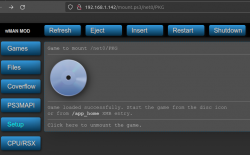
3. When I mount the remote package folder from PC with http://192.168.1.142/mount.ps3/net0/PKG I see a mount succes, see attached image.

However, I don't see a disc icon under Webman Games as is visible in your screenshot. However, I can see that the two packages are listed under http://192.168.1.142/dev_bdvd

4. When I go to Package Manager > Install Package Files > Standard I see packages listed under devhdd0/packages, but not my packages from the remote PKG folder...

Any thought?

EDIT:
Regarding point 6: By default I indeed see the packages in /dev_hdd0/packages under PS3 system storage. However, AFTER mounting the remote PKG folder, the Standard folder shows the packages of /dev_hdd0/packages instead of the remote packages under dev_bdvd

Also, in another thread I see you suggest to remap app_home to dev_bdvd. Is that still/also relevant for my use case?

To clarify, I'm using latest Evilnat cfw 4.90, latest Webman mod and latest linux ps3netsrv
 

Attachments

  • mount_success.png
    mount_success.png
    86 KB · Views: 90
Last edited:
To install a PKG file from your PC using PS3 NET Server (ps3netsrv), first ensure that both your PC and PS3 are connected to the same network. Next, run the ps3netsrv application on your PC. On your PS3, navigate to the "Network" section of the XMB menu, then select "PS3 NET Server." Locate your PKG file within the server directory and select it to initiate the installation process on your PS3. If encountering any issues, double-check network connectivity and ensure that the ps3netsrv application is running correctly on your PC.

Thanks for chipping in. Am already on same network, that's not my problem.
Also, I am looking for a way to multi install packages, not a single package. ps3 net server is not listed under network in my case btw.
 
@cloudstrife Verify if your package files (.pkg) are listed in /dev_bdvd using the XMB File Manager after having mounted /net0/PKG
The option is found in Network > Custom Firmware Tools > File Manager

If your files are listed there, they should appear somewhere in Package Manager. Maybe they appear in another section instead of Standard.

BTW if you press TRIANGLE on the Standard folder you should see a side menu with the option Install All Packages.
That option installs all packages in the root directory of all storage devices (including /dev_bdvd). Therefore if you plan to install only the packages from the remote PKG folder you have to remove all the USB devices to prevent installing unwanted packages.

NOTE: Install All Packages may install some files even when they are not listed in the "Standard" folder. You could try that too.
 
@cloudstrife Verify if your package files (.pkg) are listed in /dev_bdvd using the XMB File Manager after having mounted /net0/PKG
The option is found in Network > Custom Firmware Tools > File Manager

If your files are listed there, they should appear somewhere in Package Manager. Maybe they appear in another section instead of Standard.

BTW if you press TRIANGLE on the Standard folder you should see a side menu with the option Install All Packages.
That option installs all packages in the root directory of all storage devices (including /dev_bdvd). Therefore if you plan to install only the packages from the remote PKG folder you have to remove all the USB devices to prevent installing unwanted packages.

NOTE: Install All Packages may install some files even when they are not listed in the "Standard" folder. You could try that too.

Just verified that the two packages I have on remote (my pc) are listed in /dev_bdvd using the XMB File Manager
But unfortunately still, when I go into to Standard folder, I see packages listed that are in dev_hdd0/packages and not in net0/PKG (dev_bdvd)... I do have the option 'Install All packages' available, but it will install the wrong packages as explained above.

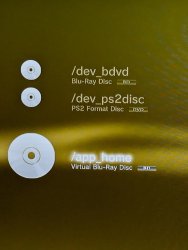
I am wondering what do you see listed when you go to * Custom Firmware Tools > File Manager > Optical Disc?

I see: attached image

Before connecting and mounting to ps3netsrv all three are empty. After connecting and mounting, the situation is like this:

/dev_bdvd > contains two packages from remote pkg folder net0/PKG
/dev_ps2disc > is empty
/app_home > contains packages from /dev_hdd0/packages

So somehow in my case /app_home is linked to the Standard folder instead of /dev/bdvd

Edit: I just noticed that /app_home (and thus the Standard folder) is being populated with packages from /dev_hdd0/packages as soon as I make a connection with ps3netsrv. So even before I mount net0/PKG to /dev_bdvd.
 

Attachments

  • ps3.jpeg
    ps3.jpeg
    359.9 KB · Views: 96
Last edited:
I vaguely remember trying this before. I think I found the remote pkg files located in the video section on the XMB. Perhaps mounted as a bluray disk or something. Just thought I'd add my two cents incase this is the same issue.
 
Back
Top