PS2 [OPL Theme] Korium

Berion

Developer
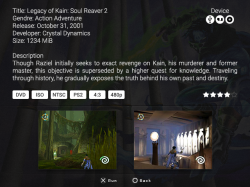
Actually it is proof of concept, based on one of the Jay-Jay's theme, and using his PS2 cover. I'm not sure if such effect is possible exactly as on preview image (cannot find good documentation about skinning system, so I reading existing theme scripts).

edit:

Korium (proof of concept, minimalistic, match to OPL logo):

opl_thm_korium_poc.png
 
Last edited:
I have understand whole script and everything from above example is possible (with one exception: arrow pointing to current highlight item).

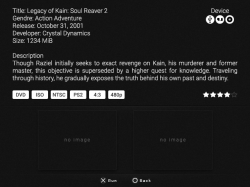
Which is better pattern, above or below?

opl_thm_korium_poc2.png
 
Great, thanks! Feel free to create it. ^^ I have gave up, due to lack of time.

In attachment You will find every necessary files. Some filenames are not proper so keep that in mind. Most of the files are optimized 8bit, so whole theme should be extremely light.
 

Attachments

u've done it again, my friend of Takeshi's castle fandom. :-P great work, @Berion .my ps2 isn't soft modded. it's hard modded. and, it's sandwiched between my wii and my main wii u. there's an hdd right next to it, but it's for the wii and the wii u, so I don't have the room nor the money to buy a new hdd and enclosure for the ps2.

I think the usb ports on the ps2 r version 1.1, right? r there any issues with games not loading quickly? this seems to be a non issue for phats with an hdd bay. I own a sim though. I'll probably just stick with discs since I have a new laser, and I have like 300 backups among two or three binders. a backup of Dragon Quest V is in my system at the moment. :D
 
In theory, yes. But it's even slower than USB v1.1 on PC. I don't have to much experience with loading games from USB as I've done all games in times when USB Advance just appear (and it sucks ;]). But I shouldn't be too optimistic in OPL case, FMV probably stuttering, and the same with heavy audio. Everything else should be fine (except games which streaming textures in real time). That's a hardware limitation (DVDx4 is faster and this is speed for the developers of the all games which they expecting).
 
right now, I have a 512MB flash drive in one of the usb ports (yeah, it's that old). it's from an unknown company, but it's worked for me over the past 12 years. I just use it to transfer saves and elf files mostly. I have codebreaker on a memory card via a button press. it's only like 3MBs, so it fits. :-P none of my friends have a soft modded ps2. it's like once the disc drive failed, that was it for those systems. my new laser loads ps2 games faster than I can switch sources. psx games r noticeably slower though. I can't recall if it was like that originally.
 
Progress, however there are a few things.

I had to edit many of your images in order to make them work in OPL the theme is not as light as it was but its working and everything is pretty spot on. Hint Text cannot be "centered" until source code is changed I believe..shouldn't be too difficult.

I can't test the length of the games list as I only have 5 games on my console currently. I also removed the POPS/ELM image from sources as it is not supported in the official ifcaro repository.

Multiple font sizes are not supported in OPL at the moment unless I use font forge to make the glyphs smaller which would mean another .ttf file which would resullt in the theme being bigger so I left that for now.

Disc icon image is larger than your concept as 64x64 is the standard so I increased the size of your default icon..this can be changed to reflect concept image if requested.

So the theme is much bigger now but it is working, if you wanted to try reduce the size by changing modes/color depth/bit rate or whatever and then see if it breaks the theme I think thats a better way of doing it. Your bg image wouldn't display originally as it was 8bit Indexed png so I had to change it.

Theme looks great on a CRT TV or 4:3 aspect ratio on LCD but the overlay gets stretched when TV is set to 16:9...only way I know to get around this is to have 2 separate theme downloads and squish the width of the 16:9 images so when the ps2 stretches the display it stretches the images back to their original aspect ratio.

Anyway, If you have time have a look and let me know if you want anything changed :)
 

Attachments

Thanks for Your time and effort! I'll check everything in this week, ok?

After quick first look:
- disc icon needs to be make new, as resized looks horrible ^^, don't worry, I'll do this
- You have cut shadow in device/protocols icons (and BTW: why You have delete POPS?), if there is need to only those four, I'll correct them
- wow that's ASCII ART :D I love it
- we need add credits the author for this loading
 
Yeah the disc icon is tricky as it needs to be larger and it wasn't centered in the canvas either so that will need to be remade.
Loading icons I was just testing, they are the ones No.47 made from PSX scene..He just put up some newer ones though.
It seems 8bit pngs are not supported so any images without transparency could be made BMP but other than that there might now be much space to save.

Devices, yea POPS is not needed. Only need 4 USB Ethernet HDD Apps.
 
But isn't there is somewhere a fork of OPL with support POPS? Anyway, I'm fine also with only four. ;]

About length of the games. I believe You can trick the OPL just making empty files with corresponded filenames inside images folder. ;) @UniqueUserName have made something like this.
@Krah.Johlito
If it helps you at all, here is the "trick" Berion was talking about... In the "Simulated" folder of the download below... Good luck!
http://www.psx-place.com/resources/...2-0-project-max-resolution-for-opl-0-9-3.596/

@Berion
I ran out of time while fixing grammar-errors in those documents, of which you linked me the other night... Will get those finished up and to you soon... Sorry for delay... Real-Life got me lolol which is why Ive only been online a few minutes over the past few days... Ill talk to you soon. :)
 
I will give it a go and adjust the list co-ords if necessary.
I can't login to psx-scene as I get constant errors so I will post reply here.

TnA "...and why did that guy, which modified/updated the Korium-theme not resize the disc-icon via theme-script?!?"
That was the first thing I tried however due to the default icon being 58x58 canvas size and the actual disc inside it being around 44x44 resizing it like so..
# Disc Icon
type=ItemIcon
default=disc
width=44
height=44​
Resizes not only the actual Disc Icon but the canvas size of the default icon as well because they are linked, so you still have a 20px difference between the disc icon and the default icon.

Possible solution 1. Remake default disc icon at 64x64 px and have it the standard dimensions.
Possible solution 2. I can try make the default disc icon part of the case overlay so its a constant static image and therefore is not actually linked to the Disc Icon. Obviously the Disc Icon would need to be displayed one layer above this which is easily done. This would also keep the concept dimesnsions.

jolek "I've only a problem with game covers in default res (140x200). They do not fit in whole space (only 75% is used)."
Unfortunately you are always going to get a reduced width when trying to replicate a perspective on a 2d surface. If i understood correctly :P

Possible solution 1. Remake case overlay with larger dimensions to accommodate larger covers, simply up scaling the overlay may result it reduced quality. But I will mess around with the cfg and see what happens.
Possible solution 2. Look at a new overlay more of a front on view with all @Berion 's nice gradients, shadows & bevels included :D (see attached pic)

Untitled.png
[This is clearly an xbox 360 case but could be altered with a gradient overlay etc and be more accommodating to maybe Maximus32's high res cover setup. This is just an example.]
 
@Alisson
Could You also make screen from about screen? I'll be glad.

Disc icon is there because many peoples using disc covers. To be honest, I don't like it either, can be removed if it's not needed. ;)

- - -

@Krah.Johlito
Sorry for not testing this yet. However based on image above, could You add some corrections of the space between "containers" distances? Both "A" should be the same width (maybe even one more game would fit there), both "B" should have the same height, and both "C" should have also the same width. This should be more friendly to an eye (human brain like symmetry).

And thanks for Your works of course (You saving this theme from the void of history ^^).

opl_korium_correction_1.jpg
 
Last edited:
@Alisson
Could You also make screen from about screen? I'll be glad.

Disc icon is there because many peoples using disc covers. To be honest, I don't like it either, can be removed if it's not needed. ;)

- - -

@Krah.Johlito
Sorry for not testing this yet. However based on image above, could You add some corrections of the space between "containers" distances? Both "A" should be the same width (maybe even one more game would fit there), both "B" should have the same height, and both "C" should have also the same width. This should be more friendly to an eye (human brain like symmetry).

And thanks for Your works of course (You saving this theme from the void of history ^^).

wbz6mw.jpg
 

Similar threads

Back
Top