
You are using an out of date browser. It may not display this or other websites correctly.
You should upgrade or use an alternative browser.
You should upgrade or use an alternative browser.
Pinky’s PS3 Tutorials
- Thread starter pinky
- Start date

pinky
Retired
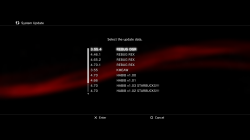
Thanks found the guide I needed. Also with the system update debug you really only need folder 01 and you can place all 20 PUP files in there. Found this way much easier to manage my firmwares via FTP.
didn't know that. thanks! have u ever tried putting 20 pups in the 01 folder, then another pup in the 02 folder to circumvent the 20 pup limit? I wonder what'd happen if anything.

atreyu187
Loathsome Dung Eater
didn't know that. thanks! have u ever tried putting 20 pups in the 01 folder, then another pup in the 02 folder to circumvent the 20 pup limit? I wonder what'd happen if anything.
Yes I tried but it doesn't work the max is 20 PUP's on 4.xx firmwares but only 10 for 3.xx firmwares. Only thing that happens is the first 20 PUP's are listed.
Last edited:

Yes I tried but it doesn't work the max is 20 PUP's on 4.xx firmwares but only 10 for 3.xx firmwares. Only thing that happens is the first 20 PUP's are listed.
I find the folders useful only when you have multiple pups with the same name as REBUG REX (I drop of the numbers and the pup extension)
Edit: or if you want to put them in a certain order
Last edited:
Kinda offtopic here but does anyone where or how can i get these set of XMB icons listed in this video?
https://www.youtube.com/watch?feature=player_embedded&v=YDm5szY8vs0
I found the video here:
http://www.psx-place.com/forum/down...imated-xmb-logo-installer-clock-mod-2158.html
https://www.youtube.com/watch?feature=player_embedded&v=YDm5szY8vs0
I found the video here:
http://www.psx-place.com/forum/down...imated-xmb-logo-installer-clock-mod-2158.html
pinky
Retired
Kinda offtopic here but does anyone where or how can i get these set of XMB icons listed in this video?
https://www.youtube.com/watch?feature=player_embedded&v=YDm5szY8vs0
I found the video here:
http://www.psx-place.com/forum/down...imated-xmb-logo-installer-clock-mod-2158.html
I made a package for both of themes, so it'll install both.
Code:
http://www.mediafire.com/download/gv36jzb7u3if4lb/EP0001-RBTICEMAN_00-REBUGTHEMEICEMAN.pkginstall pkg, go to theme, select theme, and click apply.
I was going to create an icontex of iceman's theme upon his request, but considering the detail of his icons, it would've required a little of trial and error with negative space. it's difficult to see them in 3d on the ps3, but they (the icontex, not the theme) r built with nvidia's 3d plugin.

kozarovv
Developer
What language you have in your PS3? If is not english then you should edit correct language file (German.xml etc.), not English.xml
Edit: Also there is UK English and US English split in 90% of PS3 system (from 4.00 CEX and little bit earlier DEX). Also this can be a problem. To fast figure out is that or not change language to ?US or UK if your PS3 using English language.
Edit: Also there is UK English and US English split in 90% of PS3 system (from 4.00 CEX and little bit earlier DEX). Also this can be a problem. To fast figure out is that or not change language to ?US or UK if your PS3 using English language.
Last edited:

Sdw100
Member
Is unknown 18 if you have UK english setting or this can be unknown 01 for US. PS. [MENTION=148]Sdw100[/MENTION] I just want to remind you that currently is available patch that complete remove this warning and speed up start instead of just blank it out.
I dont understand what u are saying
Ses im in uk
atreyu187
Loathsome Dung Eater
I dont understand what u are saying
Ses im in uk
This is what he is talking about. It removes the warning speeding up boot times 4-5 seconds sooner.
Patches - PS3 Developer wiki

pinky
Retired
[MENTION=3657]pinky[/MENTION] you missed "★ How to play PS2 Classics (Custom) w/ Multiman, Transfer Saves, And And Revert Them Back For Use w/ Cobra ★"
Edit: i mean aname and jumpto
thank u. I've corrected the error.
pinky
Retired
How do you force a package where the content ID in the PARAM.SFO differs from the install directory? It seems to bork on package registration. Sony does this with PS1 & PS2 games, where the ID in the PARAM.SFO is the original system's ID, but the install directory differs from that.
I'm not sure I understand ur question. if ur asking how to install a pkg to a location that differs from the PARAM.SFO, u need to had ForcedInstallTo to the package.conf. since u'll be creating a game pkg, the system will use dev_hdd0/game as the base folder. if u were to have ForcedInstallTo = SLUS10000. the system will ignore the PARAM.SFO location and instead install the content to dev_hdd0/game/SLUS10000.
Similar threads
-
-
-
PS3 [Tutorial] Update Frankenstein PS3 Firmware That is Too Low to Initialize RSX (< 3.41) (NAND Models)
- Started by byt3swap
- Replies: 0