
You are using an out of date browser. It may not display this or other websites correctly.
You should upgrade or use an alternative browser.
You should upgrade or use an alternative browser.
PS3 PKG Linker v1.0: Scan & Serve PKGs to PS3 from PC (CFW & PS3Xploit HAN)
- Thread starter pink1
- Start date


That is a network/port issue I think, not sure what could have changed for you. Check your firewall is not stopping it connecting. make sure to install the package_list.pkg manually via USB and reboot ps3 until its working again.i get this error 8071053d but before, all works fine i install a couple of games but today i tried to install the naruto shippuden ninja storm and get the error, i tried to change the port i edit the hhtp but i start the pkg linker still being the same 80 port pls help
Changing the port:
For the server, change the server config to your preferred port and close the server. The server will need to be restarted for the port change to take effect.
Also type the port after the IP in the app, you don't need to close app to apply settings, just click save list again. your settings will not be saved if you close it. Don't worry when the app displays "80" after the port you entered in the pop up.
Then start the server again. Install that package_list and try again.

ВФВВН
Forum Noob
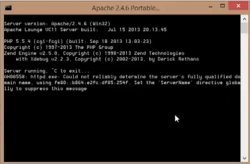
Guys! I finally wrote a problem with the message: «AH00558: apache2: Could not reliably determine the server's fully qualified domain name, using 127.0.1.1. Set the 'ServerName' directive globally to suppress this message»
Required in file "httpd.conf", It is necessary in the file that is in the folder: bin\ApacheHTTPD_PHP_Portable\Data\conf add row: ServerName localhost!!!!
Required in file "httpd.conf", It is necessary in the file that is in the folder: bin\ApacheHTTPD_PHP_Portable\Data\conf add row: ServerName localhost!!!!
Attachments
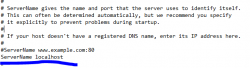
Cool. Thanks. Its nice to know how to solve that, but for me and many thousands of others, that error made no difference to connectivity.Guys! I finally wrote a problem with the message: «AH00558: apache2: Could not reliably determine the server's fully qualified domain name, using 127.0.1.1. Set the 'ServerName' directive globally to suppress this message»
Required in file "httpd.conf", It is necessary in the file that is in the folder: bin\ApacheHTTPD_PHP_Portable\Data\conf add row: ServerName localhost!!!!
So before anyone gets their hopes up too much, Im not sure if it will help anyone with 80710092 errors.
ВФВВН
Forum Noob
At me costs Windows 10. But I tried and on windows 7. There was a same error!!I've not had that error other than when I set the port wrong or forgot to start the server. What OS are you on?
That error can be a number of things. In testing the only time we got any errors was when when we made a mistake not saying that's what's wrong it's just confusing me.
ВФВВН
Forum Noob
There was no such error, so I can not help you.Cool. Thanks. Its nice to know how to solve that, but for me and many thousands of others, that error made no difference to connectivity.
So before anyone gets their hopes up too much, Im not sure if it will help anyone with 80710092 errors.
Not related to this afaik, pkg issue. Test with the refresh item or small working pkgs, if those install then you know this is set up correctly and that the problem is with your pkgs. This app will not fix broken pkgs.getting error 80029515 on all games enabled han but still not working
Gamer4life
Member
You have to sign the pkgs with resigner tool.And make sure they are from a trusted source(retail pkgs)Can't tell you where you can get them because rules prevent that.What I will say is that use the right files.If you did all that and enabled han and games aren't working then that's not explicable since I have four games and even a ps2 classic working fine.Try and look back on something you did recently which might have caused this.If it still doesn't solve the problem,I recommend installing a new ofw and installing the exploit again.It will most likely remove any problems.getting error 80029515 on all games enabled han but still not working
fidelcastro
Member
80710092, this error is for the configuration of the ports, disable the windows firewall and should be corrected, I did it like that and ...

ВФВВН
Forum Noob
It's absolutely not clear what you want to say! Where does the error occur? On the console? If you look at your screenshots, the first one shows the correct launch of Apache. On the second with an error. How to treat it I wrote above. I can only add that if you use windows 10, it is possible (additionally) to do the following: run "Command line" as administrator. At the command prompt, type net stop WAS, and then press ENTER; type Y, and then press ENTER to stop the Web Publishing service as well.I get this window when I start the serverView attachment 11531
instead of this window
View attachment 11532
and it shows error 80710092
fidelcastro
Member
Maybe I modified some file?
try even if you have not modified to reinstall pkg, delete the bin folder and launch pkg linker again.
how does the connection, lan or wifi, if it is by lan to the pc explain how it does and tell you what is wrong.
try even if you have not modified to reinstall pkg, delete the bin folder and launch pkg linker again.
how does the connection, lan or wifi, if it is by lan to the pc explain how it does and tell you what is wrong.
It's absolutely not clear what you want to say! Where does the error occur? On the console? If you look at your screenshots, the first one shows the correct launch of Apache. On the second with an error. How to treat it I wrote above.
My apache always looks like the second image, and it always works perfectly so I don't think that error is important for local sharing. That error about "could not reliably determine..." is not important imo, we are not trying to share files online. I always get that error and I never have any issue, I think don't worry about that error.
fidelcastro
Member
My apache always looks like the second image, and it always works perfectly so I don't think that error is important for local sharing. That error about "could not reliably determine..." is not important imo, we are not trying to share files online. I always get that error and I never have any issue, I think don't worry about that error.
if you watch my video you will see that I have the same error, and even then it is fluid and perfect
Same with my video.if you watch my video you will see that I have the same error, and even then it is fluid and perfect
can only add that if you use windows 10, it is possible (additionally) to do the following: run "Command line" as administrator. At the command prompt, type net stop WAS, and then press ENTER; type Y, and then press ENTER to stop the Web Publishing service as well.
This is interesting thanks for the tip.
I don't know why but the Apache server window instantly closes
http://www.psx-place.com/threads/pkg-linker-2-0-serve-packages-to-your-ps3-han-cfw.17252/
Try this new version.

Light_Warrior
Member
Is there any way to make PS3 backups directly into my PC? Maybe with PKG linker¿
Similar threads
-
-
 PS5 Porkfolio All in One PS5 Utility (Game Library, Backporks, FTP Transfers, Cheats, Saves, Pa
- Started by Red
- Replies: 0
-
 PS VITA / PsTV Batman: The Dark Knight Rises Vita port by TheFloW & Rinnegatamante
- Started by jolek
- Replies: 1
-